CC account shows "balance w/pending" in header but "bank balance" when editing account

The editing panel for an account is defaulting to the wrong balance type. The simplest way to explain this is with a couple of screenshots.
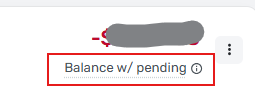
First, the header for the credit card transactions list:
Then, the relevant portion of the editing panel for the same account (this is the panel that pops up when you click on the 3-dot menu next to the account balance in the header):
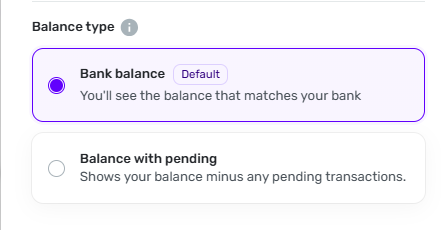
One shows that the account is set to "Balance w/ pending" while the other shows that the account is set to "Bank balance."
DryHeat
-Quicken Classic (1990-2020), CountAbout (2021-2024), Simplifi (2025-…)
Comments
-
Thanks. I'm aware that there is an issue with the balance type toggle not actually changing the balance type.
This issue is a little different — namely that the toggle does not necessarily reflect the actual balance type.
This creates a problem when an account has Savings Goals counted against it, because in that case the balance type is not shown in the header. Instead, the location where the balance type is normally shown is taken over by the savings goals/available balance info.

The only way I know to check what balance type is set for this account is to look at the toggle, either using the 3-dot menu in the transaction register or in Settings | Accounts. (Is there another way?)
But the state of that toggle may or may not show what the actual balance type is.
DryHeat
-Quicken Classic (1990-2020), CountAbout (2021-2024), Simplifi (2025-…)1 -
Hello @DryHeat,
Thanks for the reply. We still believe this issue is related to the issue I linked above, and our product team is working on a resolution that should hopefully fix both issues mentioned. Our product team is aware that the Balance Type functionality is not currently working as expected and is prioritizing a fix. Once a fix has been released, be sure to let us know if it has resolved the issue you reported here.
-Coach Jon
0
