Wells Fargo "service is currently unavailable" error (edited)

I am receiving an error on all my Wells Fargo accounts since yesterday afternoon in Quicken Simplifi. It says "service is currently unavailable" and has the cloud with a line through it symbol by each one in the Dashboard. None of them are updating. These same accounts are updating normally in Quicken Classic. I logged into the bank website and everything seems fine there and I don't see any errors or alerts. Is anyone else having this issue with Wells Fargo?
Comments
-
@msanders93, thanks for reaching out to the Community with this issue!
When checking your connection attempts from our end, I see successful connections with Wells Fargo as of yesterday. When you say the accounts aren't updating, are you referring to the balance not updating, or transactions not downloading, etc.?
When attempting to establish a new connection with Wells Fargo in Quicken Simplifi, I see this connection error notice, which may be the reason you're seeing the "service unavailable" message:
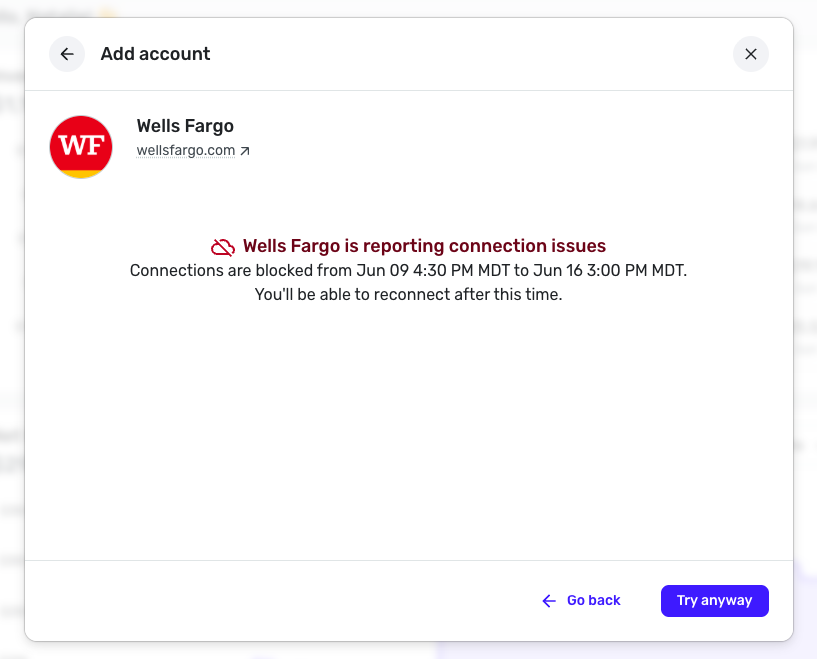
You can try following these steps to establish a completely fresh connection with the bank:
- Navigate to the bank's website, sign in, and remove Quicken's access from the bank's third-party linked apps.
- Navigate back to Quicken Simplifi and make all of the accounts with this bank manual by following the steps here.
- Once you see the account(s) listed in the Manual Accounts section under Settings > Accounts, go back through the Add Account flow to reconnect to the bank.
- Carefully link the account(s) found to your existing Quicken Simplifi account(s) by following the steps here.
However, if those steps don't work, I'd recommend waiting until after the 16th at 3 PM MDT to see if you're able to connect and update your accounts at that time, since it shows a specific date and time in the messaging I sent a screenshot of above.
Please note that you will need to re-link your accounts at that time, following steps 3 and 4 above, if you made the accounts manual and were unable to link them back up today.
Let us know how things go!
-Coach Natalie
0 -
Thank you for checking my connection! I am referring to the transactions not downloading.
I'm still simultaneous using Quicken Classic (because I have since 1994 and I'm not sure about making the change to Simplifi). The WF transactions did download to Classic. AND, I opened up Simplifi Mobile on my phone just to check there, and the WF transactions did download there too. So, I tried logging out of Simplifi on my browser, restarting my computer, and logging back in, but I'm still getting the WF "service unavailable" error. However the transactions from Simplifi Mobile must have synced to my Simplifi account because now they are showing up in the browser even though the accounts still show the "service unavailable" error?
I logged in to WF bank website and checked my 3rd party connected apps to see if there was an error there, but I don't see anything. The bank doesn't seem to to distinguish between the Quicken Classic connection and the Simplifi connections, because Quicken is just listed once.
Since you are seeing an error on your end with my WF connection that has a specific timeframe, I think I'll just wait till the 16th and see if the error goes away. Especially since I am able to get the transactions to download to Simplifi Mobile which seems in turn to sync them to the browser version, That seems the easier route than disconnecting the accounts in all of the above software and having to set it all up again. Hoping it just goes away! Thanks.
1 -
I just wanted to let you know that the WF errors are gone this morning. 🤷♀️
1 -
That is excellent news! Thanks for the update.
-Coach Natalie
0
