Simplifi State Employee Credit Union - NC Balances Don't Match Bank Web Site (edited)

I've noticed since Simplifi resolved connection issues with the new NCSECU web site there is now a difference in the balance shown for my Checking account (maybe true for other accounts but Checking is obvious since it has many pending transactions).
For example my Checking in SECU website shows a balance of $1700 with a $300 pending transaction. Simplifi shows Checking balance of $1400 with $300 pending. So it looks the pending amount is always being subtracted unnecessarily from the $1700 balance.
As Coach Natalie suggested, I went into the settings for the Checking account and verified the balance was set to display the bank's balance (rather than have Simplifi subtract pending transactions). I then selected the option to have Simplifi subtract pending transactions and it made no difference. So in summary, both options seem to subtract pending transactions from the bank's balance.
Can someone please look into this? It's been consistently off (always by the pending amount) since Simplifi started working again with NCSECU yesterday. Thank you.
Comments
-
Hello @techie001,
Thanks for reaching out! This is certainly a strange issue. I would have you verify whether the following steps work to resolve the issue you are seeing:
- Make all of the accounts with the bank manual by following the steps here.
- Once you see the account(s) listed in the Manual Accounts section under Settings > Accounts, go back through the Add Account flow to reconnect to the bank.
- If the connection is successful, carefully link the account(s) found to your existing Quicken Simplifi account(s) by following the steps here.
Let us know how this goes!
-Coach Jon
0 -
Thanks for your reply and help. I had to do this already because NCSECU lost connection to Simplifi when they stood up a new website. Since then the balance has been off. Prior to this I've never had this problem. I spent 40 years in IT so I'm somewhat adept at resolving technical issues. 🙂
It's surprising no one else has reported this issue. It's pretty obvious once the NCSECU accounts are reconnected.
I think something important in my post was that the toggle to include or exclude pending transactions in the balance has no effect on the balance shown. I would think that should have shown two different balances, even if they were incorrect.
Any other thoughts?
0 -
Hello @techie001,
Thank you for the update. I can confirm we do not have other reported cases of this issue at this time, so it may be specific to your dataset. Could you please provide the following information to assist us with investigating further? Feel free to send this via DM if you prefer.
- The name of the account in question, as it appears in Quicken Simplifi.
- The name of the account in question, as it appears on the bank's website.
- A fresh screenshot of the balance for the account in Quicken Simplifi.
- A screenshot of the balance displayed on the bank's website for a comparison.
- A screenshot of the Accounts Summary page from the bank's website that has a wide enough scope to show the full page URL. This is the landing page after signing in, and typically lists all accounts and balances. You will want to take this from a web browser and not a mobile browser, as well as redact any private info such as account numbers.
We will also need logs to be submitted:
- Log in to the Quicken Simplifi Web App.
- Select the Profile icon in the upper-right corner of the screen.
- With the Profile menu open, hold down the Option key (Mac) or the Alt key (Windows), and then click Send Feedback.
- Leave all boxes checked, add a brief description of the issue, and then click Send.
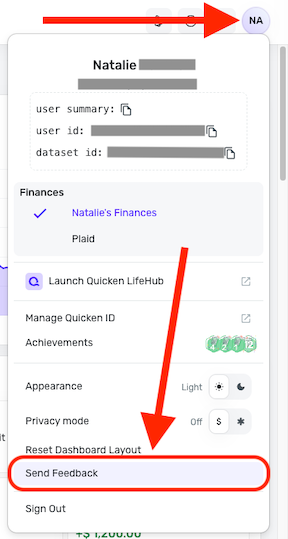
-Coach Jon
0
