HSA Bank - HSA Invest account is missing holdings and transactions (edited)

This has been raised before, but the threads keep being closed…
I have provided the information to support regarding this issue, but it does not seem to get esacalated.
The main issue is that if you have an account with HSA Bank and then decided to invest your funds, it is invested in a subsidiary called HSA Invest. While you can view your funds and distributions on the HSA Bank website, that information is not coming over into Quicken Simplifi. Quicken will only show that you have whatever balance is left over in HSA Bank and has not been invested. This provides an inaccurate picture of your finances then.
Can we please look at getting this issue escalated? At one time I did speak with an engineer and I was screen sharing with him to show the steps when signing into the HSA Bank in order to get to the HSA Invest information, but I never heard back.
Thanks,
Merg
—
Today’s problems don’t worry me, I haven’t solved yesterday’s yet.
Comments
-
Hi @The Merg,
Thank you for reaching out and for sharing the details of what you’re experiencing. I understand how frustrating it can be not being able to connect the account, and I apologize for the inconvenience this issue may be causing.
I reviewed your account on our end and can see that you previously submitted log files as requested. However, I would appreciate it if you could please submit a fresh set of logs so we can continue investigating.
- Log in to the Quicken Simplifi Web App.
- Select the Profile icon in the upper-right corner of the screen.
- With the Profile menu open, hold down the Option key (Mac) or the Alt key (Windows), and then click Send Feedback.
- Leave all boxes checked, add a brief description of the issue, and then click Send.
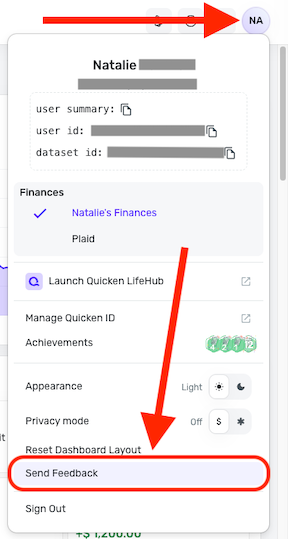
Additionally, could you please let me know what type of investment account you are working with (for example: brokerage, IRA, 401(k), etc.)?
I know you may have already answered the following questions previously, but I would appreciate it if you could confirm them again so we can ensure we have the most up-to-date information:
- Has there been any activity in the account within the last 90 days?
- Has the bank made any recent changes to its website or sign-in process?
Thank you, and I look forward to your response!
-Coach Laura
0 -
Hi @The Merg,
Thank you for coming back and providing more information; this is very helpful.
To access the feedback option, please hold down the Option key (Mac) or the Alt key (Windows), then click Send Feedback.
Also, when you go to the Account List (Settings > Accounts), could you confirm whether the account in question is set up as a savings or brokerage account?
I look forward to your response.
-Coach Laura
0 -
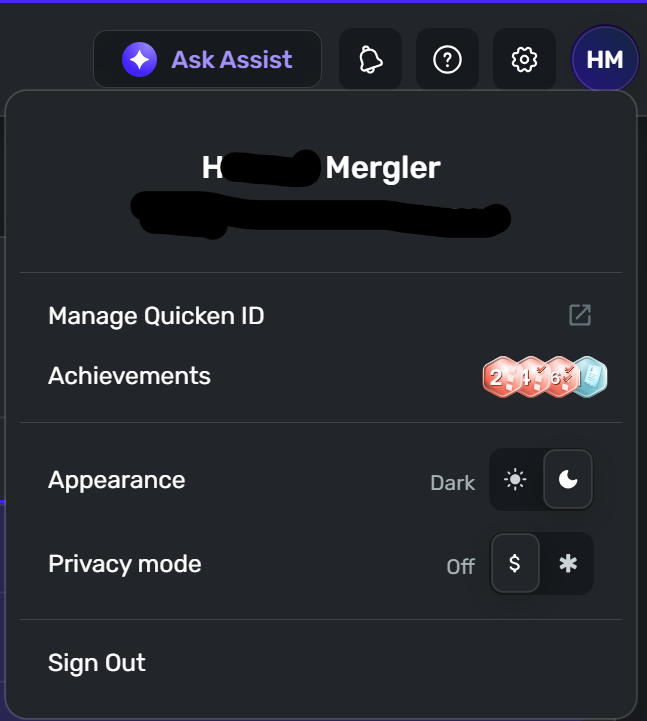
So, as you can see from the screen shot above, I do not even have the Send Feedback menu option to be able to hold down the Alt key when I click it…
As for the accounts, HSA Bank is set up as a savings account as that is what it really is. My HSA Invest account is set up as a Manual Account with the type of Other Investment.
Thanks,
Merg—
Today’s problems don’t worry me, I haven’t solved yesterday’s yet.
0 -
Thank you for your reply,
It is a hidden option. When you click on your profile icon, it won't initially be visible.
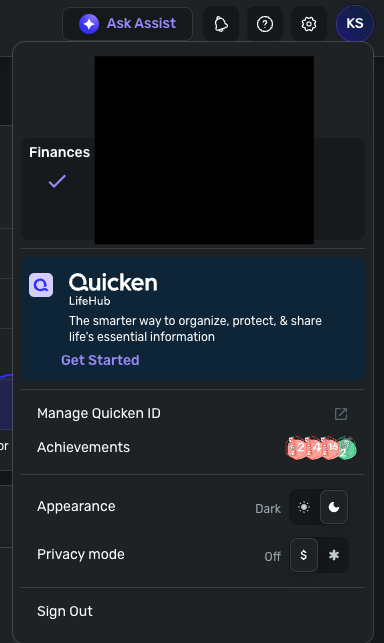
Press and hold the Alt key, and the option will appear.
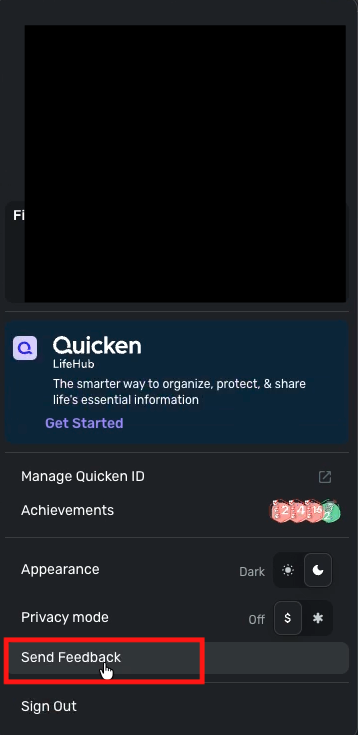
Note: You will need to keep holding the Alt key to be able to click on it.
I hope this helps!
-Coach Kristina
0 -
Well, I had tried that and it was not working…
Apparently, I have to use the right-side ALT key and not the left-side ALT key on my Surface Pro. Err…
Log files sent.
Thanks,
Merg—
Today’s problems don’t worry me, I haven’t solved yesterday’s yet.
1 -
Sorry, I did not see that you had responded.
I went to submit the log files and I do not appear to have the "Submit Feedback" button. I am using the Windows app Version: 6.23.0 (66956/2160328e70).
To answer your questions though…
It is a Simplified Brokerage account. HSA Invest is a subsidiary of HSA Bank. I can connect and see my balance and transactions for HSA Bank, but once I transfer funds over to HSA Invest, I cannot see my holdings or balance there unless I manually track it.
I have activity in the account every 2 weeks as I have funds deposited into HSA Bank which is then moved to HSA Invest. The website has not changed its sign on method.
I have never had an issue with seeing my transactions on the HSA Bank side. It's the HSA Invest side that I cannot see via Simplifi.
Thanks,
Merg—
Today’s problems don’t worry me, I haven’t solved yesterday’s yet.
0 -
Hello @The Merg,
Thank you for sending the requested logs! To help clarify this situation further, it is the HSA Invest side specifically that is not coming over, correct? Is the HSA Bank account coming over, but with no Investment holdings/transactions specifically? Or is the entire HSA Bank account missing within Quicken Simplifi?
-Coach Jon
0 -
All HSA Bank transactions are coming through, to include deposits, withdrawals, and transfers to HSA Invest.
There is no visibility on any of the transactions or holdings on the HSA Invest side though.
Thanks,
Merg—
Today’s problems don’t worry me, I haven’t solved yesterday’s yet.
0 -
Hello @The Merg,
Thank you for the reply! Is it my understanding that this is a single account, with investing features included? Or is it two separate accounts, HSA Bank and HSA Invest, that can be viewed from the same portal on HSA Bank's website? Is the HSA Invest side managed externally? As in, if you access the HSA Invest side on the website, does it direct you to a different website/URL?
-Coach Jon
0 -
When you log into the HSA Bank website, there is a menu option to view your HSA Invest side of things. It is all done through the HSA Bank website. I’ll send a screenshot a little later showing how it appears.
Thanks,
Merg—
Today’s problems don’t worry me, I haven’t solved yesterday’s yet.
0 -
Sending via DM…
Thanks,
Merg—
Today’s problems don’t worry me, I haven’t solved yesterday’s yet.
0 -
Hello @The Merg,
Thank you for the screenshots. They definitely helped with my understanding of the issue. Can you also send a screenshot of how the account currently appears within Quicken Simplifi? I know you stated it is set up as a Savings Account. Does that mean there is no investment information showing at all for the HSA Invest side in Quicken Simplifi? Let us know!
-Coach Jon
0