duplicate transactions still showing

First, I am new to Quicken Simplifi and feeling very dissatisifed with the customer service response so far. I submitted a ticket a week ago re: duplicate transactions in May and June that were imported from my bank feeds and now appearing in my transactions list. I saw another post with a similar issue in June 2026 and a quicken support rep said on June 4th it was a known issue that was now resolved and all the duplicate transactions deleted. The duplicates are still showing on my account as of June 15th. I have not heard back from anyone at Quicken regarding my open ticket case. Why am I having to chase down a resolution to this very important issue?
Second, it also baffles me that for over two years customers in this community section have requested that authenticator app MFA security be added to protect very important financial data and it is still not setup in 2026. Why does it seem like thay request being ignored and such a difficult feature to add to this plaform?
Comments
-
Hi @nspi15
Sorry you are having this issue still. Support probably thinks they fixed it, but they should have followed up. A coach on here will be around this morning to help you with the issue.
I was lucky not to get the duplicate issue. I got the one where transactions disappeared, and I re-added them, and they came back, so I deleted my duplicates.
How many duplicates do you have?
Good luck.
Steve
Quicken Simplifi (Safari & iOS) Since 2021
Quicken Classic (MacOS) Since 2009
Dollars & $ense (DOS) and MS Money (Windows) 1987-20090 -
Hello @nspi15,
Thank you for reaching out! I can see the ticket you mentioned with chat support. I am not seeing that the ticket is open, so that is most likely why a follow-up wasn't done once the alert was resolved. If you are still having an issue with duplicate transactions showing, we can certainly help troubleshoot here if you prefer.
Can you let us know how many duplicate transactions you have? Is the issue present in multiple accounts? Does the issue persist with new transaction downloads being duplicated, or just the older transactions? Let us know!
-Coach Jon
1 -
The random duplicates seem to have occured between May 10 and June 1st across multiple accounts. There are quite a few. Unfotunately, your software doesn't allow me to sort the transactions by date then amount so it's difficult to count how many duplicates but at least 30 I would guess.
0 -
Hello @nspi15,
Thank you for the information. I would have you try signing out and back into the Quicken Simplifi web application to see if that resolves the issue regarding the duplicate transactions.
If the issue persists, please provide the following information. Feel free to DM this information to me if you prefer.
- The name of the accounts the transactions are duplicated in, as it appears in Quicken Simplifi.
- The Date, Payee, and Amount (or Date, Security, and Amount if it's an investing action transaction) of a few example transactions that are currently duplicated in Quicken Simplifi.
- A screenshot of the example transactions from the bank's website.
- A screenshot of the corresponding register in Quicken Simplifi showing that the transactions are duplicated.
- Confirm whether the duplicate transactions are impacting the balance in Quicken Simplifi or not.
- A screenshot of the Accounts Summary page from the bank's website that has a wide enough scope to show the full page URL. This is the landing page after signing in, and typically lists all accounts and balances. You will want to take this from a web browser and not a mobile browser, as well as redact any private info such as account numbers.
We will also need logs to be submitted:
- Log in to the Quicken Simplifi Web App.
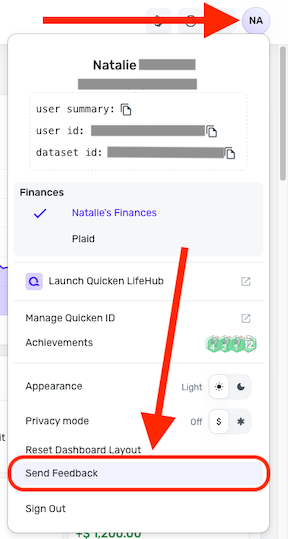
- Select the Profile icon in the upper-right corner of the screen.
- With the Profile menu open, hold down the Option key (Mac) or the Alt key (Windows), and then click Send Feedback.
- Leave all boxes checked, add a brief description of the issue, and then click Send.
-Coach Jon
0 -
This is an insane request to ask me to gather all these details. I've already submitted this feedack
0 -
Hello @nspi15,
I can certainly understand your frustration; however, we will need the information I requested in order to troubleshoot further here in the community. You can reach out again via chat support if that is the avenue you prefer, since you already submitted information through that channel. Please let us know what you decide.
-Coach Jon
0 -
@nspi15 Just a suggestion for you. Why don't you just delete the duplicates? The underlying issue was fixed, so it is doubtful they will return. (And if they were to return, that would be a different issue, and then you would need to follow Coach's instructions to open a support ticket.)
I assume all of these transactions, originals and duplicates, are cleared, and if so, their deletion won't affect your balances.
If you used the default date sort, the duplicate should be the one on top of the original. I assume they are identical duplicates including categorization and splits. If not, then you'll want to make sure you keep the one with your categories and splits.
Anyhow, this is what I would do and have done. Because right now, your Spending Plan for May as well as any reports you may want to run will not be right until the duplicates are gone.
Steve
Quicken Simplifi (Safari & iOS) Since 2021
Quicken Classic (MacOS) Since 2009
Dollars & $ense (DOS) and MS Money (Windows) 1987-20092 -
This would be much easier process to complete if Quicken Simplifi allowed the user to sort the transactions by mulitple levels. For example, if I wanted to sort all transactions first by date, then sort all transactions by amount, I could find all the duplicates much quicker than I can now.
0 -
Thank you but these requests date back to Feb 2025. This and the authenticator app 2FA request that to date seem to have been completely ignored, leave me with little confidence that Quicken Simplifi cares what its customers need or want.
0

