Entering Transaction Even at 730am Still Defaulting to Yesterday's Date

I've seen this phenomenon and reported it before, but it was always around 4am in the morning (Central Time), but today it has persisted even up to now 7:54am.
I've added several transactions and each one has defaulted to yesterday's date, 6/22/26. When I hit the calendar to update to the 23rd, it shows that today is the 23rd.
Not a biggie, but weird.
Here is a screenshot I did just now at 7:57am:
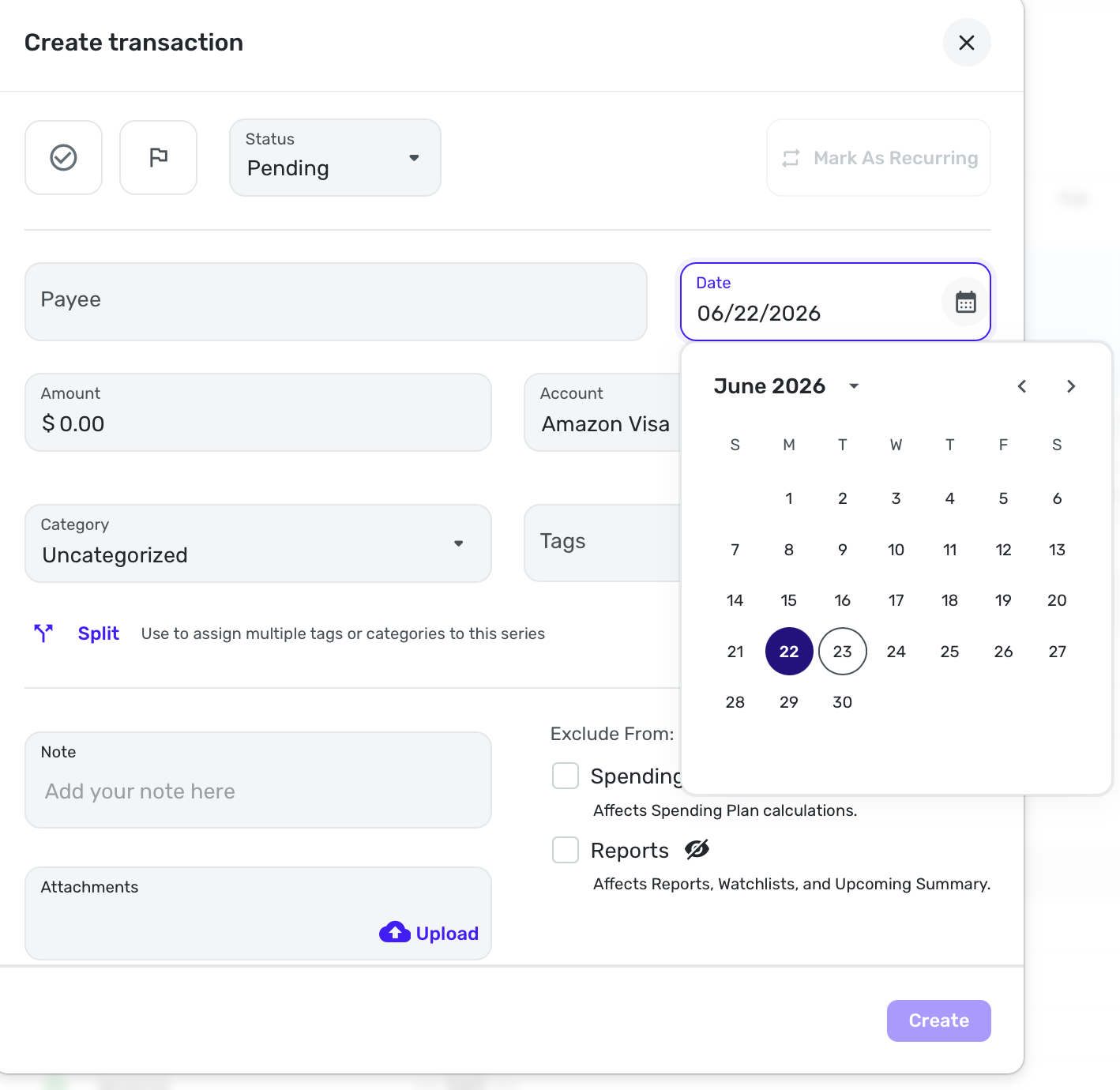
This was in the Visa account, but has been the same for my Checking account and a manual account as well.
Edit: I closed the browser and reopened it, and that fixed it. I think I kept the window open all night. I remember now because when I got up, I was perplexed as to why Simplifi had already updated my accounts. So, as usual, the simple thing is the thing to try first. With Safari, closing the window doesn't necessarily close the app.
Steve
Quicken Simplifi (Safari & iOS) Since 2021
Quicken Classic (MacOS) Since 2009
Dollars & $ense (DOS) and MS Money (Windows) 1987-2009
Comments
-
-
I've seen this as well and sometimes (like over the weekend) it can be more than one day behind.
1 -
@EL1234 Yes, I have too, and it's annoying.
But I am irritated with myself for not closing the browser first.
I am going to try to remember not to leave my Simplifi app open before going to bed.
Steve
Quicken Simplifi (Safari & iOS) Since 2021
Quicken Classic (MacOS) Since 2009
Dollars & $ense (DOS) and MS Money (Windows) 1987-20090 -
I wonder if refreshing it would help. Do you have this in the mobile app? Because I only use it in the browser.
0 -
I don't use the mobile app much, so this is the browser. Mac Safari, and I have QS saved as a web app, which might be the problem. It updates the downloads and transactions automatically though so it's a mystery why after entering a transaction, the date picker doesn't get updated.
What browser and OS do you use?
Steve
Quicken Simplifi (Safari & iOS) Since 2021
Quicken Classic (MacOS) Since 2009
Dollars & $ense (DOS) and MS Money (Windows) 1987-20090 -
I'm using Chrome on Windows and I have it saved as a web app as well, which means that it opens at a separate window with its own taskbar icon. And I don't usually close it overnight :)
1 -
It's 12:12pm and I just tried creating a new transaction and it defaulted to yesterday. I refreshed the browser tab at least once today. Hmmm….
0 -
Weird. This does seem like a bug.
Edit: Or at least it seems like a refresh problem. I'm not having the problem today.
Steve
Quicken Simplifi (Safari & iOS) Since 2021
Quicken Classic (MacOS) Since 2009
Dollars & $ense (DOS) and MS Money (Windows) 1987-20090 -
I just signed in to Quicken Simplifi and entered a new transaction, and it defaulted to today's date. If this is not happening for you, please sign out and back in to Quicken Simplifi to force a refresh.
Let us know if signing out and back in does not work!
-Coach Natalie
0 -
It's showing today's date for me now without signing out and back in. I can try that next time. Though I think it's funny to need to sign out and back in every day…
2

