Create a Rule with AND condition instead or OR

geekcred
geekcred Member ✭✭

I am using Simplifi. I discovered some transactions being renamed using logic I did not anticipate. After some research I discovered each keyword listed is basically treated as an "OR" condition.
In the example below if either "trade" or "coffee" appear the rule is triggered.

image.png


I have numerous transaction I'd like to set up with "AND" logic.
If a transaction has BOTH "trade" and "coffee" then, and only then, should the rule be triggered.
I noticed the drop down when editing my rule has an option for "is Exactly". Does anybody have experience using this parameter in rules? The "Is Exactly" option appears to apply to text or a phrase which is not quite what I am looking for (Keywords based on AND) but still useful so long as I can identify a phrase which will always match the transactions?

image.png

Comments?

Comments

  • Coach Jon
    Coach Jon Moderator admin

    Hello @geekcred,

    Thanks for reaching out! Transaction Rules can be used to have Quicken Simplifi automatically recognize your incoming transactions based on specific or broad keywords, and then rename those transactions appropriately. For example, you can input the keywords "wal" and "mart" for a Payee Rule to rename to "Walmart", and then "Groceries" as a Category Rule. Then, whenever a transaction containing those keywords comes in, Quicken Simplifi will automatically rename the Payee to "Walmart" and set the Category to "Groceries". This support article goes into more detail here: https://support.simplifi.quicken.com/en/articles/4792733-how-to-use-transaction-rules#h_22b9a65773

    We do also have this idea post available to vote for and follow if you would like to add your vote here:

    -Coach Jon

  • DryHeat
    DryHeat Superuser ✭✭✭✭

    @Coach Jon

    I'm a little confused by this discussion. The idea post you linked seems to be asking Simplifi to implement an "OR" condition, which is what @geekcred and the support article say we already have.

    • @geekcred says that keywords words in a rule are treated as "OR" conditions (and then goes on to request support for AND conditions).
    • The idea post you linked says that "The AND condition: this is what you have" (and then goes on to request support for OR conditions).
    • The support article you linked says you can "add additional OR keywords by clicking the plus button."

    For my part, I thought that:

    • the "Contains" version of a rule was basically an "AND" rule — the transaction had to have all of the keywords listed, but not in any particular order, and
    • the "is Exactly" version of a rule was also an "AND" rule — but that the transaction had to have all of the keywords listed, in order, and no other words.

    Can you help me with this? Is it true that the key words in a rule (using "Contains") are treated as "OR" conditions? Does that mean that a rule will match a transaction if it contains ANY of the keywords?

    DryHeat
    -Quicken Classic (1990-2020), CountAbout (2021-2024), Simplifi (2025-…)

  • Coach Jon
    Coach Jon Moderator admin

    Hello @DryHeat,

    Even though the idea post I linked has a title that requests an "OR" condition, the idea post itself is for multiple conditions/flexibility to be added to the rules feature.

    I hope this makes sense.

    -Coach Jon

  • DryHeat
    DryHeat Superuser ✭✭✭✭

    @Coach Jon

    Sure, I saw that @RobjWill718 asked for both an "OR" condition and a "Dollar Range" condition.

    But my question was only about whether keywords are treated as "AND" or "OR" conditions:

    Is it true that the key words in a rule (using "Contains") are treated as "OR" conditions? Does that mean that a rule will match a transaction if it contains ANY of the keywords?

    As I noted above, I'm uncertain about this because while @RobjWill718 and I thought keywords were treated as "AND" conditions, @geekcred and the support article indicate that they are treated as "OR" conditions.

    I'm just wanting to know which way it works so I can fashion my rules correctly. Can you help?

    DryHeat
    -Quicken Classic (1990-2020), CountAbout (2021-2024), Simplifi (2025-…)

  • geekcred
    geekcred Member ✭✭

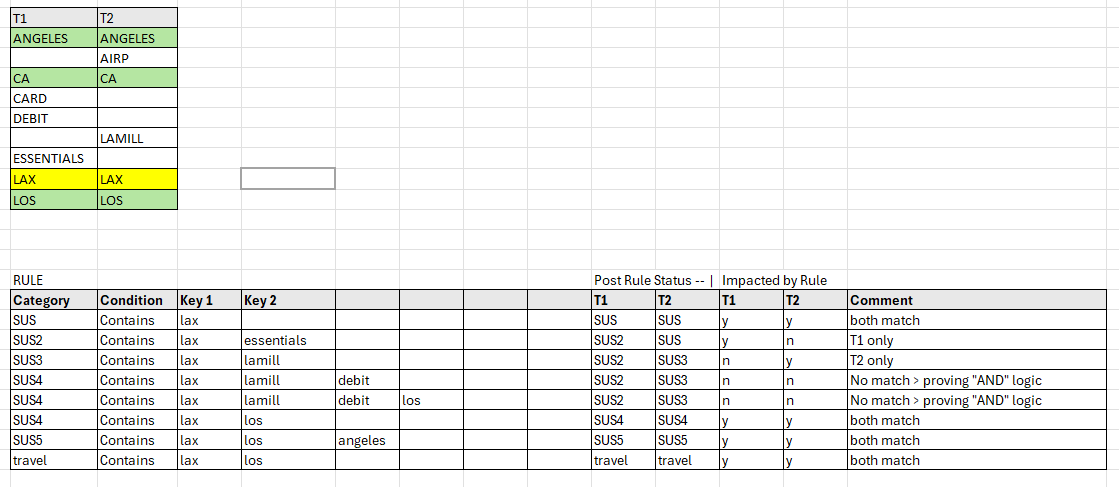
    I took some time to do some actual testing of the Rules implementation in Simplifi.
    Turns out what I thought was being treated as an "OR" condition is actually an "AND".
    In order to achieve an "OR" condition you would create a separate role for each keyword.
    Below is my documentation based on the default "Original Statement Name".
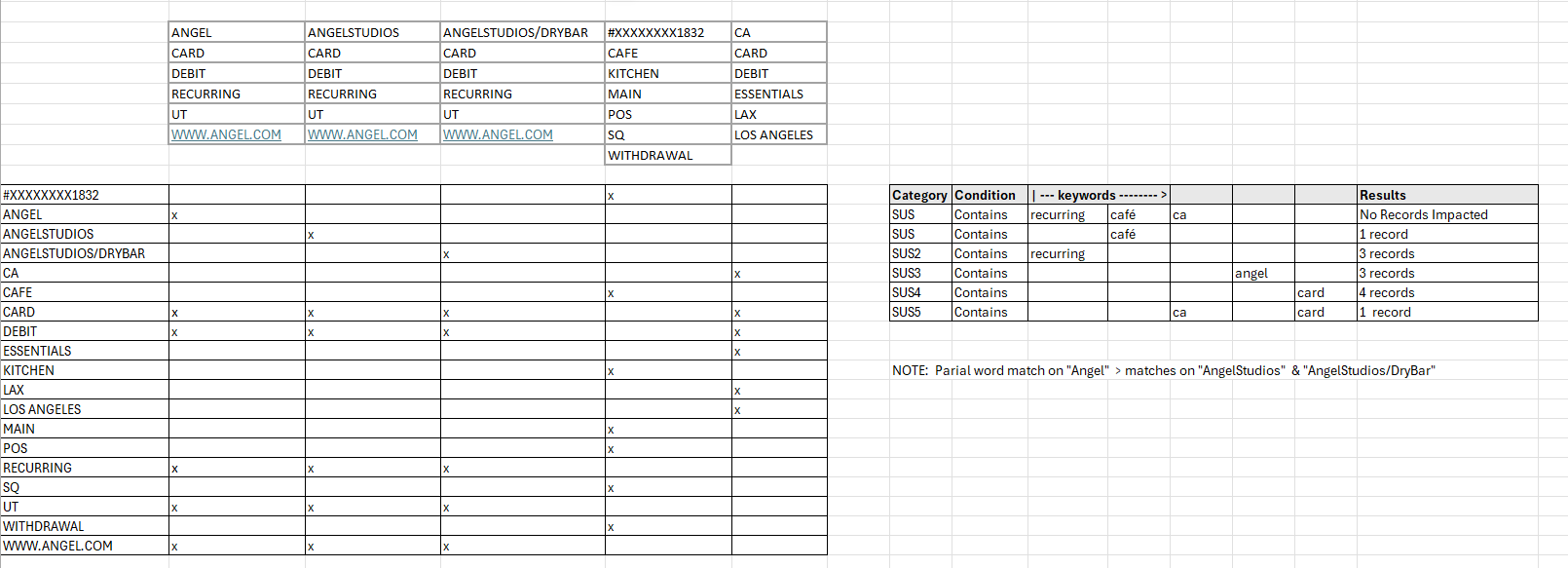
    Keep in mind that by partial matches are considered matches as well (see scenario 2 "angel")

    Scenario 1

    < --- Orig Statement Name > search = "lax"
    DEBIT CARD LAX ESSENTIALS LOS ANGELES CA
    LAX AIRP LAMILL LAX LOS ANGELES CA

    image.png

    Scenario 2

    < --- Orig Statement Names > Search "angel"
    RECURRING DEBIT CARD ANGEL WWW.ANGEL.COM UT
    RECURRING DEBIT CARD ANGELSTUDIOS WWW.ANGEL.COM UT
    RECURRING DEBIT CARD ANGELSTUDIOS/DRYBAR WWW.ANGEL.COM UT
    WITHDRAWAL POS #XXXXXXXX1832 POS SQ MAIN KITCHEN CAFE SQUARE PURCHASE LOS ANGELES CA
    DEBIT CARD LAX ESSENTIALS LOS ANGELES CA

    image.png


  • DryHeat
    DryHeat Superuser ✭✭✭✭
    edited June 16

    @geekcred

    Good analysis. Thanks for all the detail.

    One question regarding the way the "OR" works…

    Does the order of the rules make a difference? In other words, does Simplifi go down the list and apply the first rule that matches the transaction?

    For example, if you had Rule 1 with just "LAX" that set the category as "Dogs" followed by Rule 2 with both "LAX" and "ESSENTIALS" that set the category to "Cats," would it matter which came first in the list? Would both T1 and T2 be set to "Dogs" if Rule 1 came first, but T1 set to "Dogs" "Cats" if Rule 2 came first?

    (Edited because sometimes I'm stupider than other times.)

    DryHeat
    -Quicken Classic (1990-2020), CountAbout (2021-2024), Simplifi (2025-…)

  • geekcred
    geekcred Member ✭✭

    @DryHeat

    Thanks.
    Good question. Hypothetically the separate "OR" condition would be mutually exclusive but I can imagine a scenario like what you outlined. Intuitively I would imagine the execution order of the rules IS a factor and the last rule to be a match would be the final category assigned but harder to prove using my testing method since I manually ran the single updated rule(s) for testing purposes then observed the results.

    This is worth setting up a real life test! I'm off to work for now but will set something up later and report back results. Stay tuned!

  • Coach Jon
    Coach Jon Moderator admin

    Hello @DryHeat and @geekcred,

    Thanks for the research and replies. After more research, I believe the support article should reference "AND" instead of "OR" when referencing keywords for rules. I will be sure to let the team know so that this can be corrected.

    -Coach Jon

  • DryHeat
    DryHeat Superuser ✭✭✭✭

    @geekcred

    I created a suggestion that the user be able to control the order in which rules are applied.

    You can find it here:

    DryHeat
    -Quicken Classic (1990-2020), CountAbout (2021-2024), Simplifi (2025-…)

  • geekcred
    geekcred Member ✭✭

    @DryHeat

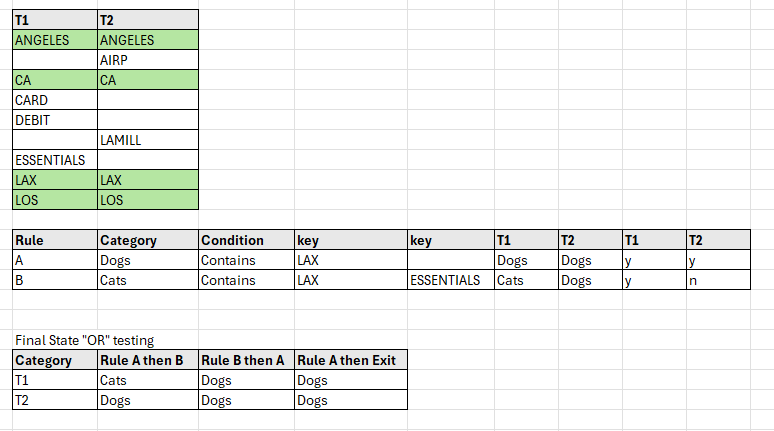
    Does the breakdown below capture your scenario accurately?
    Still need to test. Definitely worth figuring out!

    image.png
  • DryHeat
    DryHeat Superuser ✭✭✭✭

    @geekcred

    I think I understand your spreadsheet. Here's what I think would happen given the rules and transactions as you have laid them out.

    If Rule A is run first:

    • If system exits after the first matching rule then T1=Dogs (Rule A) and T2=Dogs (Rule A)
    • If system runs all rules and last matching rule controls then T1=Cats (Rule B) and T2=Dogs (Rule A)

    If Rule B is run first:

    • If system exits after the first matching rule then T1=Cats (Rule B) and T2=Dogs (Rule A)
    • If system runs all rules and last matching rule controls then T1=Dogs (Rule A) and T2=Dogs (Rule A)

    This is based on the idea that multiple keywords create an "AND" condition, which is what I think actually happens. With that assumption, Rule A would match both T1 and T2, but Rule B would only match T1.

    DryHeat
    -Quicken Classic (1990-2020), CountAbout (2021-2024), Simplifi (2025-…)

  • DryHeat
    DryHeat Superuser ✭✭✭✭

    @geekcred Did you ever get around to testing the Rule system as discussed above?

    DryHeat
    -Quicken Classic (1990-2020), CountAbout (2021-2024), Simplifi (2025-…)

This discussion has been closed.