Savings Goals are incorrect if you withdraw
Hi,
I had a goal and had originally assigned too much and wanted to withdraw to use it elsewhere. when I did, the bar continues to say I have saved the money towards the goal. I understand how someone might be making partial payments out of a savings goal and would want it to act that way, but sometimes you may just want to rob peter to pay paul so you would want the overall saved amount to match what is actually in the account.
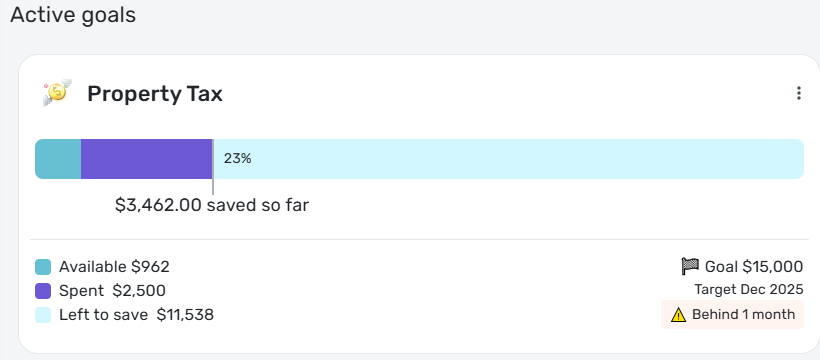
see example below for my problem. It shows $962 available but the bar also includes what I spent i.e. removed to go somewhere else. I would rather not delete and re-add the goal, but that is the only way I know around this tracking issue.
Thanks for reading… Feel free to ping if you have questions.
Regards,
Greg
Comments
-
@Greg-n-Texas, thanks for posting to the Community!
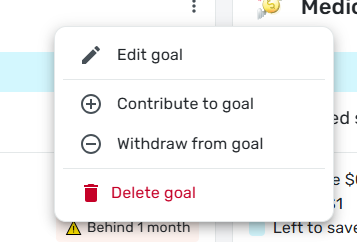
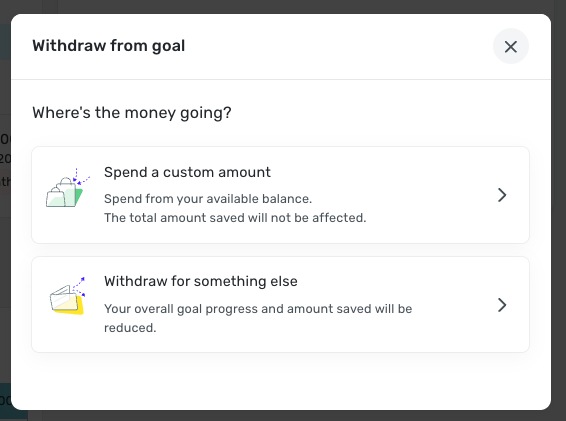
It looks like what you described is the expected behavior when you withdraw from a Savings Goal to "spend" for it. If you want to return part of your contributions back to the account so you can designate the funds elsewhere, you would want to use the "withdraw for something else" option. Our support article here goes over this in more detail:
If you'd like to correct the existing Savings Goal, the best way to do so would be to go ahead and delete and re-create it.
I hope this helps!
-Coach Natalie
0 -
Thanks Natalie. I'll give it a try. May I suggest that withdraw for another purpose is in the same menu as contribute and withdraw?
0 -
@Greg-n-Texas, thanks for the reply!
It is technically in the same menu; once you click on "Withdraw from goal", you are presented with both of the withdrawal options:
If you'd like to request that the withdrawal options be added to the main three-dot menu of Savings Goals, you may do so by creating an Idea post. Idea posts allow other users to vote on your suggestion, as well as allows our product team to get an idea of the features users would like to see.
I hope this helps!
-Coach Natalie
1 -
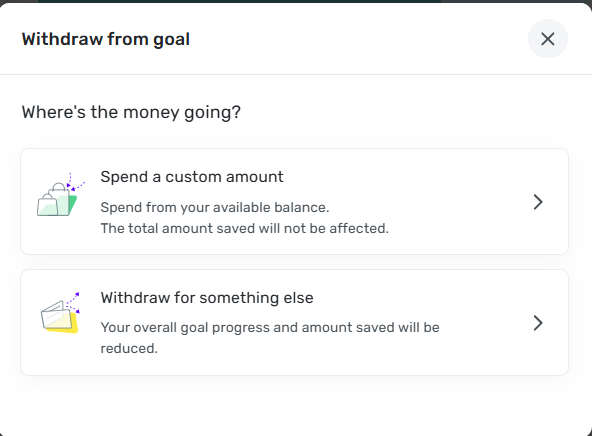
I have also found the withdrawal process a little confusing. The "Withdraw from goal" menu item brings up the following window:
Do you think it would be better if the "Spend a custom amount" choice were labeled "Withdraw to spend on the goal" instead? That would contrast better with "Withdraw for something else."
DryHeat
-Quicken Classic (1990-2020), CountAbout (2021-2024), Simplifi (2025-…)1 -
I like it! rephrasing does make it more understandable and might have prevented me from posting. Combine that with bringing both selections up a level would seem to make it more understandable, reduce clicks by 1, UI guys don't have to manage yet another popup, fewer/simplifying QA tests, etc… etc…
0 -
Actually, @DryHeat and @Greg-n-Texas the "Spend a custom amount" used to be something like "Withdraw to spend on goal". I'm not sure when that changed but it did cause a moments confusion when I first saw it written the new way. The former language seemed clearer to me.
Danny
Simplifi user since 01/22
”Budget: a mathematical confirmation of your suspicions.” ~A.A. Latimer1 -
Until Simplifi implements this Idea Post, I’ve chosen to exclusively use the “Withdraw for something else” option. Yes, it probably breaks some of the designed functionality of Savings Goals, but I despise having to recreate Savings Goals over and over and over and…
https://community.simplifimoney.com/discussion/2753/recurring-savings-goals-year-over-year-ability-to-restart-goals-editedChris
Spreadsheet user since forever.
Quicken Desktop user since 2014.
Quicken Simplifi user since 2021.2