Transaction Activity – Notes not fully displayed (edited)
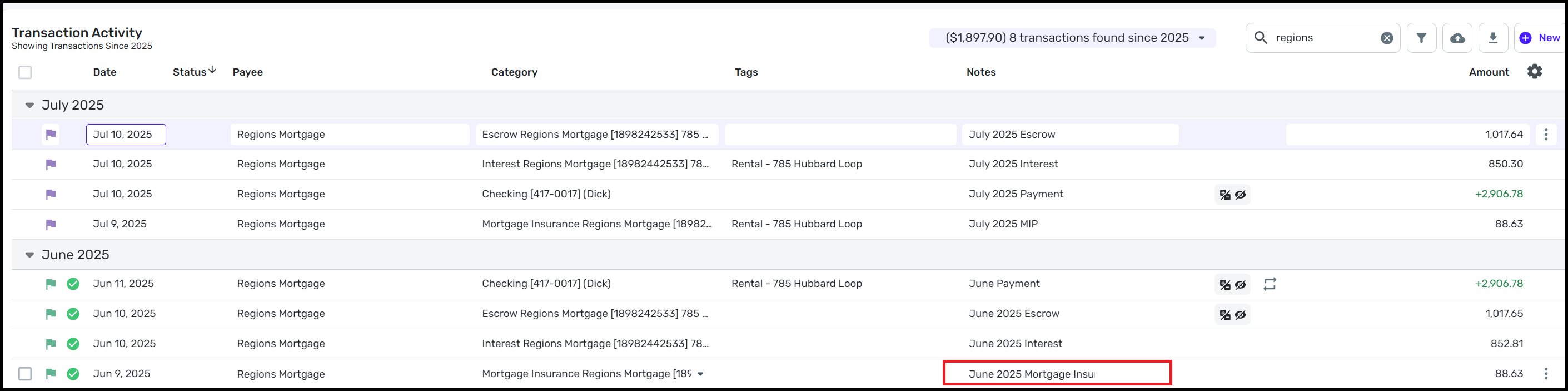
In the Transaction Activity, the Notes are not fully displayed. The entry can be longer than is shown, for example “June 2025 Mortgage Insurance” can be entered in full, but when the entry is saved only “June 2025 Mortgage Insu” is shown as marked in the image attached. This shortening of entry is consistent for all the Note areas.
Dick Davis
Wanting to Migrate from Quicken Classic Premier to Simplifi
Comments
-
Hello @Dick_Davis,
Thank you for sharing your experience. When you click on the transaction, is the note visible in full in the Transaction Detail window, or is it truncated there also?
I look forward to your response!
-Coach Kristina
0 -
@Coach Kristina, when I click to get the details of the transaction, only the truncated text is shown.
Dick Davis
Wanting to Migrate from Quicken Classic Premier to Simplifi
0 -
Thank you for your reply,
To clarify, are the notes truncated in the Transaction Detail window, or only in the Notes column of the Transaction Activity screen?
Are the notes downloading from the financial institution, or are you adding them manually? If you are adding them manually, when are they getting truncated? Which web browser are you using? Does it make any difference if you use a different browser?
If you use the mobile app, do you see the same problem there?
Thank you!
-Coach Kristina
0 -
@Coach Kristina, the notes are truncated in the transaction detail. I do not use the mobile app as I am still learning the web version and I can work easier with the web appl. Someone would need to test this for your problem determination process. The notes are not downloaded from the financial institution, so these are added manually. Thus the notes are truncated when manually added. Since the notes are not downloaded from the financial institution, I do not see here this would be a difference since they are added manually. I hope this assists.
Dick Davis
Wanting to Migrate from Quicken Classic Premier to Simplifi
0 -
Thank you for your reply,
I haven't been able to replicate what you describe in my own Quicken Simplifi. The Notes column is truncated in Transaction Activity, but once I open the Transaction Detail window, I can see the full note.
Which web browser are you using when accessing Quicken Simplifi? If you use a different browser, does the issue persist?
If you haven't already done so, please try logging out of Quicken Simplifi (you can do this by clicking the profile icon near the lower left, then selecting the Sign Out option), then logging back in again.
Please let me know how it goes!
-Coach Kristina
0 -
@Coach Kristina, I say that if you are not able to replicate, then we can chase this further. I have used both Edge and Chrome browsers. Also, I log out of Simplifi frequently during the course of working with the app so that I don't make an entry that is incorrect.
So, at this time, if it can't be duplicated, I recommend we close until it happens again.
Dick Davis
Wanting to Migrate from Quicken Classic Premier to Simplifi
1 -
I have seen the same apparent text truncation in the Notes display field in Transaction Activity.
It seems the edit mode of the Notes field does not resize when you widen the column to increase the width of the display field. When you edit, the field shrinks back to its default size and long text appears to be truncated.
However, re @Coach Kristina's question, in my case the text is not actually truncated as you reported. The full text is still visible if I open the Transaction Detail window.
It can be confusing, though, because the text continues to appear truncated in the Transaction List if you click away from Simplifi into another program window on the screen, like another browser window.
(Oddly, the Payee column does not show this behavior — its edit field resizes to match the display field.)
I don't expect this situation to change anytime soon, as I was informed that this is not a bug. (See below.)
DryHeat
-Quicken Classic (1990-2020), CountAbout (2021-2024), Simplifi (2025-…)0 -
Correct, this is not a bug but rather a design error to be corrected. But there are any design inconsistency in Simplifi that do not thwart the app operation but need to be addressed during a re-write or heuristic upgrade.
Dick Davis
Wanting to Migrate from Quicken Classic Premier to Simplifi
0


