Transfers created from a Split Transaction should show Flags in the register (edited)

EL1234
EL1234 Member ✭✭✭✭
edited May 6 in Feature Requests

Reposting from per @Coach Jon 's instructions

The transaction I'm trying to modify is a transfer to a manual account, and it was created by splitting a transaction that was downloaded from a bank.


When I hover over this transaction, there's no checkbox or flag icon to select the transaction or edit the flag. When opening the transaction, I can edit the flag, but when I save and close the transaction, no flag is displayed in the list. In addition, when my transaction list is filtered to show transactions without a flag, this transaction is displayed. When I open the transaction again I do see the flag I have selected, but that doesn't help me very much.


I also noticed that when I open the manual transaction, it seems to show me the original automatic transaction for the full amount - not the partial amount created when I split the original and categorized one part as a transfer. So maybe I'm flagging the wrong one which is why it doesn't show when I close it. And when I click to go to the other side of the transfer, it doesn't let me save any changes. I get this error: Cannot update transaction "XXXXX.", the other side of the transfer is in a split. To update it, edit the transfer transaction in the transfer account


This new issue is frustrating since I use this manual account to track reimbursable expenses, which sometimes originate from splits, and I flag the transactions once I've received the reimbursement. I filter by transactions without flags to see which transactions still require reimbursement (which is why I use flags and not tags, since there's no way to filter by transactions without a specific tag).
I'm pretty sure this used to work and so I hope that you add it back in!

Thank you in advance.

4 votes

Active · Last Updated

Comments

  • Dick_Davis
    Dick_Davis Member ✭✭✭✭
    edited August 4

    When the split transaction has a flag set, then recommend that the transfer transactions show the same flag. In this version, the transaction has been marked with a flag. However, the transfer transactions are not showing this flag.

    Ideally, the spit transactions could be allowed to set the flag to any color that the user desires. The default would be the same as the transfer transaction. Additionally, this would make reconciliation easier when transfer transactions are sent to other checking, savings, and investment accounts.

    [removed images - privacy]

    Dick Davis

    Wanting to Migrate from Quicken Classic Premier to Simplifi

  • Dick_Davis
    Dick_Davis Member ✭✭✭✭

    Is this problem considered to be a feature or an oversite with the program logic?

    Dick Davis

    Wanting to Migrate from Quicken Classic Premier to Simplifi

  • SRC54
    SRC54 Superuser ✭✭✭✭✭
    edited September 7

    @Dick_Davis Well, it is probably not so much an oversight as the fact that Simplifi just doesn't handle mixed splits very well. The flag field probably needs to be included in each split the way the tag field is.

    At least, if you flag the part in the manual account, it should stay flagged. But Simplifi mainly just has it there for summation and information purposes, the original side seems to be the one that matters.

    Workaround:

    I have found that if I have a transfer from a connected account and a manual account, it is better to do the transfer of the total amount to the manual account, and then split it there. It saves trouble in the long run.

    See if that won't work better. Say you have a transaction in a connected account for $500 with splits to expense category of $150 and $350 transfer to the cash manual account. Transfer the entire $500 to the cash account, then add another transaction for $150 in the Cash manual account for the expense category.

    It has the added benefit that you can now fully edit from either side.

    Steve
    Quicken Simplifi (Safari & iOS) Since 2021
    Quicken Classic (MacOS) Since 2009
    MS Money (1991-2009) and Dollars & Sense (1987-1991)

  • Dick_Davis
    Dick_Davis Member ✭✭✭✭

    @SRC54, thank you for this understanding and example you provided.

    Dick Davis

    Wanting to Migrate from Quicken Classic Premier to Simplifi

  • EL1234
    EL1234 Member ✭✭✭✭

    It (mostly) doesn't let you actually assign the flag to the manual split portion. I usually try a few times and sometimes eventually it sticks.

  • Dick_Davis
    Dick_Davis Member ✭✭✭✭

    @EL1234, I have noticed that as well. Unfortunately, the process is not consistent as it is sometimes two clicks, other times it is three, four or more. Also, at times, change to another transaction and then come back to the transaction and it works on th first click.

    Dick Davis

    Wanting to Migrate from Quicken Classic Premier to Simplifi

  • EL1234
    EL1234 Member ✭✭✭✭

    @Dick_Davis one workaround that seems to work somewhat more consistently for me is to filter/search the transaction list view so it only shows the one you want to flag, and then use the bulk edit tool to assign the flag.

    The fact that you can eventually get the transaction flagged shows that it's something that the database allows, it's just getting blocked by the user interface.

  • Dick_Davis
    Dick_Davis Member ✭✭✭✭
    edited October 31

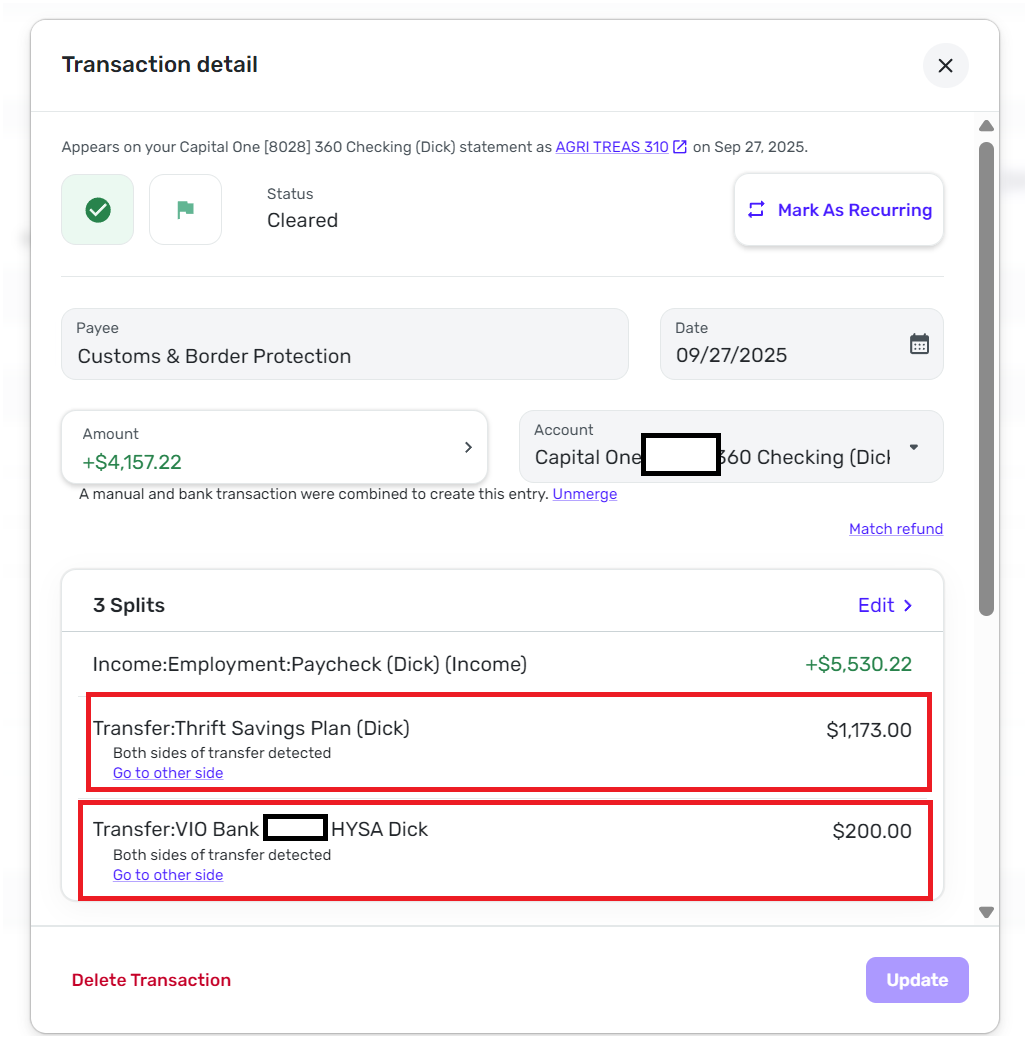
    When I started with Simplifi, I entered paycheck transactions that were spits to other accounts. (Screenshot 2025-10-31 093817). This image shows two splits to the (1) Transfer: Thrift Savings Plan (Dick) and (2) Transfer: Vio Bank HYSA (Dick). These were deposits from the paycheck to these accounts. As shown also, the source transaction is marked as “reconciled” and with a “green flag”. This indicates that this transaction has cleared in the Capital 360 Checking (Dick) account.

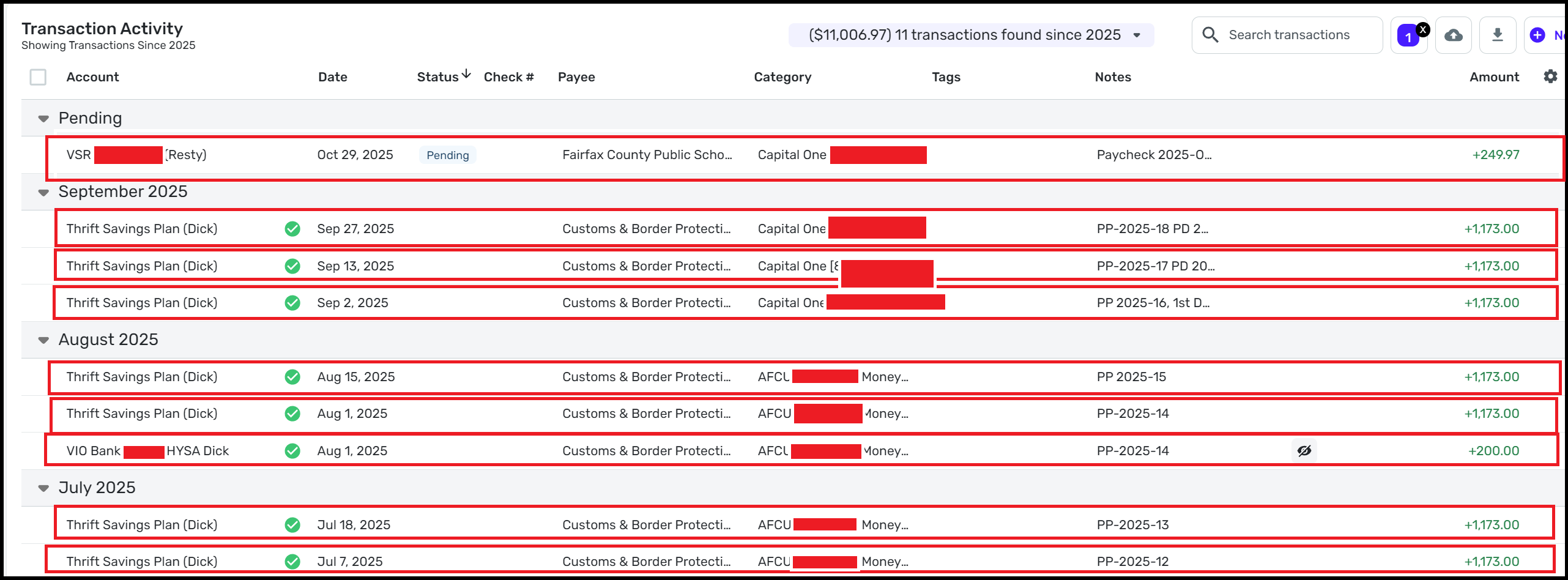
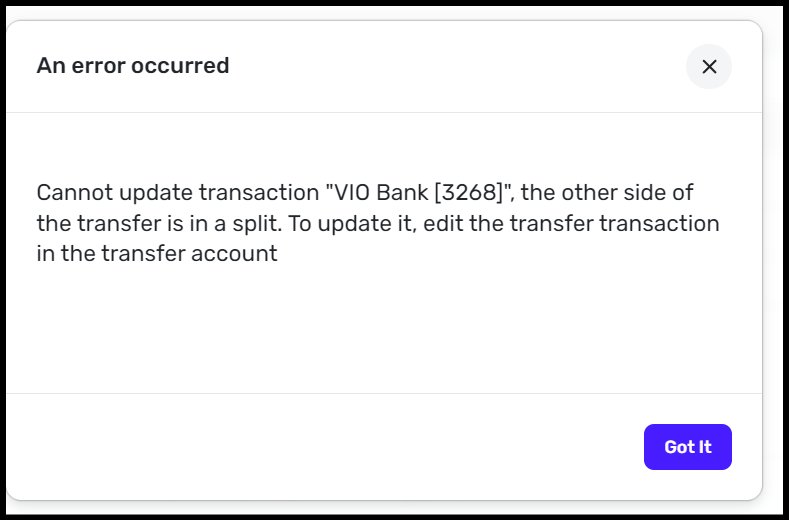
    When the transaction is showing the destination accounts (Flag from Split Transaction Screenshot 2025-10-31 093306), the flags from the source transaction (Capital One Checking 360 (Dick) is not carried forward and shown. When the attempt is made to correct the flag, make it “green”, this message is shown. (Update Split in Destination Account Screenshot 2025-10-31 095126). It states “An Error Occurred. Cannot update transaction "VIO Bank [3268]", the other side of the transfer is in a split. To update it, edit the transfer transaction in the transfer account.” This is an accurate message as the split transaction is to be updated in the source, but the flag of the source transaction needs to be carried to the destination transaction. The process is right to reconcile in both account, but the full set of information needs to be (1) carried forward to the designation transaction or (2) allow the flag to be updated in the destination transaction. If you use the accounting standard as well as Quicken Classic, then the flag should be updated in the destination transaction.

    Flag from Split Transaction Screenshot 2025-10-31 093306.png Screenshot 2025-10-31 093817.png Update Split in Destination Account Screenshot 2025-10-31 095126.png

    Dick Davis

    Wanting to Migrate from Quicken Classic Premier to Simplifi