Ability to close/minimize the Spending Plan 'Totals' panel on the Web App (edited)
Hi Simplifi Commuity!
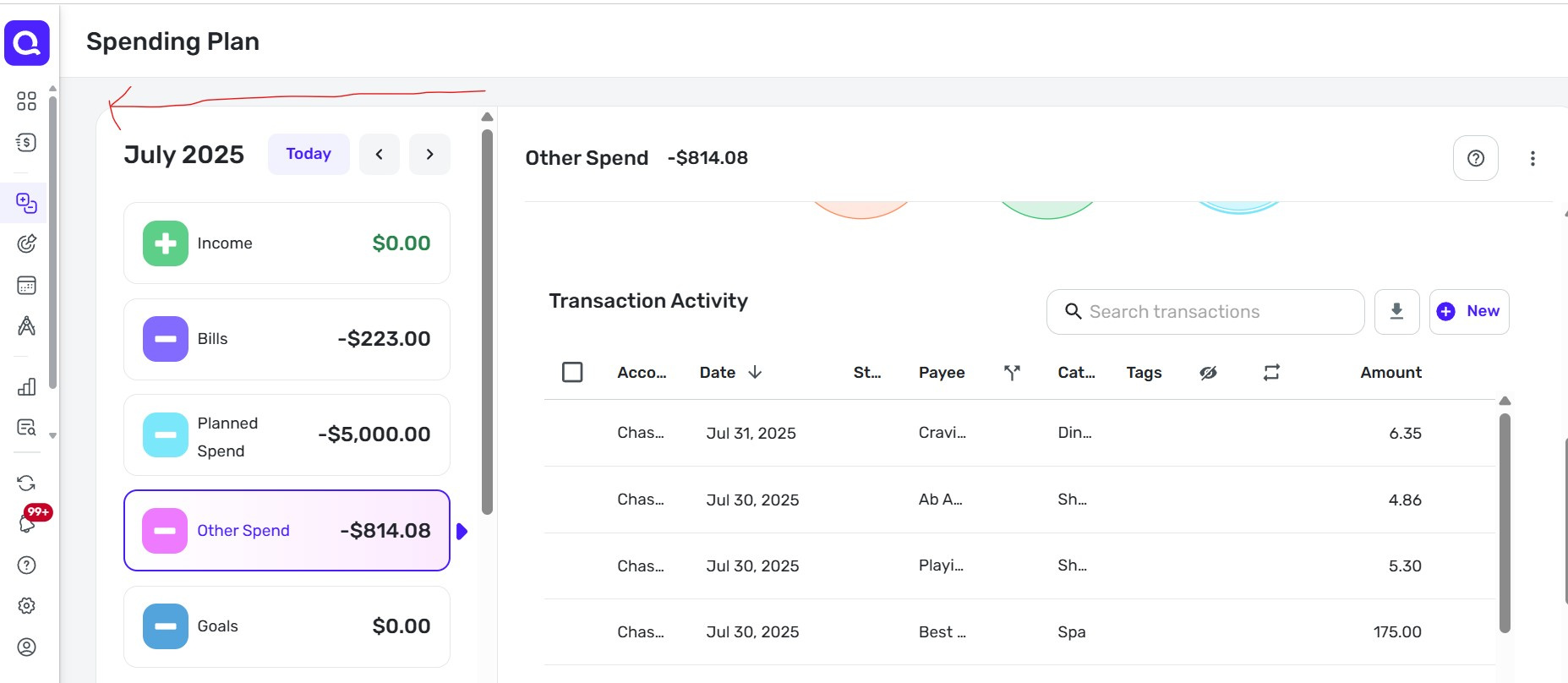
Maybe a new idea or maybe already a way to do this: How can I see more of the "Transaction Activity" by minimizing or "closing" the menu on the left side under the words "Spending Plan" where I've drawn a red arrow?
Also, is there a way to set the default columns to choose the ones I want? I know how to do it each time I'm on this view, but when I leave the page, I have to reset the columns to my preference.
Essentially, I'd like to see more of the relevant transaction columns by their titles and information.
Comments
-
@missyrae7, thanks for posting your suggestion to the Community!
Since you want to only request one item per Idea post per our guidelines here, I have edited this request to just cover the ability to close or minimize the 'Totals' panel in the Spending Plan on the Web App, as this ability is not currently available in Quicken Simplifi.
As for the column selections sticking for the Transaction Activity areas of the Spending Plan, we have an existing request for this here:
Our product team has confirmed that this ability will be added in a future release of Quicken Simplifi! You can follow along with the request for updates.
I hope this helps!
-Coach Natalie
1

