Spending Plan Redesign: Share your feedback here!
Comments
-
Thanks @DannyB but I don't think using a Watchlist solves my issue as I believe it doesn't feed into the overall spending plan math. I just want to avoid having to do a lot of extra math where some transactions in a category fall into bills and others don't (which becomes a bigger headache when those bills are weekly, biweekly etc so they total different amounts in different months). Also does Watchlist include the rollover feature? I may have missed it.
Also I don't want to stop categorizing transactions (or lump them into a single category) as having that level of detail is helpful in many ways. I just don't have a target spending amount for every category so a general basket would be useful. This was a feature in the old Mint and seemed to work well. It could be as simple as permitting a target spending limit on the existing "other spend" bucket in the spending plan.
I appreciate the suggestions however.0 -
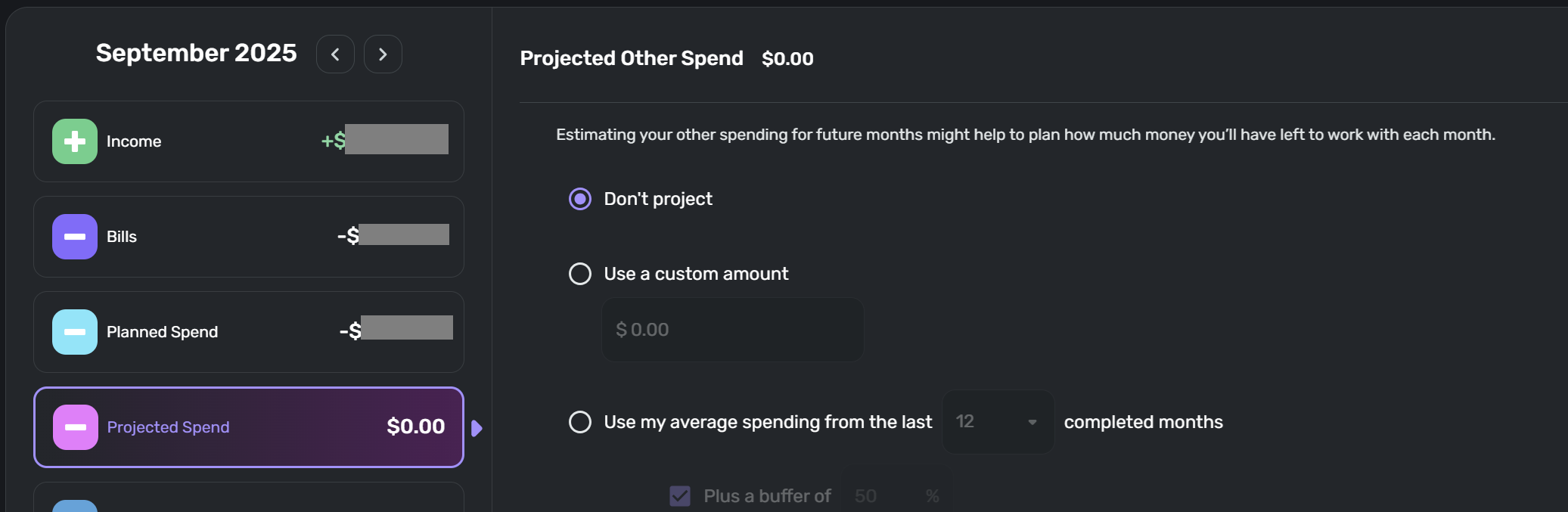
@WJB For your 2nd suggestion, this can be accomplished by setting a Custom or Average spending target (you can include a buffer too) in your Other/Projected Spending bucket for future months (see snip below). For current month, these expenses will be represented by the Other Spend bucket and can be monitored against your "Left this month" balance.
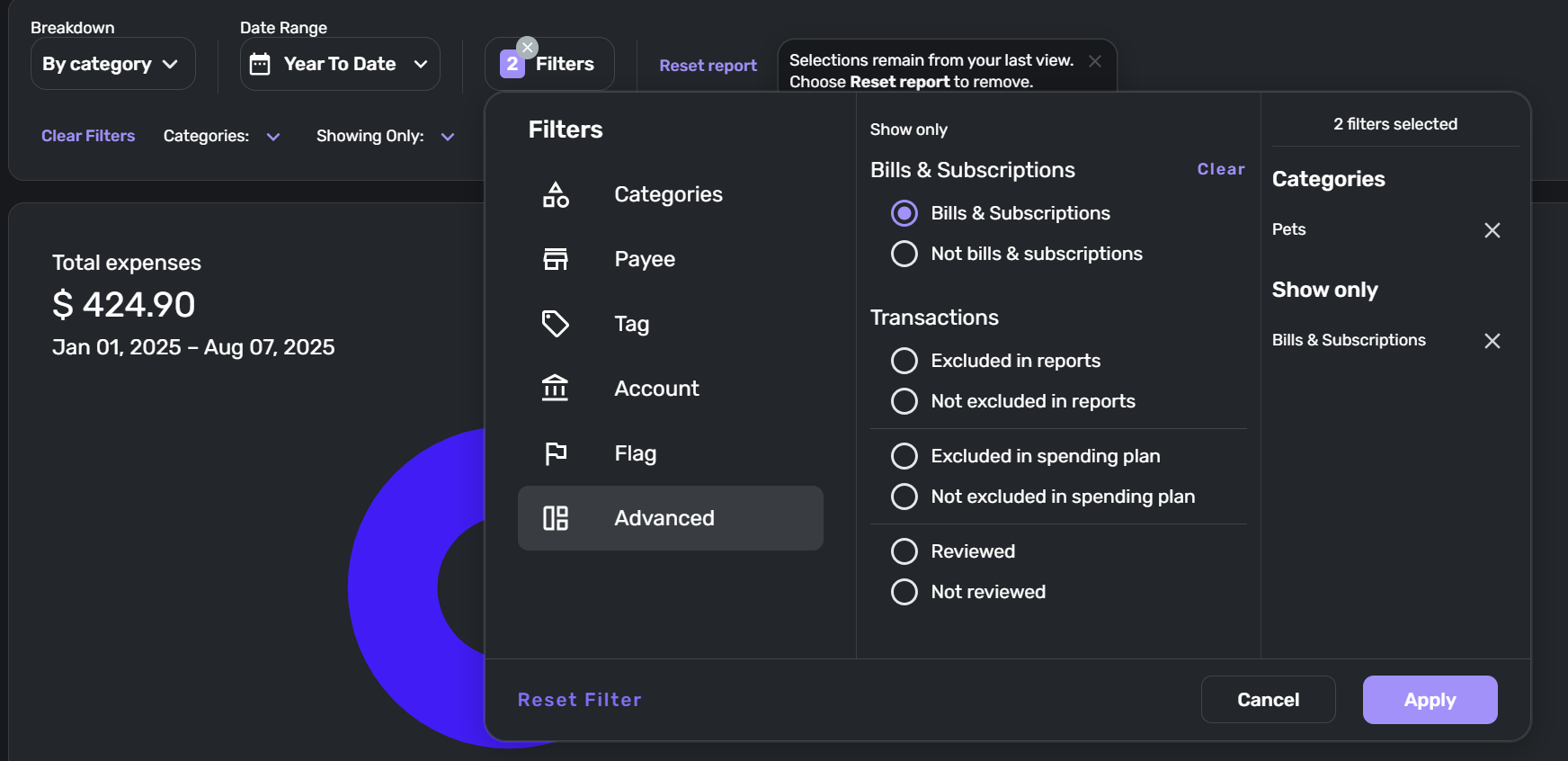
For your 1st suggestion, in Reports you can applies filters such as picking one category and then in Advanced Filters you can also apply a "Bills & Subscriptions" or a "Not Bills & Subscriptions" filter. This can be used for figuring out your burn rate in this category that are already setup as Bills versus how much you need to set as the Target in your Planned Spending section of the Spending Plan. See snip below for my example of that filtering in a YTD view with my Pets category.
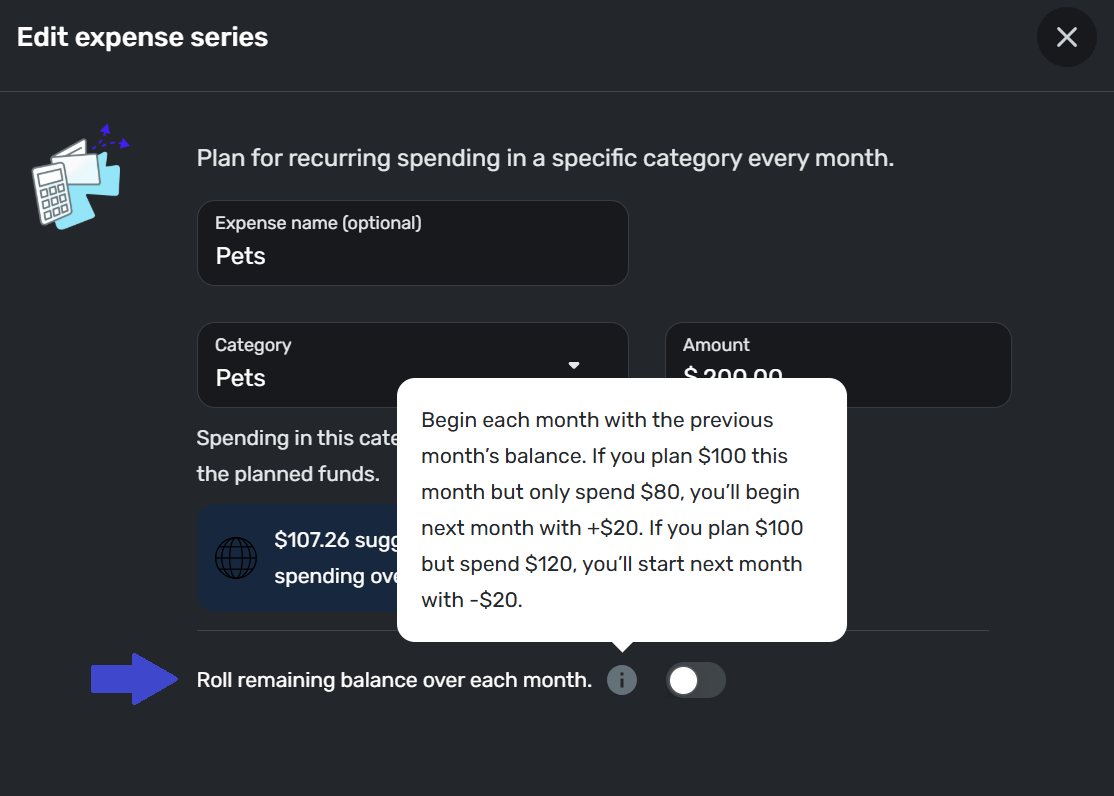
Also in your Spending Plan, you can set up the Planned expense series for that Category to roll remaining balances (see snip below). Having your recurring expenses setup as Bills/Subs for this Category of importance and accurately setting the target amount(s) for this Category in your Planned Spending will ensure your Spending Plan has accurately planned for the category.
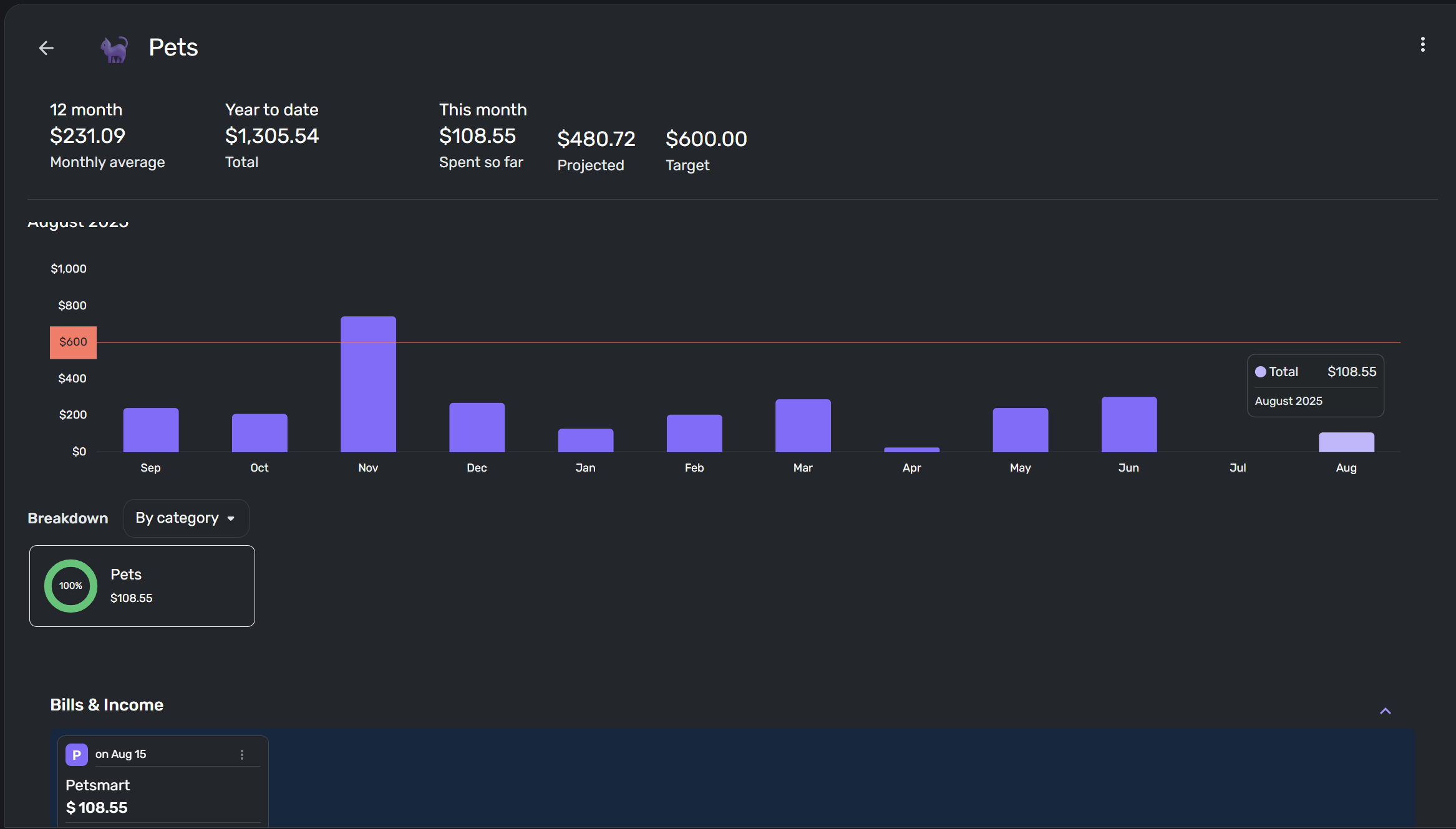
And finally, you can set up a Watchlist for that category as a way to monitor the total category spend on a monthly and YTD basis. It'll even show you in the current month not only your total spend so far but also what upcoming Bills/Income for that Category are expected. Here's a snip from the Web app version. The mobile app view has a bit less information and less history and oddly enough shows an "Average" line as the angry red line and a almost invisible dotted line as the "Target" line on the graph. But both app versions do the job. Also in the Transaction register inside the Watchlist, you can click the 3 dots and apply a Filter that says "Recurring is True" and this is a workaround way to see how much was bills vs not bills in a month. Would be nicer imo if they'd just setup the graph as a stacked bar chart that automatically showed that Bills vs Not Bills split in each bar, but que sera for now I guess (would be a great feature add! but would also get complex for Watchlists with multiple Categories assigned…Tags may be a better workaround…). Using the Target in your Watchlist would give you the monitoring capability you are asking for and combine that with an accurate Planned Spending projection for that category and that should be a decent workaround to get you started with what you are aiming for. I can't save you from having to do some math. But I think this combo of tools may help make the math easier at least.
 1
1 -
In the most recent update, you combined all of the categories and removed a lot of the organization. I will get used to that. However, you also removed the Account Name column, leaving only the transaction name. How do I get the account name back? It's extremely confusing seeing some of the cryptic transaction names without knowing the associated account. Please tell me there is a way to get this back or the Spending Plan just became a lot harder to use.
0 -
Could the team please add the $ per day figure back into the dashboard? It is there when I click into the spending plan but it used to require fewer clicks and I'd like to be able to see it at a glance when I open the app or go to the homepage/dashboard.
0 -
I love the new additions the team has made in the past month or so to the user experience. Its much cleaner and overall more intuitive, especially in the income section.
I have a simple request to make the income section even better. I just want to see my income types the same way I see my expenses with different categories. For example, I have a separate income category for "Gifts received" or "rebates" from credit card rewards or "company reimbursements". I want to set a target income amount for these individual categories, along with a target income for my paycheck and see each in a thermometer like filled bar that we have for expense categories. Especially with a predictable paycheck amount I can see is my total paycheck on target and how much extra income I have from other categories.
Thanks so much!
0 -
Is your income category column not showing in the Spending Plan/Income page?
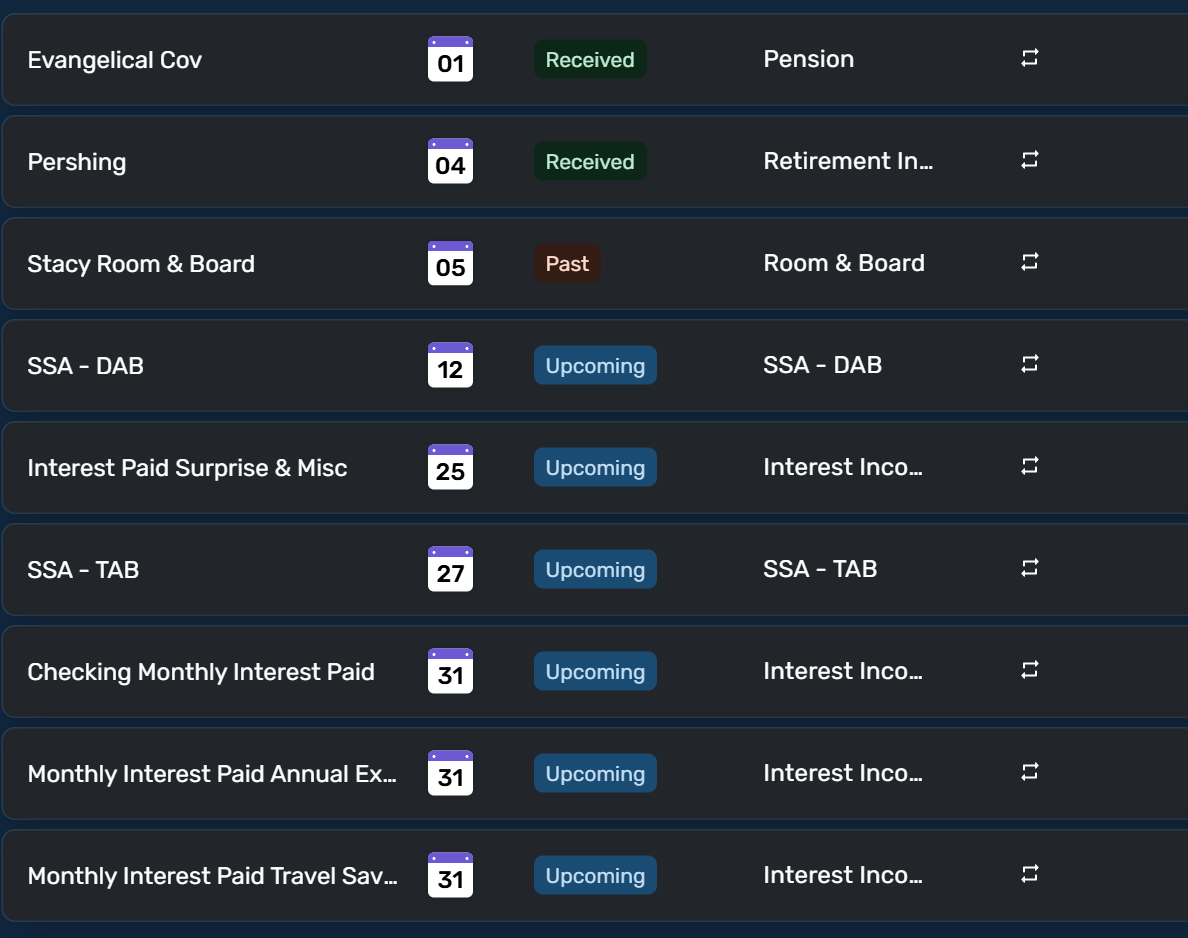
I can see my income categories in the 4th column.
To see your income by category, you can create sub-categories under "Income" for your different income types: Settings/Categories & tags/+ Category. In the category creation window, you are given the ability to assign a newly created category to an existing top category, in this case "Income."
When a recurring income deposit is matched to a recurring reminder the category will be updated to the category you select. For irregular income types you will have to select the category manually or you can create a Rule for each type of irregular income that includes a category assignment of your choosing.
Your recurring income reminders will include an income amount based on what you dictate when you set up the recurring event.
As far as setting a target and seeing a "thermometer" graph, I'm guessing you are talking about what we have in Planned Spending? Not sure how that would work for income, but hey, whatever.
Danny
Simplifi user since 01/22
”Budget: a mathematical confirmation of your suspicions.” ~A.A. Latimer0 -
@horchatawhiz, thanks for posting your suggestion to the Community!
I have merged your post with the official feedback thread for the Spending Plan. Our product team has already confirmed that the 'Per Day' amount on the Dashboard will be added back.
I hope this helps!
-Coach Natalie
0 -
Thank you!
2 -
Thanks for your help.
I figured out the problem. Rollover breaks the calcs somehow
Three screen shots below: Planned, Overspend, and Overspend without Rollover
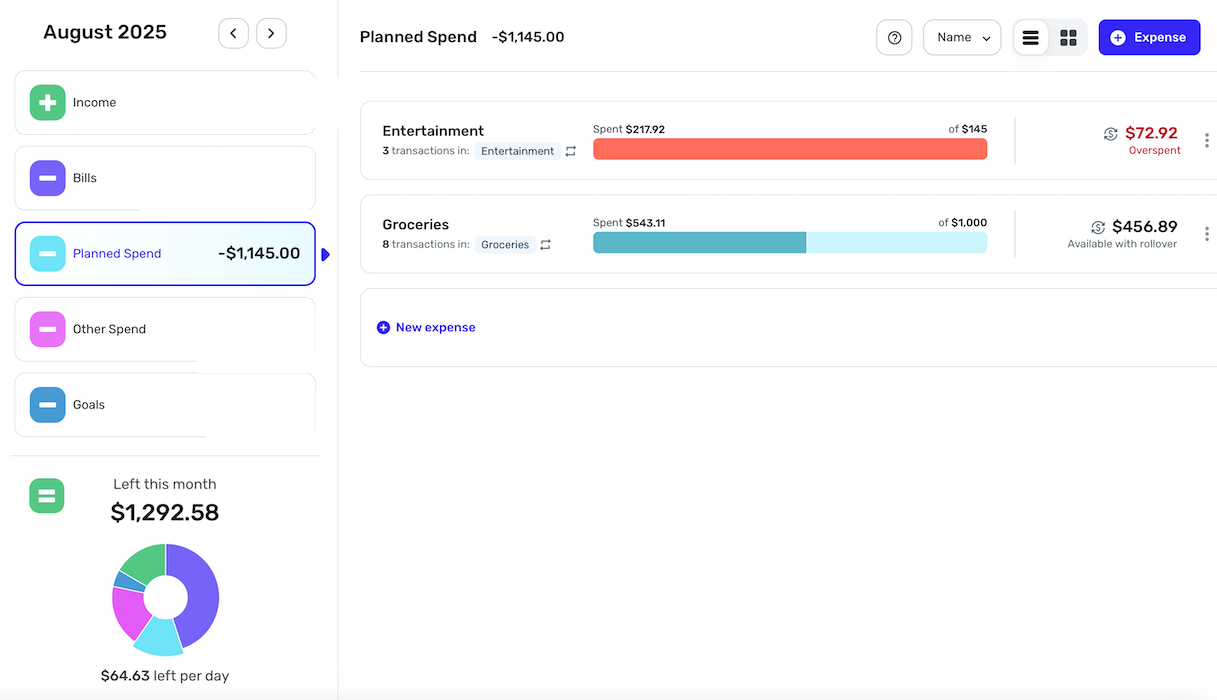
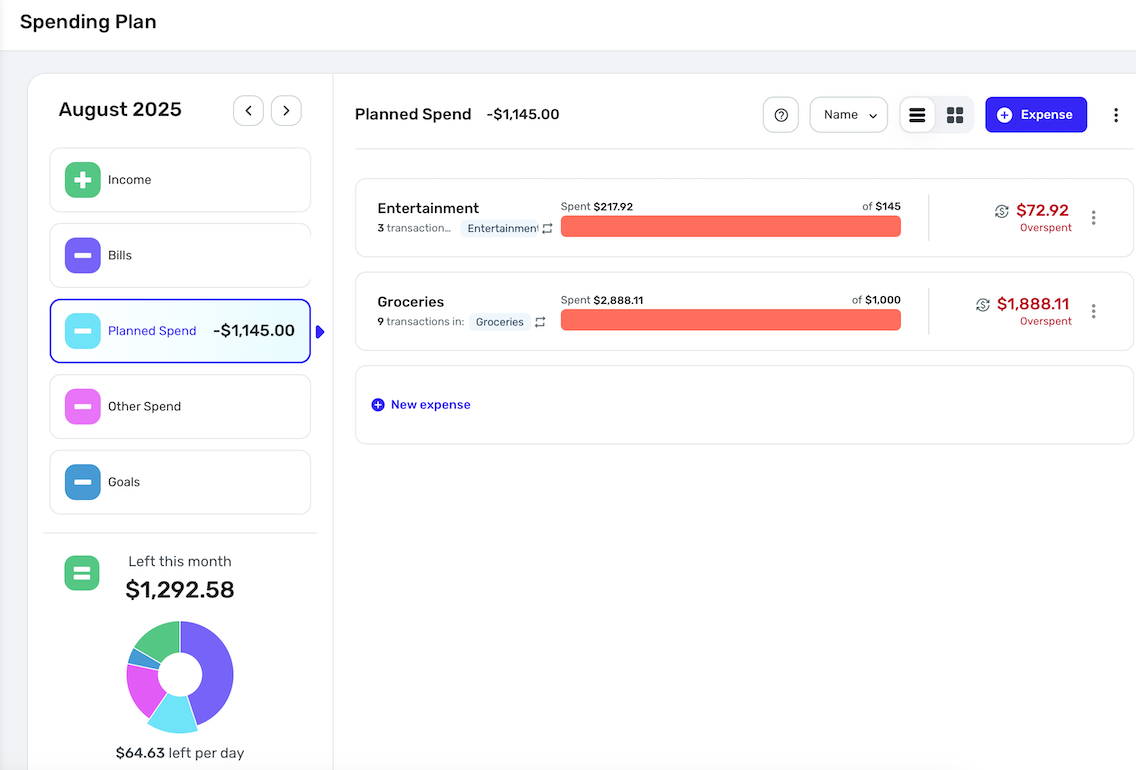
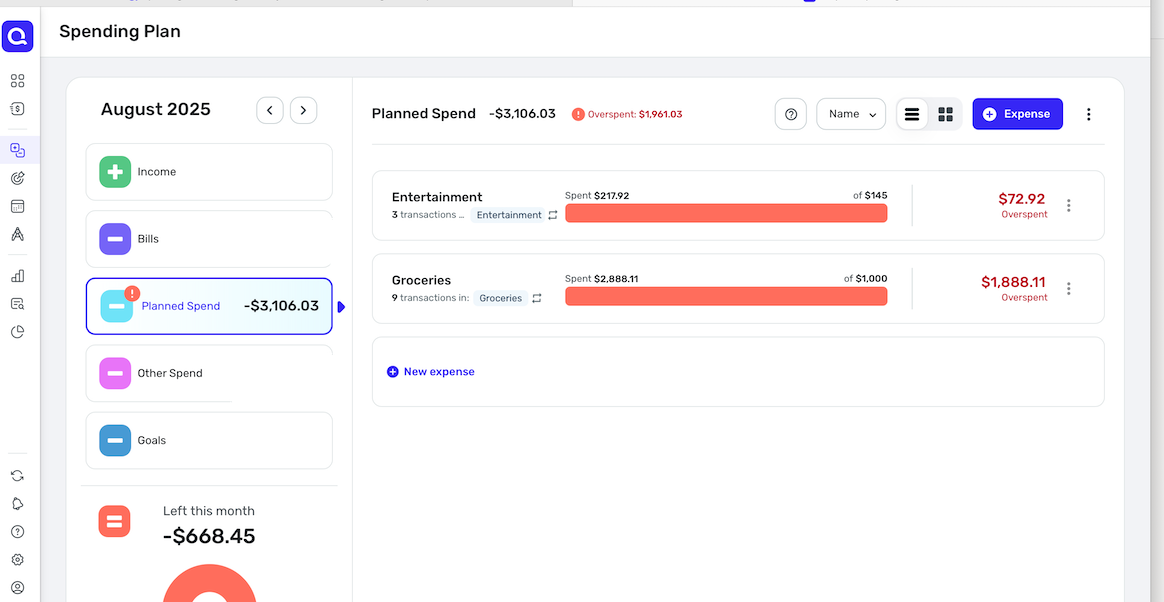
Rollover being on regardless of starting balance, including $0, sets the calcs to planned only for any category using it. I'll keep rollover turned off for now until it gets fixed.
Thanks again.
0 -
@Me123456, thanks for the reply!
I'm not sure that I understand the issue you're reporting. According to our support article here, overspending a rollover Planned Spend expense will not count that overspent amount toward the Spending Plan totals. Are you saying that the Planned Spend total in the Spending Plan is using the target amount and not counting the overspent amount? Also, did you start the month with a rollover amount, or did you just set up rollover this month? I don't see any rollover amounts in the screenshots provided. Have you tried deleting and recreating any of the expenses to see if the new expenses behave properly, or anything along those lines to troubleshoot the issue?
Let us know!
-Coach Natalie
0 -
If I have rollover enabled and I spend $1500 on a planned spend of $1000, Spending Plan treats it as if I'm still on target and the totals reflect my plan not my actuals (2nd picture). Basically planned spending with rollover enabled ignores that I'm over budget and doesn't update my money left over.
If I disable rollover, then the totals are accurate (3rd Picture). Does that help?
Happened with Rollover coming in from the previous month but also when I redid my plan and specified $0 as my starting rollover balance. Yes I've removed and re-added the categories to my spending plan.If you mean actual transactions, yes, I added and removed grocery transactions affecting my overspend and with rollover enabled they don't impact my target and money left
1 -
@Me123456, ahh, I see the issue now, and was able to reproduce it. I have passed this along to our product team!
-Coach Natalie
1 -
@Coach Natalie Glad you can reproduce the issue.
Do you have a suggested action for folks who are using rollovers?
For instance, if I turn OFF all my rollovers today, then later, QS fixes the problem, will I permanently lose that rollover amount and essentially be starting over when I turn the rollover back on?
If so, is there a way to add back the rollover?
Thanks
0 -
@Max1223, thanks for posting!
Are you referring to the latest issue mentioned with overspent rollover-enabled Planned Spend expenses? If so, I have not confirmed if this is a bug or if it was intentionally changed. If it is a bug, it looks like rollover can only be enabled for the current month, even when doing so from a prior month —
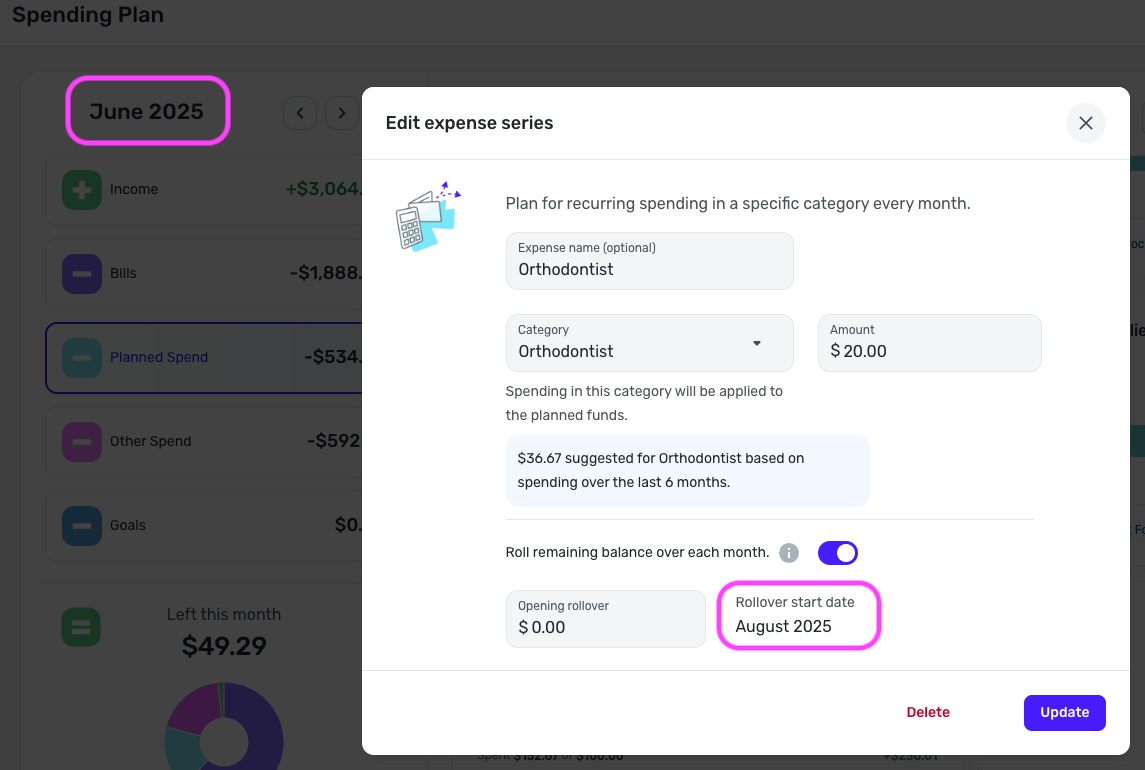
You will likely have to re-enable rollover at that time and use an 'opening rollover' amount.
I hope this helps!
-Coach Natalie
0 -
@Coach Natalie yes this help, I was referring to the issue that @Me123456 pointed out.
So let me see if I have this right: IF someone turns off rollover, they need to record the rollover amount, turn rollover off, then when re-enabling, enter that recorded amount into the Opening Rollover if they want to start from where they left off.
Looking forward to hearing the status of this, bug or intentional.
Thanks.
0 -
I have a suggestion for tracking the "Spending Plan" more easily. Currently, I only see percentages for individual planned spending categories, but I would find it very helpful to have an option that shows the " Total Percentage spent from total planned spending
"This would make it easier to track overall spending instead of having to add up individual categories.
Thank you to the whole Quicken Simplifi team. I appreciate all your hard work and thank you for making it easier to save and manage my finances.
(Attached is an example of what it would look like)
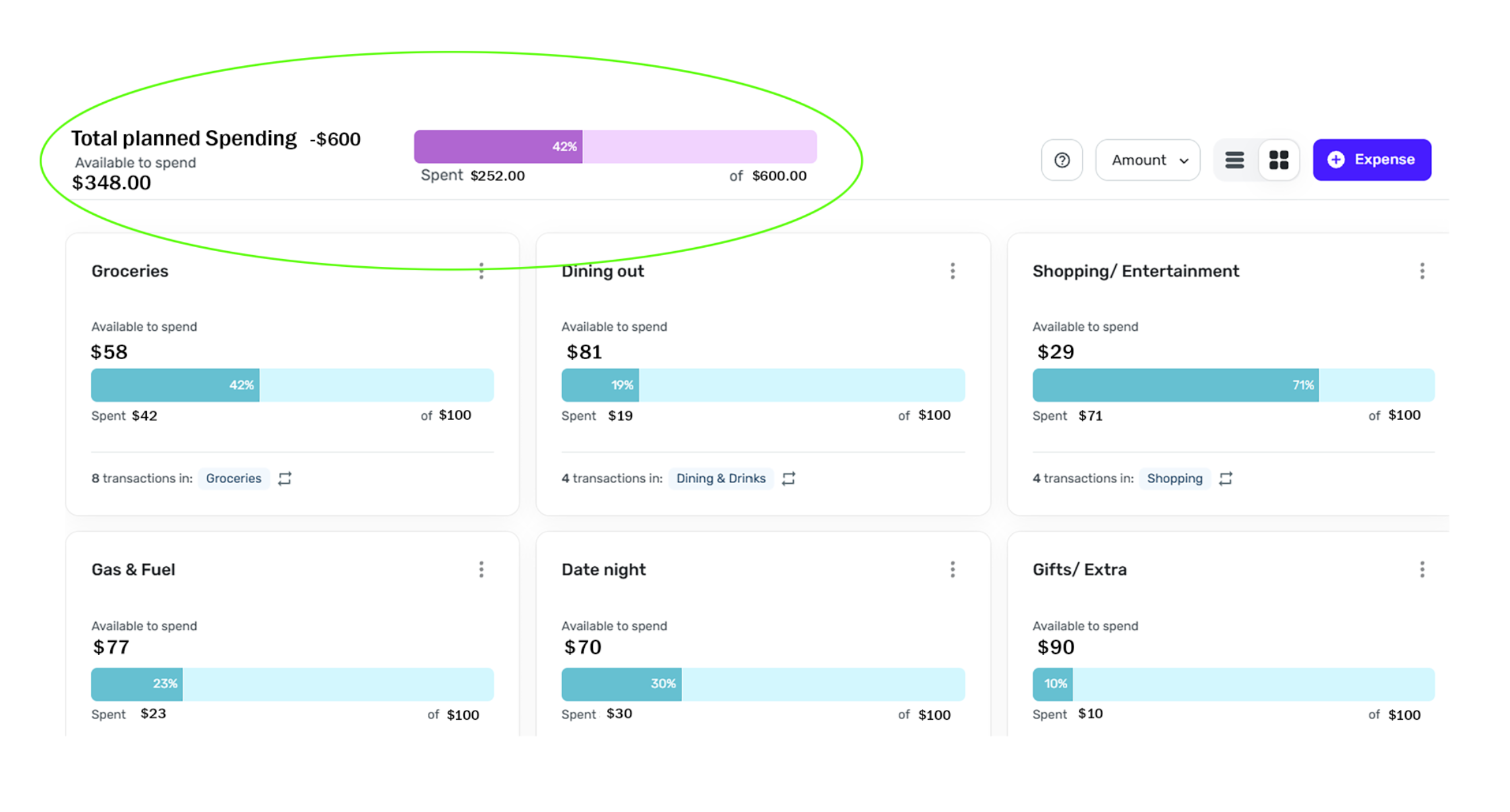 2
2 -
I like your idea of a "Total Planned Spending" bar at the top of the Planned Spend page.
I'm assuming (maybe wrongly) that the amount spent in that bar graph would include any overspending from the various planned expenses. That would help a lot, as the individual category bars tell you if you are overspent in a particular category but nothing gives a clear picture of how you are doing overall. Your idea would do that.
DryHeat
-Quicken Classic (1990-2020), CountAbout (2021-2024), Simplifi (2025-…)1 -
Saw the Left Per Day feature is back on the dashboard. thank you!!
David
Simplifi user since 2024
Simplifi Web: Windows 10, Microsoft Edge
Simplifi for Android: Samsung Galaxy S23 Ultra, Android 15
3 -
I will love this as well
Simplifi User Since Nov 2023
Minter 2014-2023
Questionable Excel before 2014 to present
1 -
@DannyB
following up on my comments from above in this thread regarding the income categories behaving like expense categories. I tried to respond to the specific thread but it appears to have been closed and merged, so sorry for having it posted here instead.I know I can create subcategories within income, and I have done that. I have 12 different categories under income to further subdivide my income into different sources. What I'd like is instead of just seeing a list of each income and the category its in, I want a category view where Simplifi aggregates all the transactions in that income category and shows me the total rather than me having to add up all the income under each category.
Similarly to expense tracking, I would like to have a target total for that income category for each month and ensure that I'm tracking towards that total. The reason for this request is I have a lot of different 'types' of income and many transactions in each type, would just be easier if simplifi aggregated them for me.
So rather than this view:
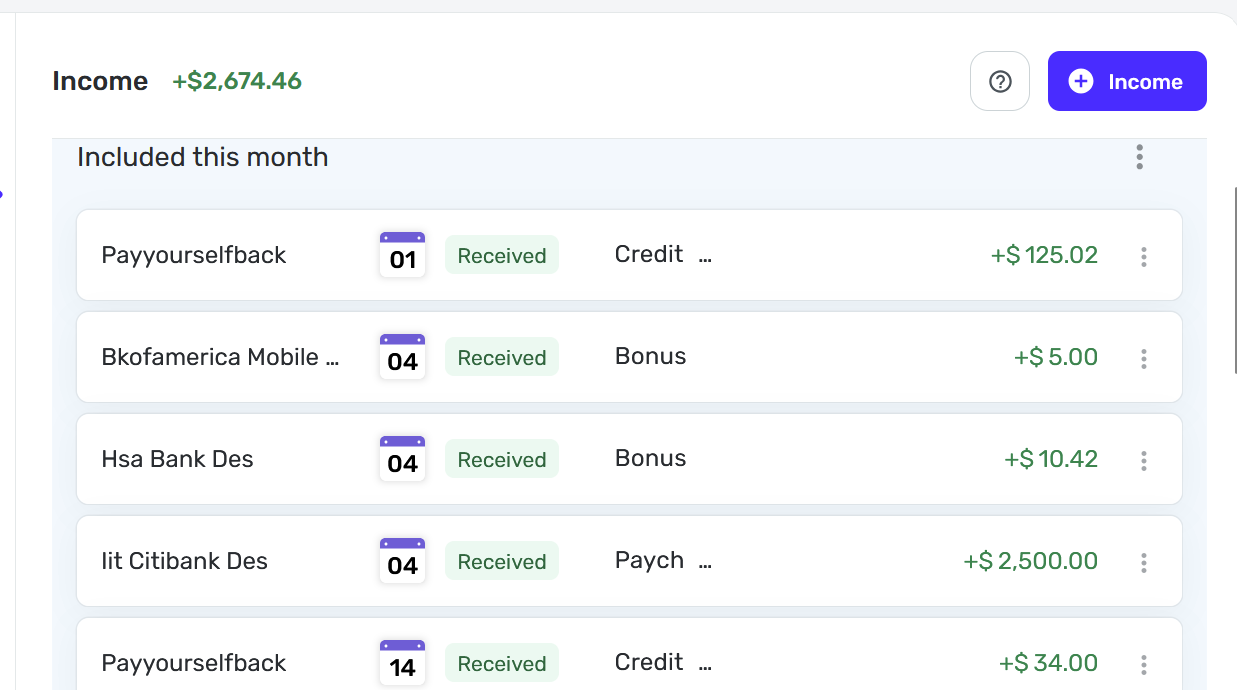
I want a view that looks like this but with income categories.
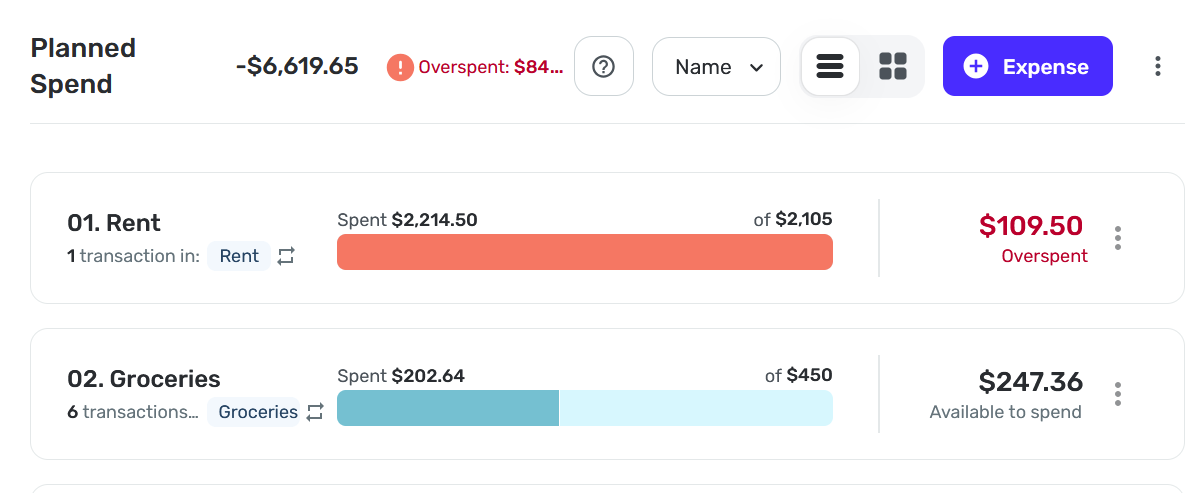
Thanks for the quick response before! hope this makes sense.
2 -
@Me123456 & @Max1223, I have received an answer from our product team!
This is how rollover-enabled expenses work in regard to overspending/underspending:
- Planned Spend series with Rollover enabled will use the target amount when calculating your Spending Plan totals, regardless of overspending or underspending. This is because the overspent/underspent amount will be rolled over to the following month.
And here is how non-rollover enabled expenses work in regard to overspending/underspending:
- For Planned Spend series that are not set up for rollover, overspending and underspending will be counted toward the Spending Plan totals.
I think I misunderstood the support article the first time I read it, but this is all outlined accurately in the "Things to Note" section:
With that, it sounds like everything is working as expected. I hope this helps to clarify!
-Coach Natalie
0 -
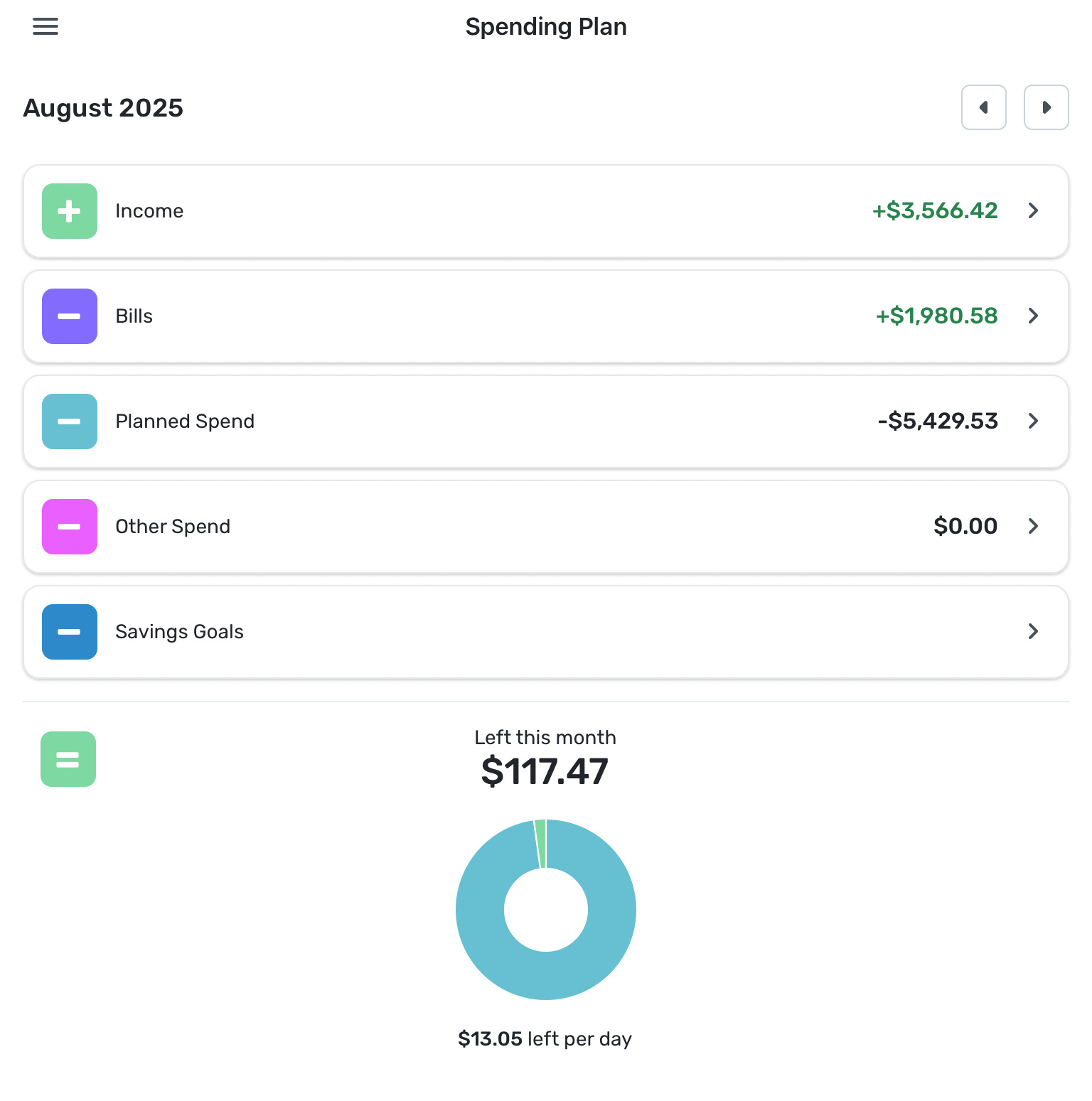
The new Spending Plan update now shows my total bills as a positive number (+$1980.58) because the ‘Transfers’ are now included here. This makes no sense at all to me. I wish the sum total of all my bills was a positive number!!
0 -
I like using Spending Plan. I believe it would be a great addition to add 2 calculations to the Planned Spend view: Underspent and Overall (as indicated in the below graphic).. It will be useful to see how the overall planned spend is tracking for the current month. Please consider adding this.
 2
2 -
With a little effort, that is something you can control. For example, this regularly scheduled transfer shows up in my Spending Plan like this…
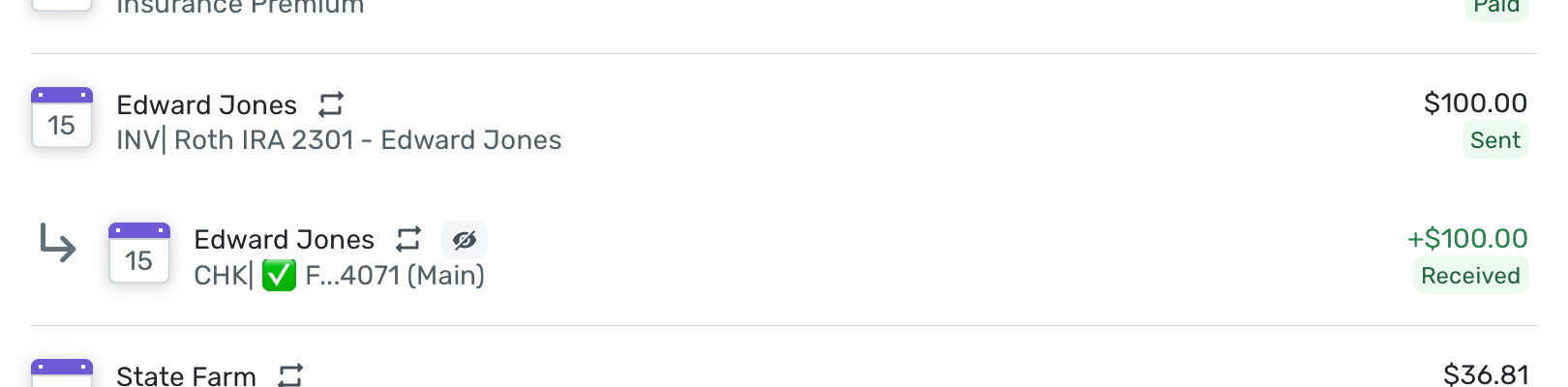
When I edit the transaction, it has these viability settings…
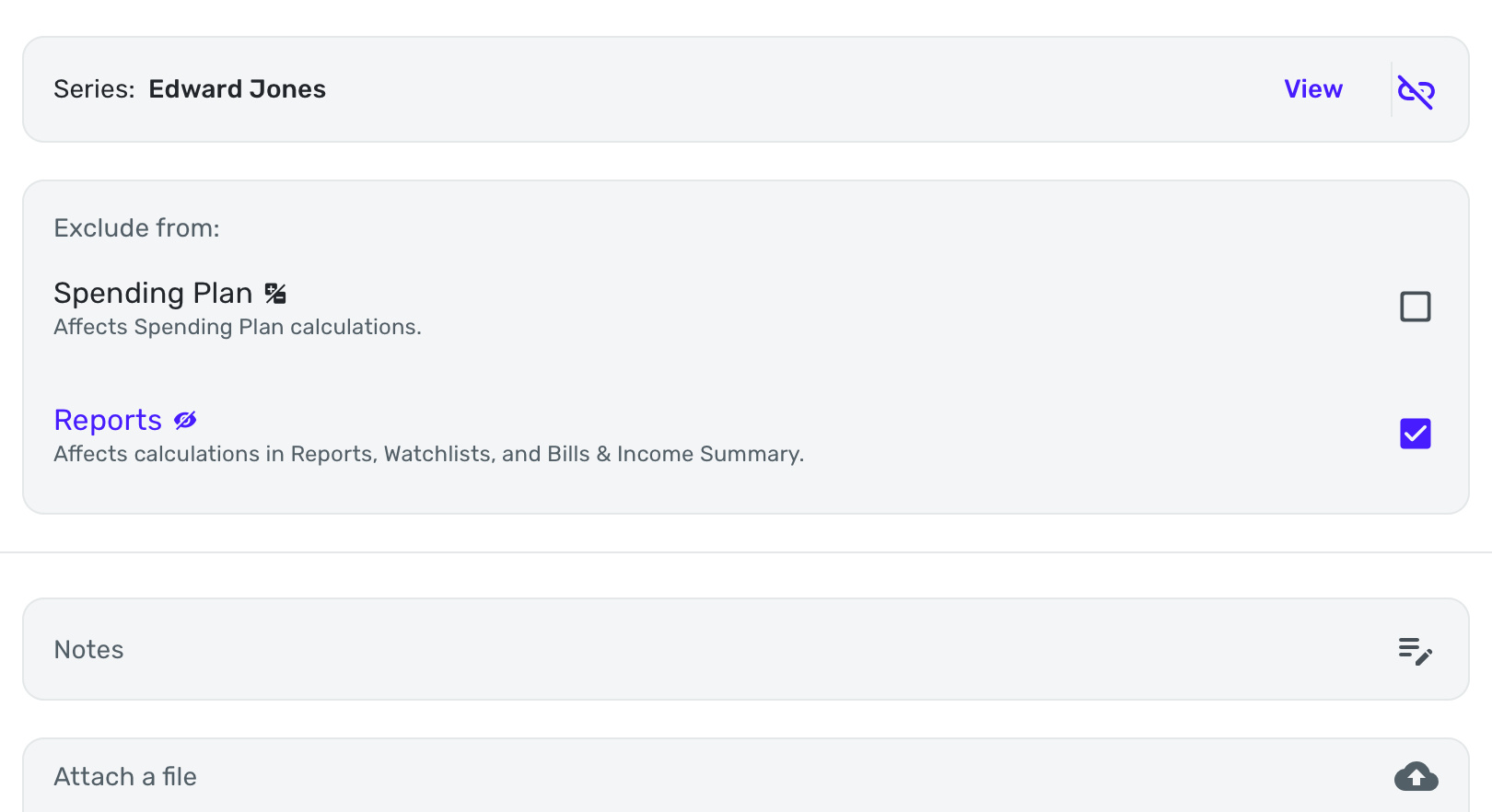
These are the settings for the Recurring Series that controls how the transaction appears in the Spending Plan.
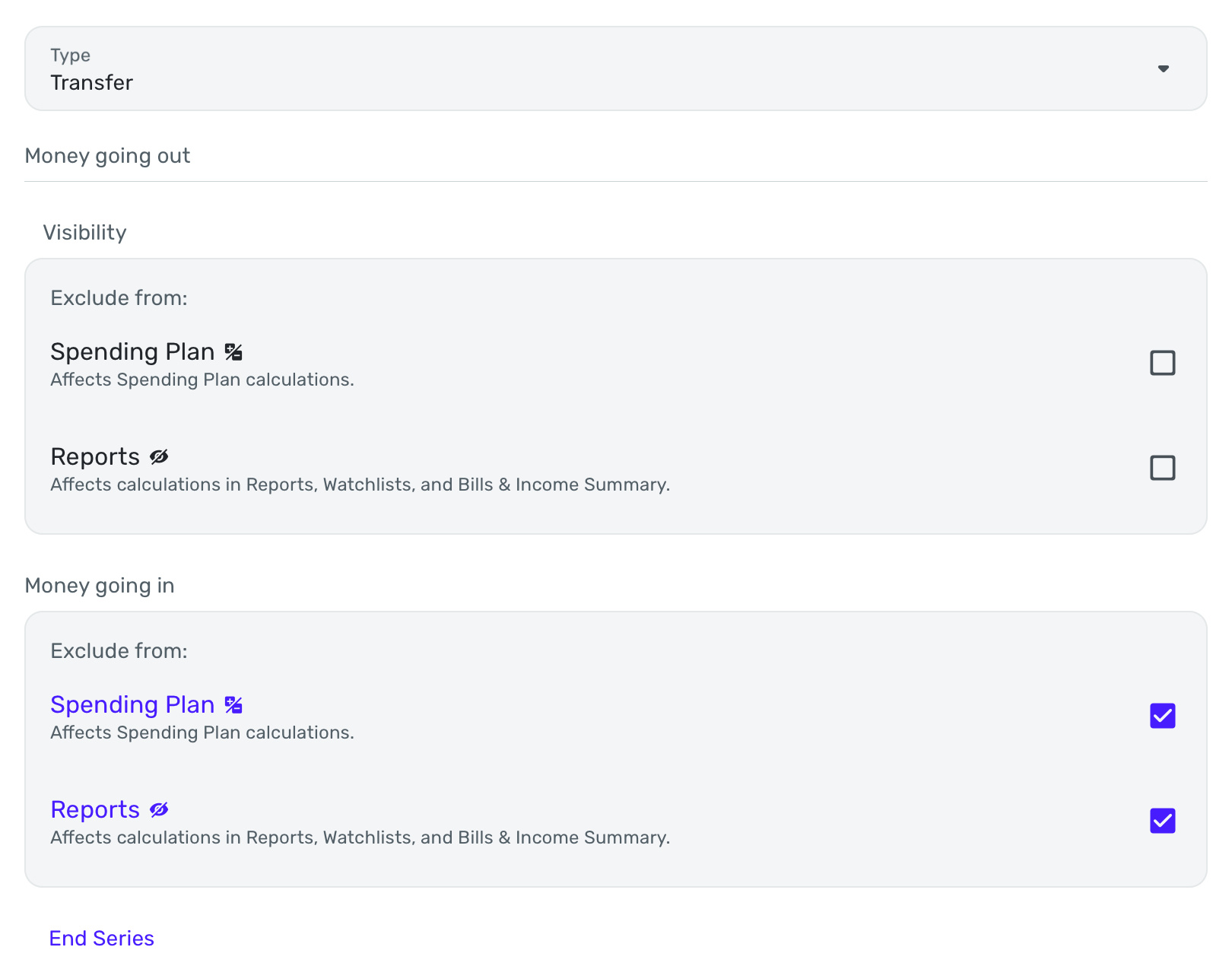
I have other transfers that don’t show up in the Spending Plan because both sides of the transaction (I think of them as two separate transactions) are excluded. Check the settings for your Recurring Series to see which one show excluded and which ones don’t.
Chris
Quicken Simplifi user since 2021.
Quicken Desktop user since 2014.
Spreadsheet user since forever.1 -
@Flopbot Thanks for your tip, however this is not a Recurring Transaction. It’s a one time transfer to bring more income into the budget, so the options you presented are not available.
I would like to see Transfers moved back to the Income level as they directly affect your total income for the month and have absolutely nothing to do with Bills!
0 -
I have a monthly transfer from a manual investment account to my checking account that I also wanted to show up as income, not as a bill with a positive amount.
The only way I could find to do that was to unlink the transactions (so the system does not see them as a transfer). Then I categorize one of them as a type of income (using a custom income category like XXX Distribution). I categorize the other one as a type of expense (using custom category like XXX Payout) and I exclude that expense transaction from the Spending Plan.
It's a bit clumsy, but the result is that the XXX Distribution shows up as income and the XXX Payout shows up in the excluded bills. This has the desired effect on my Income/Expense figures in Spending Plan.
Simplifi just isn't designed to treat transfers from one account to another account as Income. Which makes sense, of course, because it's not really "Income." But it kind of fouls up the Spending Plan if you visualize those transfers as monthly income (as many retirees do, for example).
DryHeat
-Quicken Classic (1990-2020), CountAbout (2021-2024), Simplifi (2025-…)0 -
@DryHeat Thanks for your comments. I agree it is a clumsy workaround for what used to be handled correctly before the changes to the Spending Plan. You had the option to include or not include them as Income to the Spending Plan, which made total sense to me.
Simply put; a Transfer is not a bill, most often it is a needed adjustment to your Income.0 -
@donnajean "Simply put; a Transfer is not a bill, most often it is a needed adjustment to your Income."
Many people have suggested moving Transfers out of Bills. I don't think it should be directly reflected in Income either, as it could be an addition to income but could also be movement of funds into savings or investments.
My suggestion (see comment linked below) was that Transfers should be a separate group entirely. (You'll have to click through to see the proposed Spending Plan layout.)
DryHeat
-Quicken Classic (1990-2020), CountAbout (2021-2024), Simplifi (2025-…)1 -
I agree that transfers should be separate from income and from bills.
1 -
I don't often "overspend" any of my Planned Spending categories. But on occasion I do and this month I have just such an occasion and the new design lets me know in a much less "terrifying" manner than previously:
 Danny
Danny
Simplifi user since 01/22
”Budget: a mathematical confirmation of your suspicions.” ~A.A. Latimer1