Spending Plan Redesign: Share your feedback here!
Comments
-
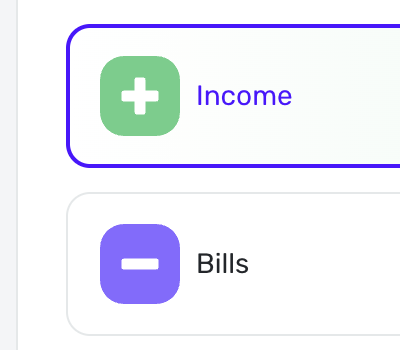
@DryHeat What I was implying in colors across QS was for consistency. eg, if Green is always income, Purple is always Expense or a Bill, Cyan is budgeted amounts, etc. while you don't need to remember what the color stands for, if its used consistently across things then it might start to make sense.
There is some of that going on e.g Spending Plan and Income Expense report shown.
 0
0 -
Since this update, my planned spend now shows a red "overspent" amount even though I remained in budget for the month. When I go back to prior months it shows this overspent warning even though I did not overspend in ant categories at all.
0 -
I'm kind of surprised that no one has commented on the inclusion of a "Transfer" tile in my rendering of the Spending Plan navigation bar. Maybe I should go back and highlight it.
"However, I do value the pie chart personally as it gives me the sense of how on track I am at a glance."
If folks value the pie chart, then it should remain. It's not helpful to me, but if it is helpful to others I'm happy for it (and all the colors) to stay if others find them useful.
"The color coding is used on transactions in Bills and Income but I agree not especially meaningful."
As far as I can tell, there are only two colors used in Bills and Income — the same ones that I use in my proposed Spending Plan navigation bar above. They basically correspond to money in and money out, which I do find meaningful. (I used a blended color for Transfers because they can go either way.)
I didn't mean that the colors that remain in the nav bar image I posted should be removed. I agree that those two (green and blue) are used meaningfully throughout QS. I edited my post to make that clearer.
But, as I said above, I don't have any real need to get rid of the other colors. I thought making all "money out" items the same color would be clearer, but the minus sign icons can take care of that.
DryHeat
-Quicken Classic (1990-2020), CountAbout (2021-2024), Simplifi (2025-…)0 -
Your Spending Plan Redesign has ruined the entire Simplifi app.
Now it is impossible to use the Spending Report to export transactions that include the "Category."
WHAT!!!!
Now the report only returns "Subcategory." My Subcategories are meaningless without the Category.
What a stupid mistake.0 -
@Max1223 I find the Per Day number interesting but not useful either, but like you, it doesn't bother me that it's there and it's coming back.
I don't think many people budget on a daily basis; usually monthly or biweekly or even weekly. Maybe for people on tight budgets knowing how much you can spend per day is helpful.
Steve
Quicken Simplifi (Safari & iOS) Since 2021
Quicken Classic (MacOS) Since 2009
Dollars & $ense (DOS) and MS Money (Windows) 1987-20091 -
I'm very disappointed that the new Spending Plan removed the "Set Custom Amount" feature in the savings goal.
As someone with transactions across many accounts, I prefer to set a monthly OVERALL custom goal based on my "Leftover" rather than setting a long-term goal which is linked to the amounts in a specific account. My savings goal is a roll-up across at least three accounts for which I have no reason to set up a specific transfer.
This for me means that the Spending Plan redesign has removed one of the most important features for me to use this tool as an actual MONTHLY budgeting tool. Yes, I can look at my Leftover and kinda keep it in the mind where I'm landing, but it was preferable to be able to segment this out in the Spending Plan rather than disregard the Leftover number in favor of the math I'm now forced to do in my head.0 -
@bobmablob You still can set a custom amount. In the Web/desktop app, you click the triple dots. If you already have a custom amount set then it'll show a "use calculated amount" option.

But if you choose "Use Calculated Amount" and then clikc the three dots again, you'll then see the "Set custom amount" option again. Kind of annoying that both aren't just always visible so you can change your custom amount without having to go back and forth with those options. But the option does still exist.
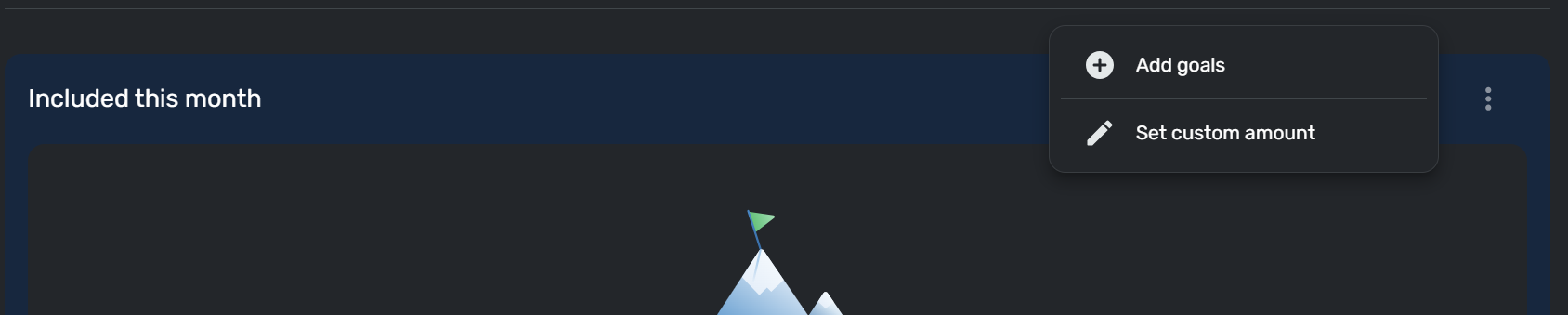
Or on the Mobile app, you have to choose "Options" at the top of the screen. Same back and forth with the "Use calculated amount" and "Set custom amount".
0 -
Please add back the amount per day on Spending Plan in Dashboard. I use this figure a lot and now I have to click the Spending Plan tile to see the number.
0 -
This thread is about the new transaction registers now in development.
If you want to weigh in on the changes in Spending Plan, you would be better off posting it here:
[removed link to merged thread]
DryHeat
-Quicken Classic (1990-2020), CountAbout (2021-2024), Simplifi (2025-…)0 -
I have an issue where my spending plan shows a total overspent, but nothing is overspent. Going back to previous months I see all months have a total overspent, when I haven't overspent on my planned spending. In fact in the previous months, I have a net positive balance.
0 -
This isn't the biggest thing in the world, but it would be really nice if clicking on a category in the pie chart for the Spending Plan on the dashboard, such as Planned Spend, would take you directly to that category instead of just to Income like everything does currently.
0 -
That appears to be the old interface, at least in my version—Version: 4.69.0 (33838/588c21bdd8/v111.5.0 - 7/31/2025, 11:33 AM)
I no longer have the three dots or a section at all for goals, so neither "Set Custom Amount" or "Use Calculated Amount" like I used to. All I have no is a screen inviting me to set goals, with the Custom requiring me to set up a Goal through the typical interface that links to an account as I stated.
Clicking +Goal brings up the same screen that is already displayed in the below screenshot.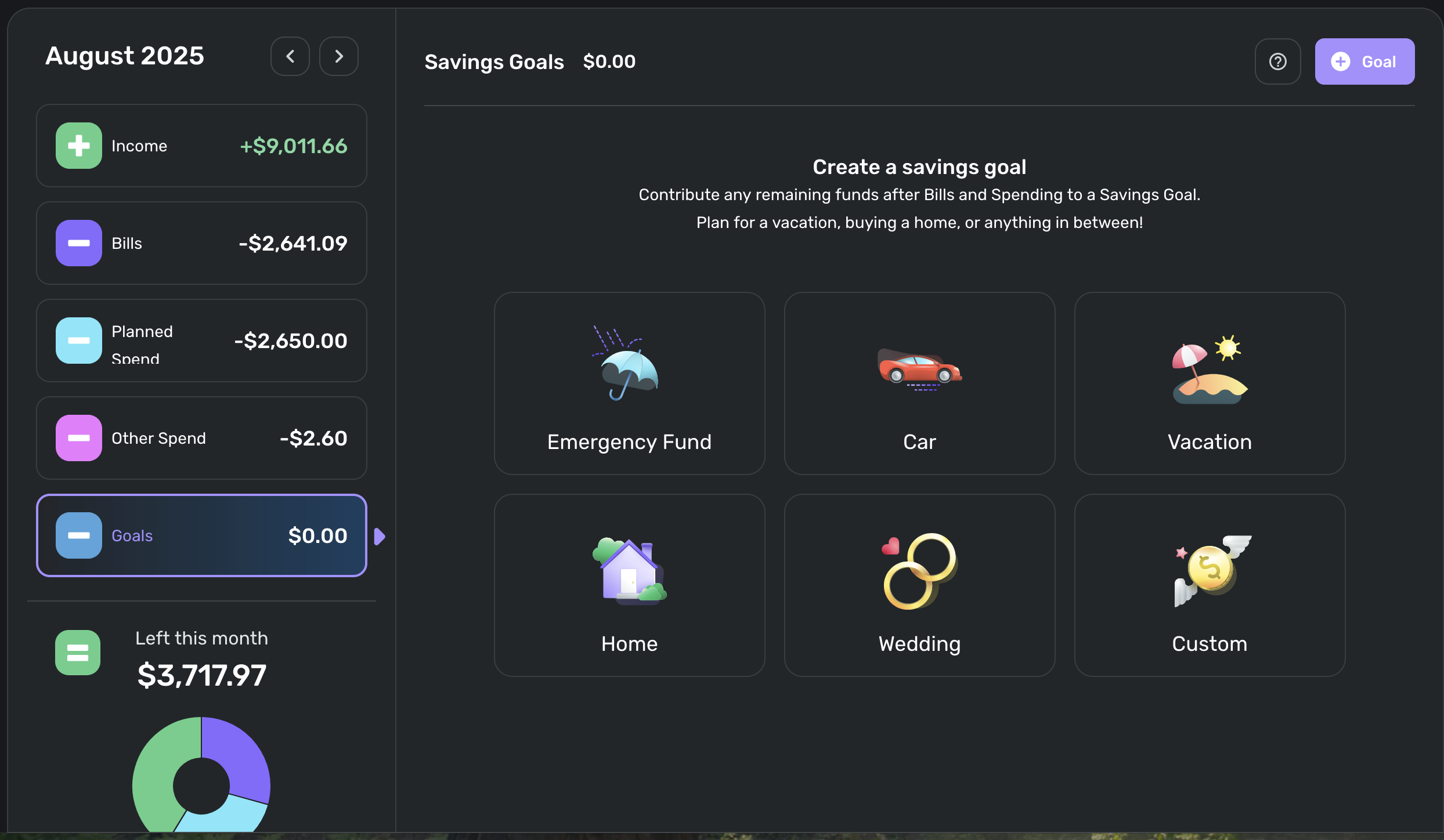 0
0 -
that’s really odd. I’m on the exact same version as you. Version 4.69.0 (33838/588c21bdd8/v111.5.0).
are you enrolled in Early Access maybe? I am not.
Do you have any existing active Savings goals that are incomplete? Perhaps that is why it won’t let you change settings if you have no goals? Just a guess. If this does turn out the reason, then I think they should add the feature to set a custom amount in Savings whether or not you have any active goals.0 -
Please bring back the easy to view feature of “available income after bills & subscription” - I do not understand why you would remove this? How would we change our spending plan each month to ensure adequate margin / savings? Now I have to go backward and do math myself and track the “available funds” separately.
I don’t mind the combination of subscription and bills but it would make sense to make the subs a subcategory within this menu. A $12 monthly subscription is different than the monthly mortgage or electric bill. Grouping these separately is useful to track which ones we can get rid of or do without temporarily.
1 -
@kimmonia I don't quite understand your first paragraph. At the bottom of the list is the amount of money you have left for the month. Isn't this the bottom line?
I agree that I like segregating Bills and then Subscriptions and then transfers so you just scrolled down to see them. I hope they will consider letting users view it that way if they wish.
Steve
Quicken Simplifi (Safari & iOS) Since 2021
Quicken Classic (MacOS) Since 2009
Dollars & $ense (DOS) and MS Money (Windows) 1987-20090 -
I used to personally use the “Income available after bills” number for making and monitoring my annual financials planning because as long as my Savings goals (in old version) was set to zero then this number represented the max amount of money available for either flexible spending (Planned/Other buckets) or Savings. I’ve used percentage targets of that “Income available after bills” number to dial in Planned and Other spending targets so I can maximize Savings while balancing lifestyle. Now that number has to be manually calculated each month instead of just jotting it down as you scroll through months.
Edit: it was also a nice differentiator from all the other budgeting apps out there. New version looks more like your run-of-the-mill budgeting apps now but at least they haven’t abandoned Bills being separate from all other expenses. If they did abandon it, I’d immediately unsubscribe because there’s cheaper apps out there.
0 -
I like the new layout better, but it's always good to understand other people's point of view and their desires/needs.
I set my category spending (Planned Spending) as low as I can so that my bottom line stays very positive to handle the high savings. I usually update my category spending as the month progresses. Usually, I can reduce some while increasing others.
Thanks for sharing @silentdream!
Steve
Quicken Simplifi (Safari & iOS) Since 2021
Quicken Classic (MacOS) Since 2009
Dollars & $ense (DOS) and MS Money (Windows) 1987-20090 -
This discussion was created from comments split from:
0 -
Hey everyone, I have passed on the issue with the overspent cue on the Mobile App. Our team will work on getting that fixed!
-Coach Natalie
1 -
I’d be much more appreciated dealing with importing issues of transactions as well as fixing broken connections
0 -
I have the same issue, in fact I see it for previous months on the iOS app. I don't see it on the website.
0 -
Hello,
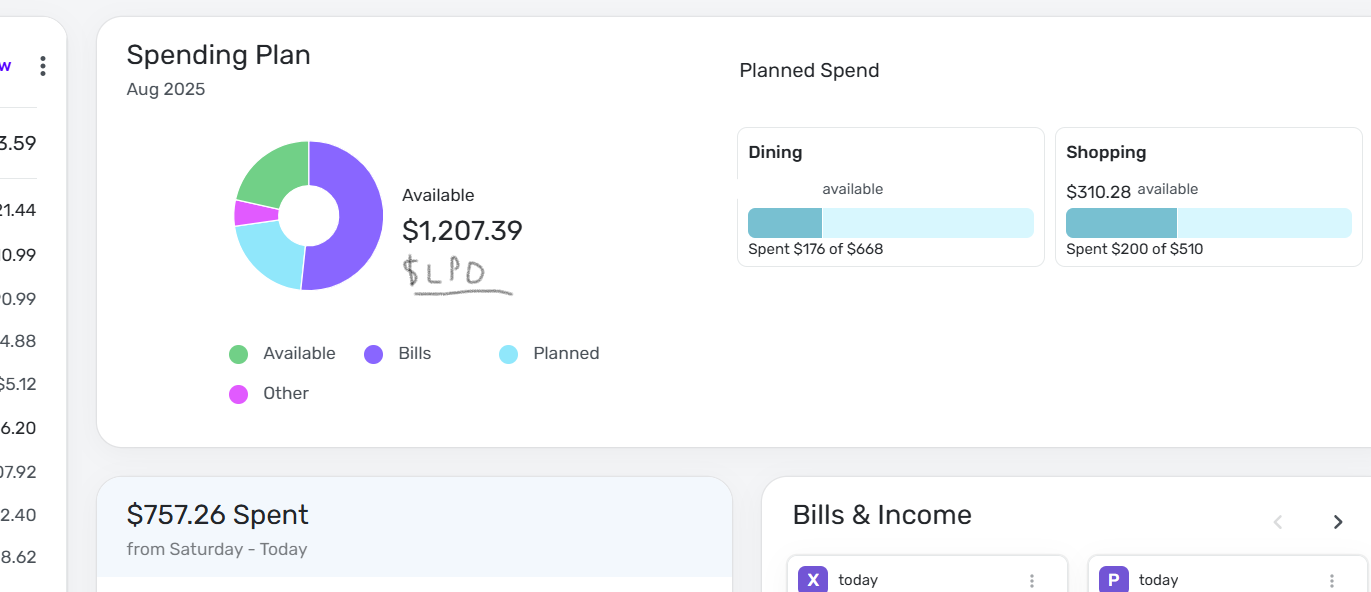
I know there's been some talk about the "left per day" feature in the new spending plan update. I use the feature a lot as just a mental/motivational tool to help curb unnecessary spending. I'm not sure if this specifically has been mentioned but I'd like to see it put back on the spending plan section of the dashboard so its front and center, as opposed to needing to navigate to the dedicated spending plan section to see it. Rr maybe there's an option I need to enable in the settings somewhere?
David
Simplifi user since 2024
Simplifi Web: Windows 10, Microsoft Edge
Simplifi for Android: Samsung Galaxy S23 Ultra, Android 15
1 -
@DryHeat not for me. My planned spend is $1895. To test it out I added a $4500 grocery expense. My Grocery shows the new total spend but the top level breakdown is unchanged. Planned Spend still shows $1895 but with an exclamation point, and my "Left This Month" is still my planned number and not the actual number which would be severely negative after spending $2600 more than planned.
0 -
@Me123456 — That's pretty odd. I tried the same test with very different results. The first image is before adding a Transaction for a large Auto expense:
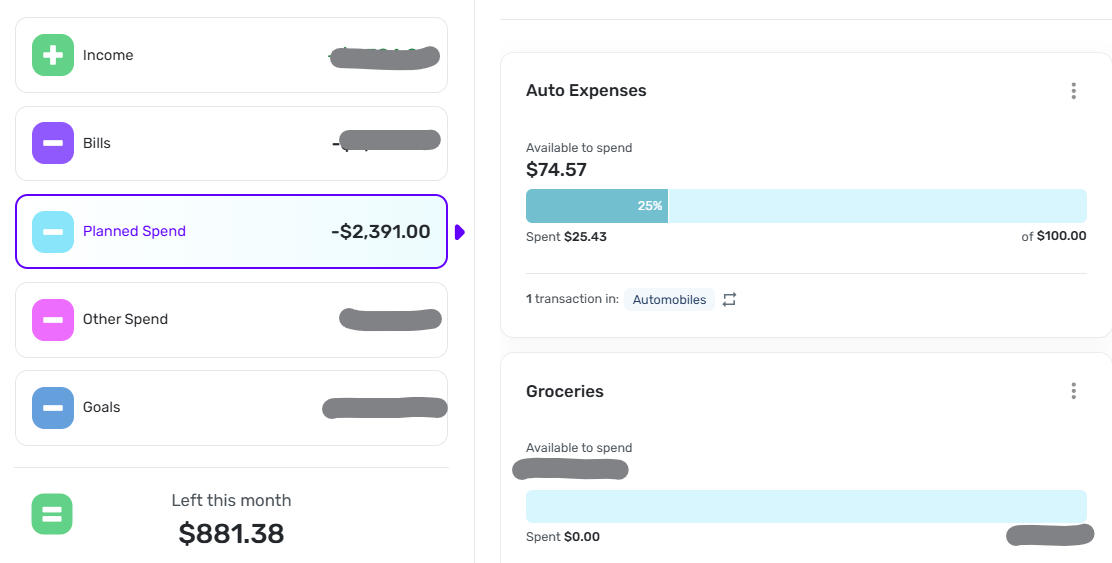
The second is after I add a $2000 Transaction for Auto expense. As you can see, the Auto Expenses are now overspent by $1,925.43, Planned Spend has increased by that same amount, and the "Left this month" figure has been reduced by the same amount and is now showing negative.
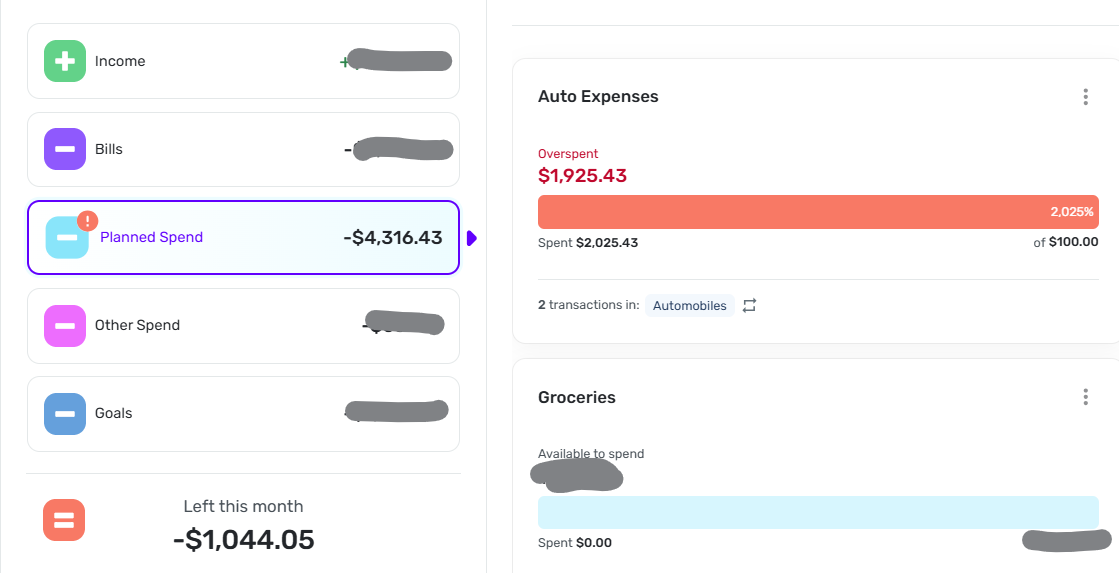
Can you provide similar images for your situation so folks can try to figure out what's wrong? (I say folks because I will be away from internet for a few days.)
DryHeat
-Quicken Classic (1990-2020), CountAbout (2021-2024), Simplifi (2025-…)1 -
The "overspent" cue in Planned Spending on the Mobile App has been fixed with version 5.36.2!
-Coach Natalie
0 -
@donnajean, thank you for confirming your process!
I think I missed the time to test your process, since the end of the month has passed. Since the issue you're experiencing seems unique to you, let's have you create a new post to report it, so we can take a look without it being buried in this feedback thread.
Much appreciated!
-Coach Natalie
0 -
I like the update. A few suggestions (sorry if I'm duplicating another post):
+ It would be helpful for the spending categories to include bills/subscriptions in the same category once paid. E.g., I have scheduled bills in "Kids Activities" for example, but also regularly have unscheduled expenses in the same cateogory. I'd like to set an overall spending limit for both, and see the scheduled and unscheduled expenses charged against that category (with excess/deficits rolled over to the next month).
+ It would be nice to have an "everything else" spending category with limit/rollover so that I can set an overall spending goal for all the small categories that aren't worth tracking individually.
+ It would be helpful to be able to exclude portions of split transactions without excluding the entire split transaction. Better exclusion rules by category would also be helpful.
Thanks.0 -
A few more thoughts on the layout:
I wonder if the Bills section shouldn't be named something like Payments, which would be broken down into bills, subscriptions and transfers (many of which are credit card payments). It would be more logical, I think. Also allow users the option to view those 3 sections in a list segregated as Bills, Subscriptions and Transfers.
Planned Spending ought to explicitly say (excluding payments) so that new users see immediately that it won't include those.
Other Spending ought to be Unplanned Spending. But most of us just mark those as one-time bills, which is what they often are.
Steve
Quicken Simplifi (Safari & iOS) Since 2021
Quicken Classic (MacOS) Since 2009
Dollars & $ense (DOS) and MS Money (Windows) 1987-20092 -
I believe Watchlists are set up to do exactly what your first suggestio is asking for.
For your second suggestion you can easily set up a Planned Spending category for this function. I have a General Expe se transaction category and a Planned Spending bucket I call General Expenses that functions alo g these lines.
There is an existing feature request for your third suggestion.
Danny
Simplifi user since 01/22
”Budget: a mathematical confirmation of your suspicions.” ~A.A. Latimer0 -
Not sure if there’s an existing feature request on this but here’s a suggestion that I think would be a helpful modification to the Bills section of the Spending Plan. I’ve had the thought before but was working on some 2026 savings projections today and ran into trouble with my cash flow projections that the below steps could help give tools to resolve:
Step 1: reintroduce the collapsible groupings so Bills/Subscriptions/Transfers are always on same page with their subtotals displayed on their group
Step 2: change the new Filter dropdown to be Accounts so you can filter this section by each of your accounts. In other words, you could quickly see how much is going to apply to a specific credit card vs a checking account.
You can sort of suss this out now with Cash Flow charts but if you have manually set recurring credit card payments then you have to do a bit of tedious manual math and cross-checking from the cash flow views to verify how much is inherently going to be charged on a credit card in a month vs what you are projecting to pay off with your recurring payment. It is usually good enough for me to estimate all or most of my Planned/Other spending projections will hit my credit card balances so those are easy to estimate in credit card payment projections. But when trying to plan how much savings I can transfer out of a checking account I need to be able to accurately account for Bills/Subs that will hit credit card balances in projected credit card payments, especially in months with abnormal bills like annual insurance premium payments. For example, if I’m not carefully looking at every bill and sub and tracing it to which account gets charged for those, then I can easily be off on my credit card payment projection by $1000 when annual veterinary visits hit in the same month as termite bond renewal and amazon/microsoft subscription renewals. Having an easy way to see Bills/Subs filtered by account could make for a quick verification of which months need extra allowance assumed in the credit card payments projections.
1





