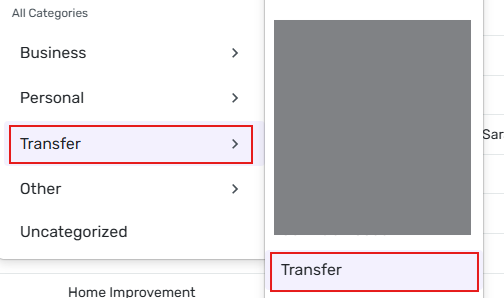
Ability to add and manage Transfer Categories (edited)
I understand there is a category for Transfers but I track multiple types of transfers in my financial life so it would be good to have a category group for transfers of different types. Defaults could be Transfers and Credit Card Payments but we should get the ability to add our own, for example loan payments.
Comments
-
In essence this ability is already available in Q-Simplifi.
I will assume that you are actually transferring to various and different real-world accounts, i.e. savings accounts, investment accounts, even other checking accounts. You can set the receiving account in the Category field in the transaction field so that the transferred funds match up with the actual transactions in both the sending account and the receiving account. This goes for credit card payments also - you can select the credit card account in the category field in the transaction window.
If you are simply transferring money into some kind of virtual account, you can set up Savings Goals in Simplifi to keep track of money residing in a real-world account that is set aside for specific purposes.
Danny
Simplifi user since 01/22
”Budget: a mathematical confirmation of your suspicions.” ~A.A. Latimer1 -
Thanks! Yes, most of the time it is a real-world account. I did not realize I could do what you suggested but that makes a lot of sense in terms of tracing the transfer from the source to the destination.
In one specific case, what I used to do in Mint when I paid for say dinner or business travel where I knew I was going to get money back later, was split the transaction so that I assign Restaurants or Personal Travel only to the portion that belonged to me and the rest to "Pay for others". This way, my expenses were against real $ and not paid $.
I guess I could create a manual account for "Pay for others" and keep sending parts of such transactions to this account and eventually it should zero out.
0 -
If you know you will be paid back or reimbursed for all or part of an expense, you can set up a refund for the expected refund amount. Wen the transaction is downloaded into Simplifi, go to the transaction detail page and click on the link below the Amount field. This will open a new dialogue box that will allow you to create a refund. Once created you will find the Refund reminder in Reports under the "Refund Tracker" tab. You can learn all about the Refund Tracker feature here.
Danny
Simplifi user since 01/22
”Budget: a mathematical confirmation of your suspicions.” ~A.A. Latimer0 -
Thanks again. Very interesting to think of this scenario as a refund, and I like it for what I am trying to do because I don't care about who it is that owes me, I care more about how much was my real expense vs something someone else would pay for eventually.
1 -
+1 from me on the original feature request, as written.
In my scenario, I have a few considerations in play
- I used Mint for almost 13 years and used their custom Transfer category feature heavily. I brought along and imported 13+ years of transactions marked with custom transfer categories.
- I do not want to track my investment accounts in Simplifi
- I only want to use Simplifi for budgeting and cash flow management for checking, savings, and credit card accounts
- I tried creating manual "dummy" accounts just to receive the other half of a transfer transaction, but ultimately found this confusing and it cluttered up my dashboard and account list views. I deleted the manual dummy accounts.
- I make regular transfers to investment accounts to multiple Kid's 529, IRA, etc.
- I do not want transfers to investment accounts to show up as "spending" or an "expense" in Reports > Net Income
- I do want planned, recurring transfers to investment accounts to show up as recurring items in my spending plan
- It would also be really nice to run a report to see transfers to 529 or IRA over a time period of several years in the Reports section
My current solution is to
- Not create or track investment accounts in Simplifi
- Mark transfers to external investment accounts as Category = Transfer
- But do not select an actual account on the receiving side
- Add a LABEL to the transaction, such as "Kids 529" or "IRA Contribution"
- Run reports using labels instead of categories
After just a few weeks on Simplifi, this approach seems to work pretty well, but is fairly cumbersome.
I'm here asking for the custom Transfer category feature because I need to fix up another 12 years of historical data. Ideally, I could just drag my custom "Kid's 529" category under a system-level TRANSFER category provided by Simplifi, and then the transactions would be treated as a Transfer. Or, at least have the ability to mark a custom category as "Transfer" instead of only having "Income" or "Expense" as the current options. Without a feature like this, I am going to spend a lot of time bulk editing historical transactions to add labels and then change the category to Transfer.
The Simplifi Savings Goals feature doesn't appear to work for me either because this acts like a virtual envelope inside of an existing checking or savings account, if I understand it correctly. I am actually transferring the money to another, real account, just not one that I have set up in Simplifi.
Hopefully that makes sense to somebody else?
0 -
Most of the Catgories in the Transfer section represent accounts that exist in Simplifi (checking accounts, savings accounts, etc.). The exception is the Transfer Category, which represents a transfer to/from "somewhere else" outside the system of accounts in Simplifi.
I would like to be able to create new subcategories underneath Transfer that work the same way the Transfer Category does, but with meaningful names that represent external entities that I regularly transfer funds with.
For example, I might want a subcategory of Transfer:MyTrustAccount to represent a savings or investment account that I do not track in Simplifi.
DryHeat
-Quicken Classic (1990-2020), CountAbout (2021-2024), Simplifi (2025-…)0 -
My previous post was merged with this thread — but I think it is different from what was discussed here.
I agree with @MTcoug (above) that the basic idea suggested in this thread — allow manual creating of categories under Transfer — is a good idea for cases where I want to transfer money to an account that I do not track in Simplifi. Why do I want that? Because:
- I want to be able to see where those transfers went in the Category field, just like I can when I transfer to an account that I do track in Simplifi.
- I don't want to create a regular category because these transfers are not income or expense.
This thread, on the other hand, is actually about (1) transferring funds to accounts within Simplifi, and (2) handling refunds. Neither of those issues are behind my suggestion.
MTcoug lays it out in more detail above, but the need for manually created Transfer categories is really about tracking non-income/expense transfers to accounts outside of Simplifi.
DryHeat
-Quicken Classic (1990-2020), CountAbout (2021-2024), Simplifi (2025-…)0 -
@DryHeat, this Idea post is requesting the ability to manage Transfer Categories, which would include the ability to create Subcategories under them.
It’s always helpful to gather multiple use cases for a request so our product team can clearly understand why users want a particular enhancement. Since this is a general request for the ability to create and manage Transfer Categories, your specific example is a great addition here.
Thanks!
-Coach Natalie
0 -
this Idea post is requesting the ability to manage Transfer Categories, which would include the ability to create Subcategories under them.
Sure… it's asking for the same solution … but I don't think it identifies the same problem.
Someone reading the first 5 posts will see messages that basically amount to this:
- I want to be able to create additional transfer categories.
- You can already set the Category to one of your other real world accounts.
- Cool! That takes care of that problem! But I also want to be able to split a check with someone.
- You can already handle that by setting up a refund.
- Cool! That takes care of that problem!
But keep it merged if you like. I doubt many people will read far enough to see the real issue (since it's "already handled"!). But I can keep using the workarounds I already have.
DryHeat
-Quicken Classic (1990-2020), CountAbout (2021-2024), Simplifi (2025-…)0