This discussion was created from comments split from:
Exporting the Income & Expense Report to CSV does not show the category names in the file (edited).
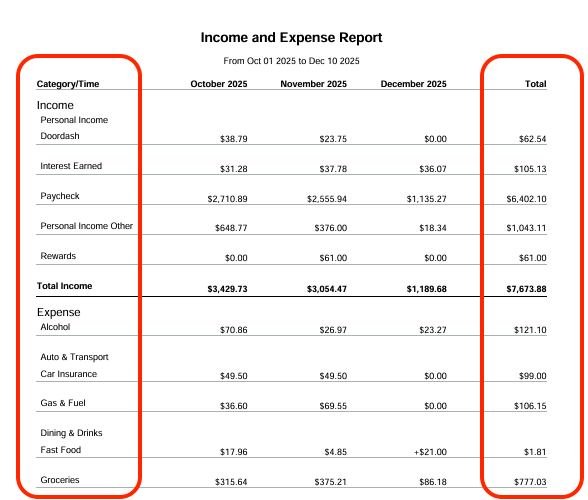
The PDF export is missing the ‘Total’ row for each Category. It’s not showing the total (sum) of all subcategories in the group.
@HTR, thanks for reaching out to the Community with this issue!
I just exported the Income & Expense Report to PDF with both the "Beta" switch off and on, and I see category totals in the PDF file, as well as totals for Income, Expenses, and Net Income.
Are you using the "Beta" reports, or do you have the "Beta" switch turned off? Also, what is the date range you're exporting? If you export several months, they will continue on additional pages, including the totals.
Let us know!
@Coach Natalie
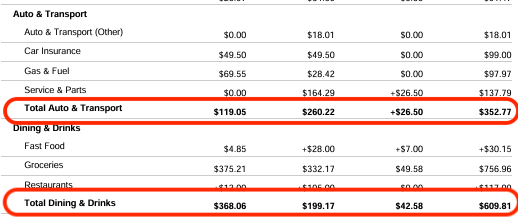
When @HTR said "The PDF export is missing the ‘Total’ row for each Category," I assumed he was talking about the horizontal subtotal row for subcategories under a category … not the Total column.
I tried it with both regular and Beta report PDFs and the subtotal rows are missing.
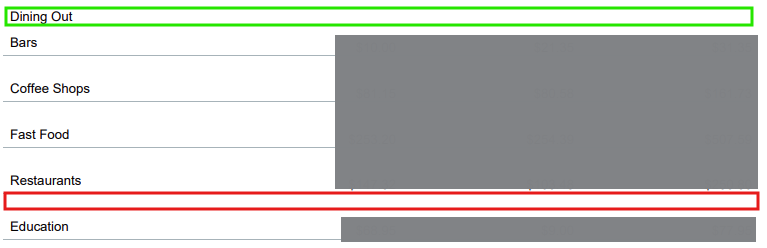
For example, my "Dining Out" category has 4 subcategories. In the on-screen version of the report, there is a row where the red box is showing the subtotal for Dining Out and all its subcategoris. But not in the PDF.
(The "Education" category is not a subcategory of Dining Out, which is too bad, really.)
@DryHeat, thanks for the insight!
We will wait for @HTR to respond to confirm the issue they're reporting is regarding subtotals for the Parent Categories in the PDF export. I'm not sure if this is the intended design or not, but we want to confirm with the OP before moving forward.
If it turns out that @HTR wasn't talking about the missing subtotal rows for Parent Categories, please accept this as my request that the omission be looked into.
Also, if this omission is part of the intended design, could you convert this to a suggestion post with a title like: "PDFs of reports should not omit summary rows shown in the on-screen reports." Thanks.
@DryHeat, if we determine the OP here is referring to a different issue, you will need to create a separate post to report a separate issue.
I would recommend waiting to hear back from @HTR first so we don't end up with a duplicate post.
Hopefully this makes sense!
@DryHeat was correct. I was talking about ‘rows’, not columns. His example is example is spot on. Thanks for looking into this.
@HTR, thank you for confirming!
I have escalated this issue to our product team and will post back here as updates are received.
SIMPL-30835
@HTR, this issue is now fixed!