Incorrect Balances and Savings Goals for all Manually Tracked Accounts and Assets (edited)
Comments
-
Check out this conversation:
Steve
Quicken Simplifi (Safari & iOS) Since 2021
Quicken Classic (MacOS) Since 2009
Dollars & $ense (DOS) and MS Money (Windows) 1987-20090 -
I have been using Simplifi for just over a year. This morning 8 accounts out of a total of 31 accounts had an entry called “opening balance” dated January 20, 2026. I did not create these transaction, they came after the morning auto update. The result is all my account balances with this entry are now roughly twice what they should be. It appears I cannot delete the 8 transactions that Simplifi created.
0 -
I understand. For the manual accounts, I have no problem just fixing those, but the Savings Goals….ouch. Without a transaction register there really isn't even a way for us to be able to try to fix it.
TiggerTrainer
Quicken Simplifi user since January 2025
Quicken Classic (Premier) user since 2004 - 2025 (21 years)
0 -
Please see:
TiggerTrainer
Quicken Simplifi user since January 2025
Quicken Classic (Premier) user since 2004 - 2025 (21 years)
2 -
Please see:
TiggerTrainer
Quicken Simplifi user since January 2025
Quicken Classic (Premier) user since 2004 - 2025 (21 years)
0 -
I am seeing the same thing. All of my Manual Asset Accounts are calculating at 3x their actual value. There are mystery account entries on 1/21/2026 but even when I remove the extra account entries, the value is still wrong. I even tried removing and re-adding one of the manual accounts and the value calculation STILL comes back incorrect even with a brand new account.
Quicken, come on guys, what is happening? Too many bugs lately… lots of us depend on this software to keep track of our finances and accounts and it is very bothersome when silly things like this happen. Can you please look into fixing this ASAP. Thank you!0 -
It appears that this was some sort of bug that went out to all Simplifi users who had manual accounts. Interestingly enough, my savings goals are not part of a manual account, but rather a connected bank account. It may be possible that Simplifi considers the Savings Goal to be a manual account.
I will be monitoring this today.
TiggerTrainer
Quicken Simplifi user since January 2025
Quicken Classic (Premier) user since 2004 - 2025 (21 years)
2 -
I deleted the new opening balance transaction in my Client Invoices account, but the account total is still still summing incorrectly, being too large by the value of that opening balance transaction. Previously it was off by twice that. I can't even create a balance adjustment in the Client Invoices account to correct this.
0 -
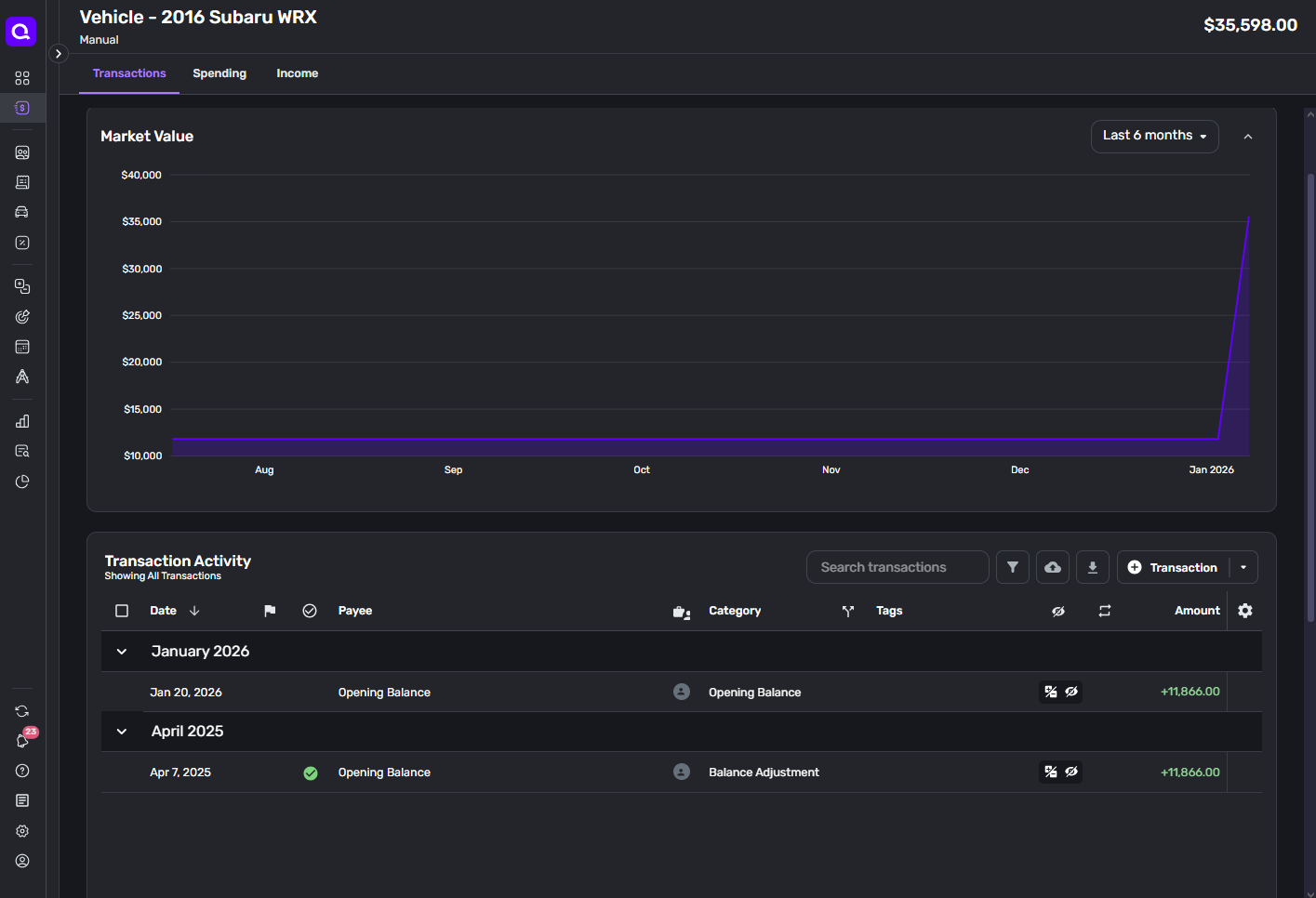
I can confirm that this is is also true for me. All asset classes have tripled. On January 20th a new (duplicate) "Opening Balance" transaction was added to all asset classes that I have, and the posted / calculated value is showing to be 3X the initial opening balance.
Here is a screen shot of the manual account I was using to track the current value of my car. It was paid off at the time I started using Quicken Simplifi, so I got the private resell value manually from Kelly Blue Book at the time I created the account in the web app. I had not updated it with any balance adjustments to track incremental changes - so it is a great example of the bug.
 0
0 -
I had the exact same issue. All my asset accounts tripled in value, and had a "balance adjustment" transaction from 1/21/26. Even when I deleted those, the value being shown is double what it should be, even though when adding up the remaining visible transactions it should be the correct value.
0 -
Ditto! All my manual accounts got doubled with erroneous opening balance transactions.
0 -
Also noteworthy, I have tried to manually "fix" the Asset class by deleting the new "Opening Balance" (on another asset account), but the calculated value remains the same (i.e. 3x the initial opening balance) regardless of whether I delete the duplicate Opening Balance or whether I add "Balance Adjustment" transactions to offset the account.
I can't speak to Savings Goals because I haven't started using that feature
1 -
I also have this issue. I ended up deleting all my manual accounts and re-adding them under the Other Banking category, which seems to work correctly for the time being.
0 -
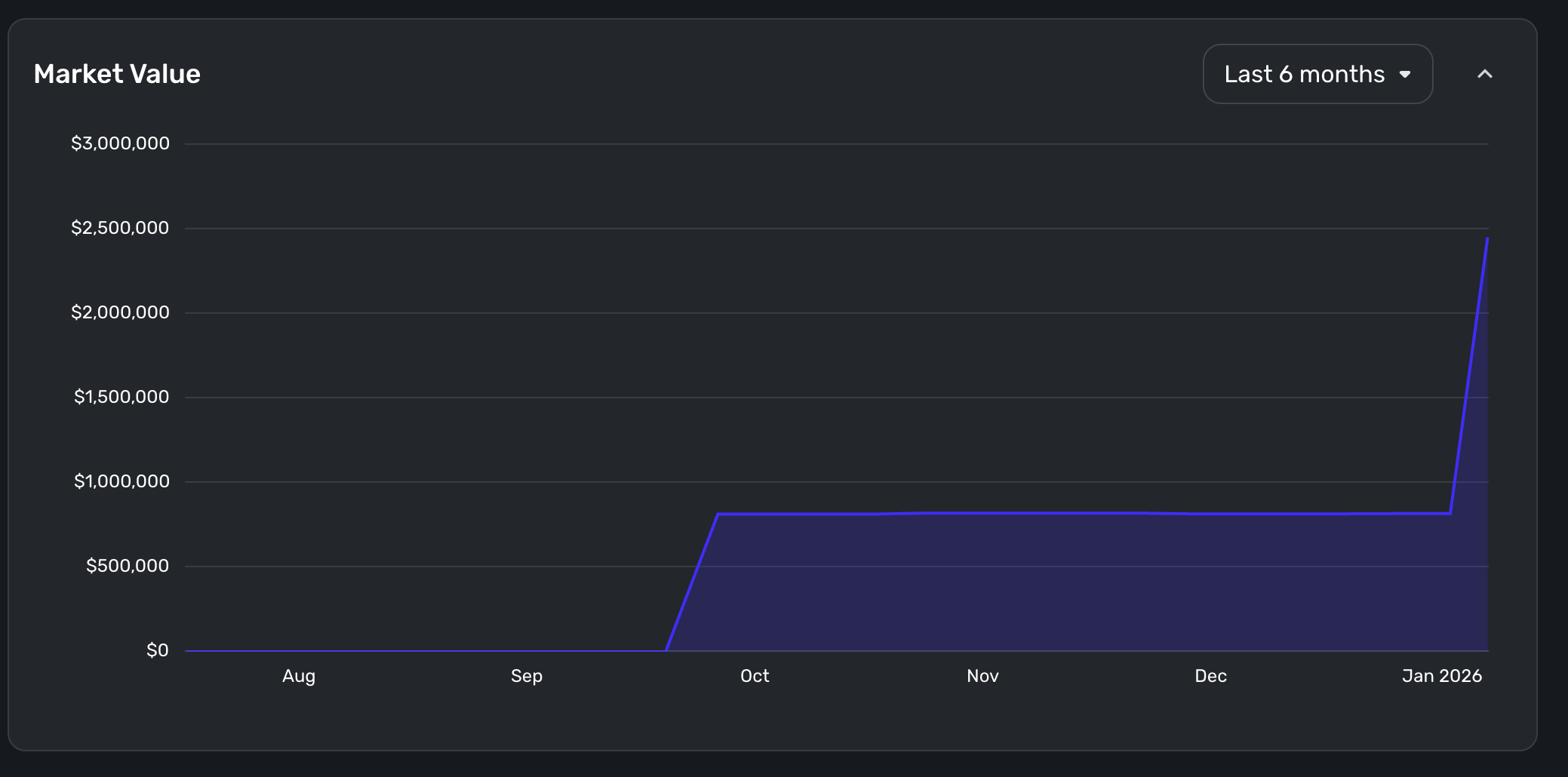
Same here. The value of my home went up about $1.6M last night. I mean, I know the housing market is pretty crazy lately, but I have doubts. Like others, I have a magical new "Opening Balance" transaction that appeared out of nowhere.
Someone on the dev team is probably having a bad day right now.
 3
3 -
I tried to adjust the opening balance after deleting the new duplicate transactions. It just added the new increment to the still doubled amount. Unless Quicken fixes this, I’ll probably have to recreate the accounts.
Can someone introduce me to their software QA manager?
Matt
At least it’s better than a spreadsheet.
2 -
Try changing opening balance to 0.00 if that is the truth; doublecheck that your transactions add up to the correct balance. Add a balance adjustment in the meantime if you like to bring it into balance. Later when presumably the balance recalculates, you can remove that balance adjustment.
As for redownloading these adjustments, that is plain weird. It hasn't happened to me. Lucky me.**
The coaches will be here soon and they can report this to Simplifi.
**Edit: My 10am update came and then it all happened to me, and deleting the offended faux transactions didn't work (as you all said it stayed doubled). However, I did Balance Adjustments to bring them back into balance while waiting for the fix or the force recalculation. The only account unaffected for me was my Cash account, which coincidentally was the only one without an opening balance. I've now added Opening Balance for all manual accounts.
Steve
Quicken Simplifi (Safari & iOS) Since 2021
Quicken Classic (MacOS) Since 2009
Dollars & $ense (DOS) and MS Money (Windows) 1987-20090 -
Thanks for letting us know. So even a balance adjustment didn't fix it. Did you try changing the asset account to Other Banking Account to see if that forces a recalculation. Just something another user said worked for him. You can change it back later.
Steve
Quicken Simplifi (Safari & iOS) Since 2021
Quicken Classic (MacOS) Since 2009
Dollars & $ense (DOS) and MS Money (Windows) 1987-20090 -
@TiggerTrainer I've noticed that you’ve linked your post into every thread about this opening balance issue, which makes thread shown as “answered”. This thread doesn’t seem to provide resolution, or feedback from one of the “coaches” (as any other posts). Is there reason you’ve linked it on every thread?
0 -
TiggerTrainer, why do you keep linking your other post? It makes it seem like there is a resolution there, which there is not. If you are suggesting that the "fix" for this is creating temporary balance adjustments for all manual accounts, that isn't an acceptable solution. Quicken needs to actually fix this.
2 -
Same issue here - all my manual accounts have incorrect "Opening Balance" transactions that were added between 1/20/26 and 1/21/26.
0 -
All,
As a test, I took the following steps:
- I removed the new "Opening Balance" transactions (Dated 1/22/26 in my photos)
- I adjusted the first transactions in each account (Zillow & cash) from "Balance Adjustment" to "Opening Balance" (Since it looks like this was also changed, they used to be "Opening Balance" at the original account balance, which was not zero)
The results are that the new account balances are now DOUBLE the actual, but had been TRIPLE the actual.
Let's use my cash as an example:
- Actual balance: $175
- Balance shown on initial 1/22/26 login (Before adjustments): $525
- $525 ÷ 3 = $175
- Balance shown after the above steps (1 & 2): $350
- $350 ÷ 2 = $175
I exported all transactions from my "Cash" account and put it in excel to re-create the balances for each transaction. After all transactions from the "Opening Balance", the "End balance" shows $175.
This confirms that all my transactions are correct and the account *should show $175, but it currently shows $350.
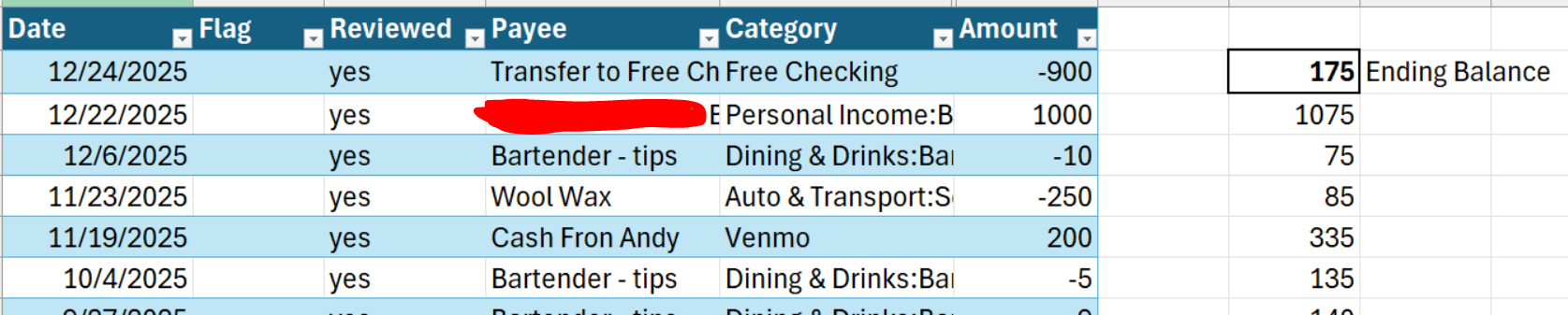

So, something is still off (Possibly in the background). Maybe this is something Simplifi will fix soon.
0 -
Same thing for me. Not cool.
Support said they are aware of this issue and are investigating what happened and a fix for it.
0 -
Ditto, experienced the same thing, all assets totals tripled. I also noticed new opening balance transactions for each account on todays date. I manually deleted these new transactions and the asset balances are now showing double, but when looking at each asset there is only 1 transaction for the actual amount but the Accounts summary list shows a double value.
1 -
i'm having a similar problem. i have a manual account to track cash and i had a random opening balance added for the amount that was my total balance previously. i deleted the transaction not paying attention to my total and i'm still over the same amount because it must've added it twice in some way.
i don't have screenshots but imagine i had $100 in my cash account when i checked this morning there was an opening balance transaction for $100, which i deleted, but my total says $200. selecting all transaction in this account equals to the $100 i'm supposed to have it so it doesn't seem like there is another erroneous transaction in there.0 -
I'm having the same issue. ALL of my manual accounts have an "Opening Balance" entry, that I did not create, with a random dollar amount that posted on 1/21/26. Deleting the transaction does not affect the balance, so all of my account balances are wrong.
This doesn't leave a whole lot of faith when your financial management program adds entries on its own, and then can't add or subtract them properly. REALLY???
0 -
I'm having the same issue. ALL of my manual accounts have an "Opening Balance" entry, that I did not create, with a random dollar amount that posted on 1/21/26. Deleting the transaction does not affect the balance, so all of my account balances are wrong.
This doesn't leave a whole lot of faith when your financial management program adds entries on its own, and then can't add or subtract them properly. REALLY???
1 -
My 5-year old used car went from $11,140 to $33,420 - or about 3 times what it was.
-Rob
—
Rob Wilkens
0 -
Assets and liabilities all had adjusting opening balance transactions posted 1/21.
0 -
Same here. 2-3 days ago I had a manual cash account that suddenly showed a -$350 balance. It should have shown +$150. I was unable to change the account total by adding another transaction to have correct balance read +$150.
Then this am, my spending plan was all crazy and all seemed to center around savings goals. Some doubled or tripled. It's hard to figure out since they dont let you see actually see a history of contributions/withdrawals from savings goals.
0




