I have two accounts at Voya that were working fine with Simplifi until a week or two ago when they stopped updating. Attempting to reconnect I get an error "No eligible accounts found." after logging in.
[edited title]
@sburley, thanks for posting to the Community!
I'm not seeing any errors on our end when checking your connection attempts with Voya Financial. Since Voya Financial is one of our OAuth API banks, I would recommend following these steps to establish a completely fresh connection and gain a new access token:
Let us know if this works for you!
@sburley and @Coach Natalie I am also facing this issue. I’ll try the above step and comment back.
Steps 1 and 2 worked fine. At step 3, I logged into Voya, selected my accounts, and got the message "You have already added all your accounts at this bank." I now see that there is a connection to Voya but no accounts under it.
@sburley, thanks for the reply!
By "you now see that there is a connection to Voya but no accounts under it", do you mean that there is an empty institution under the Manual Accounts section in Settings > Accounts? If so, I believe that is pretty common when disconnecting from a bank, and if there are no accounts under it, you can just delete it. Do you see your Voya accounts listed in the Manual Accounts section? And do you see Voya listed anywhere else on the Settings > Accounts page?
@FutureEye, be sure to let us know how things go for you as well!
Yes, there was a section for Voya Financial with no accounts listed, below the manual account section. I pulled up Settings > Accounts just now and it had disappeared. I tried step 3 again and got the same result, with the "You have already added all your accounts at this bank" message and a new empty section for Voya.
My Voya accounts are listed in the manual accounts section. I don't see Voya anywhere else on the page. Edit: Also, when I go to Voya's website I don't see Quicken under 3rd party apps.
I am having the same issue with Sun Life Voya. Step 1 and 2 above were not necessary as I had never connected Voya before. Step 3 fails with "You have already added all your accounts at this bank", when in fact I had not. Voya appears at the bottom of the account list for a short period of time with no accounts and then disappears on its own.
I am also having this issue. It was connected until 2 weeks ago. Yesterday, 3 different things happened.
1) I got a message that I already have a Voya connected account (but it wasn't connected)
2) I deleted the existing, non-updating, Voya account and tried to add. It just started to go thru the authentication, and then stopped.
3) I tried again, and now it says I am denied access. Yesterday, it pulled up Voya successfully, but then said I didn't have a Voya account.
So it's been a bit of everything wrong.
Hello everyone,
Thank you all for coming to the Community to report this issue! It looks like this issue has already been escalated internally, so we created an Alert that everyone can follow for updates as the issue is worked on:
In the meantime, you can track the account manually by adding manual transactions, which will keep your records up-to-date. Here are the steps to do so: https://support.simplifi.quicken.com/en/articles/3348103-managing-transactions-in-quicken-simplifi#h_85ca9fed99
If the account is an investment account, the manual tracking steps are a little different —
Make the account manual so you can add and edit Holdings: https://support.simplifi.quicken.com/en/articles/5321064-how-to-make-an-account-manual#h_d9c41566d8
Add/edit your Holdings to keep accurate records: https://support.simplifi.quicken.com/en/articles/4474538-tracking-investments-in-quicken-simplifi#h_f8a7bc2e30 and https://support.simplifi.quicken.com/en/articles/4474538-tracking-investments-in-quicken-simplifi#h_034717f2b3
And if the account isn't currently in Quicken Simplifi for manual tracking, here are the steps for adding a manual account: https://support.simplifi.quicken.com/en/articles/4295304-adding-accounts-in-quicken-simplifi#h_933c74c4b4
We appreciate everyone's patience as we work to resolve this matter!
I see this issue to be resolved now for me.
It's still happening for me.
@Coach Natalie, thank you for looking into this.
Hey everyone, this issue should now be fixed. Are you all able to update/add your Voya accounts now?
Let us know!
I'm getting a different error now.
@Coach Natalie I'm getting the same error as @Dan23
Hello @Dan23 & @sburley,
Thank you for letting us know that the error has changed. Are you encountering this issue while authorizing your account(s)? If so, at what point in the process are you encountering it?
I look forward to your reply!
It first occurred just after entering id and password to authorize, now it happens every time just before I would start the authorization.
It happens when I enter my name and password in the Voya login popup.
Thank you for your replies,
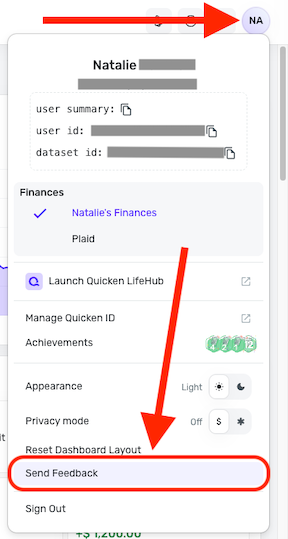
To help our teams investigate this error, please send logs. To do that, follow these steps:
Thank you!
Feedback sent
I have sent feedback as well.
@sburley & @Dan23, thank you for the information!
I have passed this along to our team. Please continue to follow the Alert for now, and we will post back here if/when any further info or testing is needed:
Much appreciated!
Voya has implemented a possible fix for this issue. Can you all give it another try and let us know how it goes, please?
Hi @Coach Natalie ,
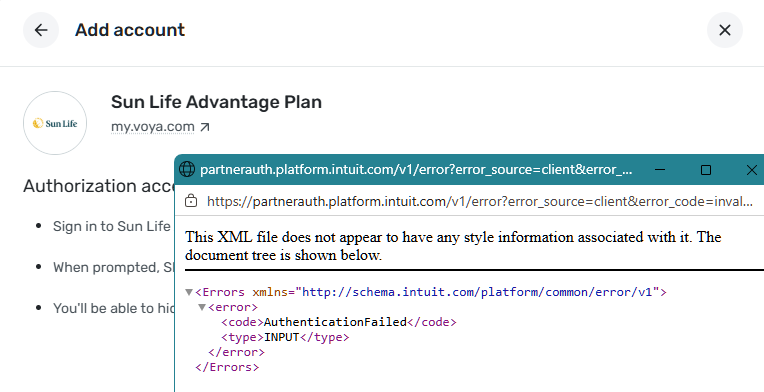
I tried to sign in after seeing your message. It still does not work. It says: No accounts were authorized. Go back to your bank and select at least one account to continue. Care Code: access_denied. Then I tried to re-sign in, it showed: This XML file does not appear to have any style information associated with it. The document tree is shown below. <Errors xmlns="http://schema.intuit.com/platform/common/error/v1"><error><code>AuthenticationFailed</code><type>INPUT</type></error></Errors>
The screen keeps circling but nothing happens.
Thank you for trying! I have shared this with my team.
I tried again as well, the first attempt I encountered the error "You have already added all your accounts at this bank". Then I tried again and got the error "XML file does not appear to have any style information associated with it".
I'm getting the same error.
Thank you for letting us know. I forwarded that information to our team!
This issue is still being worked on. Please be sure to follow our Alert for future updates:
Thank you for your continued patience!
FYI... I was able to add my Voya account today.
Thank you @Dan23 it worked for me as well
This issue should now be fixed! Is anyone still experiencing it?