Unable to scroll to the bottom of the navigation menu and other pages on tablet web browser (edited)

How do I get rid of the mobile app bar at the top of the screen? I am unable to scroll down to get to the “Settings” icon on the left side of the screen and I am not able to sign-off the WebOS app. Usually, when an app option is offered, an “X” is placed to the left of the app name so that I can close that row on the screen.

Comments
-
@Coach Jon …. Thanks for your reply. I did close the Safari browser and then reopened it. Still have the banner. I then opened Simplifi in Chrome. No banner, but still the full screen does not show. In both Safari and Chrome, the last option I see at the bottom of the left side of the screen is not visible. The last option I can see is Settings. Thus, I am not able to log out.
0 -
Can you clarify what you mean by full screen? Do you mean larger than the browser window? In chrome, the only way to do that that I'm aware of is by creating an app shortcut — Menu→"Cast, Share and Save"→Install Page as App, then close chrome an. open the "app" which is a full screen web page. I believe safari offers similar functionality, but despite being a mac user I don't use Safari very often.
—
Rob Wilkens
0 -
Here is what I get when I install as an app to illustrate:

And if i wanted to sign out of web app, I would click the bottom left icon and sign out.
Do you have a full screen screenshot that shows different?
—
Rob Wilkens
0 -
@RobW, @Coach Jon … Here is my full screen in Safari on iPad.
 0
0 -
didn’t realize it was iPad, sorry. I use the app on iPad and it works for the most part.
—
Rob Wilkens
0 -
Thank you for your reply and for the screenshot,
Have you tried using any other web browsers to access the web app? If so, did you see the same behavior? Is the banner persistent on the web app, or does it go away on it's own after a while? It's possible there are display or layout options for the iPad or the browser that may help fit everything on the screen also.
I hope this helps!
-Coach Kristina
0 -
@Coach Kristina…. Same issue with Chrome except the mobile app banner does not appear at the top of the screen.
-jlexky
1 -
Thank you for your reply,
I tested in a tablet that uses Android OS, using Chrome browser, and see the same thing as you describe. The settings and profile options are cut off and there is no scroll bar to scroll down to them.
I have forwarded this to the proper channels for further investigation and resolution. In the meantime, are you able to download the mobile app on your device, or do you have a computer/laptop you can access the web app from?
Thank you!
-Coach Kristina
0 -
@Coach Kristina …. Thank you for checking on this issue. Yes, I use the mobile app on my iPad and WebOS on my MacBook. So, I can stay in business. 😁. I do use my iPad more than the MacBook so I'll look forward to an update. Thanks, again!
-jlexky
1 -
@Coach Jon …. Many thanks!
-jlexky
1 -
@Coach Kristina…. any updates as to when this issue will be resolved? In the iOS version of Simplifi, I can upload "files." In the mobile version, I can only upload "photos." So, until this is resolved, I have to access Simplifi on my MacBook Air. Thanks, again, for you help on this.
0 -
@Jlexky, thanks for the inquiry!
As soon as there is an update on the escalation, Coach Jon will reach back out to you in this thread to let you know. There have been no updates to provide as of yet.
We appreciate your continued patience!
-Coach Natalie
0 -
@Coach Jon Any updates as to when this will be fixed?
Thanks.
0 -
@Coach Jon …. Any updates on when this issue will be resolved. I am not able to use Simplifi on my iPad and I have begun researching other financial software products; e.g., [removed]. Honestly, I’m truly disappointed that Simplifi on iPad used to wrk perfectly; but, then, someone broke it and Simplifi has not made fixing this a high priority. It is obvious that a change was made and and moved to production without adequate testing. Simplifi must do better.
0 -
Hello @Jlexky,
Thanks for the reply! I can confirm the issue is still being worked on for resolution. We will let you know when we have any status updates on this issue. In the meantime, @RobWilk is correct that there is an iPad application for Quicken Simplifi that you can try using!
-Coach Jon
-Coach Jon
0 -
@Coach Jon, @RobWilk. The iPad app does not allow PDF files as attachments. Thus, I have to use WebOS on my MacBook Air.
1 -
That is odd that certain attachments are allowed depending on where you log in.
The discrepancy sounds more like a 'bug' than what might otherwise seem like a feature request.
@Coach Jon Do you agree?
-Rob
—
Rob Wilkens
0 -
Have you tried desktop mode in Safari on your iPad?
 0
0 -
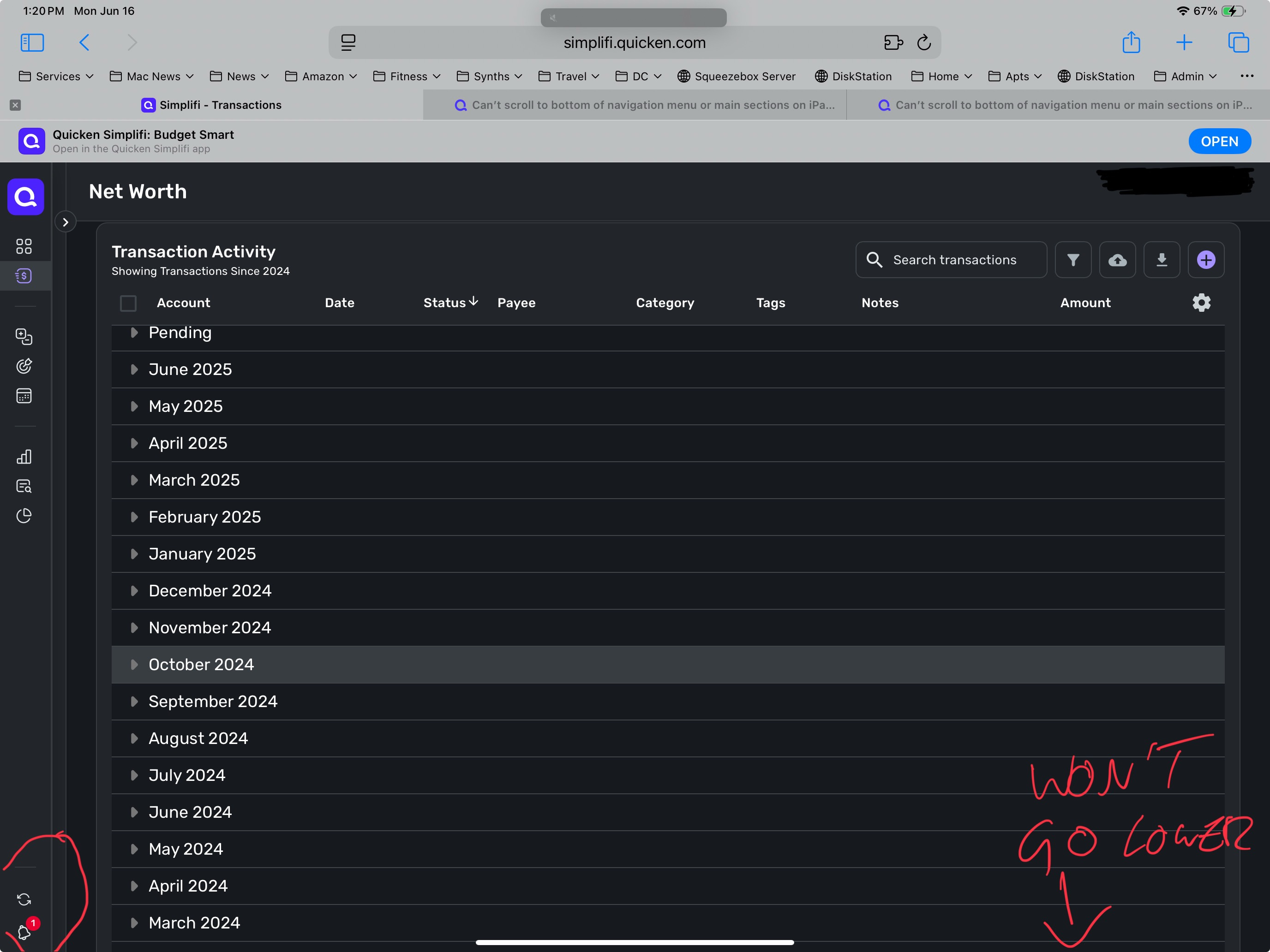
I can’t scroll to the bottom of the menu - the far left menu column, where I select reports, savings goals, settings. I can’t reach the bottom of the menu, so can’t get to settings or log out of account. The last bottom menu point that I can access is the notification bell, nothing below. I also can’t scroll to bottom of anything that is displayed in the main section. For example, selecting an account to see all transactions, that transaction list won’t scroll to the last lines. The account list is solved, but the other parts aren’t yet and have the same issue. This is on very latest hardware and software - iPad Pro 12.9, iOS 18.5.
0 -
Hello @jorder,
Thanks for reaching out! To clarify your situation, are you using the Quicken Simplifi iPad mobile application, or are you accessing the program via a mobile web browser on your iPad? If you can clarify what you mean by the "main sections", this would be helpful in understanding as well!
-Coach Jon
-Coach Jon
0 -
web version. Anything in the third part of the screen from the left. Example: click on transactions in the menu; select an account; read the individual transactions in the “main window”. These transactions won’t scroll to the bottom - can’t see the very last lines. Same bug as the one that was just fixed for the account list that also didn’t scroll to the bottom. On top of that, the bottom menu options also won’t show. Can’t get to settings or whatever is below the bell.
0 -
Hello @jorder,
Thanks for the reply. Perhaps screenshots showing the issue you are experiencing would help here. In this case, I might also recommend using the Quicken Simplifi mobile application as well, since there is an iPad version now.
-Coach Jon
-Coach Jon
0 -
I use the iPadOS version but the new Income & Expense report isn’t available in the app, only web. Here’s a screenshot of the bottom menu item missing. In the transaction view, I cannot get below March 2024, though there are entries for Feb, Jan, etc.
If you look up the scrolling bug for the account list that was just fixed, it’s the same issue, except it affects the other parts of the screen.
 0
0 -
Hello @jorder,
Thanks for the reply again. I merged you to this existing thread for this issue and added your information to the existing ticket we have as well. You can follow along in this thread for any status updates as we work to resolve the issue.
-Coach Jon
-Coach Jon
0 -
@Coach Jon …. Referring to my original issue of not being able to scroll to the bottom of the Simpli WebOS screen using Safari on iPadOS, this issue still exists. That said, Web Release 4.63.0 did resolve this issue for Chrome on iPadOS. That's good news! Safari is my preferred browser and I look forward to this issue being resolved for Safari. Any idea when this might be fixed? Thanks!
Jlexky
0




