Cannot Access Settings Using Safari on iOS & IPadOS

The "Open in Quicken Simplifi" header that Safari throws up pushes the Setting option below the bottom of the Dashboard page.

Comments
-
Hello @tannebil,
Thank you for letting us know you're seeing this issue. To clarify, this happens when opening the Quicken Simplifi web app using Safari browser on iOS devices and iPadOS devices?
I tested on my iPhone to see if I could replicate the issue you're reporting. While I do see the same issue, I also saw a warning message saying that our web app is not optimized for mobile sized screens.

Are you able to use the mobile app on your devices? Are you trying to use a function that only the web app supports?
I look forward to your reply!
-Coach Kristina
0 -
I missed your reply, sorry. I don't recall seeing that screen so it might only happen the first time.
The feature (and bug) match are not 100% between the mobile and browser versions so occasionally I want to use both on the same device. That's almost always my iPad where there is enough screen real estate for the browser version to be usable but this exact issue exists on both.
I've attached an iPhone screenshot. The issue is that the available screen space to draw in is smaller than the screen actually drawn in that one tiny window with those controls if the mobile app is installed. Likely the way the code is determining the window size is broken in this use case.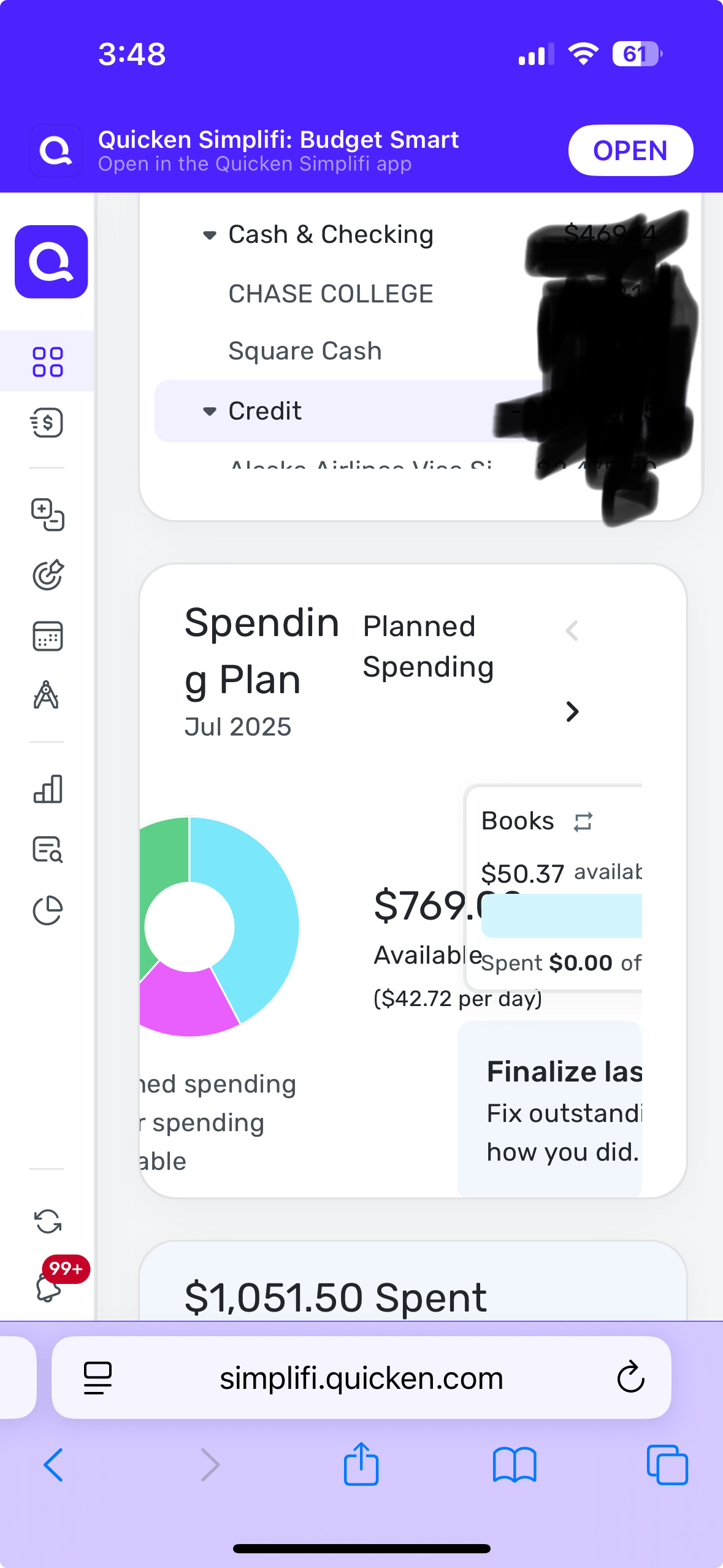
I would consider the overlapping display of Spending Plan as "not optimized" and that one goes away when I rotate the phone into landscape. Not being able to get to a screen as important as Settings is a bug that is in need of fixing. Unfortunately it may be an unavoidable result of the web tooling being used and therefore may not be practical to fix.
I just wanted to make sure it's a known issue.
0 -
@tannebil, thanks for the reply!
It sounds like the issue of being unable to scroll to the bottom of the menu and access Settings has already been reported here:
I'd recommend following along with that thread for updates:
Regarding the Spending Plan overlap on the Dashboard, is this occurring when using the Quicken Simplifi Web App on your iPad's browser, or when using the Quicken Simplifi Mobile App on your iPad? If the former, it does state that the Web App is not optimized for mobile devices, so issues like this are likely to be expected. I'm glad to hear that using landscape mode fixes it, at least!
-Coach Natalie
0 -
That's the same problem. Landscape mode does NOT fix the problem.
The fix might be as simple as a setting on the HTML for the pages to not display the prompt to switch to the native app.
One person's "not optimized" can be another person's "badly broken". Hopefully it will find its way onto somebody's bug list and will get fixed someday. But I'd much rather see improvements in other parts of the product, e.g. split allocations in bill series, functionality to transfer SG amounts from one account to another, or many other quality of life improvements in both the regular and non-mobile web versions of the app.
0

