Apple Cash account balance incorrect on Iphone after latest update

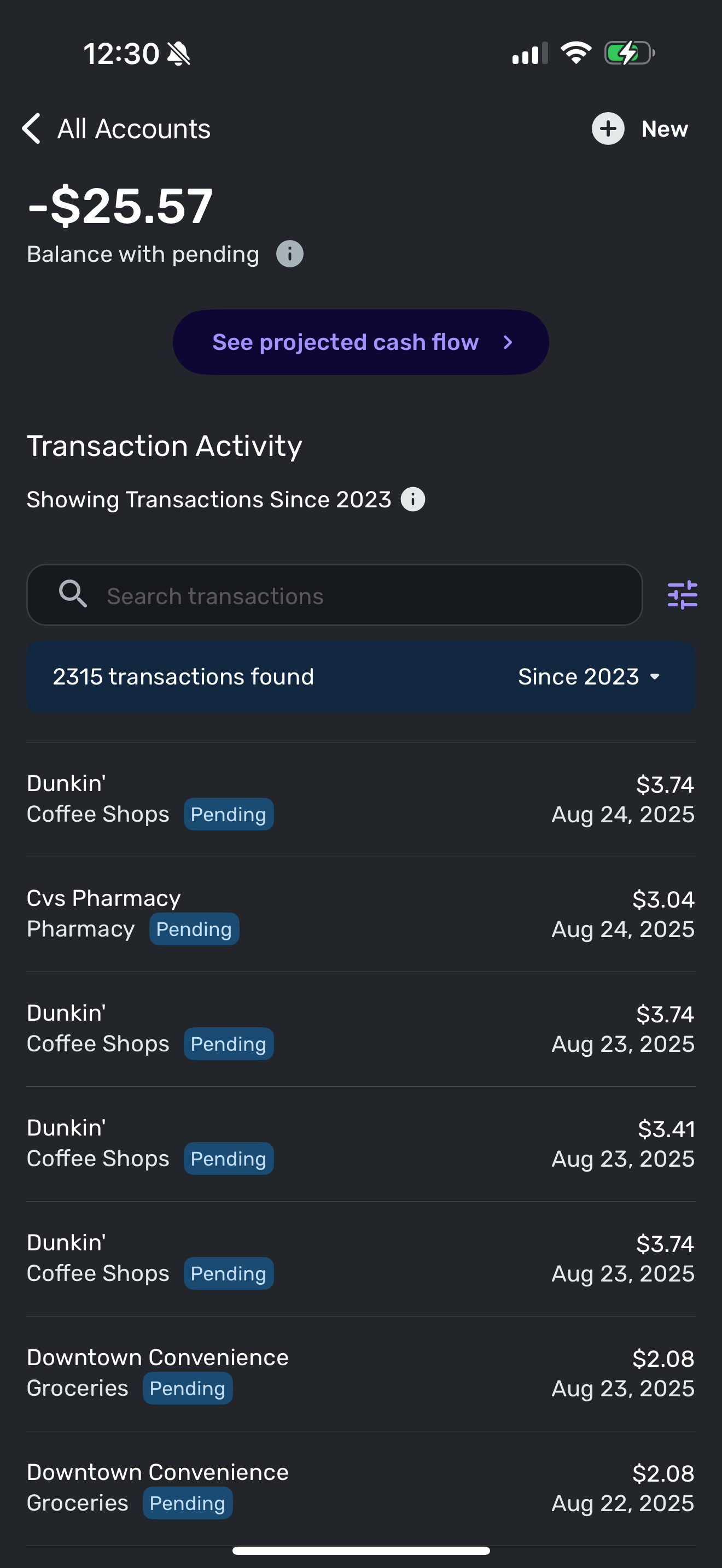
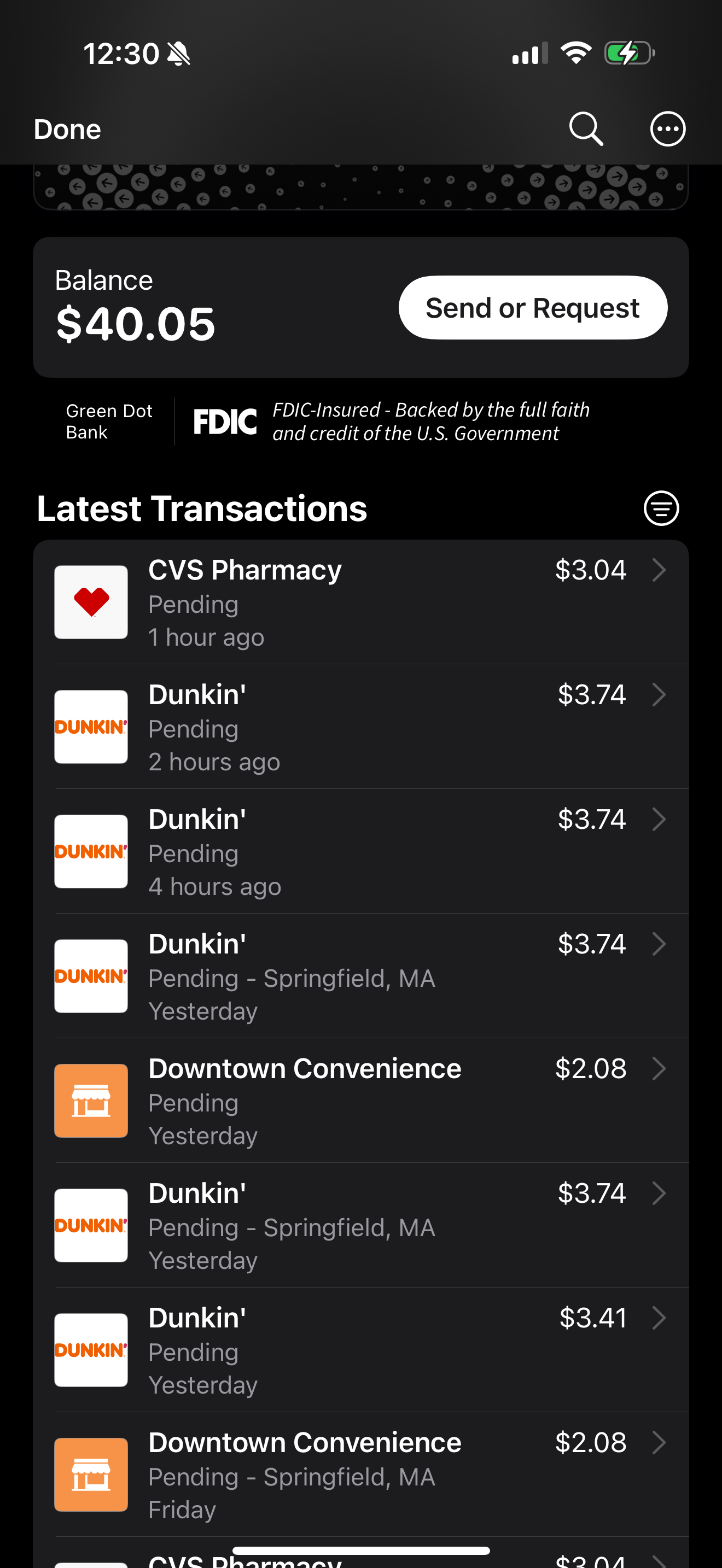
I have noticed that the apple cash account has started downloading pending transactions since the latest update. This should not happen for apple cash accounts. I have tried the setting “use bank balance” but that causes my two Chase accounts to show incorrect balances.
This issue has just started after the latest Mobile update for Iphone. What changed regarding apple cash in the update?
i have already tried the following but issue remains:
- Reset connection
- Deleted and added apple cash account
- Set pending transactions to cleared sets apple balance to zero balance.
i am also using the latest ios 18.6.2 on iphone 16 ro mac.
Simplifi version is 5.37.0(42800)
Comments
-
Hello @Pmrussell892,
Thank you for letting us know you're seeing this issue! To troubleshoot this, you will want to check if the Apple Cash account is set to show pending transactions in Quicken Simplifi.
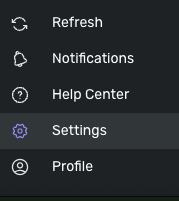
To check this, you will need to login to Quicken Simplifi using a web browser, rather than the mobile app. Once you are logged in on a browser, click on the Settings gear near the lower left.
In Settings, click on Accounts.

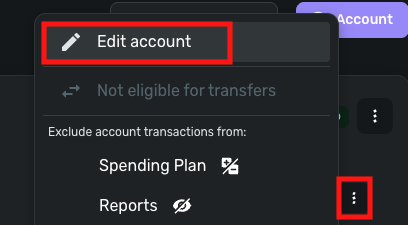
In the accounts screen, locate your Apple Cash account. Click on the 3 dots next to the account, and select Edit account. Note: Make sure you click the 3 dots next to the account. If you click the 3 dots next to the financial institution, you will not see the Edit account option.
Once in the Edit account screen, you should see a dropdown that will let you choose between bank balance and bank balance with pending.
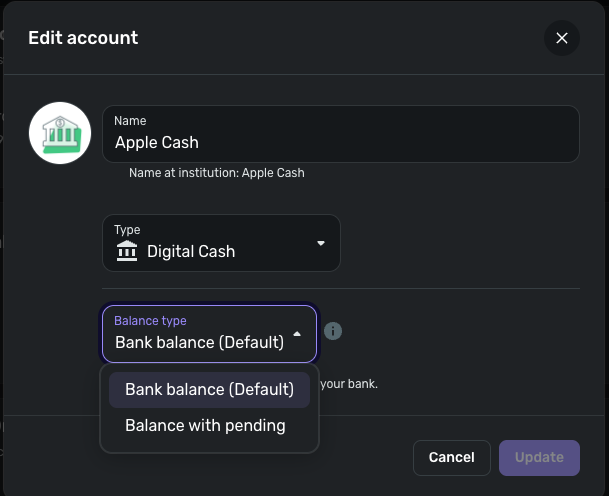
If that dropdown is not already set to Bank balance, please set it to Bank balance and click the Update button.
Please let me know how it goes!
-Coach Kristina
0 -
Thank you very much for the help. That fixed the issue. I did not realize I could set that setting per account. Very useful to know. Thank you!
1 -
Ok so I thought this was fixed. However, it appears the Chase accounts keep reverting back to "Bank Balance" and the "Bank balance with pending" setting does not stick. I have made sure the accounts have gone through a successful update. Also, if this setting can be set per bank in the account settings, then why dooes the setting also exist in the three dot menu under the accounts list in the dashboard?
Something is very wrong. The accounts have all been fine until the latest update.0 -
Hello @Pmrussell892,
Thanks for the follow-up! To clarify your response, you are stating that the balance option you selected is reverting after some time, correct? Is this after signing out and back in, or how long before you noticed this issue occur? Does the setting stick within the Quicken Simplifi web application? Let us know!
-Coach Jon
-Coach Jon
0 -
Hi @Coach Jon
I click in to edit the account. Set the setting to "Balance with pending" then click the Update button. The modal window closes and I click the three dots again to reopen the modal and the setting is reverted back to "Bank Balance". I have also waited for a successful refresh of the bank but the setting is still reverted to "Bank Balance"
I have included a screen capture video of my performed actions.0 -
Hello @Pmrussell892,
Thanks for the reply. Yes, the balance option change does not go into effect until the next successful account refresh (usually 4-6 hours). I would suggest trying to change the setting once again, signing out of the application, and signing back in to see if the change takes effect with the next successful refresh. Let us know!
-Coach Jon
-Coach Jon
0 -
Still says bank balance.
0 -
hi @Coach Jon
it seems a change has been made to apple cash. Apple cash never used to show pending transactions. And this is causing the apple cash balance to be incorrect.I had ten pending transactions in apple cash and I set them all to cleared which caused the apple cash balance to show zero. It seems the actual bank balance returns zero when “balance with pending” is selected. It is correct when bank balance is selected. Maybe this is a change on apples end?
0 -
Hello @Pmrussell892,
I would not be sure if Apple Cash has made a change, unfortunately. However, if the balance is correct when setting the balance option to "Bank Balance" within Quicken Simplifi, then I would keep the account on that option going forward.
-Coach Jon
-Coach Jon
0 -
@Coach Jon I can confirm today that Apple Cash has changed something. I used it for the first time in a while and it reset my balance to 0.00. The actual balance is 199.06.
I have reconnected the account twice and changed the settings for Bank Balance. The default is Bank Balance. I've change it a couple of times back and forth, but it made no difference.
Right now I have a Balance Adjustment entry to make it right. Apple has never shown pending transactions for Apple Cash. It's always just done the balance.
Steve
Quicken Simplifi (Safari & iOS) Since 2021
Quicken Classic (MacOS) Since 2009
MS Money (1991-2009) and Dollars & Sense (1987-1991)0 -
Update: After reinstalling the Quicken iPhone app, I had to re-set up my Apple Accounts again. After doing this, Apple Cash was almost right.
Apparently, the transaction I did this morning is Pending. I had never seen that before in Apple Cash (it even says it in the Wallet App!). From what I've read online, this seems to be unusual but does happen.
I paid a friend $40 and transferred some Cash into Apple Cash and those were never pending. So I will wait a few days to see if this pending transaction goes through. But this is a change at least it was for me.
There was something wrong though with the update because even with the pending, the balance should never have been $0. But now the balance is right with the Pending transaction.
@Coach Jon Toggling Balance with Pending and Bank Balance doesn't seem to make a difference with the Apple Cash account.
Steve
Quicken Simplifi (Safari & iOS) Since 2021
Quicken Classic (MacOS) Since 2009
MS Money (1991-2009) and Dollars & Sense (1987-1991)0 -
Hello @SRC54,
Thanks for the update. Definitely let us know how that goes. As far as the balance option setting not changing, please remember that when changing this setting, the selected balance option does not go into effect until the next successful account refresh (usually 4-6 hours).
-Coach Jon
-Coach Jon
0 -
@Coach Jon Thanks. Are you sure it takes 4-6 hours to go into effect with Apple accounts, since they can be updated as many times as you want?
Also I was really referencing the toggle in the Accounts List (at the top) where you see the 3 vertical dots.
But I will keep you informed. Thanks!
Steve
Quicken Simplifi (Safari & iOS) Since 2021
Quicken Classic (MacOS) Since 2009
MS Money (1991-2009) and Dollars & Sense (1987-1991)0 -
Hello @SRC54,
Thanks for the reply. Generally, refreshes from the bank are 4-6 hours, correct. The tooltip when selecting the balance option states the option change does not go into effect until the next successful refresh as well.
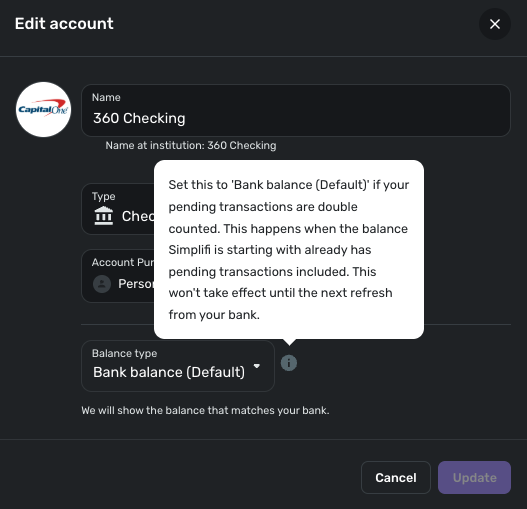
Thank you for keeping us informed!
-Coach Jon
-Coach Jon
1 -
@Coach Jon
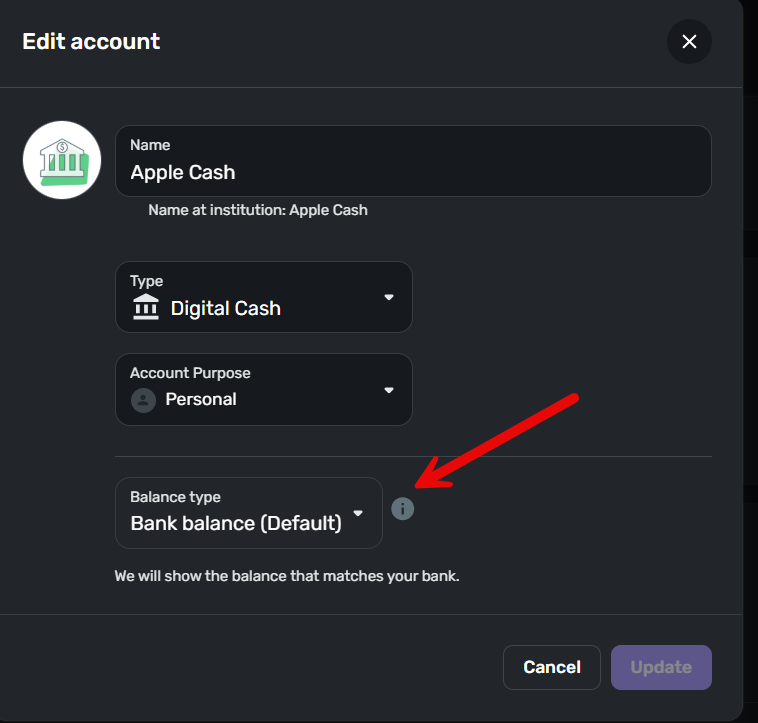
Could you please explain the difference between the settings in the two images? I would think that we would not need the setting in the accounts list within dashboard if the setting is different per account as set in the Account settings.
I am finding that I need to keep toggling the setting in the account dashboard depending upon which account I am working with for the balance to be correct. However, with incorrect balances it is throwing off other values within other areas of the application. Is there really a need for both?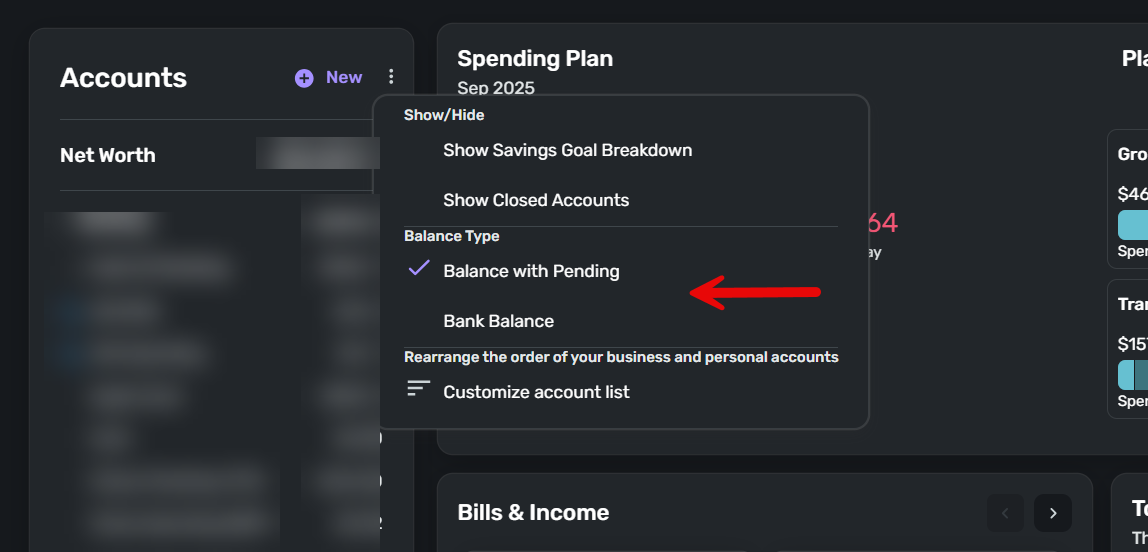
 0
0 -
Well, this morning the pending transaction cleared and Apple Cash balance is correct (as it was yesterday after the reset, but subtracting the pending transaction).
I discovered a few things about Apple Cash accounts after some research.
- There are sometimes transactions that are pending for about a day. It seems random and Apple says it is usually a network problem that delays it. When that happens, apparently, it downloads as pending. (Apple Card charges are usually pending for a couple of days before clearing, I think, but I use that almost never.)
- Displaying Bank Balance or Balance with Pending will affect other accounts but won't change how Apple Cash balance is displayed. You don't want it to anyhow, because Simplifi will take the Bank balance and subtract pending transactions if any. If you clear prematurely the pending transaction or delete it, the balance will add back that transaction's amount. (In Apple Wallet, Apple Cash displays the balance including the pending transaction, but apparently downloads to Simplifi the Cleared balance, which is why you need the pending transaction to be in Simplifi.)
- Trying to change the Balance Type in Settings:Accounts will likewise have no effect. It's maddening anyhow since it always displays Bank Balance (Default). But with other accounts if you change it, it will work after the next download. I don't think it does anything with the Apple Accounts, but I am leaving well enough alone for now.
- Something definitely went wrong to start this chain of events because @Pmrussell892 and I had the account go to zero balance. If this happens again, I will first uninstall the mobile app and reinstall it, because that forced a reset of the Apple accounts, which fixed the erroneous $0.00 balance.
I use the Apple Cash account just a couple of times per month usually to pay the guy who mows my lawn, so I had never seen the Pending thing. That confused the issue really since it was the balance going to $0.00 and subtracting the pending giving me a negative balance that was so disconcerting.
Steve
Quicken Simplifi (Safari & iOS) Since 2021
Quicken Classic (MacOS) Since 2009
MS Money (1991-2009) and Dollars & Sense (1987-1991)0 -
- Something definitely went wrong to start this chain of events because @Pmrussell892 and I had the account go to zero balance. If this happens again, I will first uninstall the mobile app and reinstall it, because that forced a reset of the Apple accounts, which fixed the erroneous $0.00 balance.
"
My apple cash was showing correctly with all my other accounts this morning. Now after making some apple cash transactions and syncing the apple cash is now showing -98.83 balance. And I can bet that if i manually clear all the pending transactions it will show a zero balance. Something is causing the Apple Cash to pull in a zero balance instead of the current balance of the account.
0 -
@Pmrussell892 Gosh, I was hoping this was a one-time glitch. I guess I will do another transaction later today or tomorrow to see what happens to mine.
Steve
Quicken Simplifi (Safari & iOS) Since 2021
Quicken Classic (MacOS) Since 2009
MS Money (1991-2009) and Dollars & Sense (1987-1991)0 -
Hello @Pmrussell892 and @SRC54,
Thanks for reporting your findings. It definitely sounds like something with Apple Cash has changed in how information is sent to Quicken Simplifi, if the account was showing a correct balance this morning, and it is now incorrect after making some transactions and syncing.
@SRC54, If you can let us know what occurs for you with your Apple Cash account after making more transactions to see if the issue is still occurring, this would be helpful.
If the issue is still occurring, please provide the following information:
- The name of the account in question, as it appears in Quicken Simplifi.
- The name of the account in question, as it appears on the bank's website.
- A fresh screenshot of the balance for the account in Quicken Simplifi.
- A screenshot of the balance displayed on the bank's website for comparison.
- A screenshot of the Accounts Summary page from the bank's website that lists all accounts and balances (feel free to redact any personal info) and has a wide enough scope to show the page URL (this must be taken from a web browser and not a mobile browser).
-Coach Jon
-Coach Jon
0 -
@Coach Jon Will do! Thanks.
Steve
Quicken Simplifi (Safari & iOS) Since 2021
Quicken Classic (MacOS) Since 2009
MS Money (1991-2009) and Dollars & Sense (1987-1991)1 -
@Coach Jon Yep, I went to Walgreen's and purchased $1.63 and it reset my Apple Cash balance to $-1.63. The charge is pending and subtracting from $0.00. The actual balance without the pending is $309.06 and with pending is $307.43.
The Account in Simplify is iCash. At the site in Apple Wallet it is Apple Cash. There is no URL or web site for Apple accounts, I don't think, but I will double check.
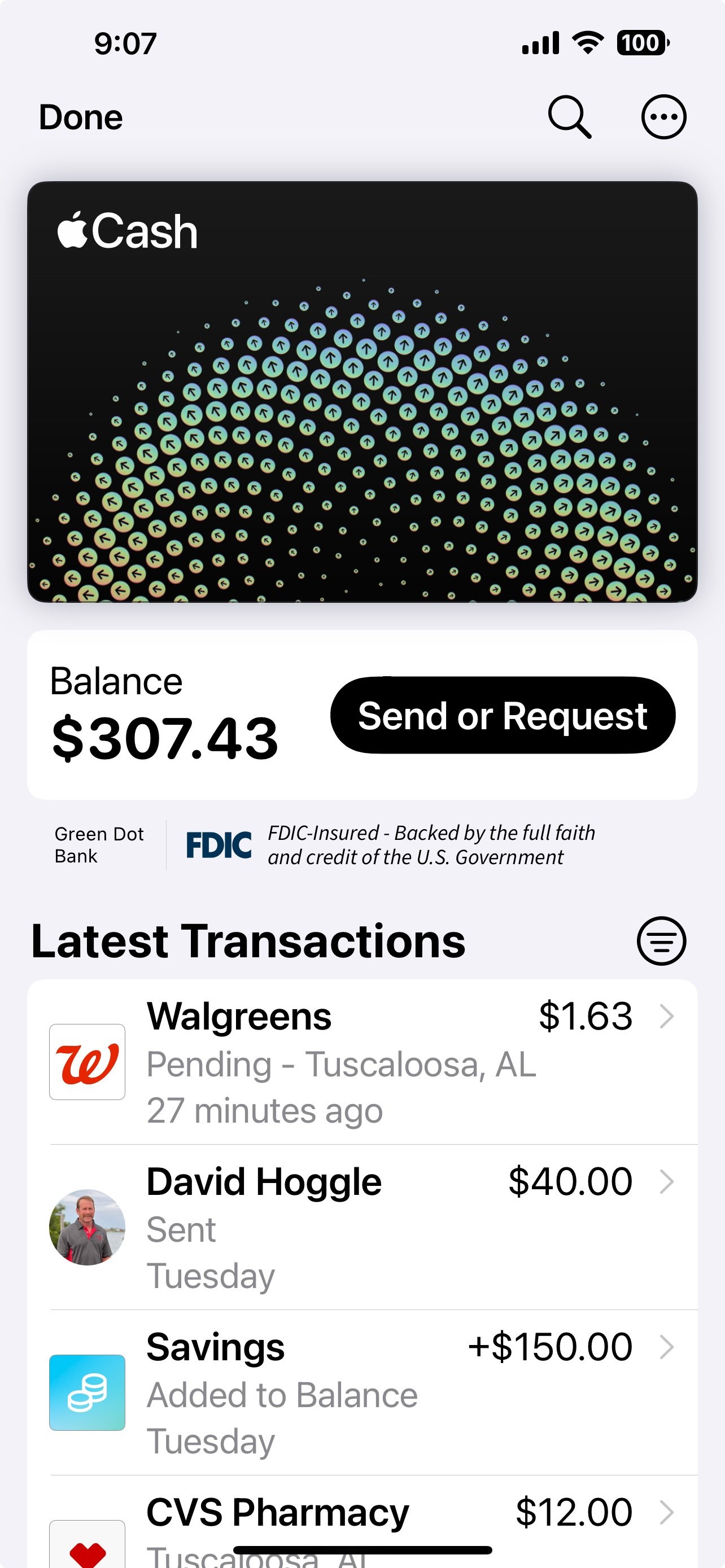
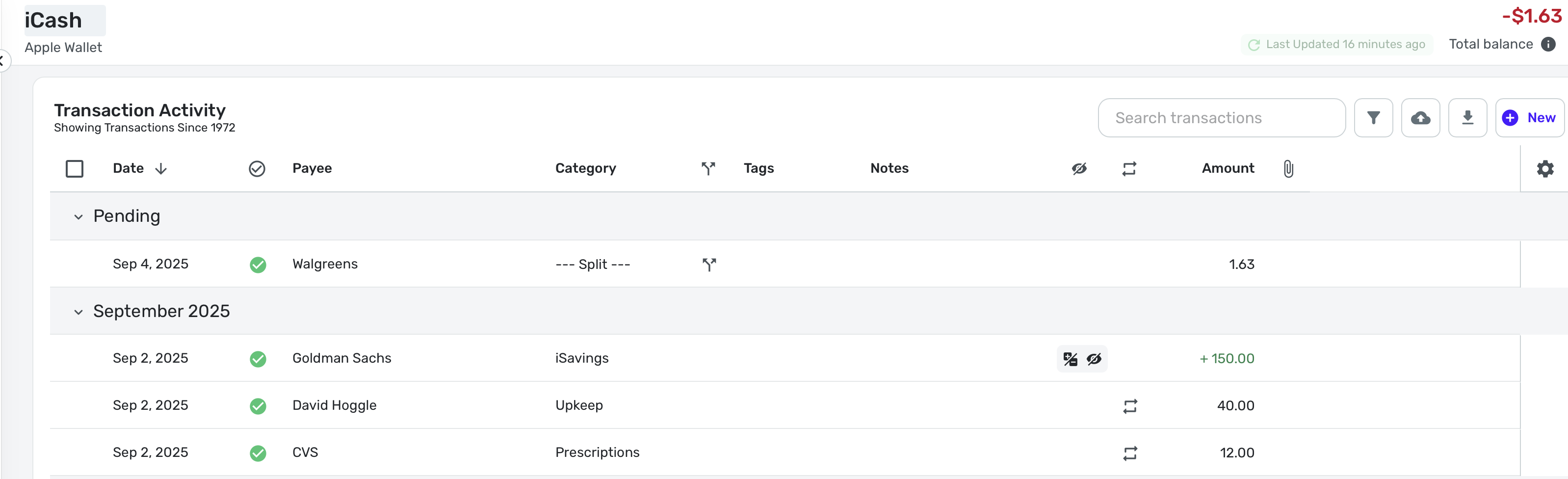
Thanks.
Steve
Quicken Simplifi (Safari & iOS) Since 2021
Quicken Classic (MacOS) Since 2009
MS Money (1991-2009) and Dollars & Sense (1987-1991)0 -
Hello @SRC54,
Thank you for the update. That is certainly strange behavior. I would have you try the following steps to establish a fresh connection by making the account manual and re-linking to see if that fixes the current issue.
- Make all of your Apple Wallet accounts manual by following the steps here.
- On your iPhone, go through the flow to add Apple Wallet.
- Carefully link the accounts found to your existing Apple Wallet accounts by following the steps here.
Let us know if this ends up fixing the issue you are seeing! If it does not, please supply logs so that we can get this issue reported:
- Log into the Quicken Simplifi Web App.
- Select Profile from the left-hand navigation bar.
- With the Profile menu open, hold down the Option key for Mac or the Alt key for Windows, and then click Send Feedback.
- Leave all boxes checked, add a brief description of the issue, and then click Send.
-Coach Jon
-Coach Jon
0 -
@Coach Jon I am confident the steps you outline will fix it because it fixed it on Tuesday when I got a pending transaction. But there is a problem, and it will happen again. it has happened twice now for both @Pmrussell892 and me.
I reinstalled the app, and completely reset up my apple accounts on Tuesday. I will send you the logs. Thanks.
Edit: See post below. I thought the reinstall was what had fixed it before but that wasn't it apparently. It was when I paid my yard guy for cutting my grass that must have fixed it. The two events were almost simultaneous, but today the balance didn't fix itself until I sent my wife $5 (as a test).
I believe, but am not certain, that it would fix also when the pending transaction clears. Any cleared transaction seems to straighten out the balance. Is that right @Pmrussell892 ?
Steve
Quicken Simplifi (Safari & iOS) Since 2021
Quicken Classic (MacOS) Since 2009
MS Money (1991-2009) and Dollars & Sense (1987-1991)0 -
@Coach Jon It didn't fix it, and it is still broken. I went manual with the accounts, then reconnected them. I deleted the Apple Wallet completely. Then I re-added the accounts and Apple Cash was still wrong.
Then I deleted the App and reinstalled. When it came up again, it told me again to reconnect as there was a problem, which I did. That still didn't fix it.
I then remembered that Tuesday after getting the pending transaction, I had paid the guy for cutting the grass, and that was what fixed it. So I sent my wife $5. That transaction was instantaneous and not pending, and it fixed the balance once again.
So we are back to what @Pmrussell892 said before, that all of a sudden, we are getting pending transactions in Apple Cash and the connector doesn't seem to know how to handle them.
I sent you the logs.
Steve
Quicken Simplifi (Safari & iOS) Since 2021
Quicken Classic (MacOS) Since 2009
MS Money (1991-2009) and Dollars & Sense (1987-1991)0 -
Hello @SRC54,
Thank you for the update. The last thing I will have you try is the following steps to reset your Apple Wallet information. Let us know if they work in resolving the issue you are seeing:
Make all of your Apple Wallet accounts manual:
- Click the Menu icon (the three lines in the upper left corner).
- Select Settings and then Accounts.
- Locate the Account you'd like to make 'manual' and click the three dots at the end of it.
- Select Make manual.
- Click Confirm.
Check third-party access to your Apple Wallet information:
- Go to Settings in your Apple Account.
- Tap on Privacy & Security.
- Select Wallet.
- Choose Quicken Simplifi (or any other relevant third-party app).
- Make sure to select Allow All Activity.
- Re-add your Apple Wallet accounts.
To link the account(s) found to your existing account(s), follow these steps:
- Click the Link to dropdown menu.
- Select the existing account from the list.
- Click Update, and then click Confirm once each account selection is completed.
Let us know how it goes!
-Coach Jon
-Coach Jon
0 -
@Coach Jon I will do that the next time it is broken. Right now it is working because I made a cleared transaction this afternoon. Apparently, when a transaction goes through immediately, i.e., paying a fellow Apple user, in this case, my wife, the balance rights itself.
I rarely use the Apple Cash for buying things at retail. I did it this week twice to troubleshoot the problem @Pmrussell892 was having, and then I ran into the same problems he reported. First on Tuesday and again today. I may try it again tomorrow, but it's no fun being a guinea pig. 😁
It seems to be something new with downloading transactions that show as pending. I don't think that used to happen. They would sometimes be pending in the Apple Wallet but just download as cleared into Simplifi.
I reported it to Apple, which, as I knew, was a waste of time. Even banks aren't much interested when things don't work right in Quicken, and Apple just says, "we're not a bank".
Steve
Quicken Simplifi (Safari & iOS) Since 2021
Quicken Classic (MacOS) Since 2009
MS Money (1991-2009) and Dollars & Sense (1987-1991)0 -
@SRC54
"I believe, but am not certain, that it would fix also when the pending transaction clears. Any cleared transaction seems to straighten out the balance. Is that right
"
That is exactly right. The balance is negative after new transactions, and straightens out once any of the pending clears.
1 -
Hello @Pmrussell892,
Thanks for the reply! Can you also try the steps I shared above to see if this resolves the issue you are seeing:
-Coach Jon
-Coach Jon
1 -
Thanks for confirming that @Pmrussell892. I thought that was the case.
I have now followed all the instructions and reset everything again. Assuming you have done the same, the next time we download a pending transaction and it messes up, we will have proven there is a problem.
I cannot believe we are the only two to have reported this, but I have some theories.
- You and I have used it at retailers where we are more likely now to get a pending transaction.
- Those who use it to pay other Apple users probably won't see this as they won't have pending transactions.
- Also, a lot of folks don't keep a cash balance in Apple Cash. When they use it, Apple then makes a withdrawal from their debit card to cover it, so they would expect a 0.00 balance. (Indeed a purchase for $20 would give them a negative balance and the immediate deposit of $20 from their bank, which automatically clears would fix it.)
Steve
Quicken Simplifi (Safari & iOS) Since 2021
Quicken Classic (MacOS) Since 2009
MS Money (1991-2009) and Dollars & Sense (1987-1991)1


