Apple Cash account balance incorrect on Iphone after latest update
Comments
-
I just discovered that my Apple Cash Account is broken also. I haven't used it for quite a while, and made a purchase online for $13.03 yesterday. Now Simplifi reports my balance at -$13.03, which is the amount of my transaction yesterday, LOL! My actual balance is $12.29.
1 -
Yep @TheReal702 It's broken. I haven't used it recently, but I know it will do the same thing for the third time on me if I do. It may fix itself after the transaction clears.
@Coach JonI hope Simplifi will now open an investigation on this.
Steve
Quicken Simplifi (Safari & iOS) Since 2021
Quicken Classic (MacOS) Since 2009
Dollars & $ense (DOS) and MS Money (Windows) 1987-20091 -
Hello @TheReal702,
Thanks for letting us know. We can certainly look into getting this issue reported since you all are reporting the same behavior here. Can you please try these troubleshooting steps first to verify if they resolve the issue?
Make all of your Apple Wallet accounts manual:
- Click the Menu icon (the three lines in the upper left corner).
- Select Settings and then Accounts.
- Locate the Account you'd like to make 'manual' and click the three dots at the end of it.
- Select Make manual.
- Click Confirm.
Check third-party access to your Apple Wallet information:
- Go to Settings in your Apple Account.
- Tap on Privacy & Security.
- Select Wallet.
- Choose Quicken Simplifi (or any other relevant third-party app).
- Make sure to select Allow All Activity.
- Re-add your Apple Wallet accounts.
To link the account(s) found to your existing account(s), follow these steps:
- Click the Link to the dropdown menu.
- Select the existing account from the list.
- Click Update, and then click Confirm once each account selection is completed.
If the issue is still occurring, please provide the following information:
- The name of the account in question, as it appears in Quicken Simplifi.
- The name of the account in question, as it appears on the bank's website.
- A fresh screenshot of the balance for the account in Quicken Simplifi.
- A screenshot of the balance displayed on the bank's website for comparison.
- A screenshot of the Accounts Summary page from the bank's website that lists all accounts and balances (feel free to redact any personal info) and has a wide enough scope to show the page URL (this must be taken from a web browser and not a mobile browser).
And we will also need logs, of course. Thank you!
- Log into the Quicken Simplifi Web App.
- Select Profile from the left-hand navigation bar.
- With the Profile menu open, hold down the Option key for Mac or the Alt key for Windows, and then click Send Feedback.
- Leave all boxes checked, add a brief description of the issue, and then click Send.
-Coach Jon
-Coach Jon
0 -
I'll let it soak over the weekend and if it doesn't self resolve I'll give it a go.
1 -
I may have fixed this. My wife turned on TMZ in the living room and I had to go to my office to get away from it, so I decided to play with Simplifi.
I opened the Simplifi app on my iPad and selected "Transactions" in the left menu bar, then selected the 3 dots in the upper right hand corner, and selected "Balance with pending" in the account options pop-up.
I then opened the app on my Mac desktop and went to Settings > Accounts and selected the 3 dots for the Apple Card > edit account > and selected "Bank balance (default). Then I did the same for my Apple cash accounts.
All account balances for all institutions are now accurate, and they all still show pending transactions - including the Apple Cash account.
It's a mystery to me how it changed my settings by itself, but fingers crossed that it maintains my selections.
1 -
@TheReal702 Well, I hope it keeps working, but none of that worked for me the two times I had the trouble. My iPad says Balance with Pending already and the Web App always says Bank Balance Default. You can toggle it, but it takes a few hours to do anything, but maybe you've found a shortcut. Keep us posted.
The thing that was weird is that even counting or not counting the pending, the balance should not have been 0.00 (bank balance) or a negative balance (with pending). So I remain dubious.
I actually tried to buy something with Apple Cash today but the Apple Store charged my Apple Card instead.
Steve
Quicken Simplifi (Safari & iOS) Since 2021
Quicken Classic (MacOS) Since 2009
Dollars & $ense (DOS) and MS Money (Windows) 1987-20090 -
To clarify -
My Apple card and Apple cash accounts are set to "Bank balance (default)".
All other accounts are set to "Balance with pending".
1 -
Thanks for clarifying. I'll try again to buy something tomorrow and try out your method. It would be great if you found a solution. I don't use the iPad app very much, and this seems to be something on the iPad that isn't in the iPhone app, or at least not as obvious. Thanks!
Steve
Quicken Simplifi (Safari & iOS) Since 2021
Quicken Classic (MacOS) Since 2009
Dollars & $ense (DOS) and MS Money (Windows) 1987-20091 -
@TheReal702 First, this is a great find, and the user interface is better on iPad than anywhere. I cannot find a way to change Bank Balance with Balance with Pending on the iPhone. On the Web app, it always says Bank Balance(Default) and to change it, you just switch to Pending and it will change it the other way, whatever way that is. Simplifi really needs to make this consistent with all its apps!
Yesterday, I made sure that in the iPad, I had selected Bank Balance (Default) for the Apple accounts (Cash, Card and Savings). Changing one changed them all. It SEEMED to work and fixed a problem I was having with the charge I accidentally made on the Card.
So I went to Walgreens and looked for something to buy, that I didn't need. I got a low sugar chocolate bar that was supposedly on sale, but no, they charged me the full price. I paid with Apple Cash.
I came home and updated it on iPhone as usual. As usual, it was pending, and, as has been the case for a couple of weeks, it messed up my balance changing it to a negative amount.
So back to iPad I went AND apparently the iPhone had changed it back to Balance with Pending. I changed it once again to Bank balance, and voilà it fixed the balance!
So my conclusion is that something is wrong with the iPhone app. So tomorrow I will stop again and buy something again with Apple Cash. Then I will come home and this time update on my iPad to see if it works. I will double check first to make sure that it still says Bank Balance.
This is curiouser and curiouser.
Steve
Quicken Simplifi (Safari & iOS) Since 2021
Quicken Classic (MacOS) Since 2009
Dollars & $ense (DOS) and MS Money (Windows) 1987-20090 -
Something is wonky for sure.
My accounts, all of them, have reverted back to "Bank balance (default)". This is checking them all on my Mac desktop.
My Apple cash account balance is correct, but that one transaction has now cleared.
Everything was rolling along so well for me for a few months, now this glitch. Ugh.
1 -
Hello @SRC54,
Thank you for sharing your observation. It is interesting that viewing it in the iPhone app seems to cause pending transactions to reflect in the balance.
Please let us know what happens when you try updating in the iPad first!
-Coach Kristina
1 -
OK, @TheReal702 and @Coach Jon
After spending some time with the iPad app, I can now definitively say that it does not work any differently from the iPhone app. All you can do in either one is change the global setting of whether Simplifi displays the downloaded Bank Balance or the Balance with Pending that subtracts any pending transactions in Simplifi in order to show the soon-to-be balance. Changing all your accounts to display Bank Balance could make the Apple accounts look right but it throws off all your other accounts in the transaction list. It serves to confirm but is not a fix.
The above setting doesn't have any account-specific effects. In the web app, in the Settings:Accounts, you can edit supposedly what balance you want to download into Simplifi, which you should do if Simplifi is double-counting pending transactions. Confusingly, in Settings, it will always say bank balance (default) but you can opt to change it to bank balance with pending that will take effect the next download in 3-4 hours. But afterwards, it will still show Bank Balance (default). I have previously requested in another conversation that this wording be changed.
Now back to the Apple problem…
For some reason, the Apple connector has been messing up the downloaded balance when it downloads a pending transaction. It should download the balance counting the pending so you don't end up double counting pending transactions. This problem is merely a nuisance as it will fix within 24 hours. (The fast fix is just to clear those transactions in Simplifi. I've done this before and it is no problem. When they clear, they usually match. If not, just delete the duplicate.)
What is more irritating is, for some reason, that when Simplifi gets a pending transaction from Apple Cash, it resets the balance to $0, and subtracts the pending from that giving a negative balance.
Edit: So even the fast fix of clearing the pending transaction won't work. What will work is to pay your spouse a few bucks because that clears immediately and any cleared transaction seems to fix it.
So back to the drawing board this morning. I will make another purchase later today.
Steve
Quicken Simplifi (Safari & iOS) Since 2021
Quicken Classic (MacOS) Since 2009
Dollars & $ense (DOS) and MS Money (Windows) 1987-20091 -
What is more irritating is, for some reason, that when Simplifi gets a pending transaction from Apple Cash, it thinks the balance is $0, and subtracts the pending from that.
This is exactly what I had happen too. Changing the settings as I described seemed to fix it, but the settings reverted to the default and the one transaction I had cleared simultaneously making it appear as the workaround was a permanent fix. It's not, and something is broken. I'm not sure how long this has been going on as I rarely use my Apple card so there isn't much in Apple cash for me to use.
1 -
Hello @TheReal702,
Thanks for the update. To clarify further, does the issue with the account balance showing as $0 resolve itself after a certain period of time? Or does the correct balance appear after a pending transaction clears in the account specifically? Have you seen the issue only on one device in particular, or across multiple devices? We will want to be sure of all of this information in case we do end up reporting this to our product team.
-Coach Jon
-Coach Jon
0 -
It actually never showed as $0. It showed the correct positive amount until I made a purchase using Apple cash. I've only seen it this one time as I rarely use my Apple card, and thus have a very small amount available in Apple cash. With that said, I placed an order online (using Apple cash) and Simplifi showed the Apple cash balance as a negative for the amount of this transaction. It stayed that way until the transaction moved from pending to cleared, and the balance again shows the correct positive amount. This is why @SRC54 and I believe that when Simplifi sees an Apple cash transaction (purchase), it deducts that amount from $0.00 instead of the actual balance and shows a negative balance until the transaction clears. This is a new glitch.
Hope this clarifies it for you.
ETA: This occurred across all of my devices - iPad, iPhone & Mac desktop.
1 -
Hello @TheReal702,
Thank you for the response. If you can go ahead and provide the information I requested previously, we can work on getting this issue reported. You may send the information via DM for privacy reasons if you wish:
-Coach Jon
-Coach Jon
0 -
I'll message you.
1 -
Hello @TheReal702,
Thank you for the requested information. If you can provide a screenshot showing the Apple Cash account balance as it shows currently in the Apple Wallet application, this would work as well. We need to provide a comparison, showing that the balance in Quicken Simplifi is different from the balance for Apple Cash. In this case, as you described, the balance would be showing as negative in Quicken Simplifi, which is not what it would show in Apple Cash. Let us know when that can be provided.
-Coach Jon
-Coach Jon
0 -
On the way via DM.
1 -
Hello @TheReal702 and @SRC54,
Thank you for the information! I have reported this issue to our product team and will be sure to follow up here with any status updates going forward!
-Coach Jon
CTP-14527
-Coach Jon
2 -
This isn't really an update but today I used Apple Cash and opened it first in the iPad app. I discovered that I couldn't update the Apple accounts in Simplifi from the iPad! It has to be from the iPhone app. I guess the connector is installed on the phone. I assume this is the same for everyone. I'll reiterate that I never used the iPad app very much so glad to be learning more about it. (I do have an old iPad that is still on version 16 or 17 in case that makes a difference.)
Of course, when I did update on iPhone, it once again gave me a negative balance, because it was a pending transactionn. I transferred some money from Apple Savings, and that fixed it as any cleared transaction fixes it. So funny.
Just FYI for @TheReal702. I am glad to understand things a little clearer.
Steve
Quicken Simplifi (Safari & iOS) Since 2021
Quicken Classic (MacOS) Since 2009
Dollars & $ense (DOS) and MS Money (Windows) 1987-20090 -
@SRC54 Yes, the Apple accounts will only update in Simplifi using the iPhone. It's become a part of my morning routine, I open it and let it do its thing while I'm making my coffee.
I mostly use the iPad or desktop after that because of the larger screen.
Another oddity occurred today - I opened Simplifi late this morning on my iPhone and got a pop-up message that I had to re-connect my Apple Card and Apple cash accounts. It essentially did it automatically by just pushing the button (whatever it said) and all was good again.
Quirky, eh?
1 -
This morning I went in to iPhone app to update Apple Cash and I was asked to reconnect my Apple accounts. I selected No to the question of whether I had gotten a new iPhone, and they reconnected easily and correctly.
Just wondering if this was just me or anyone else got this today?
It could possibly have to do with resetting up Apple family to solve a glitch in my wife's iPhone.
Steve
Quicken Simplifi (Safari & iOS) Since 2021
Quicken Classic (MacOS) Since 2009
Dollars & $ense (DOS) and MS Money (Windows) 1987-20090 -
@SRC54 Not today, but I got it a couple days ago like I said in my last post. It also renamed my Apple Cash account back to "Apple Cash" when I did this. I had changed it to "Cash/Apple" in order to move it down the list.
I purchased a new Apple Watch this morning using the Apple Card - I'll come back here and let you all know if this transaction and the Apple Cash reward are properly handled by Simplifi.
0 -
Interesting @TheReal702 because it didn't rename mine.
Steve
Quicken Simplifi (Safari & iOS) Since 2021
Quicken Classic (MacOS) Since 2009
Dollars & $ense (DOS) and MS Money (Windows) 1987-20090 -
Give it a day or two. 🤣
1 -
I know that this issue is being worked but I thought you would like some more ammo for the repairman.
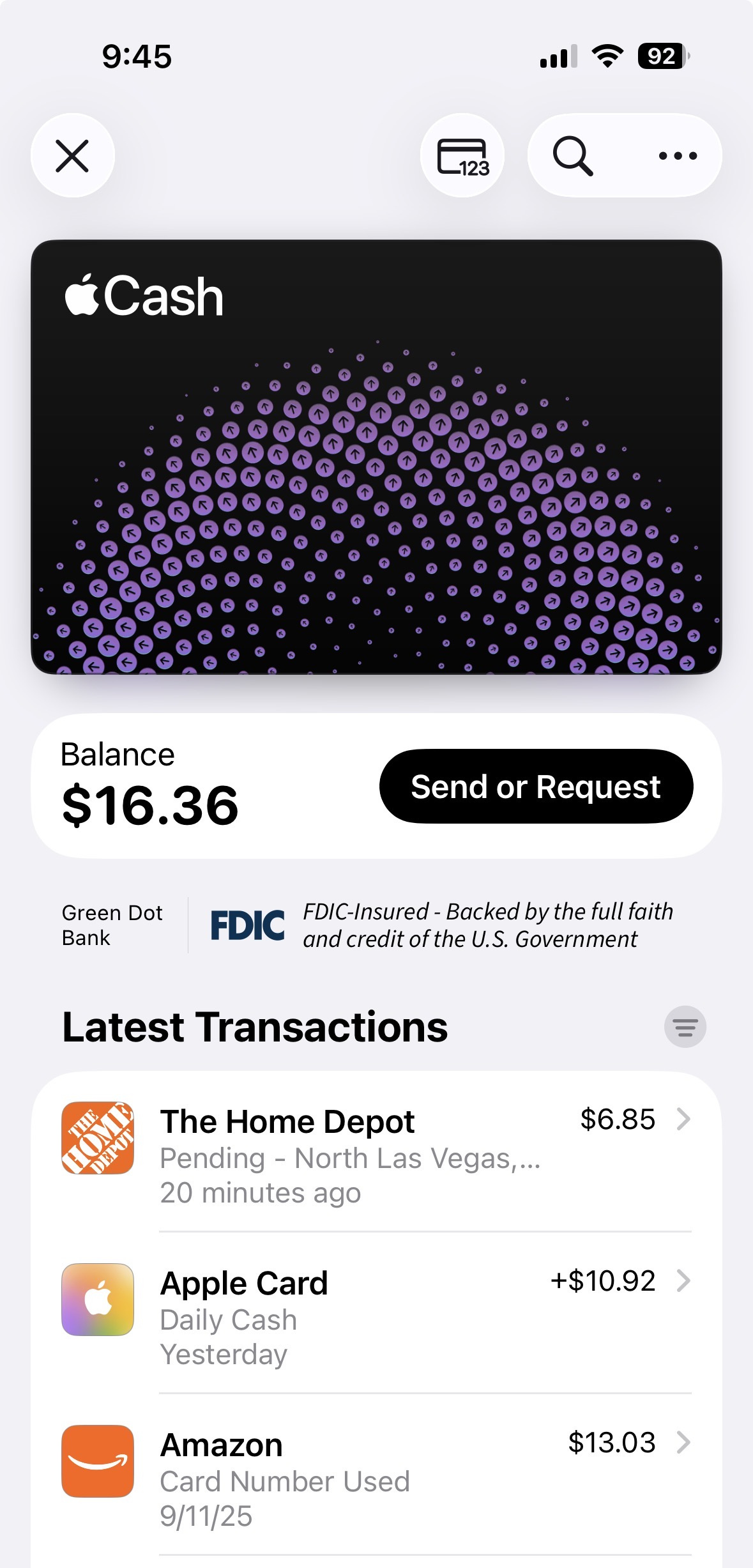
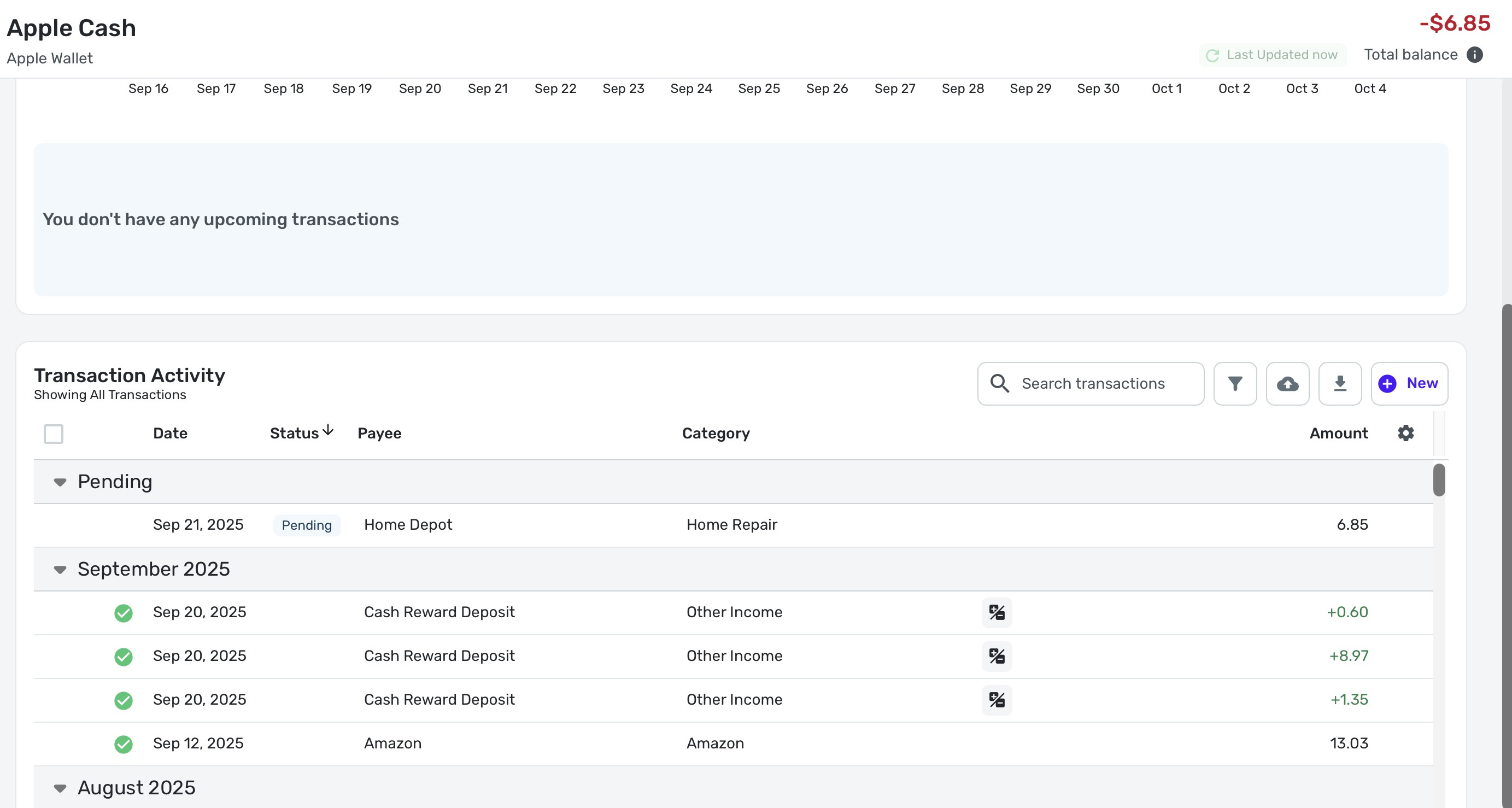
I went to Home Depot and purchased a gas can that was on clearance, $6.85 with sales tax. I decided to use Apple Cash to see what would happen in Simplifi. Yep, still broken. Simplifi zero'd out my balance then deducted the transaction. I'm sure that it will be corrected once the transaction goes from pending to cleared.
I have attached 2 screen shots, one from my iPhone and one from Simplifi.
 1
1 -
Yep, same old behavior. What I don't understand is from where Simplifi gets the $0 balance. I would understand deducting the pending twice; I've seen that happen with other accounts.
Every time Apple Cash gets a pending transaction, it goes negative. As soon as the transaction clears (or any transaction clears), it's right again.
I haven't noticed any problem with Apple Card or Apple Savings though it may be there as I don't use them much but my Apple Card does usually have a $0 balance so that could mask it. Also I haven't done a pending transaction in Apple Savings. I transfer money in, and that is cleared by default when it gets there.
Steve
Quicken Simplifi (Safari & iOS) Since 2021
Quicken Classic (MacOS) Since 2009
Dollars & $ense (DOS) and MS Money (Windows) 1987-20091 -
I used Apple Cash tonight to see if there was any improvement. Nope. Same as before. Sent my wife $1; fixed it.
Steve
Quicken Simplifi (Safari & iOS) Since 2021
Quicken Classic (MacOS) Since 2009
Dollars & $ense (DOS) and MS Money (Windows) 1987-20090 -
I used my Apple Cash account today and find, not to my surprise, that it is still broken. What's the status on this?
To recapitulate. When you make a transaction that is pending, the balance will download as a negative number.
For instance, you have a balance of $100. You make a $20 purchase. The balance is $80 and will show as that in Apple Wallet, but once you update in Simplifi, it will show a balance of $-20.
To fix it, you have to wait until the transaction clears or make any posted transaction. For example, I send my wife $5 to here Apple account. The balance is now $75 and updating in Simplifi will download the posted $5 and correct the balance to $75.
All of this started this summer when Apple started downloading transactions as Pending; until then they were never pending on our end, just posted.
Steve
Quicken Simplifi (Safari & iOS) Since 2021
Quicken Classic (MacOS) Since 2009
Dollars & $ense (DOS) and MS Money (Windows) 1987-20090



