Alerus doesn’t connect, FDP-103 (edited)

The working connection just stopped working with the credentials that successfully connect to login.alerus.com directly no longer connecting via app. This is the 7th attempt at reporting it as all other attempts in chat and elsewhere were ignored.
Comments
-
@aariana, thanks for posting to the Community with this issue!
I was able to confirm the FDP-103 error with Alerus when viewing your connection attempts from our end. It appears that the error is occurring on an existing account in Quicken Simplifi, so please start by establishing a completely fresh connection with the bank. Here are the steps to follow:
- Make all of the accounts with this bank manual by following the steps here.
- Once you see the account(s) listed in the Manual Accounts section under Settings > Accounts, go back through the Add Account flow to reconnect to the bank.
- If the connection is successful, carefully link the account(s) found to your existing Quicken Simplifi account(s) by following the steps here.
If the issue persists with the fresh connection and you are unable to complete step 3 above, please thoroughly follow these steps to troubleshoot the FDP-103 error:
- Verify the bank selected is the correct instance– You may see several different instances of your bank; check to see if you’re using the correct one.
- Verify that your login information is correct – Type your password/PIN into a text application to ensure you don’t have any typographical errors. Then, copy and paste your login information into Quicken Simplifi to ensure accuracy.
- Verify your login at the bank’s website – Try to sign in to your bank’s website using the same login credentials to ensure you've not locked yourself out of the account and that the credentials are still valid.
- Check for an app-specific password – Some banks require users to use a specific app password when connecting to a third party. Check with your bank to see if you need to use an app-specific password.
- Update your credentials – Try temporarily updating your password at your bank's website and then try again to connect in Quicken Simplifi. We recommend NOT using the following special characters: & < > / \.
Let us know how things go!
-Coach Natalie
0 -
I am having the same issue and this did not resolve the issue for me. The same error persists.
0 -
@Rwatkin1, thanks for posting on this topic!
If you have thoroughly followed all of the troubleshooting steps mentioned above, including changing your password with the bank directly, and the FDP-103 error is still occurring, we can certainly review your case for escalation. To do so, we will need the following data:
- The name of the account(s), as it appears in Quicken Simplifi.
- The name of the account(s), as it appears on the bank's website.
- Has there been any recent changes made to the bank's website or its sign-in process?
- What is the exact URL you use to log in to your account on the bank's website?
- What type of account(s) are you attempting to connect in Quicken Simplifi?
- A screenshot of the Accounts Summary page from the bank's website that has a wide enough scope to show the full page URL. This is the landing page after signing in, and typically lists all accounts and balances. You will want to take this from a web browser and not a mobile browser, as well as redact any private info such as account numbers.
- The format of your password (DO NOT provide your actual password!). For example, "Quicken123$" would be coded as "Xxxxxxx###$", where a capital "X" indicates a capital letter, a lowercase "x" indicates a lowercase letter, and a "#" indicates numbers; the actual special characters used will need to be provided.
Please also submit your logs via the 'Send Feedback' option:
- Log in to the Quicken Simplifi Web App.
- Select Profile from the left-hand navigation bar.
- With the Profile menu open, hold down the Option key for Mac or the Alt key for Windows, and then click Send Feedback.
- Leave all boxes checked, add a brief description of the issue, and then click Send.
We look forward to hearing back from you!
-Coach Natalie
0 -
can you advise what you mean by the name of the account on Simplifi and on the banks website? I am assuming you are not asking for our account numbers. Also, I do believe Alerus webpage may have changed. The URL is not one of the ones available when you search to add an account. So I think this is likely the culprit.
0 -
I submitted a request for the new URL: https://myalerus.alerus.com/login
0 -
@Rwatkin1, thanks for the reply!
The names of the accounts in Quicken Simplifi can be found in the Accounts List or at the top of the account itself.
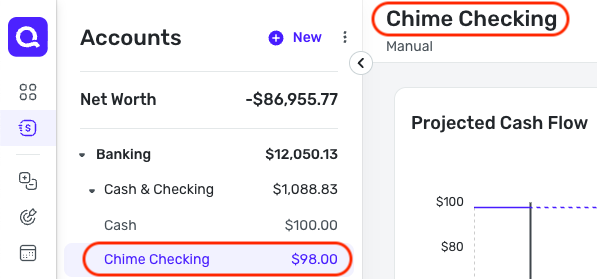
And when you sign into the bank's website, you should see the names of the accounts there as well. No, we do not want your account numbers.
As for submitting a request for the new URL, that wouldn't typically be the path to take with something like this. If a change on the bank's end causes users to receive an error, we would want to escalate it so the issue can be worked on and fixed by our service provider and the bank. To submit the escalation, we would need the info outlined above.
I hope this helps to clarify!
-Coach Natalie
0 -
I have the same problem. Changed PW on Alerus site and still no difference
0 -
I have had the same issue for about the past 2 weeks. I also changed my Alerus PW to no avail.
0 -
@Coach Natalie So I followed the direction provided earlier and moved all my Alerus accounts to manual, which I do not believe can be reversed. Attempting to add a new Alerus.com account always fails with the error message that is the basis for this thread. I can open a request providing the names of the two manual accounts, but it is not possible to create a new Alerus account because I can't get through the logon process to get to that stage.
0 -
@qkjones & @mikepell, thank you for letting us know you are also seeing this issue! To ensure all troubleshooting is followed for the FDP-103 error, please be sure to follow my steps posted above:
If the issue persists after doing so, please provide the information requested above so we can review your case for escalation:
@Rwatkin1, we will need the names of the accounts that received the error, as they appear in Quicken Simplifi. It does not matter that they are no longer connected to the bank.
Thanks!
-Coach Natalie
0 -
@Coach Natalie - The Send Feedback option doesn't permit image uploads and has a character limit. Did my best to jam what you requested into the test field permitted.
0 -
@Rwatkin1, I apologize for the confusion! The requested information will need to be provided here in the Community, either via a DM for privacy or via this thread. Submitting logs is a separate step from providing the data.
Thanks in advance!
-Coach Natalie
0 -
direct message sent thanks
0 -
@Rwatkin1, thank you for the DM!
It looks like we still need number 6, please —
- A screenshot of the Accounts Summary page from the bank's website that has a wide enough scope to show the full page URL. This is the landing page after signing in, and typically lists all accounts and balances. You will want to take this from a web browser and not a mobile browser, as well as redact any private info such as account numbers.
-Coach Natalie
0 -
Sent. Thanks.
0 -
I‘m still having this problem. Had submitted the url via other channels after a struggle with AI chatbots and finding a different communication mechanism, before finally posting to community:
The accounts page url is:
https://myalerus.alerus.com
(note, this subdomain doesn’t match any of the setup options and could be a regression bug)Been experiencing this lost connection problem most of August and my accounts are all manual now.
0 -
This is the same URL I have submitted issues on, as well.
0 -
@Rwatkin1, thank you!
I have escalated your case to our service provider and will post back here with updates.
EWC-11935454
-Coach Natalie
0 -
@aariana, thank you for letting us know you are still experiencing this issue!
To clarify, were you able to give the steps above a try?
If so, please be sure to provide the info needed for an escalation!
Much appreciated!
-Coach Natalie
0 -
Thanks
1 -
@Rwatkin1, we heard back from our service provider, and they are working on this issue with the bank. In the meantime, we have created an Alert that everyone can follow for updates:
While the issue is being worked on, you can track the account manually to keep your records up to date. Our support article here goes over adding manual transactions:
-Coach Natalie
1 -
Thank you @Coach Natalie
1 -
Still an issue as of 9/30
0 -
@aariana, thanks for posting back!
If you're still experiencing the FDP-103 error with Alerus, please follow our Alert for updates:
Thank you for your patience as this issue is worked on!
-Coach Natalie
0 -
Any ETA on the fix?
0 -
Still an issue as of 11/5
0 -
@Coach Natalie - Is there any update on this issue? This has been going on for more than two months now.
0
