Amount Matching: "Limited Range" option not matching correctly (edited)

Simplifi "matches" recurring series to downloaded transactions that are not similar.
My credit card payment on a recurring series is due Dec 8 and is about $1,800 (set by Bill Connect). The Match Criteria was set to "Auto Match." I received a refund on the credit card Nov 20 for $32.60.
Simplifi matched the refund to the scheduled payment even though the amount was off by about $1,750 and the date was off by 18 days. (It also created a spurious transaction in my checking account as the other side of the transfer so I had to delete that as well.)
I realize I can experiment with different Match Criteria, and maybe that will work better. But this result makes it look like the matching algorithm is not doing a very intelligent job.
DryHeat
-Quicken Classic (1990-2020), CountAbout (2021-2024), Simplifi (2025-…)
Comments
-
Hello @DryHeat,
Thanks for the feedback! I can certainly see how that instance of amount matching incorrectly matching your recurring transaction in this case is frustrating. Per our support article regarding amount matching:
- Auto Match: Quicken Simplifi automatically links transactions based on predefined logic. This may work well for common bills, but it may not always be accurate.
- Any Amount: Links any transaction with a matching Payee, regardless of the amount. Useful for bills like utilities or credit cards that vary monthly.
- Exact Amount: Only links transactions that match a specific dollar amount. Ideal when the Payee is used for multiple types of expenses.
- Limited Range: Allows a 30% variance (15% above and 15% below) around the set amount. Helpful for subscriptions or bills that fluctuate slightly over time.
Since our support article on this feature states that Auto Match may not always be accurate outside common bills, I would definitely suggest trying to change the Match Criteria to something like Exact Amount if you know specifically what that dollar amount will be, or Limited Range if your credit card payment usually falls around a certain amount.
Regardless, we do appreciate the feedback!
-Coach Jon
-Coach Jon
0 -
My post was meant to illustrate a problem — "Auto Match" is the default, but it works poorly.
I reported this to encourage the dev team to try to improve the matching algorithm.
But I don't think that will happen unless the team hears from users about how matching works in the field. In this case, for example, it matched a date that was off by 18 days and an amount that was off by over 5000%. If the team hears about these problems they can at least attempt to do better.
BTW, I don't know what you mean by "outside common bills." Isn't paying a credit card a "common bill"?
Anyway, "Exact Amount" is not the best choice when using Bill Connect with a credit card. Bill Connect often fails to take into account late adjustments in the account and thus the amount is off by a bit. "Limited Range" is probably a better choice in this circumstance.
DryHeat
-Quicken Classic (1990-2020), CountAbout (2021-2024), Simplifi (2025-…)0 -
Hello @DryHeat,
Thanks for the reply. Limited Range is definitely the option I would suggest using to see if it works better for you in this case. I can understand that the Auto Match option didn't work for you this time when it came to matching, but in order to report something to the product team, we need to be able to show that it is a consistent bug. The Amount Matching feature itself provides these 4 options to allow users to adjust their Match Criteria settings for their recurring series based on their needs.
If you use Limited Range and the issue is still occurring with this series not matching correctly, we can definitely work on troubleshooting further, of course.
I hope this makes sense, and thanks again for the feedback!
-Coach Jon
-Coach Jon
0 -
It's not about a bug, it's about the level of performance … "Does the matching algorithm do a good job?"
I've seen a number of posts about matching failures. And I've had a number of weird failures myself. I reported this particular one because it seems so clearly misguided.
Perhaps if enough people do that, the developers will eventually hear about it.
DryHeat
-Quicken Classic (1990-2020), CountAbout (2021-2024), Simplifi (2025-…)0 -
Hello @DryHeat,
I completely understand your concerns. I want to assure you that if enough users report a similar issue with a specific feature, we will report the trend, and the developers will investigate the matter. In this case, if more users experience the same issue with the Auto Match option, I am confident it will be brought to the attention of the product team, either by us through the community or via our chat and phone support. At this time, users switching between Match Criteria options seems to work for the majority of users based on their needs, which is definitely a benefit of having the Amount Matching options available. They help users resolve these kinds of matching issues.Let us know if the Limited Range option works better for you in this case!
-Coach Jon
-Coach Jon
0 -
@DryHeat Maybe write an "Idea" post where you define prescisely how "Auto Match" should work (i.e. you've got a developer background, use pseudocode based on info you know that the app has). If enough people agree on it, maybe it will get implemented. I don't have a great idea how to make this work for 'auto' but maybe you do?
—
Rob Wilkens
0 -
@RobWilk — Thanks, but I don't think I can do that.
Simplifi already has an algorithm for auto-matching. Suggesting a different one is a fools' errand.
The only suggestion I have is to increase the amount and variety of test cases — including harvesting problematic cases from reported failures. Perhaps app instrumentation (triggered by manual "un-matching" of bad matches) could automate the creation of an inventory of actual failure scenarios.
That would be my approach, because I'm old and my thought processes are mired in the probably outmoded practice of test driven development (TDD). But, as they say… not my monkey.
DryHeat
-Quicken Classic (1990-2020), CountAbout (2021-2024), Simplifi (2025-…)1 -
I have had problems too with the reliability of Auto Match, especially with interest payments from my Savings and Checking Accounts. I switched them to Limited Range today to see if they function correctly next weekend.
But it does seem to me that if one has interest payments on the last day of the month for 3 separate accounts with 3 separate recurring incomes set to the specific accounts that auto match should match them even if they do vary a little each month.
I am so used to cleaning stuff up on the last day of the month that I never thought about it that much.
Steve
Quicken Simplifi (Safari & iOS) Since 2021
Quicken Classic (MacOS) Since 2009
MS Money (1991-2009) and Dollars & Sense (1987-1991)0 -
I've seen other reports of problems with Auto Match, so I know it's not just you and me.
@Coach Jon says they need to be able to show that this is "a consistent bug"** before they can report it to the product team. But it's hard for an individual to demonstrate a consistent problem with Auto Match when the more efficient course of action they suggest is to change to a different matching criterion.
Support for this issue will have to come from multiple users' reports. So I assume the team here is keeping a tally of the reports on this issue in order to build up that consistent record of spotty performance.
** As I said before, "bug" may be a misnomer. This is really a performance issue. It works, but not that well.
DryHeat
-Quicken Classic (1990-2020), CountAbout (2021-2024), Simplifi (2025-…)1 -
-
Limited Range is definitely the option I would suggest using to see if it works better for you in this case.
Ok… I did that. But Limited Range didn't work any better than Auto Match.
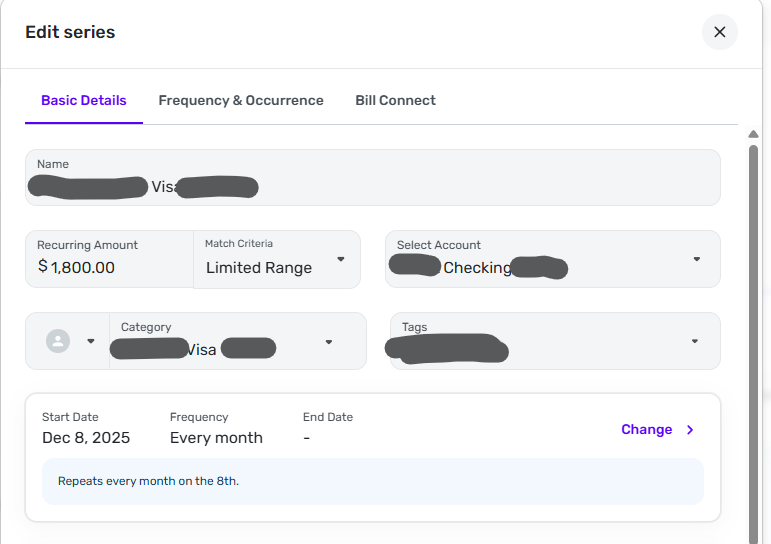
This time a Nov 30, +$16.29 transaction (a refund on the credit card) was matched with a recurring series reminder for a Dec 8, +$1,800 credit card payment. The Match Criteria was set for Limited Range, so the matching range was +$1,530 to +$2,070. That's roughly 100 times the amount of the transaction that was matched to the series.
When this erroneous match to the credit card payment series occured, there were multiple problems.
- The match created a new transaction in the checking account where the payment should come from.
- The credit card transaction was matched to the upcoming payment reminder, so now the next upcoming payment is in January.
- Clicking "Un-link recurring" in the 3-dot menu didn't do anything and resulted in the following message:

In the end I had to manually fix this up by editing and deleting transactions to clean up the Transaction Activity registers in both accounts. I also had to reset date in the reminder series so that the upcoming reminder is in December, as it is supposed to be. I'm beginning to wonder if this will have to be done every time I get a refund on my credit card.
So Auto Match didn't work and Limited Range didn't work. And I can't use Exact Amount because Bill Connect is often off a little bit on predicting the amount of the credit card payment. (And @RobWilk reports that there are problems with Exact Amount anyway — see below.)
Actually, I think I will use Exact Amount. With luck, that will prevent automatic matching altogether. After all, it will take less effort to manually match the real payment when it happens than it takes to fix things every time a refund comes in.
LINKS TO OTHER ISSUES MENTIONED IN THIS POST:
Link to thread about Bill Connect being off a bit on payment amount:
Link to @RobWilk's thread on problems with Exact Match:
DryHeat
-Quicken Classic (1990-2020), CountAbout (2021-2024), Simplifi (2025-…)0 -
Hey @DryHeat, Coach Jon will be back tomorrow and will continue to review this with you. I just didn't want to leave you hanging in the meantime.
Thanks for your patience!
-Coach Natalie
1 -
@DryHeat Update on my recurring interest payment. It didn't match even after I changed to Limited Range, and the amount was well within the range.
This recurring is for my Savings Account Interest, it was the only transaction that day and it downloaded exactly for the date of December 1. My other transaction for the month was a few days ago for a transfer.
I'm at a loss as to why it didn't work. I have switched it back to the default Auto Match.
Steve
Quicken Simplifi (Safari & iOS) Since 2021
Quicken Classic (MacOS) Since 2009
MS Money (1991-2009) and Dollars & Sense (1987-1991)0 -
Thanks for the replies. I do agree that this is probably not a bug, per se, since the tool does work. But I can also see that it may not be working as well as it should be, according to your reports. We will want to narrow down how and why this is occurring, and why it only occurs sometimes. I think we will need specific examples, as well as screenshots showing those examples, in order to better troubleshoot this issue. Can you both provide that information? Feel free to send this information via DM if you prefer!
-Coach Jon
-Coach Jon
0 -
@Coach Jon I'll be glad to do so, but hard to nail down. I have a recurring item that is in the spending plan and then I download the interest payment. It usually is classified as interest and the payee is interest payment. Then I match it manually and it updates the Payee and marks the recurring. It is an easy fix. But it is strange.
Steve
Quicken Simplifi (Safari & iOS) Since 2021
Quicken Classic (MacOS) Since 2009
MS Money (1991-2009) and Dollars & Sense (1987-1991)0 -
I do agree that this is probably not a bug, per se, since the tool does work.
My comment about it not being a bug applied to "Auto Match" — it matches, but it's performance is so weak that it's not very useful.
But I think that the performance of "Limited Range" is actually a bug — because it is matching transactions outside the range.
I'm not going to repeat everything, but here's the most egregious example. … Using Limited Range, it matched a +$16.29 transaction to a series with an Amount of +$1,800 (and a Limited Range of +$1,530 to +$2,070).
I've provided details of the false match transactions above. Below is an image of the recurring series.
I probably won't be able to provide any more information because I am changing the series to "Exact Amount" in an effort to prevent any matching at all. It's much easier to manually match the real payment once a month than it is to fix the problems caused by a false match every time a refund comes in.
DryHeat
-Quicken Classic (1990-2020), CountAbout (2021-2024), Simplifi (2025-…)1 -
The Amount Matching feature was added to accommodate for situations like this, where "auto match" has not worked well. We can work on getting a bug report filed for specific examples where one of the Amount Matching options isn't working properly. In your case, Limited Range seems to be having an issue, as reported here.
In addition to the example you provided above, can you provide a screenshot showing the transaction that was improperly matched, as well as the transaction that it should have been matched to? If you do not have the information at this time, can you supply those examples when/if the issue occurs again? You may feel free to DM this information as well! Thank you!
-Coach Jon
-Coach Jon
1 -
In addition to the example you provided above, can you provide a screenshot showing the transaction that was improperly matched, as well as the transaction that it should have been matched to?
Below is the transaction that was improperly matched to my credit card payment recurring series. It has been corrected to undo that match. (I provided you with an image of the series in my previous post.)
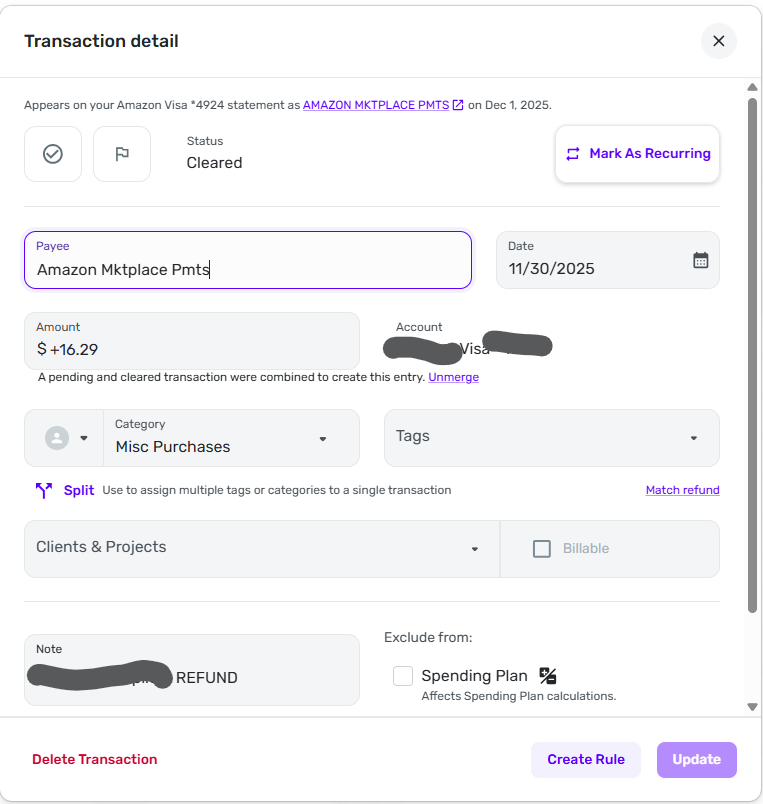
The transaction should not have been matched to any transaction at all. It was an individual Amazon return/refund and was not supposed to match any existing Simplifi series or refund. It should have just come in as a normal credit card transaction.
(Note: my initial post regarding Auto Match also involved an Amazon return/refund that should not have matched anything. It seems like Simplifi leans toward matching transactions with a positive sign with my upcoming credit card payment.)
DryHeat
-Quicken Classic (1990-2020), CountAbout (2021-2024), Simplifi (2025-…)1 -
Hello @DryHeat,
Thanks for the reply and the requested screenshot. We should be able to escalate the issue you are having with the Limited Range Amount Matching option. Please supply your web browser, operating system, and their respective versions.
Please also supply logs for us when you can.
- Log in to the Quicken Simplifi Web App.
- Select Profile from the left-hand navigation bar.
- With the Profile menu open, hold down the Option key for Mac or the Alt key for Windows, and then click Send Feedback.
- Leave all boxes checked, add a brief description of the issue, and then click Send.
-Coach Jon
-Coach Jon
1 -
Windows 11 Pro Version 25H2 Build 26220.7271
Chrome Version 142.0.7444.176 (Official Build) (64-bit)
Logs sent.
DryHeat
-Quicken Classic (1990-2020), CountAbout (2021-2024), Simplifi (2025-…)0 -
I have a series set to a limited range and a transaction well below that amount was linked to the series
0 -
Hello @DryHeat,
Thanks for the requested information! I did get this issue reported to my product team and will be sure to follow up here with any updates going forward.
@nmnmnmnmn, Thanks for reaching out as well! I merged your post into this thread, since it involves the same issue regarding the Limited Range Amount Matching option. You can follow along here for updates as well.
-Coach Jon
SIMPL-30668
-Coach Jon
1




