Incorrect Balances and Savings Goals for all Manually Tracked Accounts and Assets (edited)
Comments
-
Ditto for me: My manual Real Estate account tripled last night with a new autogenerated transaction with the original amount. Even after deleting this transaction the account balance is still double the correct balance.
Please research and fix. Thank you.
0 -
Linking it as answered was not my intention. I was simply trying to connect similar posts noting that it is all part of the same underlying issue.
TiggerTrainer
Quicken Simplifi user since January 2025
Quicken Classic (Premier) user since 2004 - 2025 (21 years)
1 -
I had the same thing happen. Not sure how to fix it since the money comes from an unknown account. Hope this gets resolved soon!
0 -
Coach Natalie,
Something happened yesterday and all Manual Assets got a brand new "Opening Balance" entry on 1/21/26. Looks like it TRIPLED the value of each of these Manual Assets. I went to simply delete this erroneos "Opening Balance" transaction, but this did nothing to the tripled value.
HELP!!!!!!
0 -
Hi All, I am sorry that you are experiencing issues with your opening balances being duplicated. We are aware of the issue and are working on a fix. Please bookmark this alert for updates.
Thank you for your patience as we work on resolving this.
1 -
Linking it and having it mark as answered was not my intention. I was simply trying to connect all of the similar issues. Quicken will be working hard to get this addressed I am sure. There is currently NO FIX for this.
TiggerTrainer
Quicken Simplifi user since January 2025
Quicken Classic (Premier) user since 2004 - 2025 (21 years)
0 -
Hi All, I am sorry that you are experiencing issues with your opening balances being duplicated. We have reported this issue and our teams are working on a fix. Please bookmark this alert for updates.
Thank you for your patience as we work on resolving this.
3 -
There currently is NO FIX for this. Having other threads be marked as "answered" and considering that there was a solution was not intended. I was simply trying to tie together all of the similar posts.
Simplifi will be working on a fix for this.
TiggerTrainer
Quicken Simplifi user since January 2025
Quicken Classic (Premier) user since 2004 - 2025 (21 years)
1 -
This happened to me as well. I tried to clean it up and now, once they apply the fix, I fear my accounts will need more manual intervention to put it all back. Switched from Quicken Classic and am starting to regret my decision.
1 -
Hi All, I am sorry that you are experiencing issues with your opening balances being duplicated. We are aware of the issue and are working on a fix. Please bookmark this alert for updates.
Thank you for your patience as we work on resolving this.
0 -
This is the first big issue that I have had in a very long time. There are minor things and desired improvements…..(looking at you recurring split transactions). That said, I am very happy with Simplifi and look forward with hope, excited for great things to come. They will find a fix and get this resolved.
TiggerTrainer
Quicken Simplifi user since January 2025
Quicken Classic (Premier) user since 2004 - 2025 (21 years)
1 -
Same here. (Just noting so I get emails on this discussion). Although, when I deleted the new 'Opening Balance' entry, it did drop the value to merely double the proper value, instead of being tripled… but I guess I did get a nice boost in my supposed Net Worth today 😀
0 -
TiggerTrainer
Quicken Simplifi user since January 2025
Quicken Classic (Premier) user since 2004 - 2025 (21 years)
0 -
Hi @NavyGolf and @jhsjh342613, I am sorry that this is happening. This issue has been reported and our teams are working on a resolution. Please check out this alert and bookmark it for updates. Thanks!
0 -
Same issue here. All my manual accounts have new record of "opening balance" created with a date of Jan 20. Apparently not by me. This should be a wide spread bug, please fix!
0 -
@Coach Janean Thanks for the update!
For what it's worth, I deleted the bad transactions and added Balance Adjustments to balance these accounts:
Vehicle 1, Vehicle 2, Possessions and House. For some reason, it has not happened to my cash account maybe because I already had an opening balance in that account. Who knows?
Steve
Quicken Simplifi (Safari & iOS) Since 2021
Quicken Classic (MacOS) Since 2009
MS Money (1991-2009) and Dollars & Sense (1987-1991)0 -
Today Zillow's real estate balances were off. The value of my home tripled because of the balance updates were recorded as added to balance. I was told this may be related to a manual accounts bug. This isn't a manual account though, it's updated automatically through your Zillow feature.
0 -
Hi @whyme, I am sorry for the trouble caused. This is a reported issue and our teams are working on a resolution. Please bookmark this alert so you are aware when updates are made. Thanks!
0 -
Hi All, I am sorry for the inconvenience caused. This issue has been reported and our teams are currently working on a resolution. Please bookmark this alert to stay up to date on this issue. Thank you.
0 -
All of my manual accounts today show triple the balance. Adding manual transactions should be the easiest thing to do in all of simplifi, but they manage to screw this up how?
0 -
Besides ruining the graph I have under Reports → Net Worth, since all that history got wiped out, no other impact for now.
1 -
Besides ruining the graph I have under Reports → Net Worth, since all that history got lost, no other impact so far.
0 -
Please see:
TiggerTrainer
Quicken Simplifi user since January 2025
Quicken Classic (Premier) user since 2004 - 2025 (21 years)
0 -
Sometime in the last 24 hours, all of my savings goals had funds automatically contributed to them, well over the monthly targets.
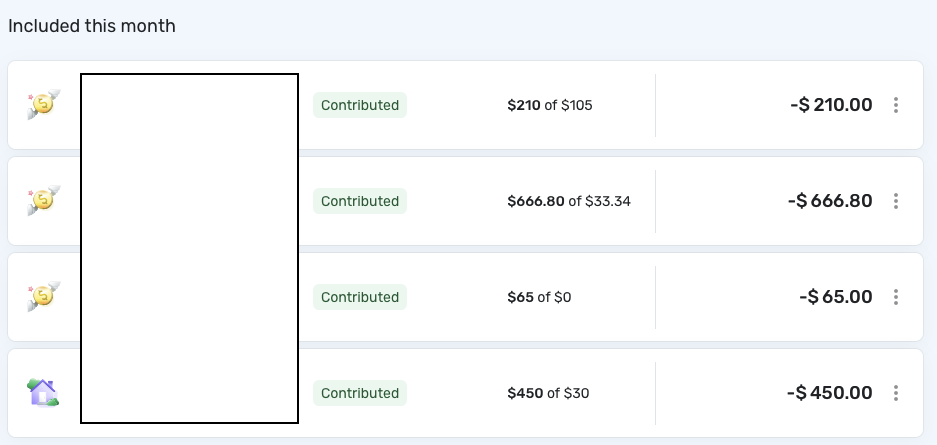
This definitely wasn't done by me.
How can I fix this?0 -
I was reconciling my two manual accounts and discovered phantom deposits in each account dated January 21, 2026 and categorized as 'opening balances' - despite these accounts having existed in Simplifi for years. I verified these are not transfers between my accounts. After deleting these erroneous transactions, the balances still don't match my actual bank balances. One account shows over $10,000 more than it should, indicating additional calculation errors beyond just the phantom deposits.
0 -
Update: Just found another phantom transaction, this time in my manual assets, not the accounts mentioned above. A five-figure transaction appeared that I did not enter. This appears to be a broader data integrity issue affecting multiple manual tracking categories.
0 -
Hello everyone!
We thank you for your patience as we continue to work on a resolution to this known issue. The alert has been updated with a temporary workaround in the meantime.
-Coach Jon
0 -
The temporary work around didn't work for me. I deleted the bogus transactions and the balances still show as double what they should.
2 -
Interesting, it fixed the balances for me @truckmann
0 -
I am concerned that the temporary workaround listed here might not be correct
What I see is that there is an extraneous "Opening Balance" transaction dated yesterday. However, when this is removed, it is still showing in the balance. It appears like 2x the "Opening Balance" number was actually added.
My concern is that this workaround (because of the double recording) may actually not be fixed and removing just the one transaction could make the fix on your end then not work.
Alternatively, I want to make sure it was known that I was experiencing this issue differently than what was stated and that the problem might be larger in scope than was originally identified.
1




