Net Worth Feature: Share your feedback here!
Comments
-
Are the HELOC accounts connected to the bank? Does the balance show as positive in the account itself? I think some screenshots showing the issue would be helpful.
Thanks!
-Coach Natalie
0 -
Yes, the HELOC account are connected to the bank. Yes, the balance does show as positive on both the bank website and in Simplifi. I'll DM some screenshots to you.
0 -
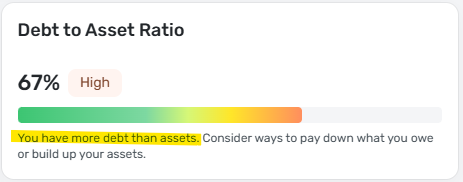
I like it, but the Debt to Asset Ratio doesn't seem to be working — it's saying "You have more debt than assets. Consider ways to pay down what you owe or build up your assets." This is not true.
0 -
@ronshapiro, thanks for confirming!
No need to send data yet. It sounds like this is an aggregation issue with the bank versus an issue with the Net Worth feature specifically. You will want to create a separate post to work on the balance issue. Once that's corrected, Net Worth should also display correctly.
-Coach Natalie
0 -
I am legally blind and use a screen reader to navigate. Typically the site works pretty well, but right now over the Net Worth page there must be a dialog for the feedback button as this is all I can select. I cannot close this by hitting Esc or clicking elsewhere on the screen. Since I am not totally blind I can see there are things on the screen, but I cannot tab to them or hover over them with the mouse as I believe the overlay for the feedback link is blocking them. Would be interested in importing more accounts if you could get this working asn add the MetLife retirement plan through Alight solutions I requested about a year ago.
0 -
This should now be fixed!
-Coach Natalie
1 -
As others have mentioned, why are these two numbers different???
I do not have any accounts excluded from the "New Worth" graph
 0
0 -
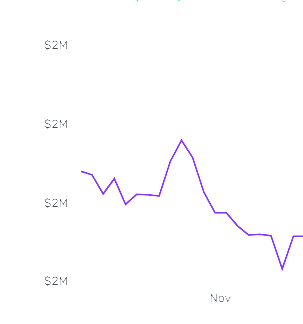
I love the new Net Worth report both on the dashboard and stand-alone. Please add a decimal point to the left axis. As it is now, it is not very useful. See screen shot.
 0
0 -
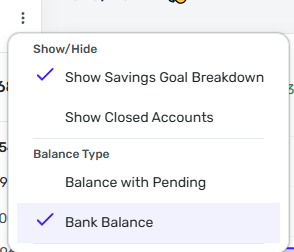
Hey! This difference may be due to the balance type you've selected in your accounts list. You can choose between Bank Balance or Balance with Pending in the main accounts list (using the 3-dot menu next to the "+ New" button), however, by default, the new Net Worth feature displays only your Balance with Pending. This could be the cause in difference between the two that you're seeing.
If that's the cause, is that something you'd like to see? i.e., having your selected balance type also control what's used in the new Net Worth feature?2 -
Understood, that was the difference. I had it set to "Bank Balance", not "Balance with Pending". And yes, that is definitely something I'd like to see. Otherwise it causes confusion with differences in values, making you question if one or both are incorrect. I think it should adjust with the main "Balance type" setting.
The only reason they are so significantly different is because my Venmo connection is broken which has been offline for almost a month. It incorrectly shows shows a -$7,046 balance with pending (It should be +$28). Hopefully, someone at Quicken can escalate that connection issue - it seems to be causing other issues, as seen in this example
3 -
I'm seeing a small discrepancy between my "All Accounts" total and my Net Worth with all accounts selected. It's a small difference, but the totals should be consistent:
 0
0 -
I think your issue was addressed in the previous comments from me and Coach Matthew.
3 -
The statement "You have more debt than assets" feels incorrect when the Debt-to-Asset ratio is below 100%.
 0
0 -
I think their percentage formula is incorrect. I believe 50% is meant to be, for example, $50 assets & $50 debt.
Currently though, it would show 50% if you have $100 assets and $50 debt.
It should be anything above 50% means you have negative net worth and anything under 50% means you have positive net worth. I assume your 67% comes from, for example $100 assets and $67 debt, $67÷$100=67%.
Looks like Quicken needs to take $100 assets and "subtract" the -$67 to get $167 total dollars. Then the $67÷$167=40%, which is I think what their intention is.
That way, if you have $100 assets and $100 debt (Net worth $0), it's $100÷$200=50%
0 -
Hey! Thanks for flagging this. It appears we just have the text description for this debt to asset ratio range incorrect, which we'll fix. The calculation itself should be working properly, but definitely let us know if you're seeing otherwise. Thanks again!
1 -
As Coach Matthew mentions above, I think the formula is correct (& simpler than laid out here, although I enjoyed your more complex thought process…lol).
DTA ratio = Total Debt / Total AssetsI calculated mine and the percentage showing is correct. Hopefully they can get the text updated, though. It scares me every time I see it.
2 -
@Coach Matthew Actually, thinking about this logically, the way the percentage is calculated and the "Risk by percent range" does make more sense than what I mentioned… because if you have more debt than assets, that's always a huge issue.
However, the "Risky" area range should probably say "80-99%+" because if you do have a negative net worth, it will be over 100%. The way this is showing, it appears that you cannot have over 100% debt-to-asset ratio… but you certainly can with the way it is calculated and intended.
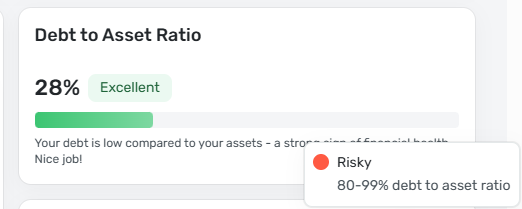
@nicolekiamichi , you beat me to it! I have a tendency to overthink things 😂 I did realize how their formula was calculated in the more simple terms, but assumed with their ranges not showing it possible to go over 100% that maybe the percentage formula was wrong LOL.
1 -
I would like be able to see the account balances by day/week/month for the period covered rather than just the ending balance numbers.
0 -
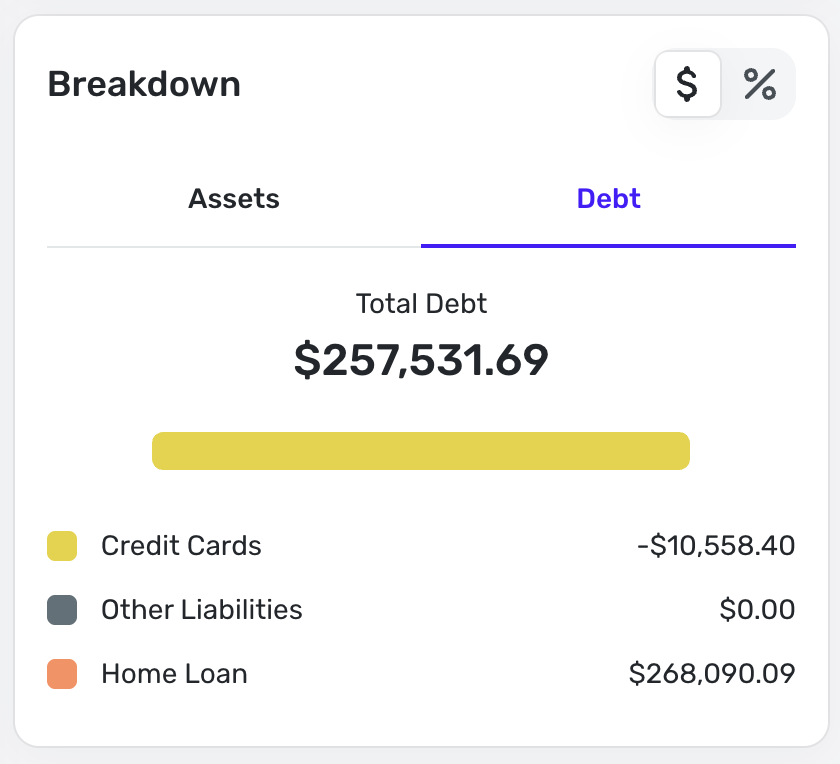
Love this new feature! However my mortgage is being counted as positive even though its listed under debts. It looks like my net worth is much higher than it actually is.
 0
0 -
Hey! Does your mortgage value also show up as positive in your Accounts list in Simplifi? Also, do you mind sharing what FI your mortgage is through? Feel free to DM me as well. It may be an issue with how your balance is being sent. Thanks!
0 -
The total for Retirement is not correct on the mobile app. If you add up all the account totals listed, it is less than the Retirement section total shown. Which throws off the overall Net Worth total.
0 -
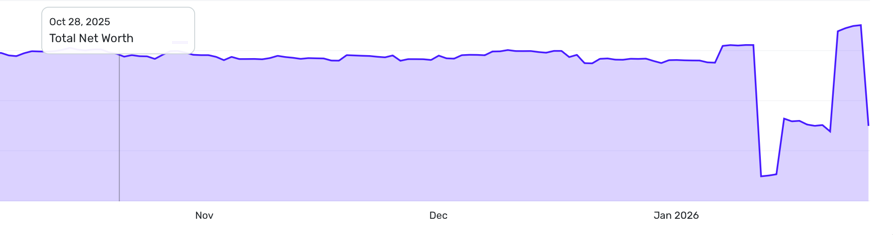
This data is wildly inaccurate - I'm showing a 125K drop on January 26-27 for no reason, there's no account changes showing as a reason, and that's something I certainly couldn't miss. I think this from adding in my HELOC, but I had to to fight with this account bit due to how the bank shows the data, and had to make it manual account because of this. I have data, going back to last summer, but it treats it as an immediate drop in the graph on the day I entered it, and doesn't calculate it into the historical info. It also seemingly doubled it?
Also, moving money from one asset location to another turns it into a rollercoaster. I moved a large sum from savings to my checking, then to my investment account, so it shows my net worth going up during that time, then crashing down again a few days later once the check cleared.
It's like it's only snapshots in time, and doesn't take historical info into account. I'm getting seasick watching this go up and down. I really wish it would base it on the data you had RIGHT NOW, instead of historical add/removes that might have been incorrect data being fixed, etc. It seems like all the charts do this, and it's awful.
 0
0 -
-
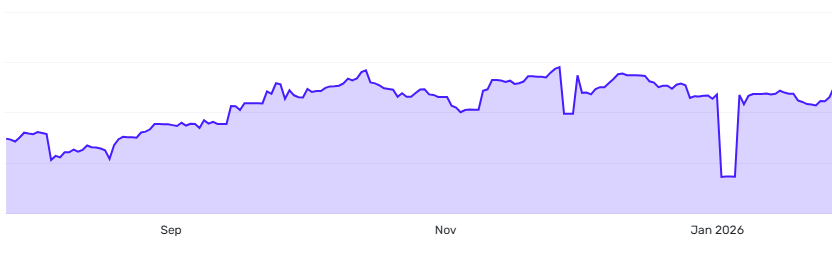
I think the disconnect here might be related to something I noticed on my accounts. I transferred a large portion of money from an investment account to a savings account recently (Jan 2026), and my account reflects the same thing… a huge dip that spikes back up. I also am not a fan of the chart showing this, but it seems to be an issue with the way Simplifi is looking at account balances.
The Dec. 2025 dip related to account balances in one account showing a huge negative incorrectly for a couple days. I don;t know what would have caused this…
I would hope this is something that Simplifi can fix, because I don't want to see a dip in this graph every time I make a transfer and Simplifi records the account balances like this. It's like it records the money going out of the one account, then doesn't record the money going into the other account for a few days. For me, it was a straight transfer, so it should have immediately went -$xx and +$xx in both accounts at the same time.
I am wondering if this relates to my previous comments about "Bank Balance" versus "Balance with pending" since it appears that the net worth graph currently only shows "Balance with pending".
EDIT: 11:36am (Original 11:13am):
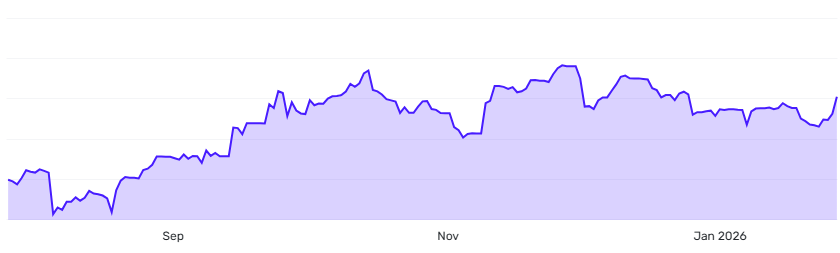
I did edit my account balances as Coach Natalie suggested. I am just wondering if there is something that can prevent the need for this. In my situation for the transfer, I do not know if Simplifi could do anything. When I go into my accounts they actually show the money being withdrawn from the investment account on 1/16/2026 and the deposit in the savings account is 1/20/2026. I do not know why there is a disconnect, but it seems to be separate from Simplifi; It comes straight from the banks…
For the other dip in December 2025, that does seem to be a Simplifi "glitch" since my account balance was just plain incorrect for a few days.
 0
0 -
@Coach Natalie / developers,
I have found another slight issue with the Net Worth feature.
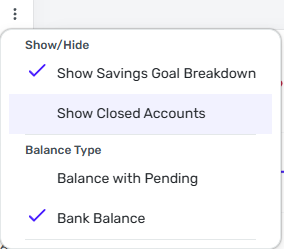
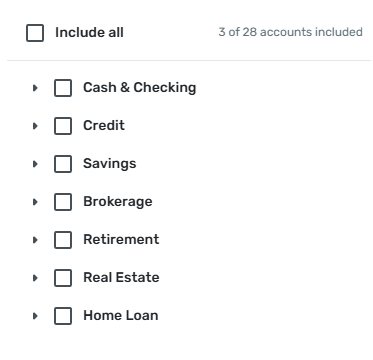
I have my closed accounts hidden. When I go to select specific accounts in the filter, it DOES NOT show the closed accounts, yet still includes them. I was trying to look at one specific account to try and figure out where these balance issues are coming from and attempt to fix them, but when I thought I only had one account selected (Since everything else was unchecked), I did not realized the closed accounts are still included, but not showing.
I think closed accounts in this filter should always show, in my opinion.
 0
0 -
Hi @Coach Matthew , thanks for your feedback on this topic!
I too have the issue where my "All Accounts" value is different from my "Net Worth" value. However, my All Accounts is set to "Balance with Pending," so that's not the cause of the discrepancy.
Any idea what's causing the difference and how to fix it?Thanks!
0 -
Hey! Sorry for the trouble. Let us know if we can reach out via DM to get your info so we can continue to troubleshoot this issue. Thanks!
0 -
Thanks @Coach Matthew ! Yes, please DM me so we can troubleshoot this issue.
0 -
This is such a great new feature which I had wished for years! Very nice and useful and I use it every day now! One item that I'd like to be addressed, is to have a way to set the "asset vs debt" to be my default view, or remember the view I used last time so I don't have to always switch to the "asset vs debt" view every time I log on. Thank you!!
2 -
I like the new net worth chart. Thank you. Could we have a per-account visual breakdown so that it is visible at a glance what accounts have gotten bigger and which ones have dwindled?
2