First Bank - CA,IL,MO FDP-106

www.first.bank has updated their website and app, ever since the update Simplifi can't connect and is throwing FDP-106. Is there any timeline when or if this can get resolved.
Comments
-
@abcdef, thanks for reaching out to the Community with this issue!
I was able to confirm the FDP-106 error when checking your connection attempts with First Bank - CA,IL,MO from our end, and it looks like it started yesterday—is that correct? Since it sounds like the issue is happening on an existing account, please follow these steps to establish a completely fresh connection with the bank to see if doing so clears things up for you:
- Make all of the accounts with this bank manual by following the steps here.
- Once you see the account(s) listed in the Manual Accounts section under Settings > Accounts, go back through the Add Account flow to reconnect to the bank.
- If the connection is successful, carefully link the account(s) found to your existing Quicken Simplifi account(s) by following the steps here.
Let us know how it goes!
-Coach Natalie
0 -
hi @Coach Natalie I tried as you suggested, making the account manual and add a new account but I still get the same error
We are unable to connect to First Bank - CA,IL,MO at this time. Please try again later FDP-106.
I first noticed the issue 3/29
0 -
@abcdef, thank you for giving those steps a try and posting back!
I'd like to get this issue escalated to our service provider. To do so, please provide the following data:
- The name of the account, as it appears in Quicken Simplifi.
- The name of the account, as it appears on the bank's website.
- What type of account are you attempting to connect?
- Have there been any changes made to the bank's website or the sign-in process recently?
- Has there been any activity in the account in the last 90 days?
- What is the exact URL you see after signing into the bank’s website?
- A screenshot of the Accounts Summary page from the bank's website that has a wide enough scope to show the full page URL. This is the landing page after signing in, and typically lists all accounts and balances. You will want to take this from a web browser and not a mobile browser, as well as redact any private info such as account numbers.
Feel free to DM any of this information for privacy. Please also submit your logs via the 'Send Feedback' option:
- Log in to the Quicken Simplifi Web App.
- Select the Profile icon in the upper-right corner of the screen.
- With the Profile menu open, hold down the Option key (Mac) or the Alt key (Windows), and then click Send Feedback.
- Leave all boxes checked, add a brief description of the issue, and then click Send.
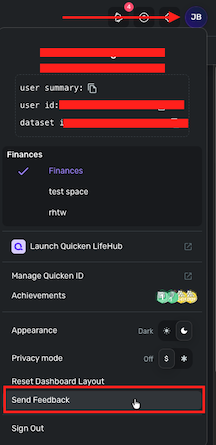
I look forward to hearing back from you!
-Coach Natalie
0 -
@abcdef, thank you for DMing the requested info! I have escalated this issue and will post back here with updates.
EWC-12336303
-Coach Natalie
0 -
@abcdef, we heard back from our service provider, and they need a debugging session scheduled. If this is something you'd like to participate in, please provide the following data:
- Confirm that the email address and phone number listed on your Quicken Simplifi Account are your best contact info.
- Provide your general availability over the next few weeks, and please also include your time zone with this.
Thank you!
-Coach Natalie
0 -
@abcdef, I wanted to check in again to see if you were able to take a look at the latest info —
Thanks!
-Coach Natalie
0 -
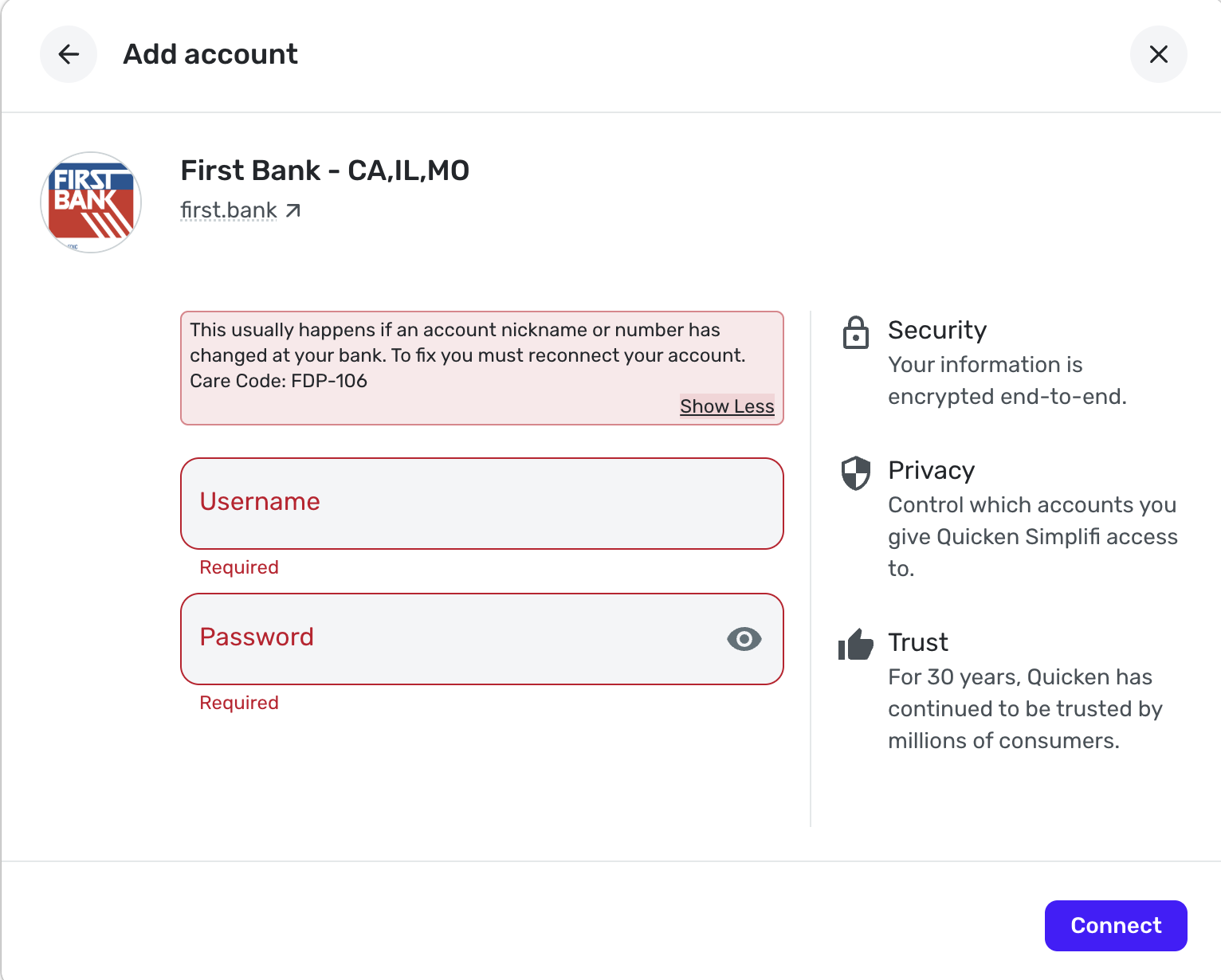
I'm also getting this error, except that I'm trying to add this bank for the first time. This is the error I get, after logging in and entering the SMS security code.
 0
0 -
@abcdef, I wanted to reach out to you one last time here. If we don't hear back from you by next Wednesday, the 22nd, we will be closing out the escalation.
Thanks!
-Coach Natalie
0 -
Thank you for joining the discussion! Since you are adding the account for the first time, there are no troubleshooting steps to follow. We will, however, need specific data from you to begin the escalation process.
- The name of the account, as it appears on the bank's website.
- What type of account are you attempting to connect?
- Have there been any changes made to the bank's website or the sign-in process recently?
- Has there been any activity in the account in the last 90 days?
- What is the exact URL you see after signing into the bank’s website?
- A screenshot of the Accounts Summary page from the bank's website that has a wide enough scope to show the full page URL. This is the landing page after signing in, and typically lists all accounts and balances. You will want to take this from a web browser and not a mobile browser, as well as redact any private info such as account numbers.
Please also submit your logs via the 'Send Feedback' option:
- Log in to the Quicken Simplifi Web App.
- Select the Profile icon in the upper-right corner of the screen.
- With the Profile menu open, hold down the Option key (Mac) or the Alt key (Windows), and then click Send Feedback.
- Leave all boxes checked, add a brief description of the issue, and then click Send.
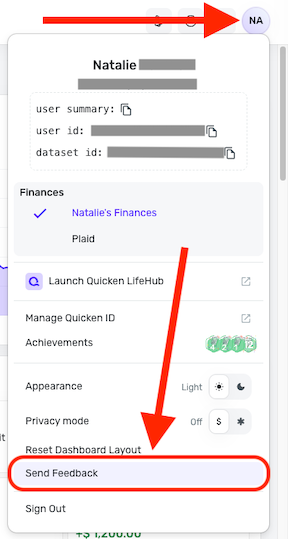
Feel free to DM any of the information for privacy. We look forward to hearing back from you!
-Coach Natalie
0 -
Hi @Coach Natalie thanks for the response. My answers are below:
- Icon Checking
- checking account
- I don't know since I am a new customer with this bank
- Yes, transactions within past 2 days
- I log in at the URL
https://login.first.bank/auth/realms/backbase/protocol/openid-connect/auth?response_type=code&client_id=bb-web-client&state=emw2ZUp5emxZRVAtRXY1azVWZWZOQmZ3dWl2TmlDamNoVjA4TTZGQWh1TGRW&redirect_uri=https%3A%2F%2Febanking.first.bank%2Fweb-app%2Fen%2Fselect-context&scope=openid&code_challenge=n2iWozwmjE5VyEWW-XnNTynmw25tPjaRSao_vq_PO7o&code_challenge_method=S256&nonce=emw2ZUp5emxZRVAtRXY1azVWZWZOQmZ3dWl2TmlDamNoVjA4TTZGQWh1TGRW&ui_locales=enand get taken to the URLhttps://ebanking.first.bank/web-app/en/dashboard - image below:
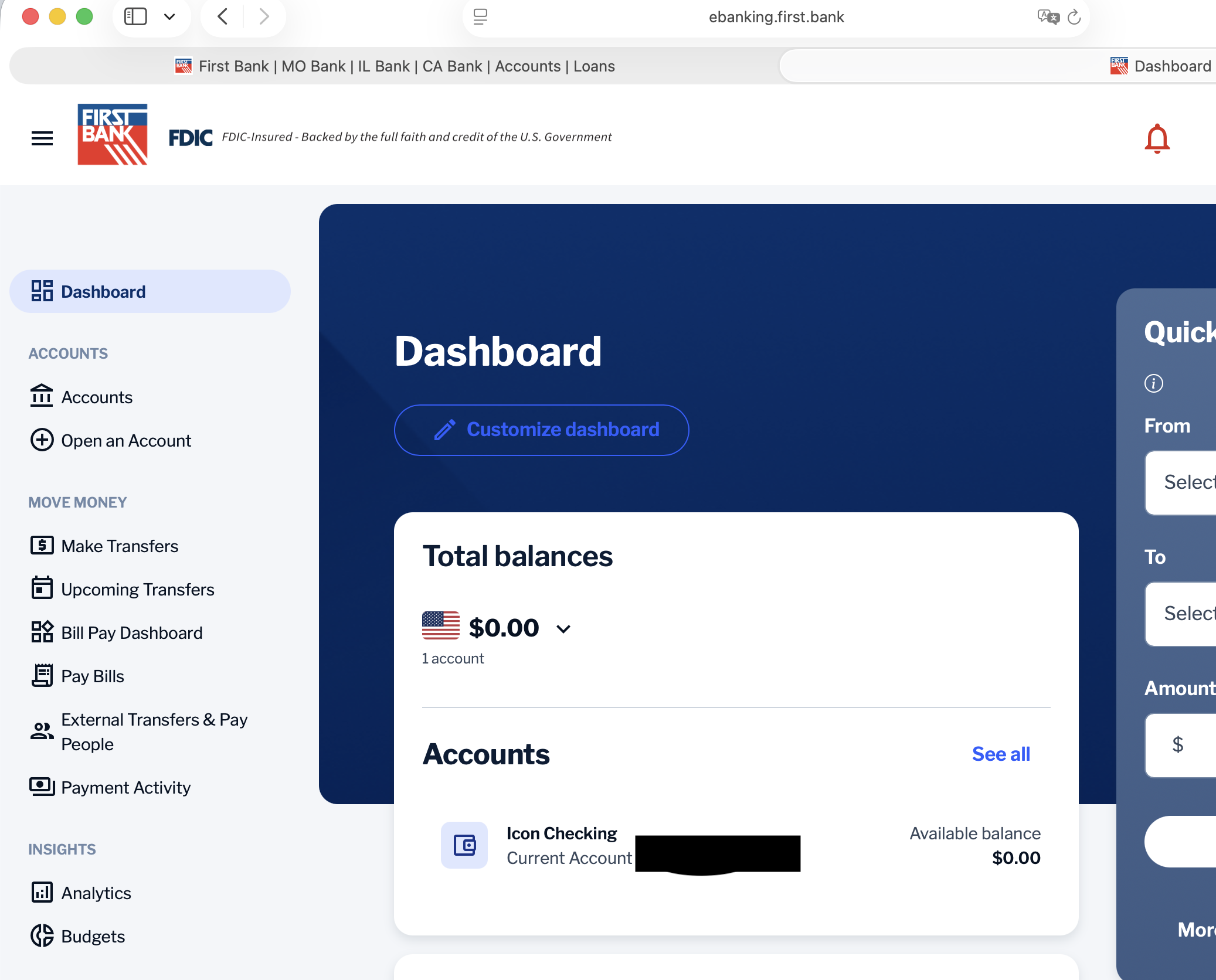
I also sent the logs, and received "report created - reference id 534544220752316418". I had to uncheck "include screenshot" because it would error out. Hopefully the screenshot in my previous comment helps.
0 -
@supermatthew, thank you for that information!
Since my latest reply from this morning, it looks like there is an update on this issue. It is now listed as a known issue with our service provider, and they are requesting a HAR file. If you're interested in participating in a session where they can gather that file from you, we'd need the following additional info:
- Confirm that the email address and phone number listed on your Quicken Simplifi Account are your best contact info.
- Provide your general availability over the next few weeks, and please also include your time zone with this.
Once we have this from you, we can request the session from our end. From there, someone from our engineering team will email you, typically within the next few weeks, to nail down a specific day and time.
Let us know!
-Coach Natalie
0 -
- yes that contact info is up-to-date
- M-F 9am-5pm pacific time (traveling the week of 4/20 however).
0 -
@supermatthew, thank you!
I have submitted a ticket to request the session, so be on the lookout for that email.
In the meantime, you can manually track the account. The following articles go over adding manual accounts and manual transactions.
CTP-17014
-Coach Natalie
1 -
@Coach Natalie Hi, sorry i haven't been in touch. Do you still need a debugging session? I see another user has also joined.
0 -
@abcdef, thanks for the reply!
I'm not sure how many sessions they would like to have scheduled. If you'd like to participate, we can still request it. We will just need the info mentioned above:
Let us know!
-Coach Natalie
0 -
- yes that is my contact info
- M-F 9am-4pm Central Time
0 -
@abcdef, thank you!
I added you to the ticket. I'm not sure if they will need to hold additional sessions, but definitely keep an eye out for an email from someone at Quicken. Otherwise, we will continue to post updates here.
In the meantime, you can track the account manually by adding transactions, which will keep your records up to date. Here are the steps to do so:
If the account is an investment account, the manual tracking steps are a little different:
- Make the account manual so you can add and edit Holdings:
- Add/edit your Holdings to keep accurate records: and
CTP-17014
-Coach Natalie
0 -
Looks like there has been some progress. Yesterday I was able to re-link my bank account. It is syncing the balances but there are no transactions
0 -
@abcdef, that's great you were able to add the account!
It doesn't look like the HAR file session ticket has been picked up quite yet, so we will wait to see how things go there. Hopefully it's not too much longer before you see a full fix!
-Coach Natalie
0
