Splits in Recurring & Other Splits Enhancements: Share your feedback here!

We’d love your feedback on Splits in Recurring Series and our latest splits enhancements! How are these updates working for you—what’s going great, and what could be better? Drop your thoughts in the comments below.
Check out the full announcement for all the details!
-Coach Natalie
Comments
-
Thank you, finally here! So far as I have tried using it on one recurring trans seems to work fine.
1 -
I don't have this enabled yet but I have a once monthly payslip coming on April 22 which would be the ideal way to test this. Otherwise It will be late May before I can fully test. Hope you can broaden access soon.
1 -
2 initial things
How do I use when creating a brand new recurring series? I only seem to be able see the abililty to edit splits from a past transaction that I'm transforming to a recurring series. In my case this transaction does not yet exist as previously created the 'split' as 3 separate recurring transactions.
Also using this for a recurring payslip, some of the splits are negative such as taxes or other deductions, but it looks like I need to enter a + before the number. Do I have this +/- syntax correct?
0 -
I'm loving this so far! Below is my feedback so far on the general transaction enhancements:
- My biggest "complaint" so far is that I have to add the tags & notes to each split. Over time that will add up to a lot of unnecessary clicks. I heavily use tags and notes so will use them more often than not on each split. I don't mind that the exclusion isn't added by default except on transfers but could go either way on this. Perhaps this is another user preference candidate long-term where the user can decide the default fields for splits.
- I feel like there's a lot of screen real estate wasted on web, at least on my larger screen. By making the dialog box larger, scrolling could be minimized.
- When viewing splits, it would be nice to view the transaction total when hovering. This is the opposite of seeing the splits when hovering when split view is disabled.
- Viewing the notes in the register is still a little odd/inconsistent. When viewing splits, I see that the transaction level notes and split-level notes are now concatenating, however, the note preview when hovering on the field does not appear making it impossible to read longer notes in the register without opening the transaction. In-line edits also seem a little odd when there are notes at both levels - when viewing splits, once you click in-line, it only displays the split note. When viewing the register without splits, only the transaction level notes are listed, but it would be nice if the notes were concatenated there as well. Personally, I'd join the separate notes with "; " instead of the colon used in the split view currently. I'm not sure my preference on a solution to the edits but would like better clarity on which note fields are being edited if allowed in-line and to be able to read the full note with a hover like you can on other notes.
- On a related note, the Notes filters/search bar don't search all notes. It differs by split view option which fields are actually searched. I've been using the split view primarily but have to toggle it on and off when I'm trying to search notes and have to complete multiple searches to locate all transactions.
I'm looking forward to testing the recurring splits once I have access soon!
1 -
Splits in Recurring are now live for all Early Access Basic subscribers!
-Coach Natalie
1 -
I have Early Access enabled, but do not see an option to add splits to existing recurring transactions or to new ones…
0 -
Hello @Maxim,
We can surely add your user directly. Let's confirm that you are looking here in the Series create dialog.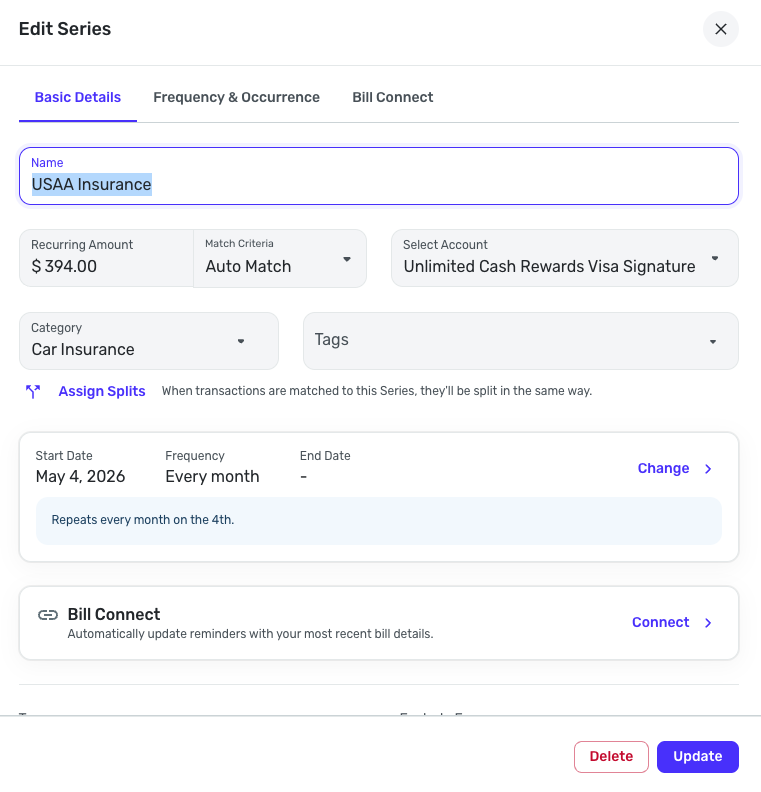
Then if you use Assign Splits, you can add split lines to an existing bill or a new one.
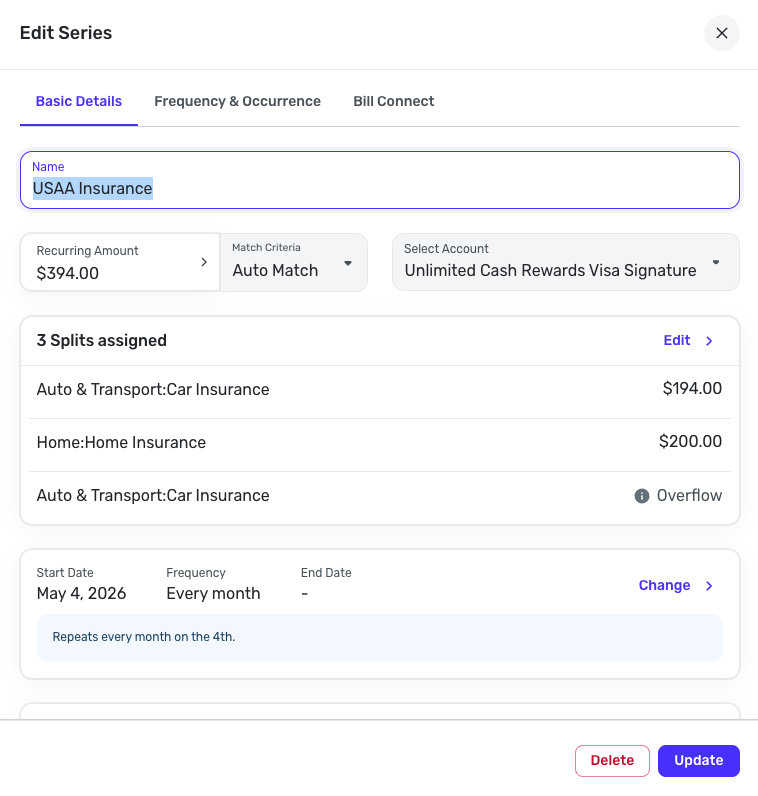 1
1 -
Any word on when these enhancements to splits in recurring series will be available in QBP?
DryHeat
-Quicken Classic (1990-2020), CountAbout (2021-2024), Simplifi (2025-…)0 -
It just showed up! Thank you.
2 -
I am playing with the Recurring Splits. I would prefer that the taxes and insurance end up in the Bills section rather than Other Spending. However @Quicken Kirby had already indicated that it would not, so I was not surprised. But I hope this can be a future enhancement.
I have split our three incomes (Pensions and Social Security) and it is very straightforward and looks good. I only have one bill that is split, which is for insurance (house and two cars). I will do that next.
Thanks for adding this feature!!!
Steve
Quicken Simplifi (Safari & iOS) Since 2021
Quicken Classic (MacOS) Since 2009
Dollars & $ense (DOS) and MS Money (Windows) 1987-20092 -
+1 to the additional clicks for adding tags to splits. I do this for most splits and it's already becoming tedious
0 -
My wife's SSA payment arrived this morning (3rd Wednesday) and Simplifi matched it fine. The transaction shows the split of SS income and Medicare Premium. So very nice.
I went ahead yesterday and deleted my old set up of using Bills for split income recurring and switched them all to Income Recurring with Splits. (I decided I might as well do it the way Simplifi intended.) I also set up Planned Spending limits for Medical Plans (we have Medicare for SSA but also a dental plan comes out of our Pension) and one for Federal Tax. I retroactively applied that to past Spending Plans so I got all of that out of Other Spending.
Then I relinked all our SSA payments and Pension payments to the newly created split income reminders. All of this was totally unnecessary, but I am an "old campaigner" so didn't take me that long. 😀
Steve
Quicken Simplifi (Safari & iOS) Since 2021
Quicken Classic (MacOS) Since 2009
Dollars & $ense (DOS) and MS Money (Windows) 1987-20091 -
Liking this too. Waiting for my social Security to arrive next week to see how it applies the new split transaction.
I had shared the following direct to @Quicken Kirby but posting here for others who may not find the bills vs income type selector.
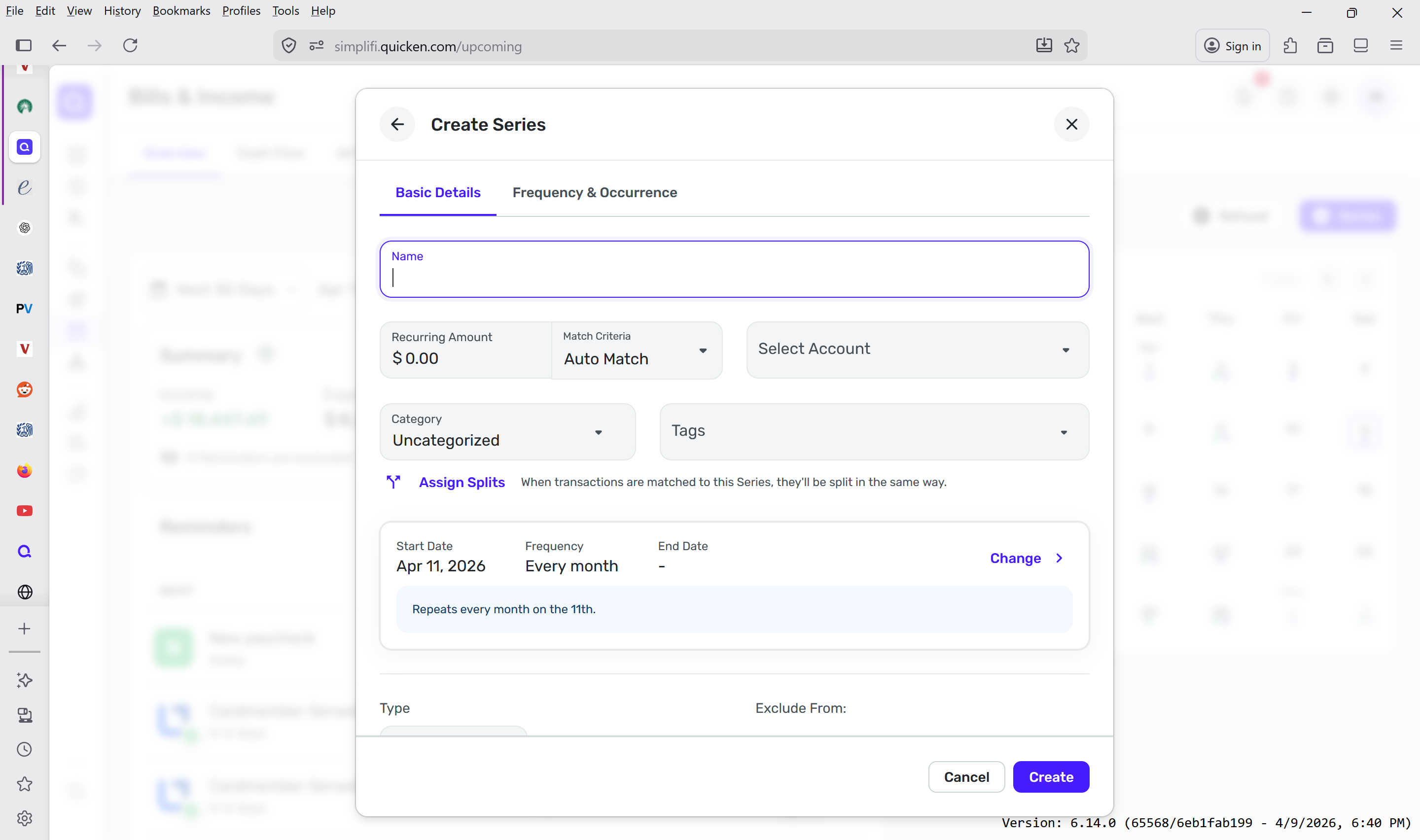
One issue I did encounter was that the series 'Type' button at bottom is not visible on the initial view on my laptop sized screen. .(see screenshot). I had to scroll down to see it. I'd suggest that button be at the top of screen or at the as its first thing the user needs to select. The default is 'bill' not 'income' so hence my +/- data entry confusion. My use case is the one you showed - income type-tax selection- health care insurance deduction
 2
2 -
This is a great new feature. Able to split out various health insurance categories from single BCBS monthly payments. Have wanted to be able to do that for a long time. Great work!
1 -
Just my two cents: Hooray! I'm busy with tax stuff today, but I'll check the new features out soon. Sounds like a huge step forward. Thanks!
1 -
-
I am assuming that splits are not applied retroactively if you link a old transaction. I did not see that in the description of the change and could not get it to work. If my assumption is correct, is there a chance that that feature is under consideration or should I bite the bullet and fix all of my old transactions by hand?
Thanks to whoever has the answer to this.
0 -
@steveb thanks for posting. I'll look into that. To confirm, does the 'sharee' have Early Access on?
Everyone,
Thanks for using splits and sharing your feedback. This improvement was a bigger feature than we planned so I'm really happy to have it available for you all to use it.
Btw, I'm a product manager on Simplifi team and I am listening here to all the feedback so we can define improvements.
And, specifically, @ek4askmb, the feature does not apply retroactively. It's not currently planned. I have an idea about a possible way. Let me experiment and get back to you.1 -
@Quicken Kirby it was @sbennet1 that was the originally sharee not @steveb @ek4askmb was the owner
I @sbennet1 , the sharee, had early access turned on and the split option did not show up with an incognito chrome browser. It did show up for the owner, @ek4askmb . @sbennet1 can try it again if you want.
@sbennet1 thanks you for looking into applying recurring splits to be retroactive. Sorry for the the 2 different user ids.
0 -
Hi. There seems to be an issue with adding notes in a split view when one of the splits is a transfer. The moment you add the note in the original transaction, and it creates a new transaction in the transfer, the note doesn't show up on the other end of the transaction (which makes it pointless to add a note in transfers).
Original Transaction: (SPLIT)

Notes added to Split in original transaction:
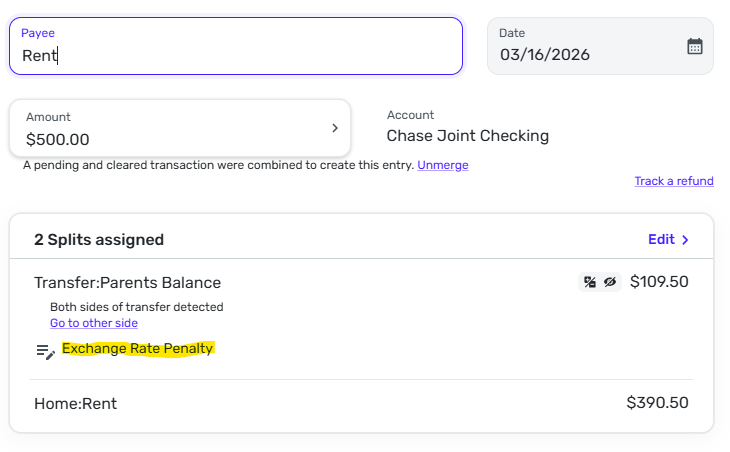
Exclusions work, but notes are not added to the destination transaction as shown.
 0
0 -
Hi there @jdtrujillo,
Thanks for the feedback and details. We definitely talked about this internally and had heard about use cases where you might want different notes on each side. And we can always improve. This what we do in Early Access.
For you, do you always want the same note on both sides of the Transfer?0 -
@ek4askmb I think I understand why this is happening. I was targeting only users on Personal Tier of Simplifi - but that targeting excludes sharees (who don't themselves have a subscription). I just tried to fix the feature flag to allow sharees as well. Let me know if you can see the feature now?
0 -
I tried it as the sharee on new instance of a incognito chrome web browser and it did not work at least on creating a new manual recurring transaction. The split option was not there.
0 -
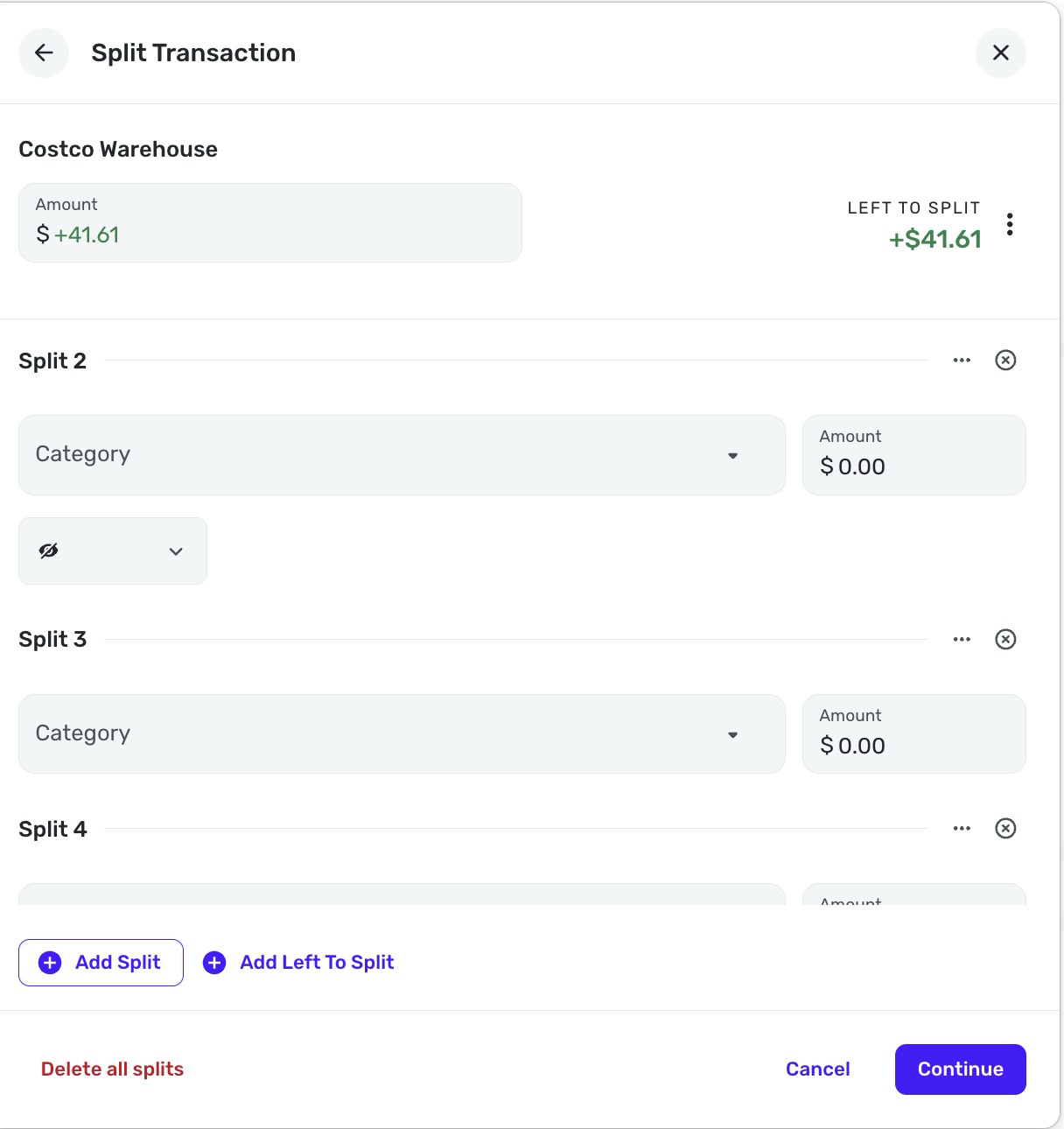
UI on splits is … not great. Exclusions are available for the first two splits but after the second they arent there. The meatball menu for tags, exclusions and notes is …. not intuitive. Feels like the UI was rushed to meet the demand but the there must be a better way to do this …
0 -
Trivial issue…When an income item such as a paycheck is split with an expense item, the income amount is no longer noted with dollar sign ($) in the cash flow chart in the Web version.
0 -
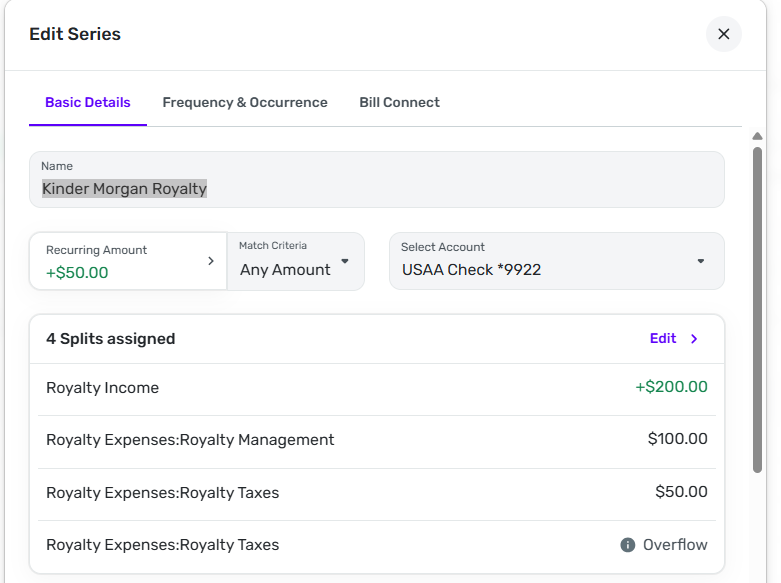
Splits don't seem to be recalculating correctly when I edit a transaction that linked to a recurring series that is using splits. Here's the setup of the recurring series:
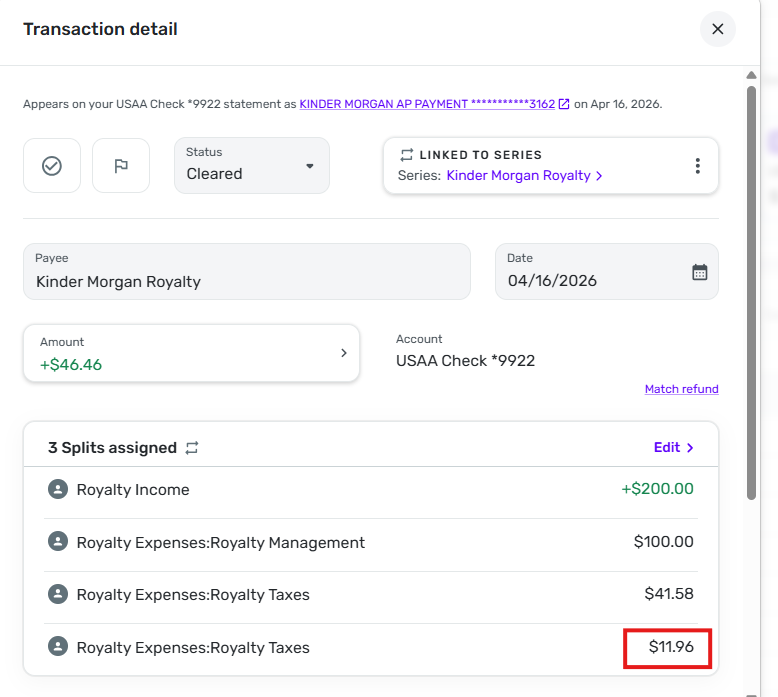
Here's the transaction that was created when the downloaded deposit from my bank was matched to the series. Note that the amount in the Overflow split was $11.96 and was assigned to an expense Category. I'm not sure why the regular Royalty Taxes split got changed from 50.00 (the amount in the series) to 41.58.
Here's the result when I edit the splits to conform to the actual royalty statement. Note that the income minus the two expense splits (+156.23-106.16-3.61) equals the Amount of the transaction (+46.46). However, the "Left to Split" amount (which should be zero) is +11.96, which is the same magnitude but opposite sign as the previously calculated Overflow split.
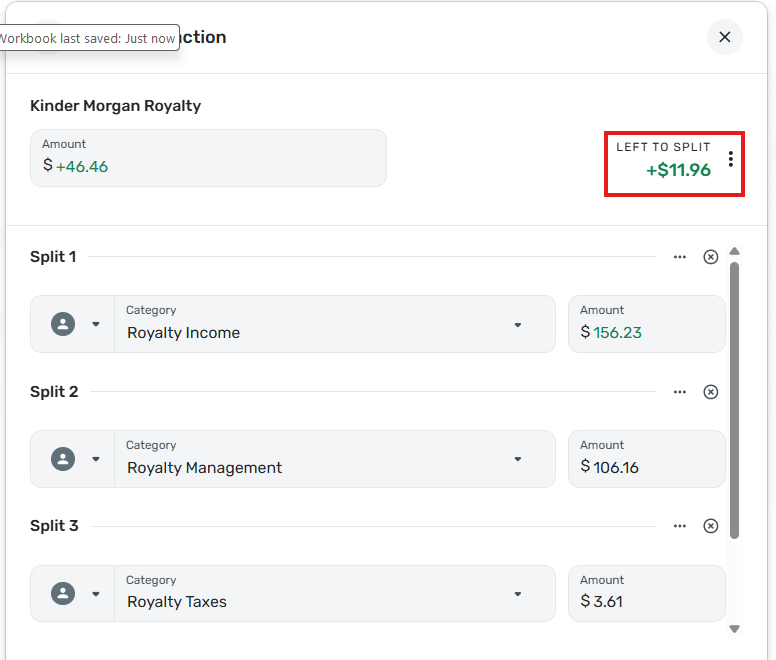
You can't see the Overflow split in the above image, so here is an image of it after scrolling down:
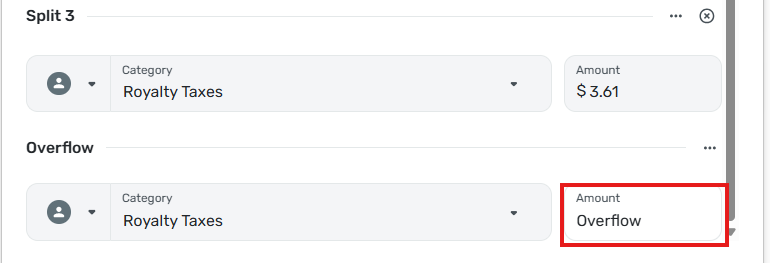
I am unable to save the transaction with the correct values because the Left to Split is not zero.
Oddly, if I reduce the split for the Royalty Management expense by 11.96 (changing it to 94.20) the Left to Split goes to zero and I can save the transaction. But this makes no sense as now the income and expenses add up to +58.42, not +46.46 (the actual Amount of the transaction). It is as if a phantom expense amount of -11.96 is being included in the transaction.
When I save the transaction with Royalty Management changed to 94.20 and then look at the transaction in the register, I see that the Overflow amount (Royalty Taxes expense) has been set to 11.96 to make the transaction balance.
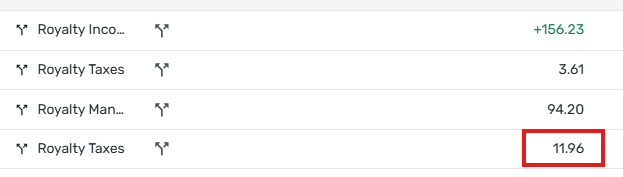
Different Problem: When I edit the splits and click Continue to save the edits, the changes made to the amounts do not show up on the Transaction detail form. I have to click Update to go back to the register to see the new amounts. When I then edit the transaction in the Transaction detail form, the changed amounts are there.
FYI… Royalty Income is an Income Category, Royalty Management and Royalty Taxes are Expense Categories.
DryHeat
-Quicken Classic (1990-2020), CountAbout (2021-2024), Simplifi (2025-…)1 -
Reports are not showing notes on splits when there is no note on parent.
0 -
@DryHeat thanks SO much for the details here - I've got to dig into with the team. I'll let you know what we find but I really appreciate your using and reporting back about it! More to follow!
0 -
Please pass along product feedback: the change that requires clicking the 3-dot menu to add Tags to split transactions adds friction and makes the workflow worse. I’d like Tags to be directly accessible when editing splits. I use Tags extensively particularly with grocery purchases.
Also, the Quicken Community link in Help Center is not opening for me.
1