Help finding and removing transactions assigned to Account: Unknown (edited)

While researching a large anomaly in the "Spending" dashboard widget (see first image),
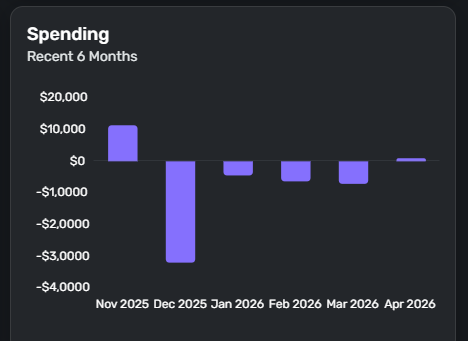
I discovered a significant number of transactions in that month (and more in prior months) assigned to the account "Unknown":
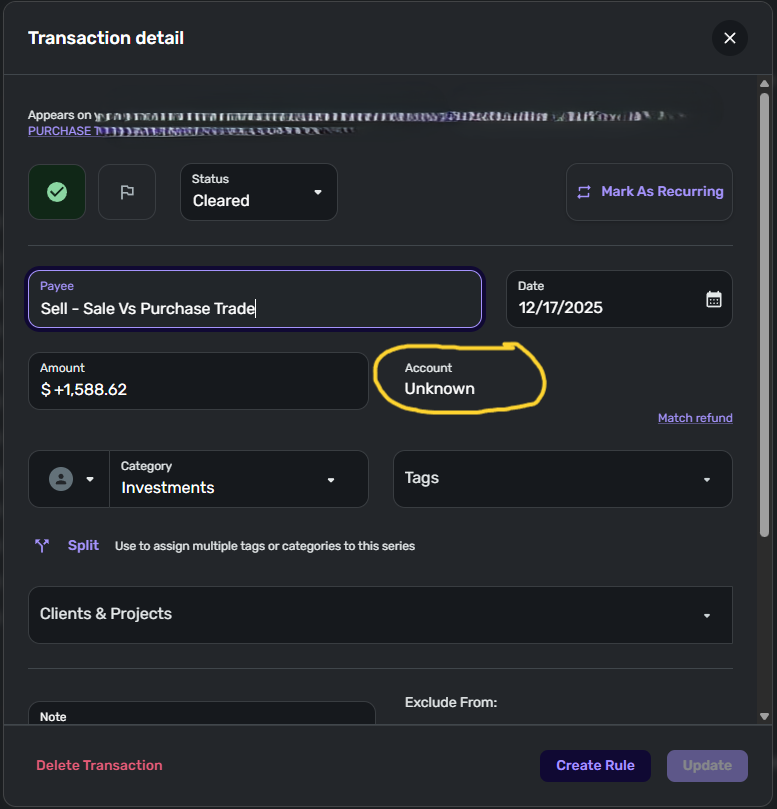
The correct account these transactions should have been in was marked "Excluded" from Spending Plan and Reports, so the transactions should not have been visible in the Dashboard in the first place.
Upon further investigation, these transactions do not appear to be duplicates. I can tell which account they should be in (many are investment transactions), but you cannot navigate to this "Unknown" account to fix the transactions. Nor can I cannot find where to search for all transactions in an "Unknown" account without just bumping into anomalies.
How do I search for these transactions, and how can they can be added back to the correct account? Their existence means I cannot trust any dashboards or reporting data in Simplifi 🙁
Quicken Simplifi user since 2024; Desktop since 1992.
Comments
-
Hello @SmittyVA,
Thanks for reaching out! I wasn't able to reproduce this issue, unfortunately. To help further clarify your issue, can you please check whether the same "Unknown" account information still appears in another web browser/incognito mode?
If you are able to locate these transactions due to knowing which account they should be in, can you let us know whether they still show as "Unknown" in the Account field? Based on your graph and transaction detail screenshot, it looks like searching in the month of December should help you locate them. Let us know!
-Coach Jon
0 -
Yes, in normal troubleshooting I've tried 3 different devices and just tried a new browser with a cleared cache and the issue persists. They still show as "Unknown" in the account field. Not all transactions from that account, but some. Weird.
However, I was able to locate the odd transactions in the correct account (I didn't think I could before, but I found them - I just cannot say "show me all account = unknown transactions" in one view - you have to go searching one by one by the transaction amount. When you open the transaction, it still shows Account: Unknown.BUT I did make progress. The dashboard widgets (graphs) are now correct, and here's how I accomplished that: I went to Settings > Accounts and UNchecked "Exclude from Spending Plans" and "Reports", then waited 5 minutes, then CHECKED "Exclude from Spending Plans" and "Reports" again, like I had them (excluded) before. Now the graphs look better! The weird transactions are not showing in the graphs anymore.
When navigating to the account, then opening the transactions individually, they still show account "Unknown" even though I was able to navigate to them and get to them via an account transaction list. Also I noticed these are all Investment transactions, if that makes any difference.Quicken Simplifi user since 2024; Desktop since 1992.
0 -
Hello @SmittyVA,
Thank you for the update. I am glad you were able to partially resolve the issue. Can you clarify how many transactions have this "Unknown" account in the transaction detail window, and whether it applies only to the transaction detail window? Or can you also see the "Unknown" account label inline from the register? What is the name of the actual account, and what financial institution is it under, as well?
-Coach Jon
0 -
In the "Expense Transactions by Category" report from clicking on the Expenses Graph, the account name shows correctly. When clicking the transaction (going to the transaction detail window), the account name is listed there as "Unknown". I don't remember seeing "Unknown" as an inline account label in a transaction list or register.
Before I did the fix (unchecking and rechecking the exclude options), some of the transactions in the same account were excluded and others were not. In Dec '25 alone, it was a dozen or so transactions. I had also checked Nov, Oct, Sept '25 and they all had transactions (same account) that were showing in the Dashboard Expense Graph totals, even though the options to hide those from reports was checked. After the uncheck-recheck fix, now all of them are excluded so my dashboard graphs look like what I would expect.The account name is TS IRA ACP ADAPT MOD AGGR ************ (masked to remove the actual account number). The institution is Ameriprise Financial (Ameriprise.com).
Quicken Simplifi user since 2024; Desktop since 1992.
0 -
Hello @SmittyVA,
Thanks for the additional information. To clarify, were you able to fix the issue regarding the account name being listed as "Unknown"? Or are there still transactions showing up with that account name? If they are, are they only from that time period? Are there any new transactions recently with this "Unknown" account name? Let us know!
-Coach Jon
0 -
It looks like all historic entries were at least hidden from the Dashboard graphs when I toggled the "exclude from reports/spending" options, but "Unknown" is still displayed in the transaction detail for each entry.
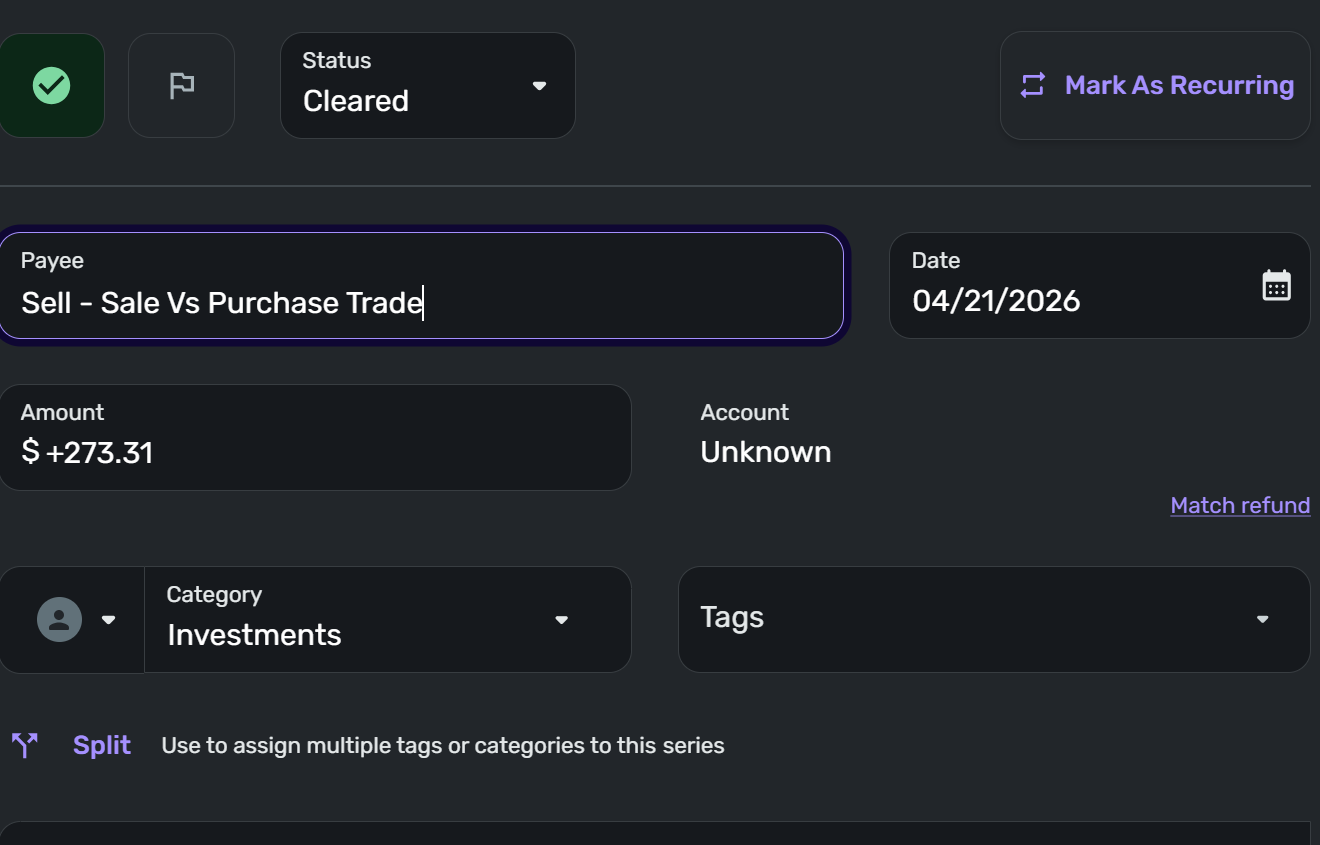
As for new transactions - I just went to look to answer your question, and yes - the April Spending graph shows negative spending, so I investigated and there are more transactions that have an account shown in the Expense Transactions by Category Report (that clicking the graph takes you to). Scrolling through those entries shows "new" entries for that account that should be excluded. It is those entries are making the Spending go negative.
In the Expense Transactions by Category Report, the correct account is displayed, but the transaction is NOT greyed out/excluded from the report totals. When you click the entry to see Transaction Detail, the Account listed in the Account field is still "Unknown"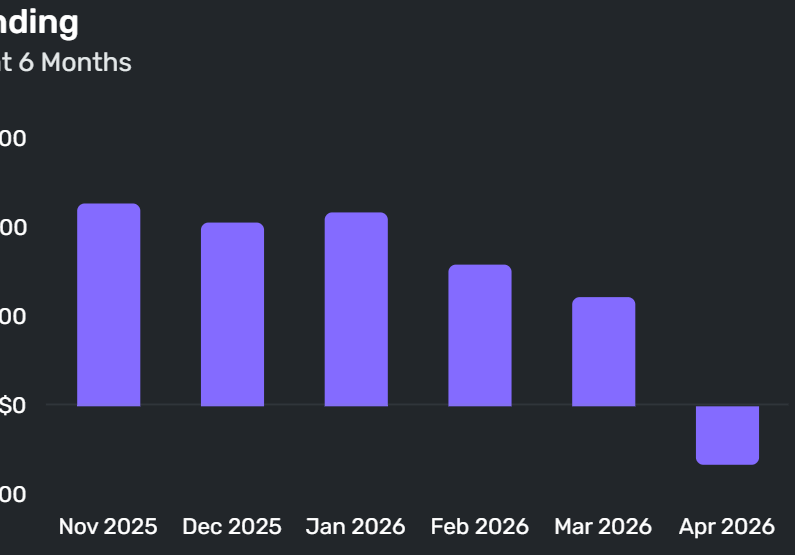
Quicken Simplifi user since 2024; Desktop since 1992.
0 -
Hello @SmittyVA,
Thank you for the reply and screenshots. Let's have you try the following steps to establish a fresh connection for this account to see if this stops these transactions with the "Unknown" account label from appearing.
- Make all of the accounts with the bank manual by following the steps here.
- Once you see the account(s) listed in the Manual Accounts section under Settings > Accounts, go back through the Add Account flow to reconnect to the bank.
- If the connection is successful, carefully link the account(s) found to your existing Quicken Simplifi account(s) by following the steps here.
Afterward, be sure to verify if those transactions still show as "Unknown" or not. Let us know how this goes!
-Coach Jon
0 -
Jon, I've completed each step above carefully - making the accounts manual, then re-adding them and linking them to the existing accounts in Simplifi. The transactions are still there and still "Unknown". That makes me think: Making the accounts manual wouldn't have changed the existing transactions, right? Is there anything we needed to do to the transactions while the accounts are set to manual?
Quicken Simplifi user since 2024; Desktop since 1992.
0 -
Hello @SmittyVA,
Establishing a fresh connection would just be to stop future transactions from appearing with the "Unknown" account label. However, you do bring up a good point. Do the transactions allow you to edit the Account field if you set the account to manual beforehand?
-Coach Jon
0 -
No, but I did discover something additional:
When you go to main navigation: Transactions > Select the Investment Account > Transactions Tab, then click the transaction to open Transaction Detail, the account is displayed properly, like this: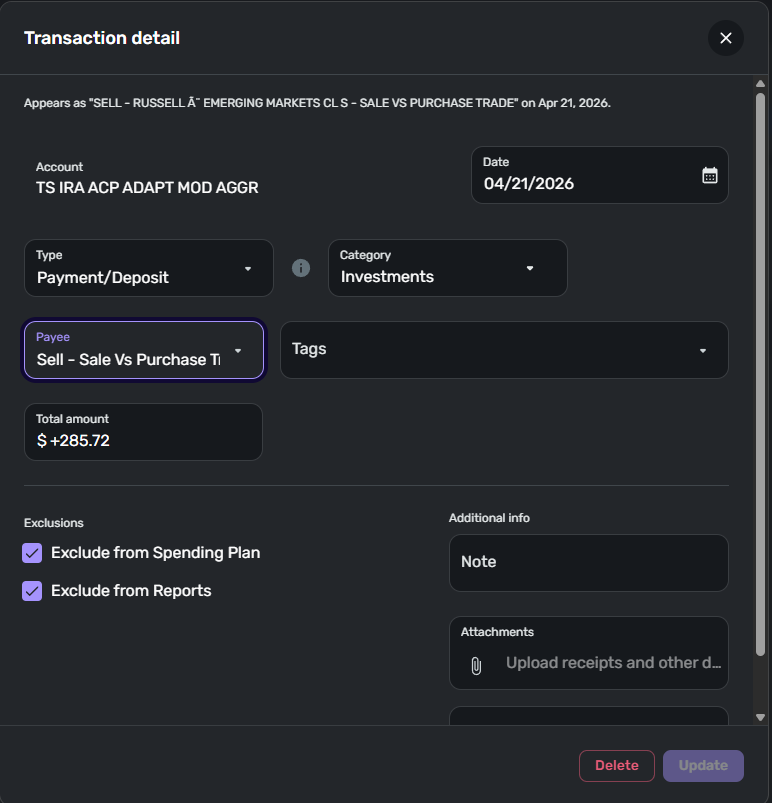
But when you go to: Main Navigation > Dashboard > Click a bar on the Expenses Graph, you get the Spending Report as expected. Then find that same transaction in this report and click on it to open the Transaction Detail, you get the "Account Unknown" behavior, like this:
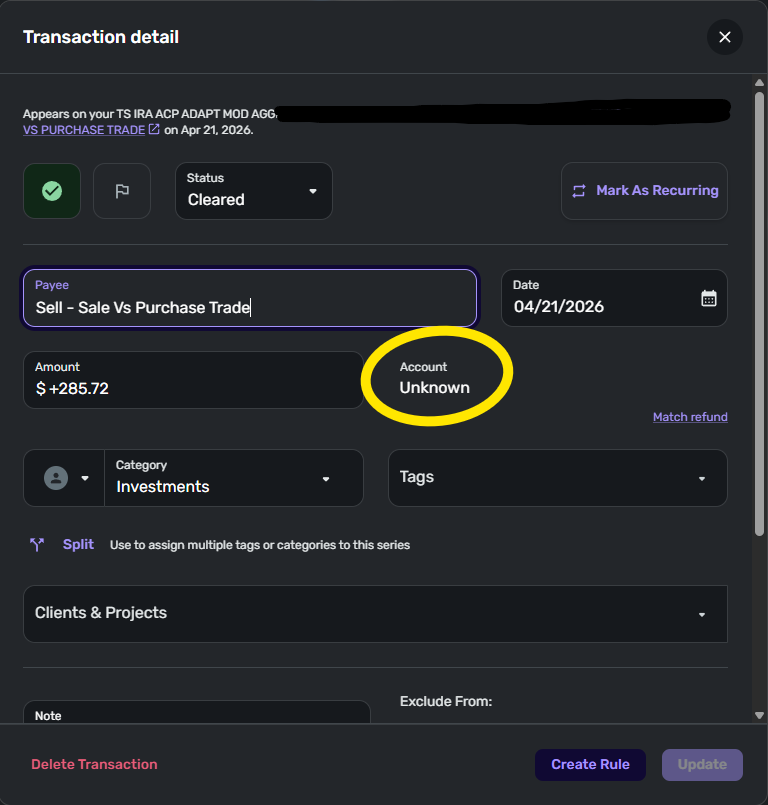
I am wondering if the Checking/Unchecking the Exclude from Reports/Spending options fixed the core issue, and this is more of a display variable issue? Or maybe new transactions will still have a problem. Either way, it is quite confusing and will want to confirm for sure. I'll wait until the next transactions show up in a future update and see if they do or do not follow the "exclude" from Reports option properly, and will report back.
Quicken Simplifi user since 2024; Desktop since 1992.
0 -
Hello @SmittyVA,
I wonder if it is showing up this way due to the account itself being excluded from Reports and Watchlists. If you unexclude the account, do the transactions show normally? Otherwise, we will await your reply in the future as you mentioned.
Thank you!
-Coach Jon
0
