Transfer categorizes as expense in reports (edited)

Comments
-
Hello @Casablanca,
Thank you for reaching out. Transfers are neither income nor an expense. (For more information, see this article.) To help troubleshoot this, please provide more information:
- What category is showing for these transfer transactions in your Quicken Simplifi?
- Which reports are these transactions showing up in?
If you're willing, please share a screenshot of what you're seeing. Make sure to redact any personal information.
I look forward to your response!
-Coach Kristina
0 -
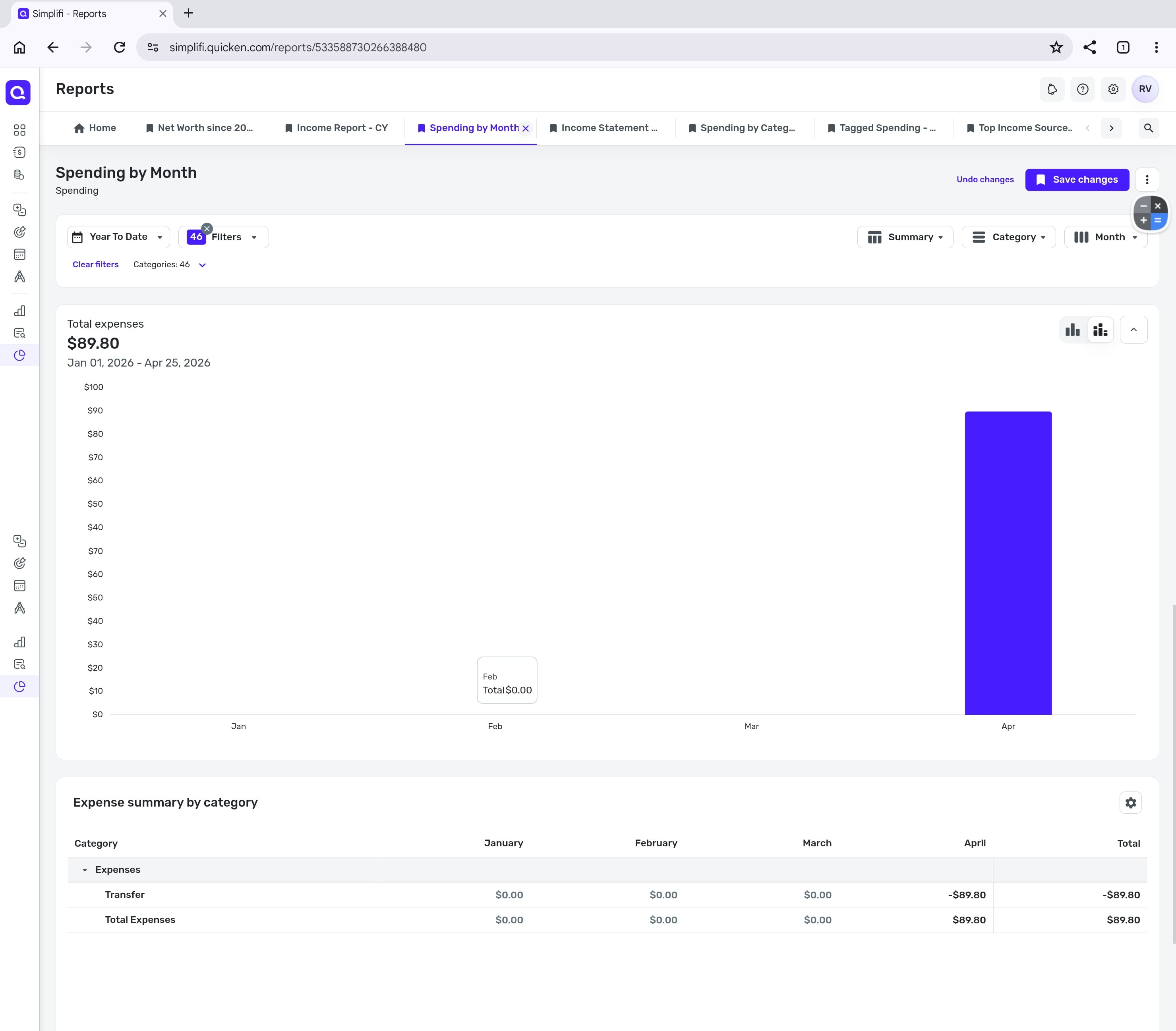
@Coach Kristina - That is interesting, as it used to work exactly as you described. Previously, transfers were treated as neither expenses nor income. However, following a recent update, all of my transfers that aren't explicitly marked to be excluded from reports are now being classified as income and expenses.
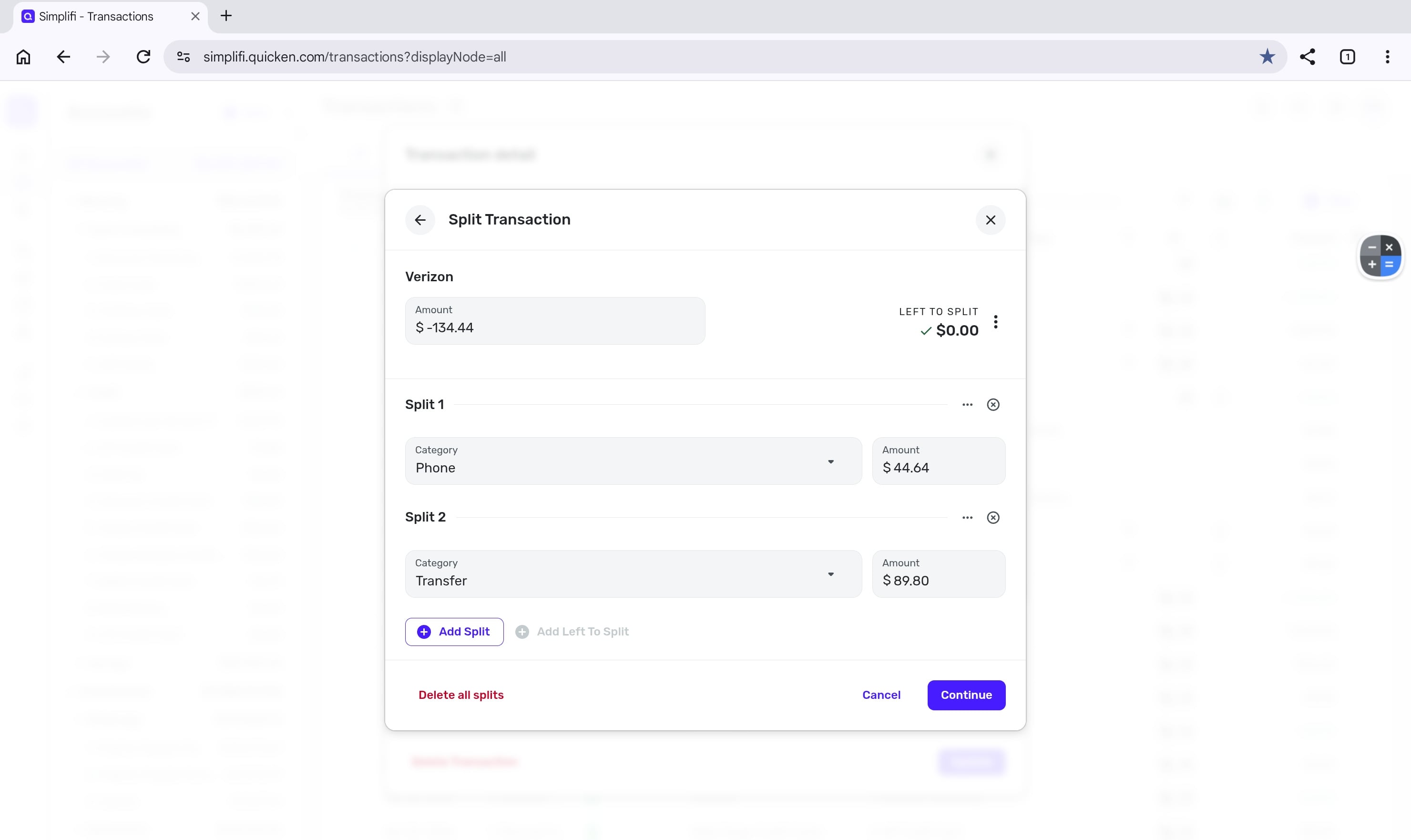
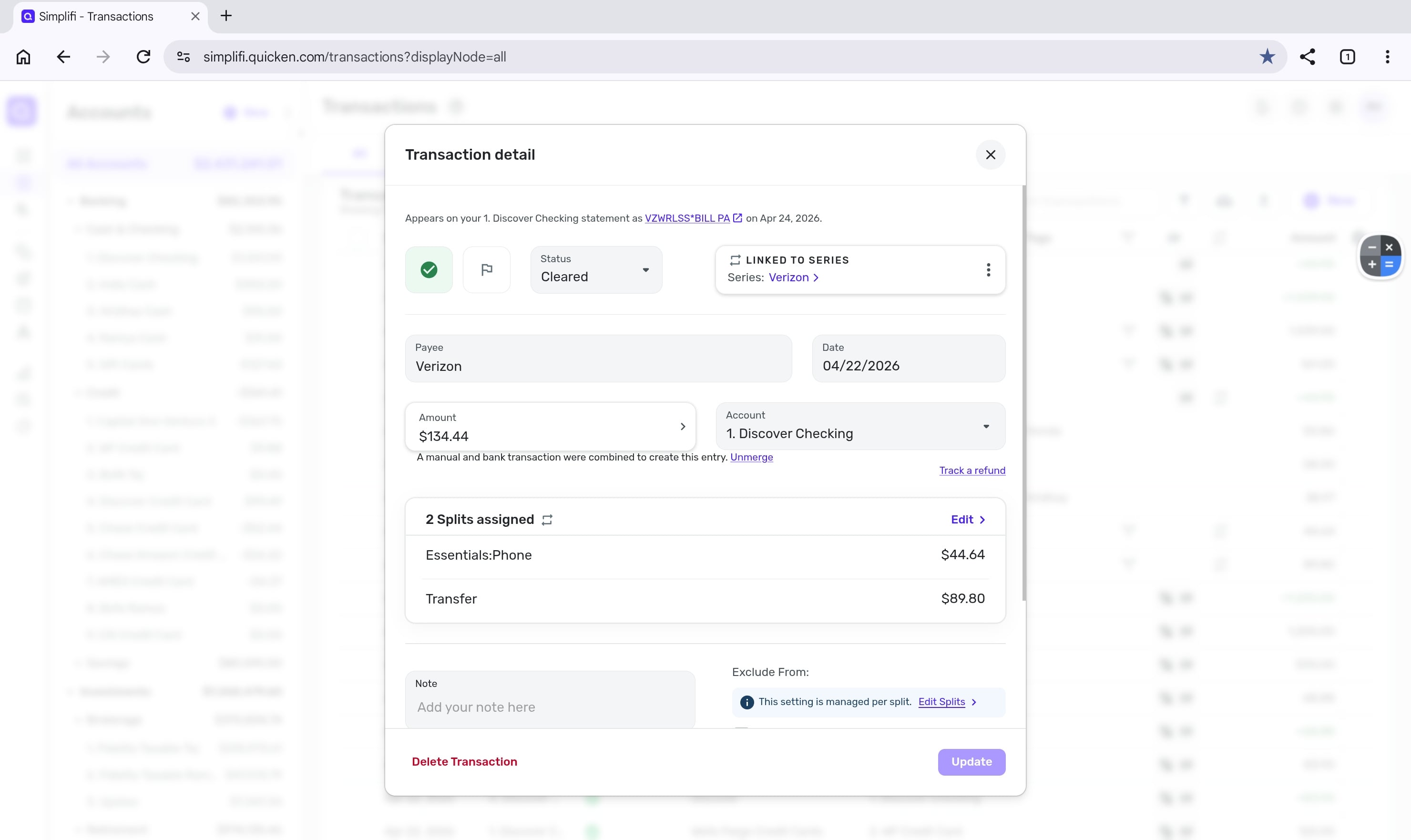
Edit: I've attached screenshots to illustrate the issue. I filtered the first report to show only transfers for privacy reasons. As you can see in the second screenshot, the transfer within the split is not excluded from the reports, which causes it to incorrectly appear as an expense in the first screenshot.
 0
0 -
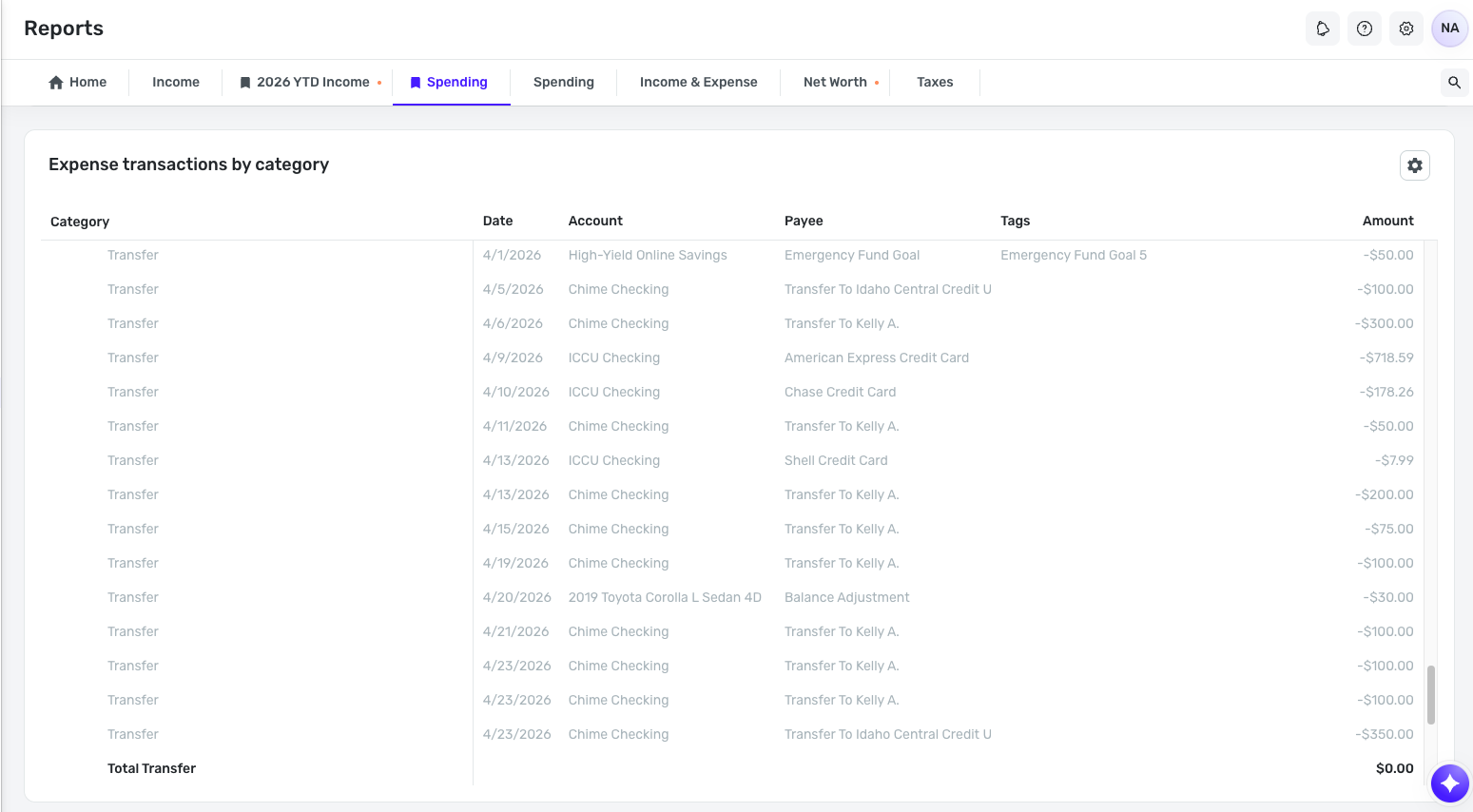
I don't know if this is related, but I notice that in the QBP Spending report showing "Expense transactions by category" there is an "expense" category for Transfers. All my transfers are listed there (but they are excluded from the total).
BUT…
Included in the list of Transfers are two "transactions" that seem to correspond to contributions I made to Savings Goals. (These are the first two lines in the image. I've had to redact most of the info for privacy.)
Neither of these "transactions" shows up in the account they are labeled with, nor in any account. The Payee for each of these "transactions" is the name of a Savings Goal, and the Tag is the automatically-created tag related to that Savings Goal.
Also, the last two lines in the report show two other "transactions" where the name of the account is the name of a Savings Goal and the amount is the amount I withdrew from the Goal that month. I don't recall ever seeing that before either.
Have contributions/withdrawals to/from Savings Goals always showed up in the expense reports? I just ran a report for the last six months and it looks like all of mine are showing up there.

DryHeat
-Quicken Classic (1990-2020), CountAbout (2021-2024), Simplifi (2025-…)0 -
Thank you for your replies,
I was able to replicate the issue, including savings goal contributions appearing as transfers in reports, and forwarded it to the appropriate channels for further investigation.
Thank you!
-Coach Kristina
0 -
@Coach Kristina The transfer came through as an expense but wasn't showing as income. I totally understand the transfer concept, it is just a bit disheartening to look at the report and see a large expense with no corresponding income. I have been messing with it in an attempt to rectify the situation so can't provide a screenshot of what happened this month. I'll have to see what happens next month or simply manually adjust in my spreadsheet. Thank you!!!
0 -
@Casablanca, thanks for the reply!
I'm guessing that being able to include transfers in reports now was an intentional change, seeing as our Idea post here was marked as in progress less than a month ago:
I did, however, reach out to our product team to confirm that this was intended to go live to users. As for treating transfers as income, it looks like any transfer with a negative amount shows in the Spending report, and transfers with a positive amount show in the Income report.
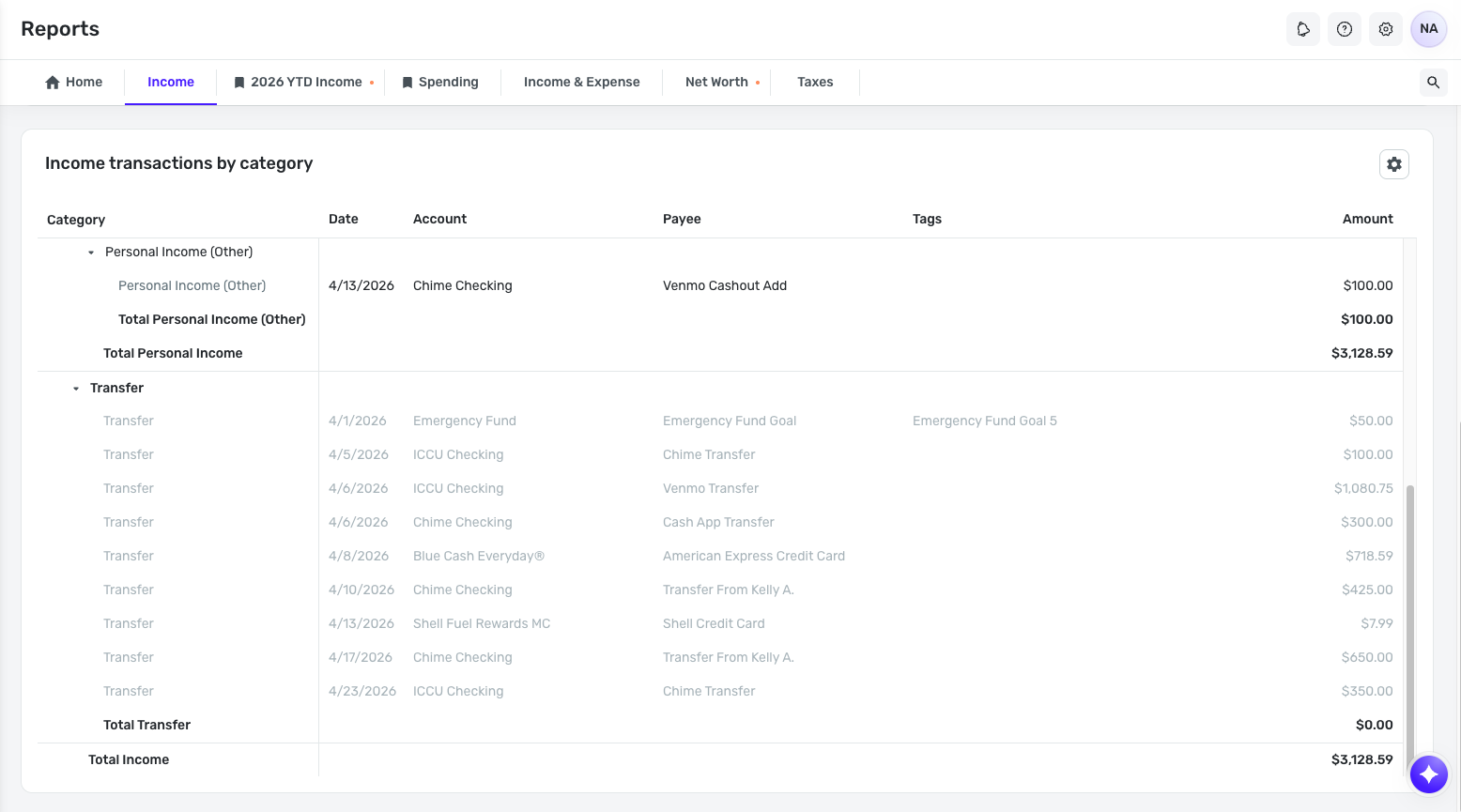
What specifically were you looking for in this regard? Let us know!
Lastly, for the issue with Savings Goal contributions/withdrawals showing as transactions under transfers in reports, we have a separate topic for that issue here:
-Coach Natalie
0 -
I think I might have figured it out. On the expense side, I need to mark the transfer as Exclude from Reports. On the income side, I mark to include. I will try to create a rule so this happens automatically, but am not sure it will work since the transfers are a different amount every month. Thanks so much for your help!! I'll keep you posted as to how it goes.
2 -
@Casablanca, I'm glad to hear you've gotten things worked out!
Unfortunately, rules don't work for transfers, so I don't think this will be a viable solution for you. But it sounds like including just the income side is exactly what you need! We are working on publishing an article for "Handling Transfers in Reports" now that the ability to include them has been added, but in the meantime, this article that goes over handling transfers in the Spending Plan may be insightful for you, as it discusses including just one side:
Let us know if we can assist any further!
-Coach Natalie
0 -
Got it figured out. On the deposit side, edit the transaction to be included in Reports. It is categorized as a transfer on the report which is fine as long as it shows up. I should note that the transfer deposit does not show in the Spending Plan (even if not excluded). I do keep the move out of the transfer account excluded. Just what I needed! Thank you!
1


