Apple Card not bringing in correct “appears on your Apple Card statement as”

Apple Card integration is only brining in the short transaction description for the appears on your Apple Card statement as.
Example:
Apple Card “shown on statement as”: exxon honey farms #xyz
Apple Card transaction description: Honey Farms
Simplifi “appears on your Apple Card statement as”: Honey Farms
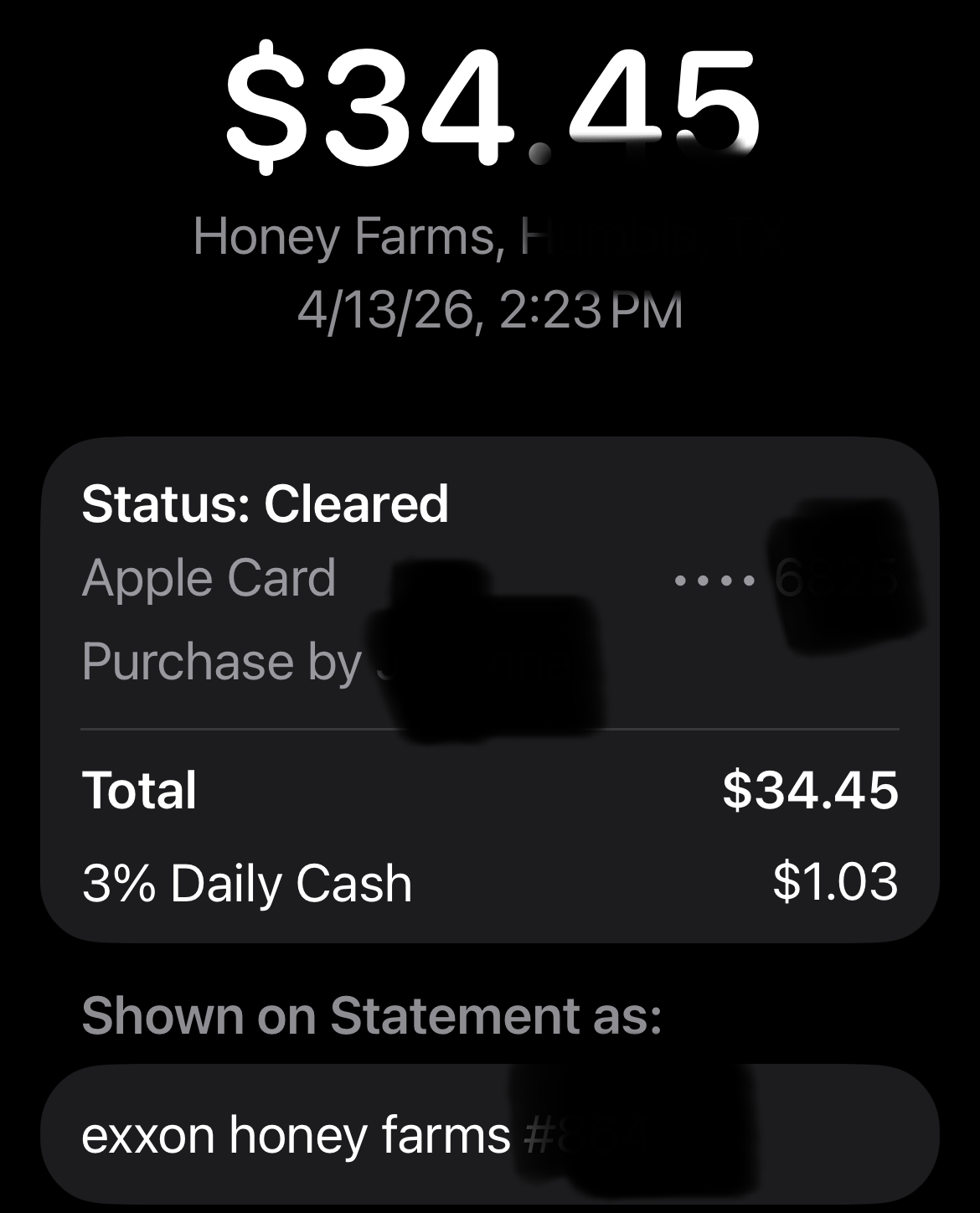
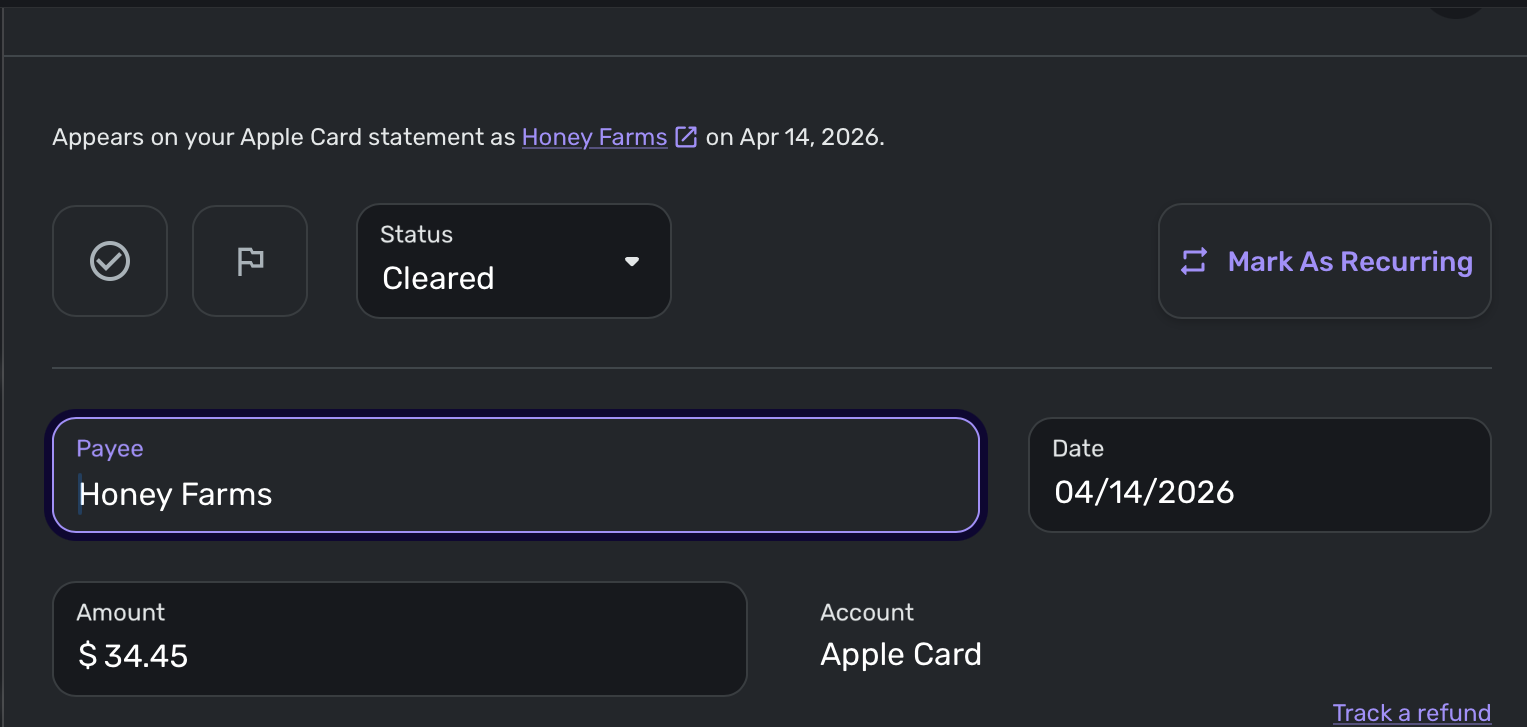
[edited images to reduce size]
Comments
-
Hello @n2it,
Thank you for letting us know you're seeing this issue. To help troubleshoot, please provide more information:
- When did you first notice this issue?
- Is this happening with every payee?
- If not, which specific payees is this happening with?
I look forward to your reply!
-Coach Kristina
0 -
Thanks for the response. Adding a few more details:
- When did you first notice this issue?
I doubt it is a new issue, but I just noticed it when I reported it here. For most of my Apple Card transactions, they are already recurring, so I’ve never really had an issue as it names them exactly what I want them to with the recurring transaction. I don’t use my Apple Card often, but my kids have started using it when they need to use a credit - these are the transaction that I am noticing
- Is this happening with every payee?
Yes. I don’t think Apple Card does a very good job on how they display the transactions. It’s almost like it really splits what is the full transaction name into multiple parts - so I can understand why it may have been programmed this way to begin with. I’ll give some examples below of - how Apple Card displays the transactions, how they come over and what would be the ideal for me so that I don’t lose any information to be able to classify the transactions - since Simpfli often messes with descriptions which of course Apple’s AI has already messed with the description, the ideal Simplifi Shown on Statement as would actually be a concatenation of Apple Card Description and the Apple Card - Shown on Statement (see Honey Farms - which is the name of a convienance store for a case where Simplifi does a stupid job of shortening the name to something without meaning (Honey vs Honey Farms))
AppleCardDesc
AppleCardShownonStatement
SimplifiDesc
SimplifiShownOnStatment
IdealSimplifiShownOnStatment
HBO Max
help.hbomax.com
Hbo Max
HBO Max
HBO Max - help.hbomax.com
The University of Texas at Austin
ut-receivables web
The University of Texas at Austin
The University of Texas at Austin
The University of Texas at Austin - ut-receivables web
The College Board
ap score report
The College Board
The College Board
The College Board - ap score report
Honey Farms
Exxon Honey Farms #123
Honey
Honey Farms
Honey Farms - Exxon Honey Farms #123
Apple The Woodlands, The Woodlands, TX
apple store #r126
Apple Store
Apple Store
Apple The Woodlands, The Woodlands, TX - apple store #r126
0 -
@n2it, thank you for the additional insight!
After checking with my product team, it sounds like the "Appears on your statement as" info is provided directly by the financial institutions and is not shortened by Quicken Simplifi. I will be sure to let you know if I learn of anything that can be done on our end; however, this sounds like an issue that would need to be addressed by Apple Wallet via its third-party app aggregation.
Sorry I don't have more info for you, but I hope this helps identify the source! Please let us know if you learn anything from Apple Wallet that could help other users.
-Coach Natalie
0 -
What do you mean when you say this sound like an issue that would need to be addressed by Apple Wallet via its third-party app aggregation?
I don't know the techincal details of how Simplifi gets its info for Apple Card - or why you mentioned "its" and not Simplifi's integration to Apple Card, so I realized I might have confused the issue by bringing up Apple Wallet - this is usually how I get check my info.
Consulting my actual pdf statement downloaded from card.apple.com, I still am still not seeing a matching "appears on statement" in Simplifi
To use the Honey Farms example from my original post the description on my
Actual pdf statement description from card.apple.com says (address changed to obscure actual location): EXXON HONEY FARMS #XYZ N MAIN STREET ANYTOWN 78001 TX USA
Simplfi "Appears on statement as": Honey Farms
Thanks and sorry if I am misunderstanding what you are saying
0 -
@n2it, thanks for taking the time to explain this further — I can see why the discrepancy is frustrating.
Quicken Simplifi uses the “Appears on your statement as” information exactly as it’s provided by your financial institution. This is what we rely on to display and help identify the payee. If certain details aren’t included in that data, we don’t have a way to retrieve or add them on our end.
If the information shown in Quicken Simplifi doesn’t match what you see on your bank or card statement, that difference would need to be reviewed by the financial institution, since they control the data that’s shared.
For Apple Wallet specifically, the connection works a bit differently than traditional bank connections, since it pulls data through the Apple Wallet account on your iPhone rather than standard online banking credentials. Because of that, Apple Support would likely be the best point of contact to look into how that transaction data is being provided.
In the meantime, you can edit transactions in Quicken Simplifi to change the payee to your preferred name. This article walks through how to do that:
Please let us know how things go with Apple Support!
-Coach Natalie
0 -
FWIW, here's another data point from a different card (Chase Bank).
— How it appears on actual card statement: TACO BELL #031730 TUCSON AZ
— What Quicken shows as "Appears on statement as": TACO BELL #XX1730
The "TUCSON AZ" — or similar location info — is included on all (or almost all) lines in the statement itself. But I think this may be something the bank is tacking on as it does not appear when the name is shown in the list of current transactions on the web (meaning the ones that are not yet showing up on any statement). So maybe that location name doesn't download as part of the "statement name".
But the change from #031730 to #XX1730 is a bit weird. It's possible the bank does this thinking it is protecting something as I see it done for any trailing number that has more than four digits. (Meaning "#123456" gets changed to "#XX3456" and "#12345" gets changed to "#X2345"but "#1234" or "#123" don't get changed at all.)
DryHeat
-Quicken Classic (1990-2020), CountAbout (2021-2024), Simplifi (2025-…)0 -
@Coach Natalie - I am bit confused as to why you would send me to Apple support or what I would ask them given I have had no involvement or no knowledge of how Simplifi is integrating with this data. You have shared is that the integration is through Apple Wallet. I would hope that someone from Simpflif who is familiar with the Apple Wallet integration would reach out to apple to verify that the proper field is being used - I would think that if there is a problem, someone who actually is a registered apple developer would have a better chance of getting a resolution. I would also hope that Simplifi would like to help correct an error if that is happening.
If that is not possible, could you find out from your developer how they are accessing the Apple Wallet data (e.g. in a quick search it appears that the FinanceKit API is likely being used) and (if so,) what Transaction instance property they are using for the "Appears on your Apple card". I am not a progammer, but I do understand how to read an API. My guess after looking at the FinanceKIt API s that Simplifi is using the wrong one. Unfortunately I am not a developer and have even less ability to test code on an iPhone. Without knowing what API call Simplfi is making, I can't tell if it is an Apple issue or a Simplifi issue without knowing what Transaction instance property is being called (if FinanceKit).
Can you help me find this out (what API is being used to access Apple Wallet and if it is FinanceKit, which Transaction instance property is being used for the "Appears on your Apple Card as")?
0 -
@n2it, I'm not seeing any information on our end regarding the API used to access Apple Wallet or which property provides the "Appears on your statement as" details. Those specifics would likely need to be addressed by Apple Support.
At this time, the correct path forward is to work directly with the financial institution to investigate the issue. Once you’ve done that, if you’re unable to get the help you need, please let us know and be sure to provide a ticket number so we can review and determine next steps on our end.
Given the information available to us, we don’t have any additional insight to provide beyond this guidance, but we’re happy to take another look if new details come up after you’ve contacted them.
-Coach Natalie
0 -
I wish there wasn't any shortening at all - just give me the whole thing! I realize that it isn't always Simplifi's fault - as they can only give you the information that they are given - like your Chase example - my guess is that they (Chase) put in logic to obscure things like an account number - anything greater than the last 4 digits (although you'd think that would only apply to payments or transfers - and not transactions).
0 -
@n2it, you may find this topic of interest:
You may also consider contacting our Chat/Phone Support team, as they have access to additional tools and can make determinations outside the scope of our Community processes:
-Coach Natalie
0 -
Doing some additional research - because I'd like to see this problem fixed, I downloaded a 34 day trial of a Simplifi competitor. They are using FinanceKit which from additional research is the only way to integrate with Apple Wallet - so they have access to the same Apple Wallet information in the same way that Simplifi does using the same API.
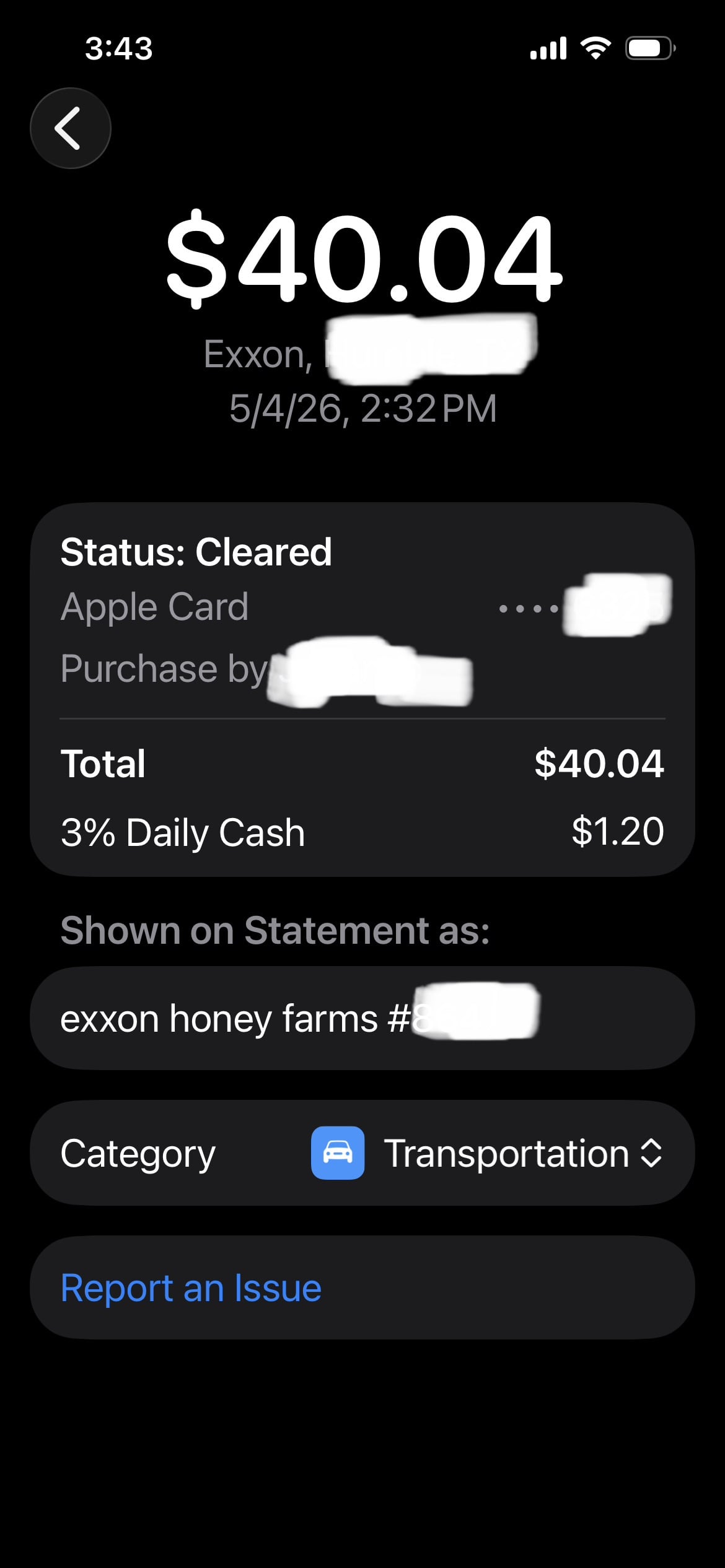
Original Apple Card transaction in Apple Wallet:
"Shown on Statement as" exxon honey farms #123
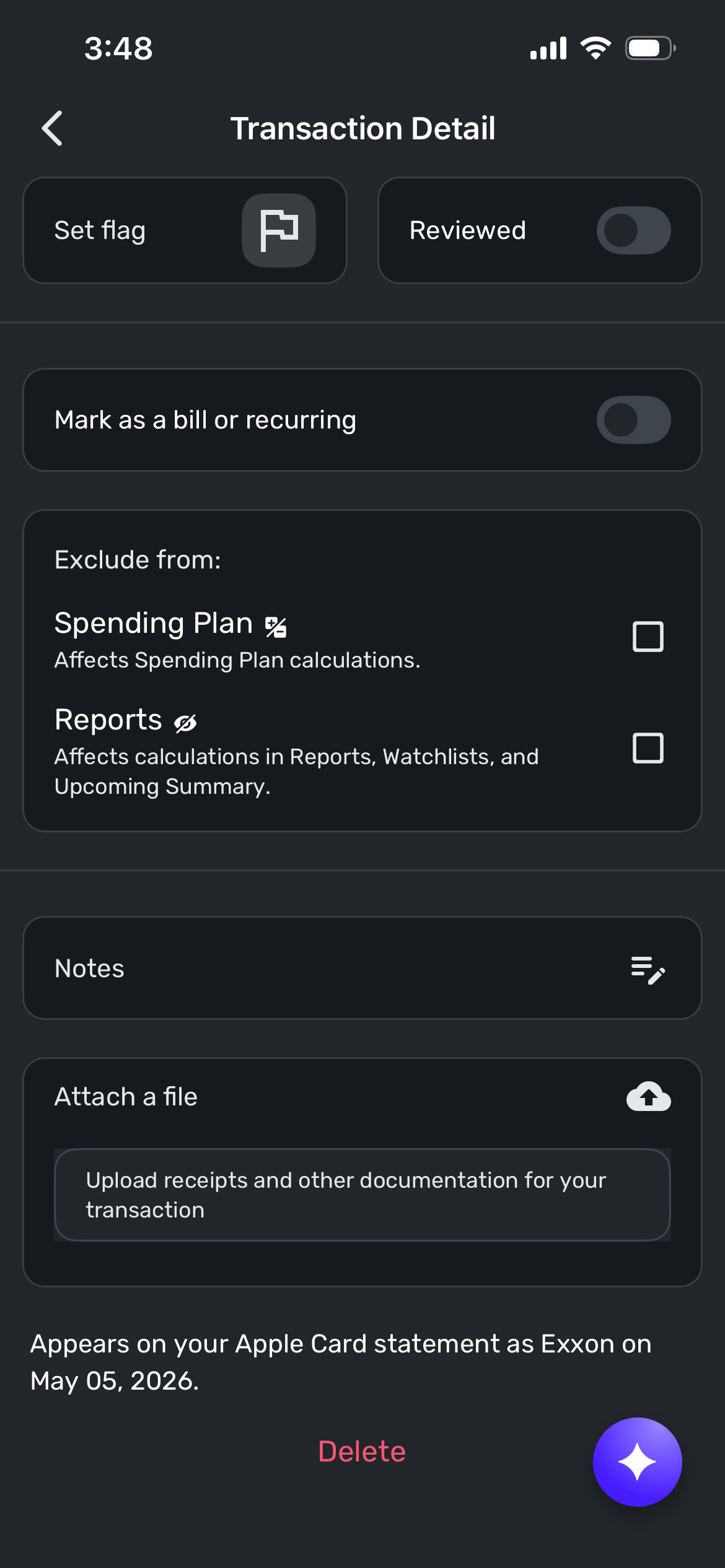
This what Simplifi shows:
"Appears on your Apple Card statement as" Exxon
This is what a competing program pulling data from Apple Wallet shows
Bank Import Details: Exxon Honey Farms x123
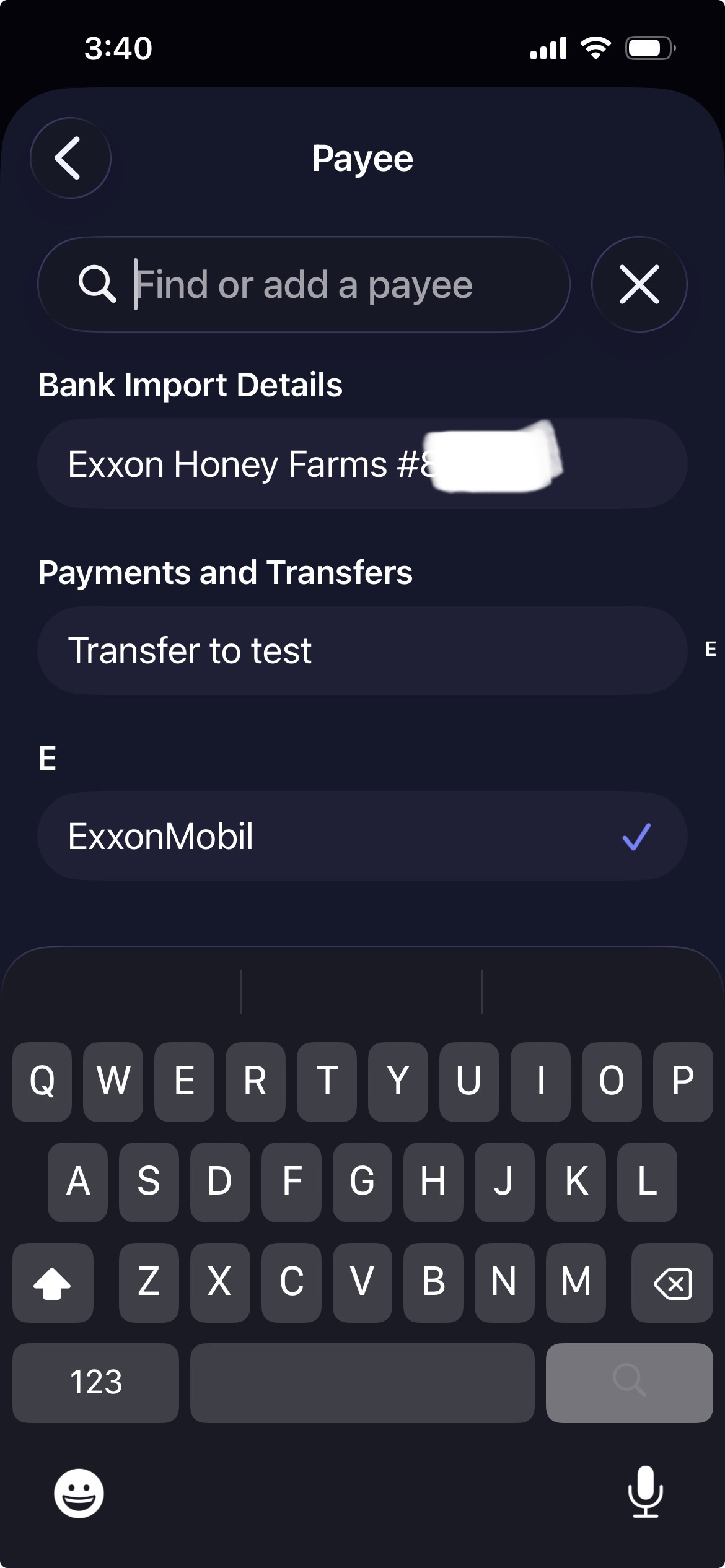
Again I just want this fixed and I don't have access to any developer support from Apple. I think I've demonstrated that It isn't an Apple issue if another program using the same Apple Wallet / FinanceKit integration that Simplifi is using can get the correct "shown/appears on statement as".
What more is needed to have someone actually take another look at this?
0


