Amex Rewards Checking accounts: mapping of Payee field to Simplifi not correct

I recently opened a new Amex Rewards Checking account and added it to Simplifi. The linking process worked well, as I already had other Amex accounts (credit cards, savings accounts) linked to Simplifi, and Simplifi is able to download all transactions correctly showing all dates and dollar amounts accurately. Unfortunately, Simplifi is not picking up the Payee correctly. Simplifi is populating the Payee field with the transaction type (e.g., Online Transfer: Credit, or Online Transfer / Payment: Debit) instead of showing the actual payee/vendor/business/entity. As a result, I have to enter the name of the entity manually for all these transactions. Since this is now my main checking account, this is a hassle. Can you please correct the mapping of Payees of the Amex Rewards Checking accounts to Simplifi so that the entities are correctly shown?
Comments
-
@skyblade42, thanks for posting to the Community with this issue!
To get a better handle on things, please provide the following details:
- Are only certain types of transactions downloading this way (i.e., only transactions where a debit card or bill pay was used)?
- Is the issue unique to this specific bank/account (i.e., do you have other accounts with this bank in Quicken Simplifi that don't have this problem)?
- How does the "Appears on your statement as…" info read for the transactions in question (this can be found in the Transaction Detail view)?
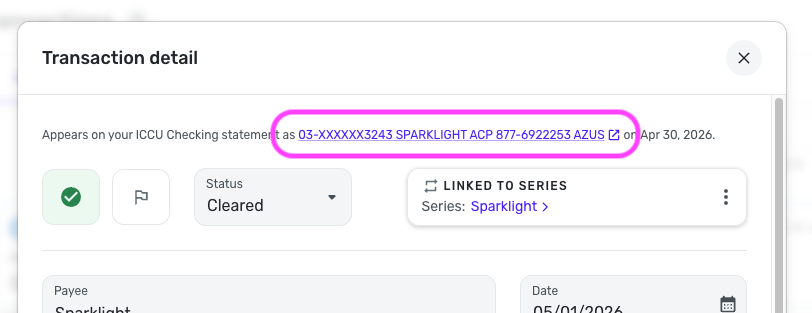
We look forward to your reply!
-Coach Natalie
0 -
@Coach Natalie Please see below the answers to your questions:
1. It seems that transactions that are charged to a debit card look fine. Additionally, there are some transaction types where I would not expect there to be a Payee anyway, (i.e., transactions of the type Interest Deposit, or ATM Cash Withdrawal), so those are fine too. Therefore, it seems it’s really only ACH transactions (either debits or credits) that are being affected by this issue. However, in my case, the vast majority of my transactions in this account are ACH transactions, so this is a very noticeable problem for me.
2. This issue is unique to this Amex account, a Rewards Checking account. I do NOT have this issue with any of my other Amex accounts in Simplifi, but those are different types of account (savings accounts and credit card accounts).
3. All the affected transactions (i.e., ACH transactions) show in Simplifi as one of the following:
- Appears on your Amex Rewards Checking statement as Online Transfer / Payment: Debit
- Appears on your Amex Rewards Checking statement as Online Transfer / Payment: Credit
For the avoidance of doubt, when I log into the bank website and look at the transactions I also see the "Online Transfer / Payment: Debit" or "Online Transfer / Payment: Credit" descriptors, but in addition to that there is also a "To Account:" or "From Account:" field (respectively) that indicates the name of the Payee. So, ideally, Simplifi would be able to pick up this information as well.
0 -
@skyblade42, thank you for that information!
Since the "Appears on your statement as" info doesn't provide any additional information for Quicken Simplifi to use in the payee field, it appears that this issue is on the bank's end. The "Appears on your statement as" info is provided by the bank and is what Quicken Simplifi uses to clean up and assign the payee. We wouldn't have any control over the information sent in here, so you'd want to contact American Express's online banking department to address this with them directly.
Please let us know if you find out anything that could be helpful for other users! Otherwise, you can manually change the payee for a downloaded transaction in Quicken Simplifi by editing it:
We also have this Idea post for full payee descriptions, which would likely resolve the lack of mapping to those additional fields you mentioned if implemented, that I'd recommend adding your vote and feedback to:
We apologize that we weren't able to address this on our end, but I hope this helps!
-Coach Natalie
0
