NetX Exchange (NETXInvestor.com) stopped working/missing accounts (edited)

In the last week or so the connection to my NETXInvestor accounts has stopped working. It says the accounts are no longer there and the only option I have is to link an account that has been closed for over 2 years. Hoping this can be a quick fix.
Comments
-
Hello @abray712,
Thanks for reaching out! To confirm the issue, are you stating that your account that was previously connected has disappeared from Quicken Simplifi? If so, were they accidentally deleted? Are you still able to connect with NetExchange, or are you receiving a specific error when trying? Please let us know!
-Coach Jon
0 -
Hello @Coach Jon
The two accounts did not completely disappear, but when I was attempting to update the values (NetXInvestor requires MFA every time), there would be no value change. Then Simplifi was giving an error code and suggested to reset the connection with NetExchange. When I attempted to reset the connection, the only account that would show from NetXInvestor was an account that has been at $0 for over two years, not the other two active accounts. I then attempted to move the active accounts to a manual account status and then relinking the connection completely. Still when I try to link the accounts, the only one pulling through is the zeroed out account. I did go on NetXInvestor directly and can still see all of the accounts.
0 -
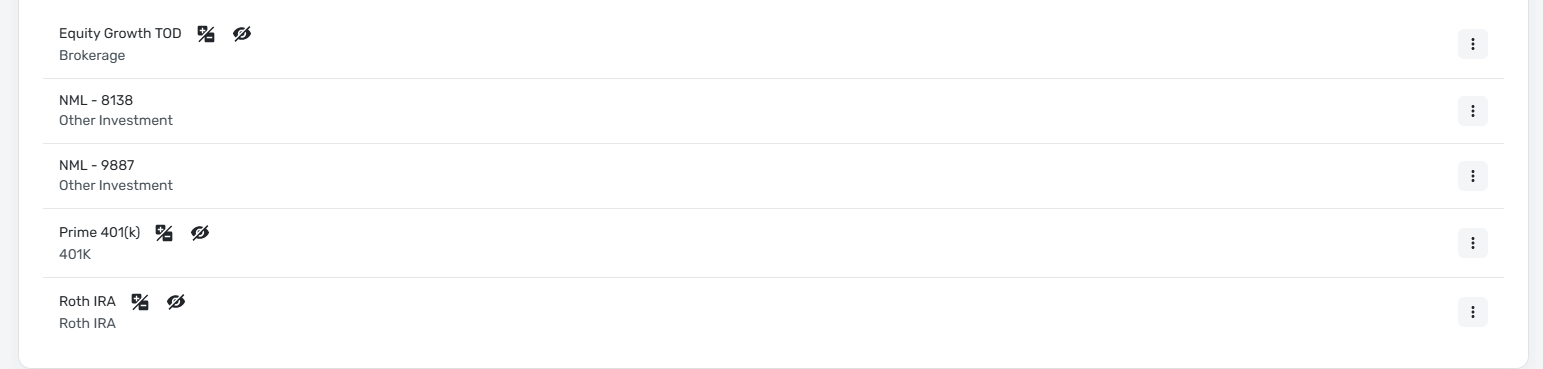
The Equity Growth TOD and the Roth IRA were the two accounts that were previously linked through NetXInvestor.
0 -
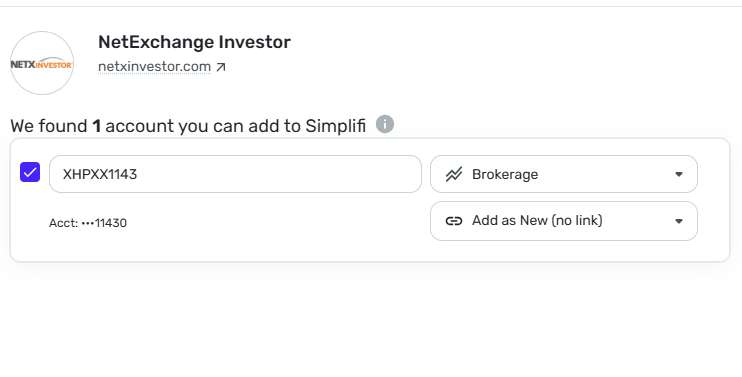
When attempting to reset the connection, the only account that appears from NetXInvestor is the account that has been closed and at a $0 for the past couple of years.
 0
0 -
Hello @abray712,
Thanks for the reply! I am not sure why the two accounts would not be showing up when connecting in Quicken Simplifi. Have these accounts undergone any changes recently? Let's have you try the following these steps to see if they help resolve the issue:
- Make all of the accounts with the bank manual by following the steps here.
- Once you see the account(s) listed in the Manual Accounts section under Settings > Accounts, go back through the Add Account flow to reconnect to the bank.
- If the connection is successful, carefully link the account(s) found to your existing Quicken Simplifi account(s) by following the steps here.
If these steps do not work, please provide the following information:
- Has there been any activity in the accounts in the last 90 days?
- Are the accounts considered external accounts (i.e. are you redirected to a different website when selecting the account on the bank's website)? If so, what URL are you redirected to?
- Are the accounts a subtype of a different account?
- Has the bank made any recent changes to its website or sign-in process?
- Are you the owner of the accounts?
- The name of the accounts, as it appears on the bank's website.
- If the issue is occurring on an existing Quicken Simplifi account, the name of the account as it appears in Quicken Simplifi.
- A screenshot of the Accounts Summary page from the bank's website that has a wide enough scope to show the full page URL. This is the landing page after signing in, and typically lists all accounts and balances. You will want to take this from a web browser and not a mobile browser, as well as redact any private info such as account numbers.
-Coach Jon
0 -
Hello @Coach Jon ,
Please see the responses to your inquiry below:
Let's have you try the following these steps to see if they help resolve the issue:
- Make all of the accounts with the bank manual by following the steps here.
- Once you see the account(s) listed in the Manual Accounts section under Settings > Accounts, go back through the Add Account flow to reconnect to the bank.
- If the connection is successful, carefully link the account(s) found to your existing Quicken Simplifi account(s) by following the steps here.
I tried doing this in the pictures above earlier, and just retried again. Still the only account pulling through is the account with a $0 balance.
If these steps do not work, please provide the following information:
- Has there been any activity in the accounts in the last 90 days?
- Yes there has been activity in the last 90 days as I add funds on a monthly basis to the accounts.
- Are the accounts considered external accounts (i.e. are you redirected to a different website when selecting the account on the bank's website)? If so, what URL are you redirected to?
- They are not considered external accounts
- Are the accounts a subtype of a different account?
- Each account is it's own stand alone account type and not a subtype of a different account.
- Has the bank made any recent changes to its website or sign-in process?
- There have been no changes to the login process
- Are you the owner of the accounts?
- Yes I am the owner of the accounts.
- The name of the accounts, as it appears on the bank's website.
- I did previously have nicknames on the site for the accounts, and changed that the other day thinking it could help since the $0 balance account did not have a nickname. The same error continued to happen.
- If the issue is occurring on an existing Quicken Simplifi account, the name of the account as it appears in Quicken Simplifi.
- Equity Growth TOD - Brokerage
- Roth IRA - Roth IRA
- A screenshot of the Accounts Summary page from the bank's website that has a wide enough scope to show the full page URL. This is the landing page after signing in, and typically lists all accounts and balances. You will want to take this from a web browser and not a mobile browser, as well as redact any private info such as account numbers.
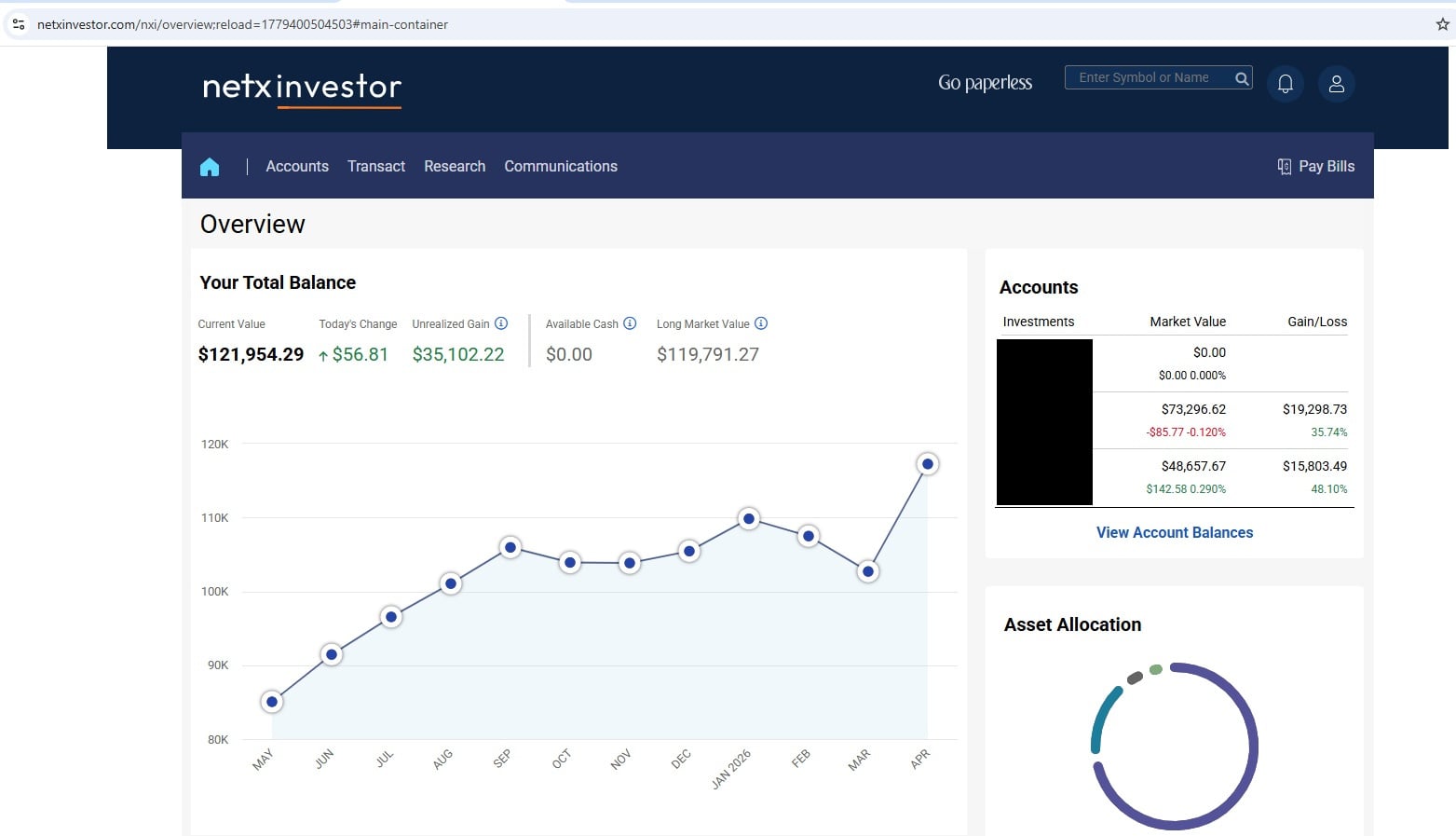 0
0 -
Hello @abray712,
Thank you for the requested information! It looks like we will still need the names of the accounts, as they appear on the bank's website. Can you provide those?
Additionally, please also submit your logs via the 'Send Feedback' option:
- Log in to the Quicken Simplifi Web App.
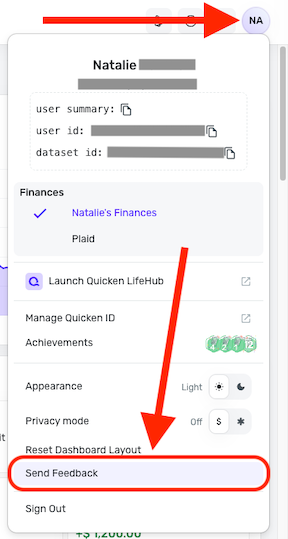
- Select the Profile icon in the upper-right corner of the screen.
- With the Profile menu open, hold down the Option key (Mac) or the Alt key (Windows), and then click Send Feedback.
- Leave all boxes checked, add a brief description of the issue, and then click Send.
-Coach Jon
0 -
Hello @Coach Jon
The accounts just appear as the account numbers on the NetXInvestor page. There are no additional nicknames for the accounts there. I also would prefer not share that information for obvious reasons.
I just submitted the Send Feedback per your request and included a link to our conversation here because there was a character limit to the feedback tool.
0 -
Hello @Coach Jon
It is not masked on the NetXInvestor website and shows the full account number.
0 -
Hello @abray712,
Thanks for letting us know. In this case, I think just including the last 4 of the account numbers should be fine. We do not need the full account numbers, and I wouldn't want to ask for them anyway, as I understand your concerns. You can DM me this information for privacy purposes.
-Coach Jon
0 -
I just sent you a direct message with the last 4 of the account numbers.
0 -
Hello @abray712,
Thank you for the requested information! I did get this escalated with our service provider and will follow up here with any updates as we receive them.
In the meantime, you can track the account manually by adding manual transactions, which will keep your records up-to-date. Here are the steps to do so: Managing Transactions in Quicken Simplifi | Quicken Simplifi Help Center
If the account is an investment account, the manual tracking steps are a little different:
- Make the account manual so you can add and edit Holdings: How to Make an Account 'Manual' | Quicken Simplifi Help Center
- Add/edit your Holdings to keep accurate records: Tracking Investments in Quicken Simplifi | Quicken Simplifi Help Center and Tracking Investments in Quicken Simplifi | Quicken Simplifi Help Center
EWC-12425103
-Coach Jon
0 -
I am having the exact same problem. I have a number of accounts at netxinvestor and none of them can connect anymore. However an old closed account shows up in the connection. Nothing has changed that I'm aware of with my active accounts. It just can't find them anymore.
0 -
@greiland, thanks for joining the discussion!
It looks like the escalation for this issue hasn't come back yet. Let's wait to see what our service provider has to say there, which will help us know how to proceed with any additional cases. Please be sure to chime back in here after the next update is posted!
-Coach Natalie
0 -
I’m having almost exactly the same problems. I can connect to NetX Investor, but only one of my six accounts appears in Simplifi (and it’s the one I care about the least.) I’ve moved everything to manual accounts and try to reconnect every couple of days with no luck. All accounts are very active and no changes have been made to the names. Started a a couple of weeks ago.
0 -
@abray712, your escalation came back, and they'd like you to give the connection another try. If the issue is still occurring, we now have an Alert that can be followed for updates:
For all other users posting here, please also follow the Alert for updates. Thank you!
-Coach Natalie
0 -
The only account showing is still just the closed one.
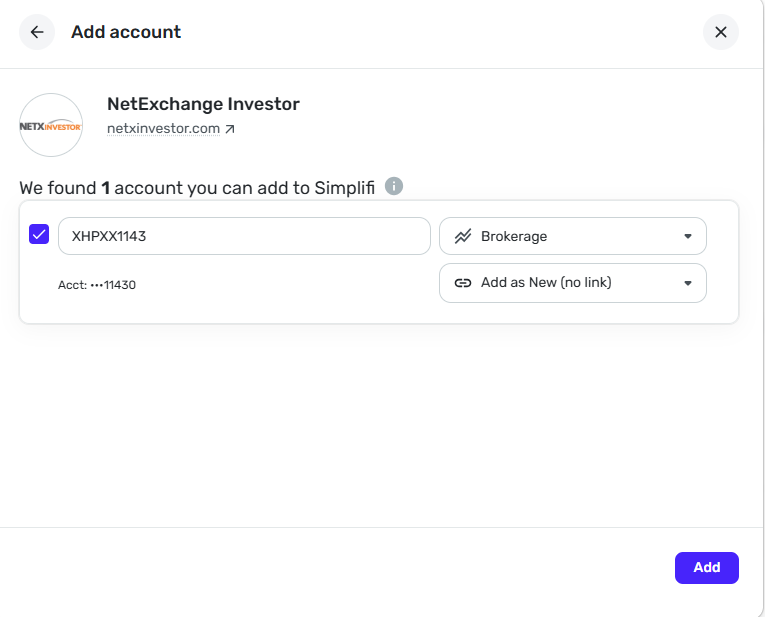 0
0 -
-
Same for me. Only 1 old closed account is showing up. None of my active accounts are listed. Issue still not fixed.
0 -
Hello everyone,
Please follow our Alert for updates as this issue is being worked on:
Thank you!
-Coach Natalie
0 -
Hello everyone,
We received an update on this issue, and it sounds like a potential fix was implemented. Can you all give the connection another try and let us know how it goes, please?
Thanks!
-Coach Natalie
0 -
Appears to be partially fixed. Now all my accounts show up and the balances look correct on the accounts listing in Simplifi, but when clicking on an account, the balance shows zero and there are no holdings listed.
1 -
Thank you for testing! I'm glad to hear you were able to connect your accounts.
For the issue with missing holdings/transactions, we have a dedicated thread here:
-Coach Natalie
0

