Morgan Stanley - Cash Management FDP-155 (edited)

This has been working for months, but now it's not. Seeing an error: Care code: FDP-155
Is this currently being worked on?
Comments
-
Hello @jbaker5400,
Thanks for reaching out! I can see from our side that you have been experiencing this FDP-155 error since 6/1/26. Generally, this error appears when the financial institution blocks access to its servers, preventing Quicken Simplifi from retrieving data to download into your file.
I can also see that Morgan Stanley - Cash Management is reporting connection issues in Quicken Simplifi at this time. This means that we are currently investigating the issue.
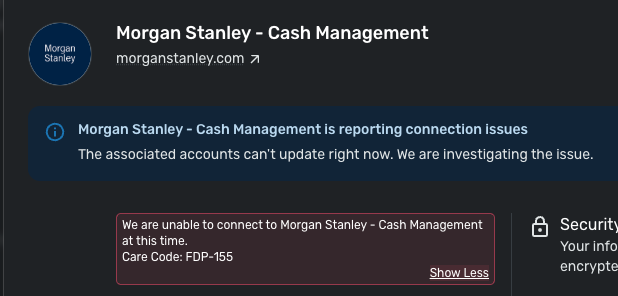
I am not sure of an ETA at this time, but I would remain on the lookout for when that banner disappears and try connecting again at that time.
-Coach Jon
0 -
Thanks Jon… hoping not much longer for a resolution. Still same error as of early Friday.
0 -
Hello @jbaker5400,
Thank you for the reply! Let's have you try connecting to the other Morgan Stanley instance available in Quicken Simplifi:
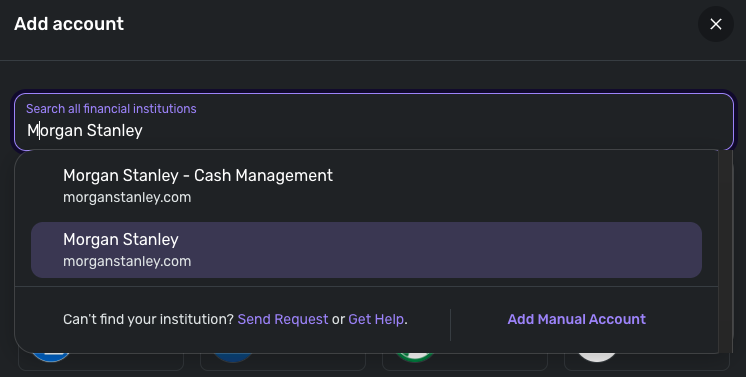
Let us know if you are able to connect, or if the same error appears there as well.
Thank you!
-Coach Jon
0 -
I'm having the same connection issues with Morgan Stanley Cash Management. Any ETA on when it will be fixed?
0 -
Jon,
I tried connecting my CashPlus with the regular Morgan Stanley connection. This worked but shows $0 value. I tried connecting it as a Cash account and a Brokerage account with the same result.
0 -
Minor update… Using just the Morgan Stanley connection, it eventually showed transactions (the is for the cash management account type.) However, this seems to treat payees as only securities…
I use this for our daily spending, so a payee might be some coffee shop down the street. However it treats it like a stock which isn't the case.
Also, having my cash mgmt account treated as a brokerage seems to prevent new downloaded transactions in such a way that they don't show up in the recent transactions list… which is how I monitor ins/outs…
I really need the previously existing cash management stuff working as it was the main reason I'm trying to move to Simplifi from Quicken Mac.
0 -
Hello @jbaker5400,
Thanks for the update! I am glad that the account was at least able to be connected and transactions to be pulled in. To help clarify the situation you described further, can you provide screenshots showing how these transactions are appearing for you within Quicken Simplifi? This can be sent via DM if you prefer. Can you also verify if the account balance is correct in Quicken Simplifi?
-Coach Jon
0 -
I was able to connect to the other instance and change the type of account from brokerage to checking. It was a little annoying, because I then had to update all of my previous anticipated transactions to have them coming from the new instance of the account (it wouldn't let me link to the already existing version of the account). But all-in-all, I think it's now resolved.
0 -
I tried the method used by SVance and that seemed to work..
At least it downloaded all the transactions. However, even after I changed the account to either 'Checking' or 'Cash Management', when trying to type in a Payee, it wanted to match up to an existing stock or create new one.
In other words, the Payee field didn't behave like it should but more like a Security/Payee field.
0 -
I also noticed that if I use the 'Edit Transaction' approach, it seems to work with being able to enter a Payee (1st screen shot,) however the account page shows the payee I entered shows up as a Category instead (2nd screen shot.)
0 -
Hello @jbaker5400,
Thank you for the replies! I wonder if the account/transactions are coming over from the bank categorized as investments. How do these transactions appear on your bank's website? Can you also try the following steps to see if this helps resolve the issue with this account?
- Make all of the accounts with the bank manual by following the steps here.
- Once you see the account(s) listed in the Manual Accounts section under Settings > Accounts, go back through the Add Account flow to reconnect to the bank.
- If the connection is successful, carefully link the account(s) found to your existing Quicken Simplifi account(s) by following the steps here.
Let us know!
-Coach Jon
0 -
Jon… that seemed to work. I had added the Cash Mgmt account previously and that was no longer downloading anything for the past week or 2. So I just made it manual and deleted the new one that was treating payee as stock. Then I made the other 4 MS accounts I already had manual.
Then I reconnected to MS (not the Cash Mgmt) version and matched the 5 manual accounts as you explained. That worked… the 4 that weren't causing me issues reconnected with no issued. And the cash mgmt account (now using Morgan Stanley and not Morgan Stanley Cash Mgmt) also connected and downloaded the past couple of weeks transactions.
So thank you for the suggestion. This was a bit painful, but it appears that I'm back up and running.
2



