How do you control what line number a taxable item is listed on for the taxes report?

I have three SSA checks in the following screenshot.
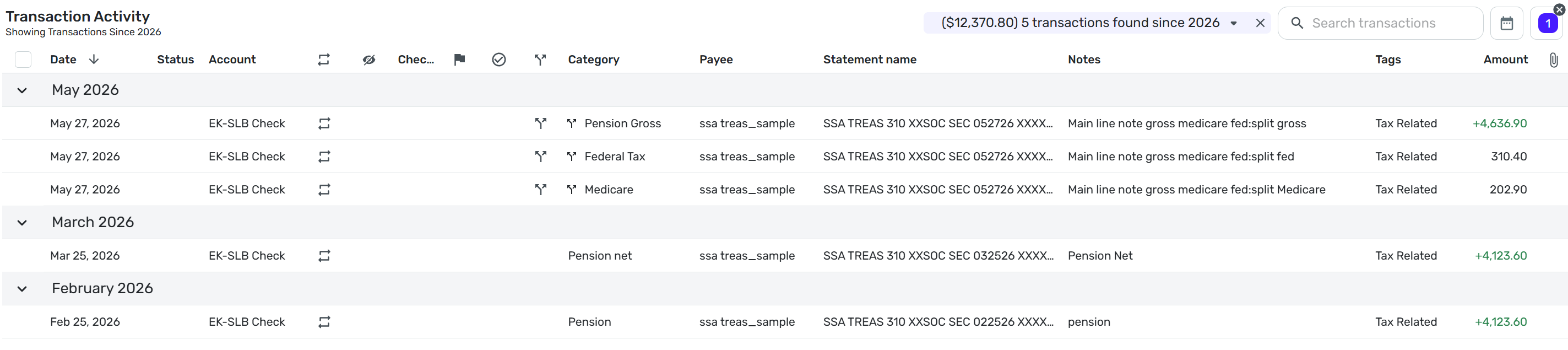
I am trying to control what line on the taxes report each line item shows on.
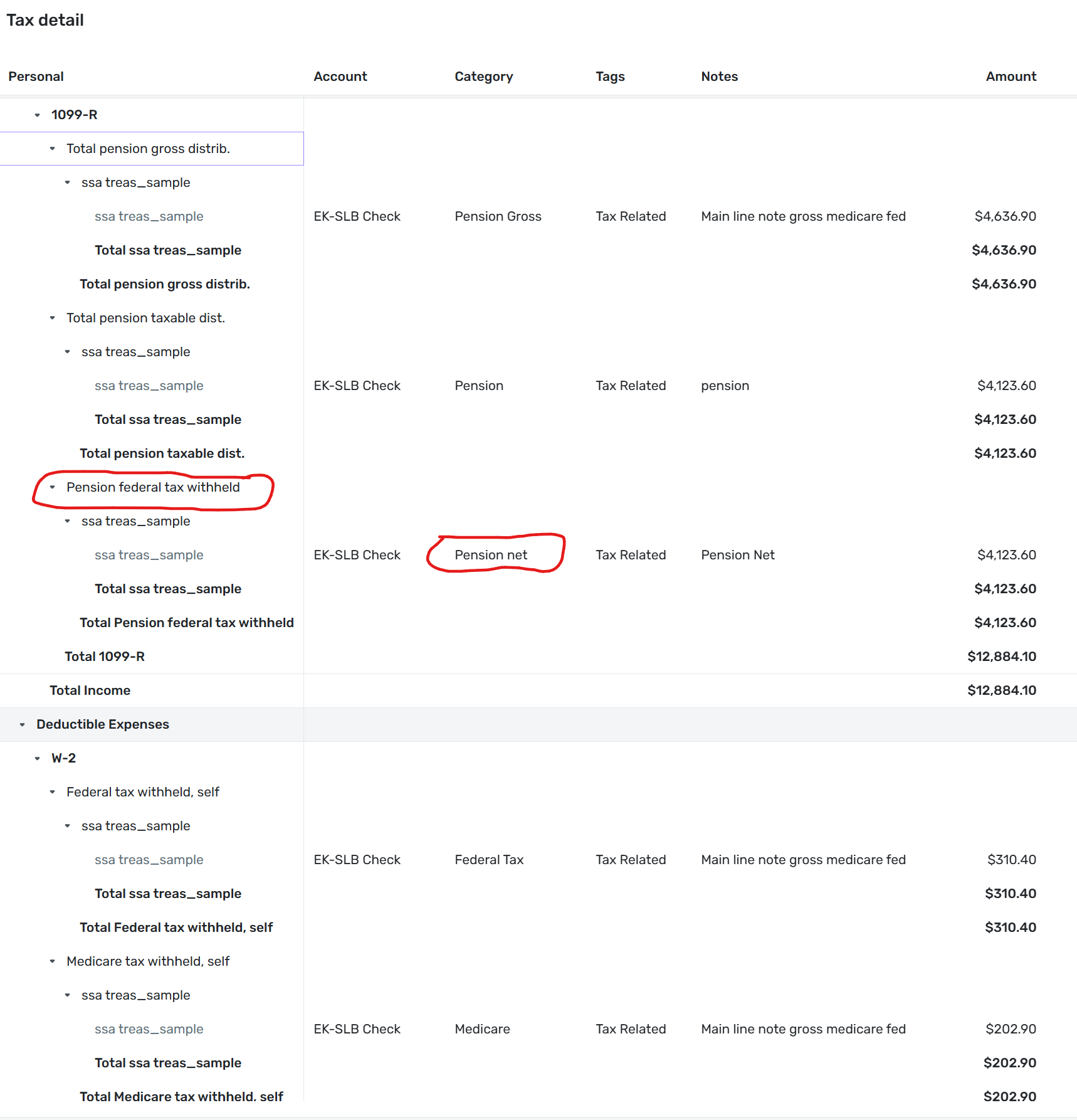
Below is a copy of the taxes report for the same 3 ssa checks. Note that Pension net is showing up under Pension federal tax withheld.
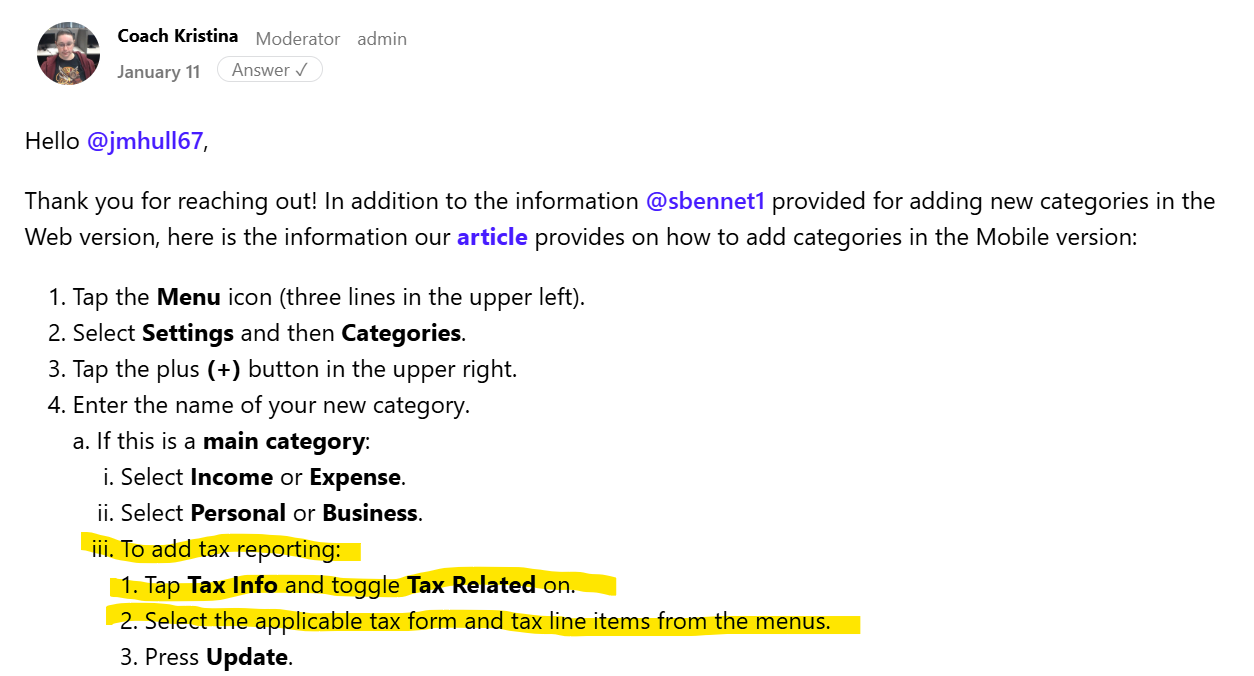
I found the following documentation about adding categories:
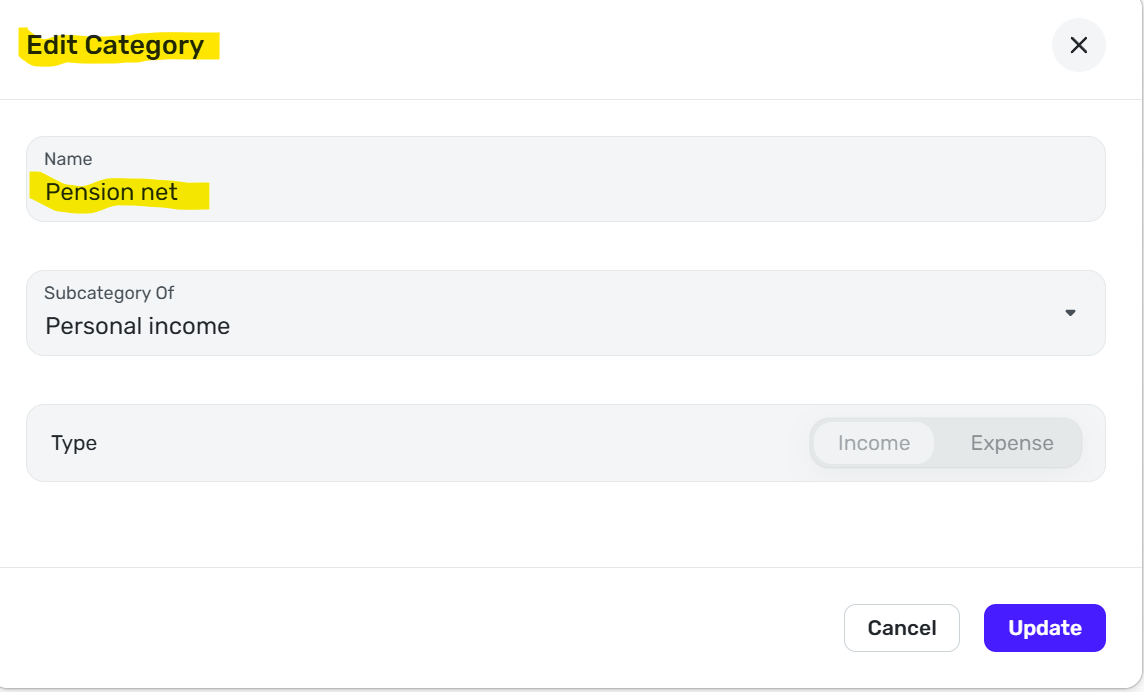
When I go to the edit categories screen I do not see a Tax Info Toggle.
How do I control the tax form and line number line that a category will appear on and what category is assigned to each line?
Steve B
Ex Fortran, Cobol, Basic, MS Access and Visual Basic for Applications (VBA) programer
Been using Simplifi since Dec 2025.
Best Answer
-
I was signed in as a shared owner of a space not the owner of the space. Apparently the tax related toggle is only available to the owner of the space. See my screenshot above. There is not a toggle.
I had a similar problem with early access to the recurring splits feature. Should have thought about that for this problem. It appears that there are a few things that only an owner can do which I did not see mentioned when I setup the shared space. I guess I need to be signed in as an owner all the time. It would be nice to have a list of the things that a shared space user cannot do and a way of printing out all of the tax related categories and the line item and form. Not sure if I want to put in a feature request for that.
Since there is a W-2 Medicare line item and I do not get a W-2 I am going to put it there.
@SRC54 Thanks for trying to help me and giving me advice on how to setup a SSA check
Steve B
Ex Fortran, Cobol, Basic, MS Access and Visual Basic for Applications (VBA) programer
Been using Simplifi since Dec 2025.
0
Answers
-
@sbennet1 You set the tax lines from the Settings (See cog wheel in top right corner). Go to Categories/Tags. Above looks like you were in the right place.
You turn on the tax related toggle and then choose what you need. Social Security is under Form 1040.
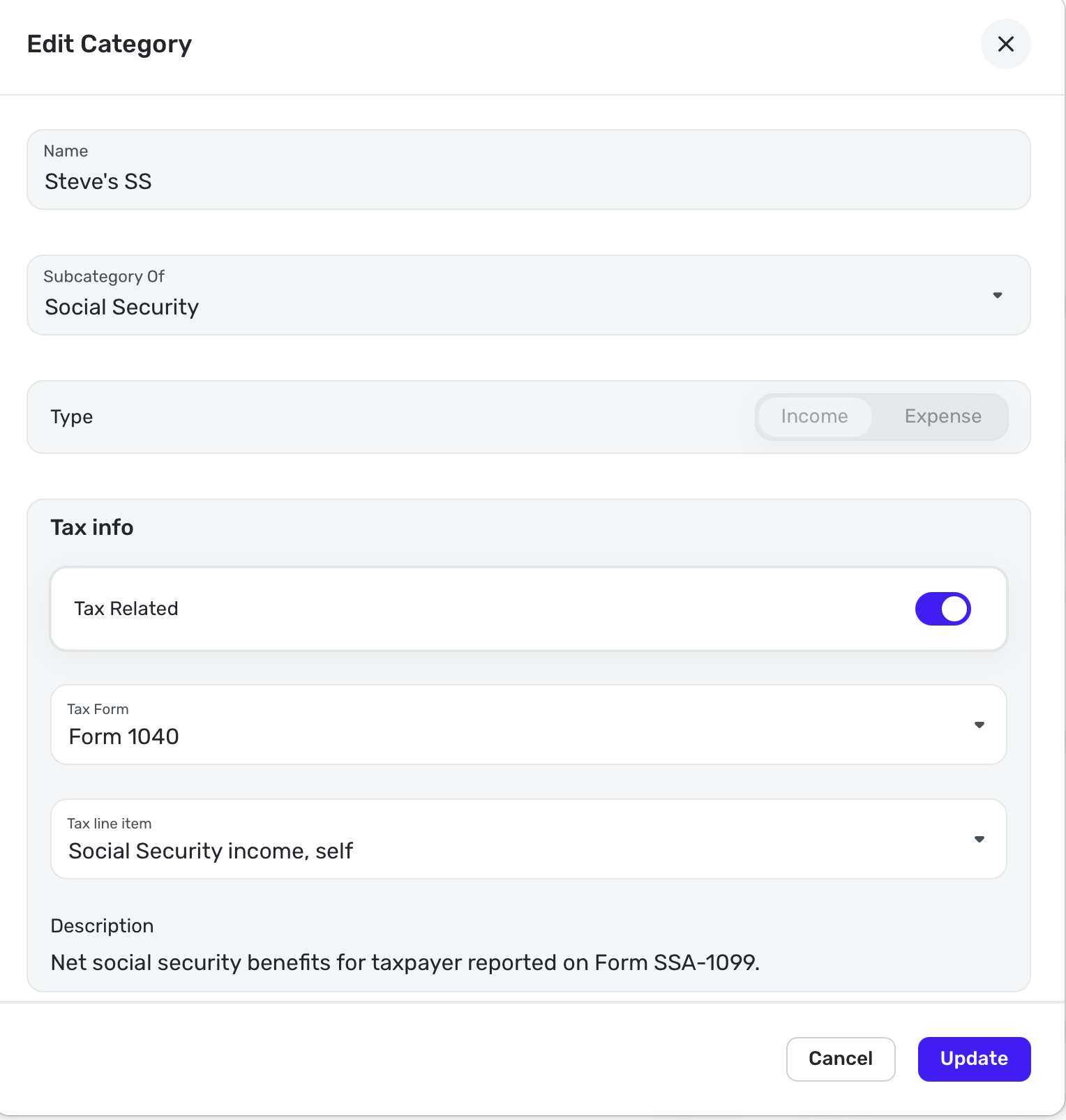
You find the Medicare Premiums under:
There isn't a separate one so I just do Schedule A: Doctors, Hospital, etc. You cannot deduct them unless your medical expenses are very high.
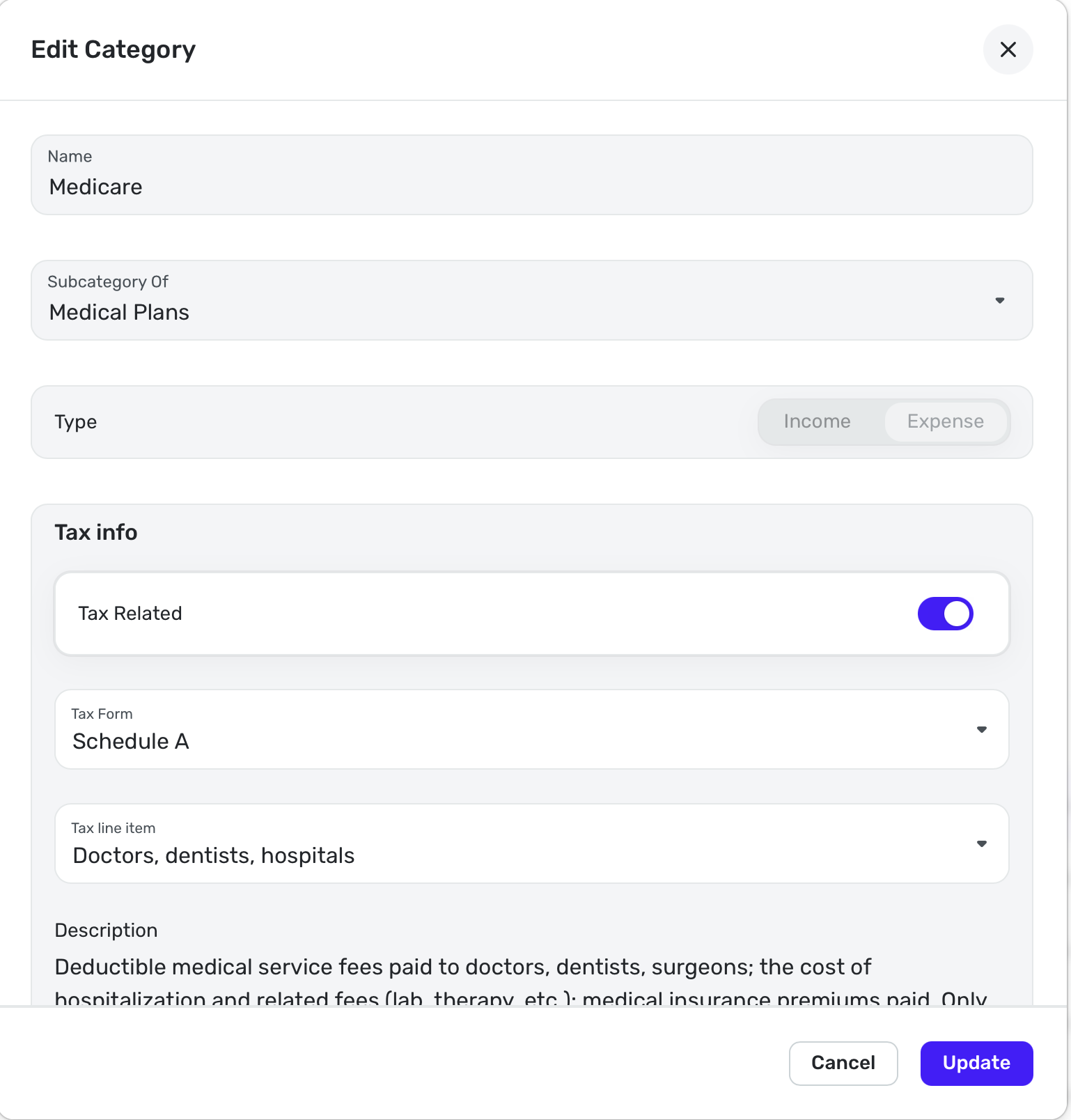
There's also one there for Fed Tax WH from Soc Security in the same place. I don't have taxes taken out of my social security so I am not showing that one to you.
Steve
Quicken Simplifi (Safari & iOS) Since 2021
Quicken Classic (MacOS) Since 2009
Dollars & $ense (DOS) and MS Money (Windows) 1987-20090 -
Glad you got it figured out. I wondered why you couldn't see the toggle! Glad to know the answer.
Steve
Quicken Simplifi (Safari & iOS) Since 2021
Quicken Classic (MacOS) Since 2009
Dollars & $ense (DOS) and MS Money (Windows) 1987-20090 -
Medicare is confusing. Not Simplifi's fault IMO.
Especially confusing for me, recently retired and on Social Security and Medicare, is that I no longer pay Medicare TAXES with every paycheck. I pay Medicare PREMIUMS by deductions from every Social Security check. The transactions look the same, hence my confusion.
It took me a while—too long—to see that distinction.
SRC54 noted above that Health Insurance (which is what Medicare is) is tax-deductible and listed on Schedule A under Doctors, Dentists, Hospitals, but didn't make the abbreviated set. And it's only useful after I exceed the standard deduction, which I rarely do.
I list all deductions from paycheck, pension, and Social Security under the income category "Withholding" as their own subcategories. Mostly these are income tax and health insurance.
Withholding is odd because I make it an Income category with payments going out. That way, all the deductions can be split out under the incoming check. It keeps them together in the register, and they match the "pay" stub they were taken from.0 -
Well, it's just that they make us pay premiums, and many pay more than the $202.90. We poor ones only have to pay that. Ha. That is the only thing that is taken out of my wife's check and mine. If using an income category works for you, go for it, but I use an expense category.
We have to each pay the 202.90 plus we pay for dental as well so I have a Planned Spending category set up for the $470 and something each month. I then do a recurring transaction for our three incomes: 2 SS and 1 Pension. The Pension has two withholdings. Federal Tax and the Dental plan. It works real well. We are lucky in Alabama that our pensions and SS are not taxed by the State. (For now! Our legislature is getting as greedy as everybody's.)
Steve
Quicken Simplifi (Safari & iOS) Since 2021
Quicken Classic (MacOS) Since 2009
Dollars & $ense (DOS) and MS Money (Windows) 1987-20090 -
Withholding is odd because I make it an Income category with payments going out. That way, all the deductions can be split out under the incoming check. It keeps them together in the register, and they match the "pay" stub they were taken from.
I'm not sure I understand why you have to make withholdings into income categories.
For example, I split one of my incoming checks into:
- one income category,
- 2 tax expense categories,
- and 1 health insurance expense category.
When I "show split details" in the register, all four splits are together and they match the pay advice document. Did that work differently for you?
DryHeat
-Quicken Classic (1990-2020), CountAbout (2021-2024), Simplifi (2025-…)1 -
@SRC54
I hear you. There does seem to be a long line of institutions picking small and large bits out of my income before I get to put food on the table. There seems to be an insidious blindness to the costs of that practice.
1 -
@DryHeat
I guess I don't "have" to make withholding an income category. I do it so that my spending plan can be based on net income, which seems easier to me. After splitting a payment, the withheld amounts are shown as deductions from gross income in the spending plan and the register.
0 -
I do it so that my spending plan can be based on net income, which seems easier to me
That makes perfect sense. It's really just a matter of how you want to see it.
I prefer to see my gross income in Spending Plan, with the deductions already listed as expenses under Planned Spend. That way the "Left this month" amount works out the same way it does under your method.
The upside to my method is that deductions can be treated as expenses. But the downside is that I occasionally have to adjust the amounts in Planned Spend to match the deductions. It works for me because my deductions are very consistent.
DryHeat
-Quicken Classic (1990-2020), CountAbout (2021-2024), Simplifi (2025-…)1


