Summary reports defaulting to daily intervals when I chose month to date (edited)

I'm not seeing this fix. Its till defaulting to daily intervals when I chose month to date.
FIXED: The Spending and Income Summary reports default the date interval to "month" instead of "day" for shorter date ranges.
Comments
-
@RobI, thanks for reaching out to the Community!
When checking the Spending Summary report, I am seeing a daily breakdown for the 'Month to Date' date range option.
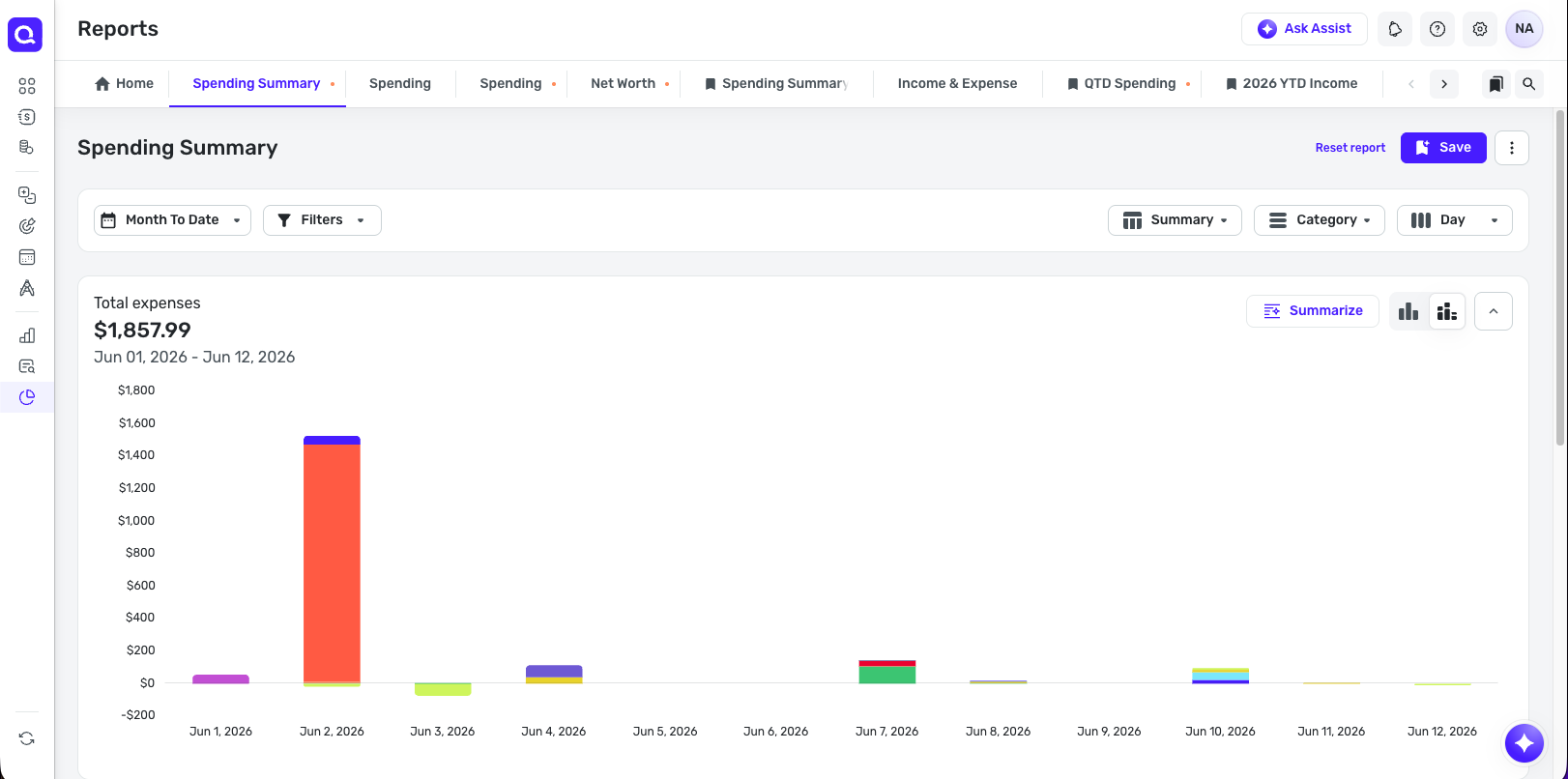
This is what the report is supposed to do. What was fixed is that it was defaulting to a per-month breakdown instead of a per-day breakdown for shorter date ranges.
I hope this helps to clarify!
-Coach Natalie
0 -
Thanks I was hoping for a monthly default behavior not the daily values shown above, which are too sparse to merit showing in chart format. This is not so much a summary as a list of daily events, and I can already get the above data in the daily transactions view.
My point of view anyway.
0 -
Thank you for sharing your feedback!
I recommend creating an Idea post to request this change. Ideas that get enough votes may be implemented in the future! For information on creating an Idea post, please review the post linked below:
Thank you!
-Coach Kristina
0

