Rules not reliably applying to existing transactions (Payee/Category)

I've built several payee-rename / category-update rules (e.g., for Capital One, Citi card payments, and an Apple Care rule), and the same problem keeps recurring across different rules and different accounts:
- The rule is correctly configured (verified — keywords, account scope, and actions are all set up properly).
- When I save the rule and select "apply to existing transactions," it does not reliably apply.
- The failure is inconsistent and partial — sometimes the Category update applies but the Payee rename doesn't; sometimes neither action applies; sometimes it works fine on one transaction but not on another with identical payee text and the same rule.
- Editing an existing rule and re-running "apply to existing transactions" does not reliably fix already-affected transactions.
Examples:
- Capital One rule: Rename Payee → "Capital One", Update Category → "Checking." On one transaction, Payee stayed blank ("N/a") and Category also failed to update, despite the rule clearly matching (confirmed via the original statement text).
- Apple Care rule: Rename Payee → "Apple Care", Update Category → "Gifts," $4.99 exact match. A transaction matching all criteria (Capital One, "apple" in payee, $4.99) was not renamed at all after the rule was created and applied to existing transactions.
- In one case, the Payee field updated to the wrong value — it picked up the raw original statement text ("CAPITAL ONE") instead of the case I'd specifically typed into the Rename Payee field ("Capital One").
What I'd like resolved:
- Why "apply to existing transactions" isn't reliably applying both actions of a rule.
- Whether there's a known issue with Rename Payee specifically not taking effect on historical transactions, or being overwritten by original statement text.
- A reliable way to get existing transactions fully updated short of deleting and recreating rules from scratch (which I've tried, with inconsistent results).
Comments
-
Quick update — this is turning out to be more widespread than I initially thought. I'm now seeing the same issue (rule correctly matches the transaction, but doesn't apply, or only partially applies) across four separate rules covering different accounts and categories — Capital One payee renaming, an Amazon Groceries-vs-Shopping rule, an Apple Care rule, and a utility bill rule. It's also happening on newly-imported transactions, not just historical ones I'm retroactively applying rules to. Wanted to flag that this doesn't seem isolated to one rule or one account.
0 -
Hello @dfmarcus03,
Thank you for reaching out! To help troubleshoot, please provide more information:
- When did you first notice this issue?
- Was it working properly before?
- What kind of transactions are the rules failing to apply to?
- If they are transfer transactions, balance adjustments, recurring transactions, or manually entered transactions, then, according to our article on transaction rules, it's expected behavior.
I look forward to your response!
-Coach Kristina
0 -
Hi Kristina,
I noticed this a few weeks ago when I began setting up rules, though I can't say when it actually started. Some of the failing transactions are indeed transfers (e.g., credit card payment transfers between accounts), but others are straightforward purchase transactions — a Whole Foods grocery charge, an Apple subscription charge — where rules with matching keywords are simply not applying. Those are the cases I'm most concerned about, since they don't fall into any of the exception categories you mentioned.
0 -
Hello @dfmarcus03,
Thank you for the response! Can you please share a few screenshots showing the rules you have created, as well as the transactions that are failing to have those rules applied? This will help us better understand what may be happening for you here.
Additionally, can you confirm whether the "Apply rule to existing transactions" option is checked when reviewing the rule and which transactions to apply it to?
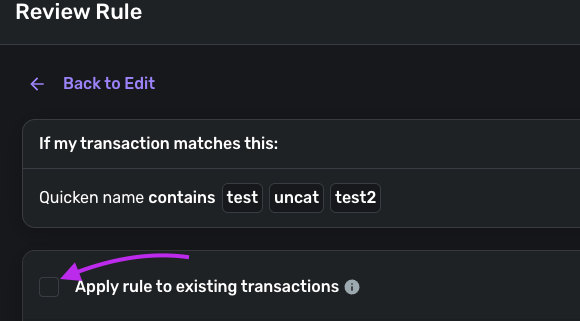
-Coach Jon
0

