Bill Connect for Credit Cards: Share your feedback here!
Comments
-
@RobWilk, I would recommend waiting a full billing cycle to see if things even out for you. Let us know how it goes!
@SRC54, Chase, along with many other credit card companies, is not supported as a connected Biller via Bill Connect. This lack of connectivity is part of the reason we came out with this Bill Connect for Credit Cards feature, where the credit card reminders can be updated using the aggregated account balance instead.
-Coach Natalie
1 -
@Coach Natalie I thought I had done it right but nope. It has been a frazzling afternoon.
I re-did it as Credit Card Payment and not transfer to Checking. So it's fixed. Thanks!
Steve
Quicken Simplifi (Safari & iOS) Since 2021
Quicken Classic (MacOS) Since 2009
Dollars & $ense (DOS) and MS Money (Windows) 1987-20090 -
I had a really great experience with this new feature at first, but have had some issues recently.
The first is that the upcoming transaction reminders for some of my credit card payments have not matched the actual amount debited from the account on the due date. I need to investigate a little deeper to figure out if they match the statement balance on the initial closing date, but the bank adjusts it due to returns and things in the interim, but I think the amounts are too much for that to be the case.
The second issue is with the transactions associating with the series. The credit card payments that just went through showed up in Simplifi and appeared to correctly associate with the series. But the reminders for those same transactions were still there. They reminders showed as past due in many cases even though the payments were clearly visible and seemed to be correctly associated. This of course made my cashflow seem totally out of whack.
The third issue (possibly related to the second) is that the reminders sometimes just go missing. For example, several of my credit cards are due right around the middle of the month (16th/17th). So the July payments have just gone through. And now there are no reminders showing up for August, and the next reminder is showing up in September. This makes my cash flow projection for August very incorrect.
Any idea of the cause of these issues? Thanks
0 -
@trewbux - "So the July payments have just gone through. And now there are no reminders showing up for August, and the next reminder is showing up in September."
I had the same experience with a credit card that I looked at today — no reminder for August, statement amount that should show up in missing August reminder now shows up in September reminder.
I changed the date on the "September" reminder to August and the next reminder after that now shows a September date.
It's like they had all shifted later by a month and by fixing the date on the first one (from September to August) I shifted them all back to their proper positions.
DryHeat
-Quicken Classic (1990-2020), CountAbout (2021-2024), Simplifi (2025-…)1 -
I tried going into the series and setting the date back to what it should be in August manually as well. I thought maybe it had gotten out of sync and got confused about when the next item in the series should be. But that did not fix it for me, the next reminder is still showing up in September, and the series “start date” is also reverting back to September like it’s overriding my attempt to correct it manually.
0 -
I just turned this feature on for one of my credit cards and will keep an eye out for issues. So far, I see that my next reminder in August shows that the bill amount has been finalized, but it actually doesn't come out until around the 1st of the month. I'll let a billing cycle go through to see what happens, but it seems wonky to me. My September reminder indicates that it will instead be the one to update with my current aggregated balance. 🤔 I will report back with my experience on this!
As for the shifting or missing reminders, it may be best to delete and recreate the Recurring Series itself to see if the newly created Series behaves properly.
-Coach Natalie
1 -
I deleted, and re-created the series, which fixed the timing of the next reminder (August ones have returned). But the upcoming reminders have not sync’d with the latest statement amount, even though it says the connection is working. Does anyone know how long it takes for the latest statement amounts to sync when you first create a series?
0 -
I am trying to get a total of credit card payments due for this month (for 6-8 cards) without having to sum it up manually. I am under Bills & Income—> Transfers. I see the upcoming payment for each card but could like to see the total here. May be this already exists somewhere else. If so, where can I find it?
0 -
@Bgz , I'd say the best place to find a total due for the month would be in the Spending Plan. If you have the items set up as Recurring Transfers, they'd all show in the Bills section. You can then filter the Bills section by "Transfers".
I hope this helps!
-Coach Natalie
0 -
"I am trying to get a total of credit card payments due for this month (for 6-8 cards) without having to sum it up manually."
As @Coach Natalie suggested, you can see these in Planned Spending | Bills (filtered for Transfers). But you won't see an accurate total there (which I think is what you are asking for) because both sides of the Tranfer show up and cancel each other out.
But you can change that by marking the payment side (but only the payment side) of the credit card transfers to not be excluded from the spending plan. Then look in Spending Plan | Bills and filter the display for Transfers.
The payments should then show up under the "Included this month" section and the total at the top of the page will be equal to the total of payments. Like this:
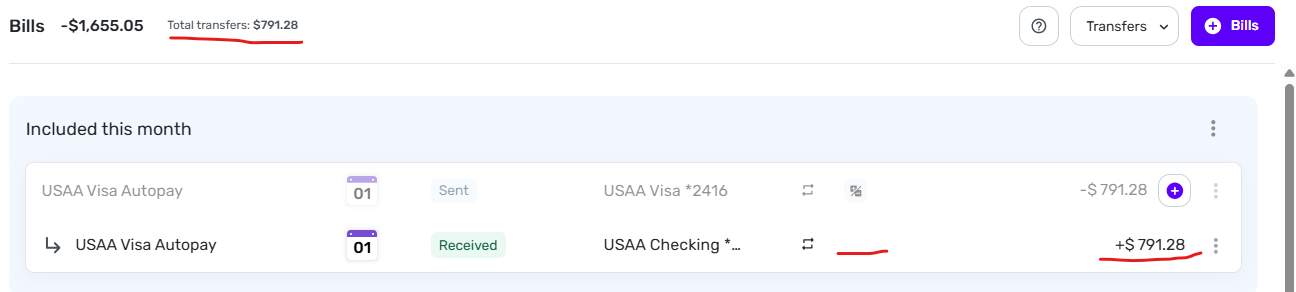
It's kind of a work-around, but it might help. The downside is that you will then be double-counting credit card transactions in your spending plan… once when you use the CC and once when you pay the CC statement.
DryHeat
-Quicken Classic (1990-2020), CountAbout (2021-2024), Simplifi (2025-…)0 -
I find that including the payment side gives a total of all my credit card payments (which is what I am looking for), but it messes up my spending plan up big time by considering that payment as income. I wish simplifi would just give us a total of all credit card payments due for each month in a highly visible spot. It shouldn't be too hard to achieve this as all the information needed for the summing up already exists from the biller connect.
0 -
"I find that including the payment side gives a total of all my credit card payments (which is what I am looking for), but it messes up my spending plan up big time by considering that payment as income."
Right. A few minutes ago I went back to edit my post to add that warning … too late, it seems.
The problem with using the Spending Plan for cash flow projections is that it isn't really designed for that. It's sort of a blend of cash flow (money in and out) and "obligations undertaken" (Usually credit card purchases).
But it's the only place I know of where you can see a listing of upcoming transfers and get a total.
A better solution would be to add the ability to select certain reminders (via a checkbox) in the Bills & Income | Cash Flow listing and have a total of the selected ones displayed at the top (like Transaction Activity lists).
Maybe you could suggest that if it would be helpful to you.
DryHeat
-Quicken Classic (1990-2020), CountAbout (2021-2024), Simplifi (2025-…)0 -
Works when it feels like it. I have cards through Chase and Capital One. Neither properly updated this month. Is there some way of refreshing? Or do I just have to stick with my estimate until the next billing cycle.
0 -
@Me123456, please wait a full billing cycle to see what happens. Let us know how things go!
-Coach Natalie
0 -
I understand that I should wait a full billing cycle to see if the credit card Bill Connect will start working again. But I'm not sure what I can/should do in the meantime, or when exactly a full cycle will be considered passed.
Specifically, I want to know:
(1) Can I can manually update the Sep 8 reminder (prior to the Aug 11 statement date and/or after the statement comes out) without perpetuating the cycle of non-function? Or do I just have to live with the wrong amounts?
(2) Given the situation described below, what constitutes a "full billing cycle"? Is it after the Aug 11 statement comes out? Or after the Sept 11 statement comes out?
Here's the situation:

—The Aug 8 bill shows as "finalized," but it was not set to the correct amount by Bill Connect. I had to edit the amount to make my cash flow projection correct. (The statement period closed on July 11.)
—The Sep 8 bill shows as "updating," but in fact it is not changing at all. It has shown the same amount at least since mid-July, even though there have been dozens of transactions since then. (I run most of my expenses through this card, so the amount is now off by thousands.)
—The Oct 8 bill shows as "connected," so it should begin updating soon after Aug 11.
Thanks…
DryHeat
-Quicken Classic (1990-2020), CountAbout (2021-2024), Simplifi (2025-…)0 -
@DryHeat, if you need the correct amounts, I would recommend editing the individual reminders:
For a full billing cycle, this means that a full billing cycle has passed since the time you enabled the feature. If the feature was enabled in the middle of a cycle, I'd recommend waiting for that one to close and the next full one to complete.
Thanks!
-Coach Natalie
0 -
The feature has been enabled since early May, I believe, and it used to work. It ceased to work when the July 11 statement came out.
Does that change your advice?
DryHeat
-Quicken Classic (1990-2020), CountAbout (2021-2024), Simplifi (2025-…)0 -
@DryHeat, have you tried disabling/re-enabling the feature, or deleting and recreating the expense, and then keeping an eye on things for another full billing cycle from there? Can you point out where you have reported this issue previously so we can review the troubleshooting that ensued?
Thanks!
-Coach Natalie
0 -
I've answered your questions below, but please remember that my question today was simply "What constitutes a full cycle?"
I think it's probably from statement to statement, but it could be from payment of a reminder to payment of the next reminder. Please let me know what you advise.
As for your questions:
"Can you point out where you have reported this issue previously so we can review the troubleshooting that ensued?"
All on this thread:
July 18: reported that next reminder (August) had disappeared, had to be recreated, failed to update — no direct response to me and no troubleshooting, but general advice to others was to wait a full billing cycle
July 21: reported that August reminder still had wrong value and following reminder was failing to update — no direct response to me, but advice to RobWilk was to wait a full billing cycle
July 23: reported that August reminder had shifted to September — advice was that it may be best to delete and recreate. But I have continued to follow the "wait a cycle" advice to see what happens
"have you tried disabling/re-enabling the feature"
No, I am trying the "wait a full cycle" approach to see what happens.
"have you tried … deleting and recreating the expense
No, I haven't tried deleting the recurring transfer series for the credit card payment, which I think is what you are talking about. As above, I am trying the "wait a full cycle" approach.
DryHeat
-Quicken Classic (1990-2020), CountAbout (2021-2024), Simplifi (2025-…)0 -
Just scrolling through this thread for first time and wanted to provide feedback that I had it doing the same thing you are reporting where it basically was a month off (i.e. marking current month reminder as "finalized", i.e. the July payment reminder for the June credit card expenses, when not and marking the following month's reminder, i.e. the August payment reminder for July credit card expenses, as the one updating. I tested it across a billing cycle for two of my credit cards and never could get it to fix. Deleted series and all things/recreated series and all things/changed settings/waited. Did most of this in June through early July but started playing with it back in May. Tried everything reasonable to try. So I turned the feature off and just do my manual updates on my reminders at the end of each month. Much less error-prone that way and doesn't mess with Cash Flow monitoring when updating manually. With the errors, it wasn't worth continuing to play with it.
But even if it had worked correctly, I found it difficult to maintain my Cash Flow projections with this feature on. It'd be nice if you could have the Cash Flow projections maintain a 'minimum payment" amount in the credit card payment reminders that you could manually adjust and only adjust the credit card payment total once you've exceeded that minimum amount or after the bill has finalized. this way, your Cash Flow doesn't deceive you early in the month thinking you have more money available to transfer to savings or whatever than will actually occur once the month progresses.
2 -
My USAA Visa has been working perfectly with Bill Connect. But now… not so much.
When the full statement balance was paid by auto payment on Aug 1:
- the Aug 1 Reminder showed the correct amount of the statement balance.
- the Sep 1 Reminder showed the correct amount of charges made after the statement, $173.80.
No additional charges have been made on that card, but today:
- the Sep 1 Reminder shows a balance of $5,747.60.
- the bank website shows the actual current balance is still $173.80.
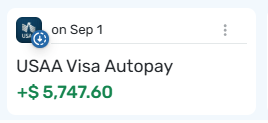
Hey… I know it's only off by $5,573.80… but it's still a problem.😉
DryHeat
-Quicken Classic (1990-2020), CountAbout (2021-2024), Simplifi (2025-…)0 -
I have had the same issues recently with AMEX and Chase cards where reminders shifted forward a month and amounts were incorrect. There is clearly an issue here.
1 -
Success with turning Bill Connect off and then on again.
After a second credit card began to show erratic payment Reminders with Bill Connect I turned Bill Connect off, waited a day, and turned it back on.
By the next day the Reminder based on the statement amount and the following Reminder (showing purchases that will be on the next statement) were both showing correct amounts.
I've been out of range of any internet for several days, but when I checked in today the payments had gone through and matched the Reminders. Also, the Reminder based on the next statement amount and the following Reminder were both showing correct amounts.
We'll see if this fix holds up, but so far it looks good.
DryHeat
-Quicken Classic (1990-2020), CountAbout (2021-2024), Simplifi (2025-…)3 -
"Success with turning Bill Connect off and then on again."I spoke too soon (sigh)… Here's what's happening now:
- The upcoming September payment (for the period that closed 10 days ago) shows this:
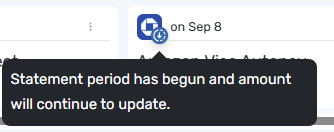
- The October payment (for the current period) is missing altogether.
- The November payment (for a period that won't start until September 12) shows this:
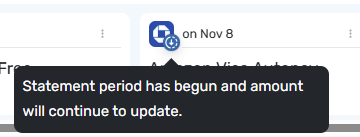
The amounts are also messed up.
- The Sept 8 payment shows the entire amount now owing on the card, not the payment amount from the statement.
- The Nov 8 payment shows an amount that doesn't correspond to anything.
I am turning off Bill Connect on this account. I will leave it on for other accounts where it is working, but if an error occurs I will turn it off.
It takes much less time to enter the statement amount each month than it does to deal with these issues.
DryHeat
-Quicken Classic (1990-2020), CountAbout (2021-2024), Simplifi (2025-…)1 -
I have similar issues with my AmEx, Citi, Discover, and Chase cards. It seems like they should have delayed release of this feature until it was tested more rigorously, considering the importance of accurate credit card balances.
0 -
After a month of testing, my reminders are still not updating properly with this feature. My next upcoming reminder shows that it's closed, and it's using the default amount for the series. This bill is definitely not closed yet! And then I see that the following reminder is the one being updated, but I have no idea where the amount is coming from.
I filed a ticket to outline this behavior to our product team. I also called out some of the comments from this thread where users have reported the same type of behavior. I will let you all know if we need any additional info or examples!
-Coach Natalie
2 -
My next upcoming reminder shows that it's closed, and it's using the default amount for the series. This bill is definitely not closed yet!
Interesting. That's the opposite of what happened in my case … My billing period is closed, but it showed as "begun [and] continuing to update." (Although, like you, I had a later reminder that was showing an amount with no apparent connection to reality.)
QUESTION: There seem to have been several different flavors of failure for this feature. Can you say which of those you found significant enough to report to the product team?
DryHeat
-Quicken Classic (1990-2020), CountAbout (2021-2024), Simplifi (2025-…)0 -
@DryHeat, thanks for the information!
I filed a ticket with what I am seeing and shared the comments from this thread describing what other users are experiencing. I started testing on my end about a month ago, as previously mentioned in this thread:
I hope this helps to clarify!
-Coach Natalie
1 -
Thanks for the reply. It sounds like you provided the product team with a full smorgasbord of the issues raised in this long thread, and that's a good thing.
I really like this feature. I hope they are able to work out the kinks. Until they do, I am cutting it off account-by-account at the first sign of trouble. In it's current state, it takes more time than it saves.
DryHeat
-Quicken Classic (1990-2020), CountAbout (2021-2024), Simplifi (2025-…)2 -
At this point, the setup of recurring reminders + bill connect + bugs just seems too complicated and fragile. I've given up on it, disabled bill connect for all recurring credit card payments, and have returned to manually updating future reminders, once each credit card billing cycle closes.
I'd recommend that the Simplifi team just implement a simple summary view of credit cards, similar to what Mint used to have. I suggested this a while back here …
Have a page in Simplifi where I can see a list of credit cards, and for each one see
- Total balance
- Last bill balance
- Last bill date
Disconnect this new proposed page in the app (or addition to an existing page in the app) from anything to do with "Bills and Income", Series, or Bill Connect. The simple act of setting up a credit card account under Settings > Accounts, could enable this feature. If you are connected to a credit card "account" then the system gives you a screen to see credit card account summary with the items above.
This would at least save me from having to login to other credit card websites or apps to manually update future reminders.
Would it be worth re-posting this idea under feature requests?
1



