Connected account balances not updating with pending transactions (edited)
Balances in Simplifi are either not updating at all or being very laggy to update. I noticed that when adding manual transactions to an account that the balance wouldn't update immediately. It would sometimes update randomly after some period of time, but it never reflected the correct balance.
In the past, when I've added new manual transactions to connected accounts, the balance would update immediately.
I tested myself by creating a fresh, manual account that's not connected to any bank. Starting with a balance of $0, I added $300 to the account, and the balance still shows $0.
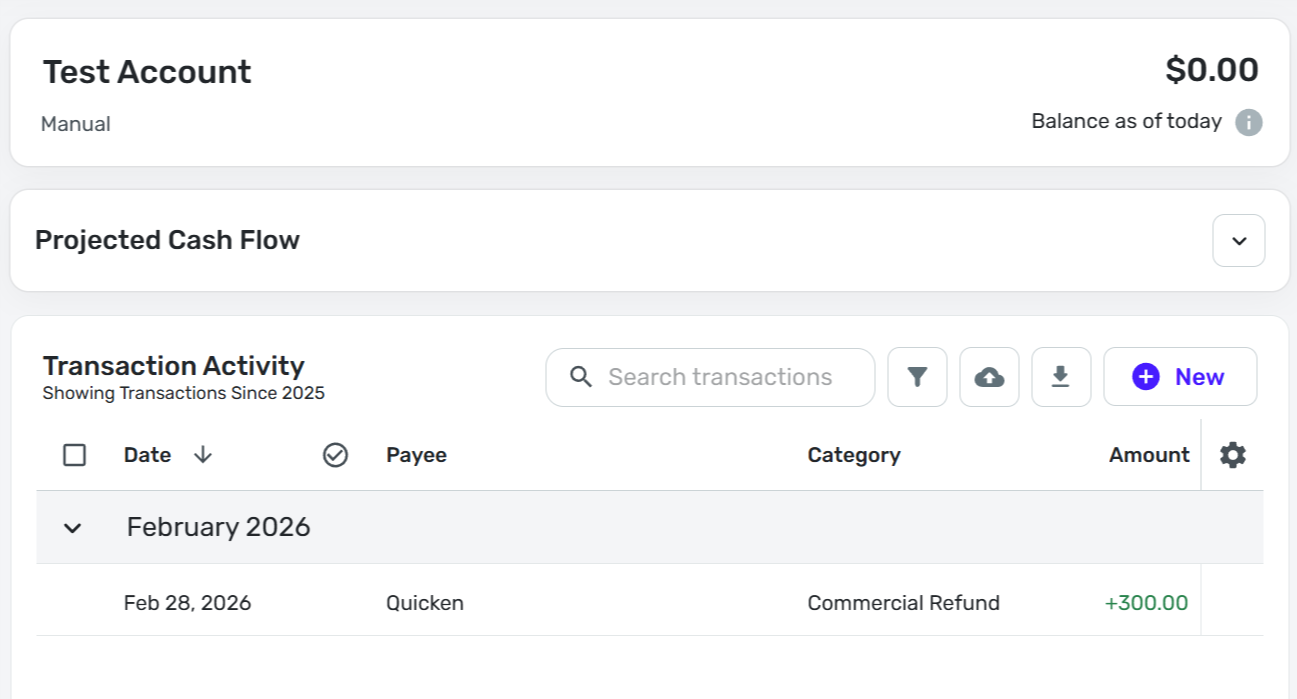
Support is telling me that I have to manually resync the balance every time I add a transaction to a manual account, which is ludicrous. They refuse to acknowledge that there's a problem.
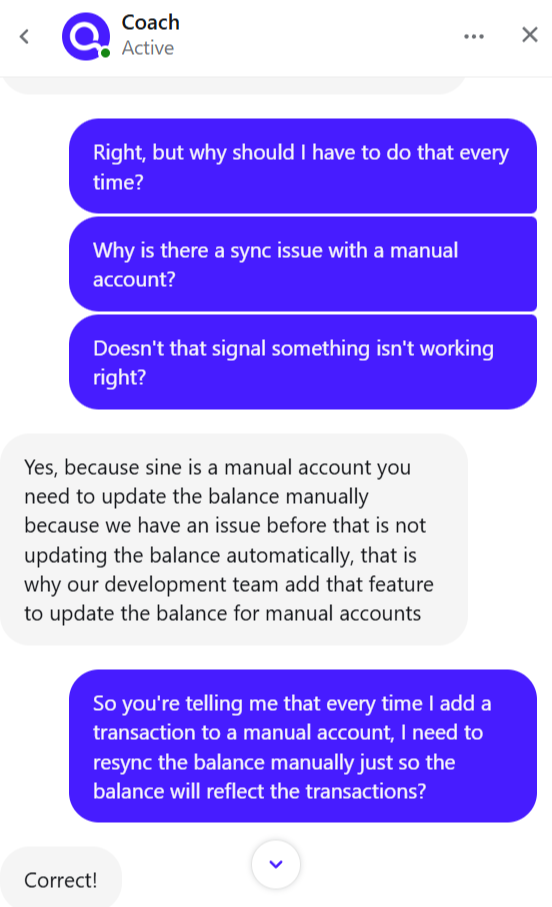
This is a product-breaking issue. How can I rely upon a ledger that doesn't accurately reflect account balances?
Is there some way for me to fix this, or some workaround?
Comments
-
I noticed this too this morning. Not sure why. I used the Re-Sync button (found by clicking the i in a gray circle) under the balance at the upper right of the account Transaction List.
Steve
Quicken Simplifi (Safari & iOS) Since 2021
Quicken Classic (MacOS) Since 2009
MS Money (1991-2009) and Dollars & Sense (1987-1991)1 -
Right, but you shouldn't have to resync manually every time, right? Like, no product should work like that. I'm not crazy, am I?
1 -
Well, no, but this has been a continual problem with manual accounts for some time. It will sync as you say after a while. The re-sync is just for those who are impatient. Like me!
Edit: I had trouble with the Kelly accounts this morning but when I added a transaction to my Cash account, it updated instantly, so go figure.
Edit 2: Just tried a test transaction in my Cash account, and it didn't update the balance. The other one was a transfer from another account so maybe that somehow triggered it. LOL
Steve
Quicken Simplifi (Safari & iOS) Since 2021
Quicken Classic (MacOS) Since 2009
MS Money (1991-2009) and Dollars & Sense (1987-1991)0 -
Seeing this issue as well. While the manual resync fixed one of our accounts, another account where I also deleted duplicate transactions won't fix the balance even with a manual resync.
1 -
It looks like balance updates are just extraordinarily delayed. After leaving and coming back, I noticed that all of my balances were consistent with the transaction log but still not updating in real time. As I've been continuing some work on my finances, I've noticed the balances changing on what may be a 15-30 minute lag.
It's terrible but not totally unworkable. It's just forcing me to have to double-check balances to have any confidence in what Simplifi is telling me, so everything's taking twice as long.
0 -
To make sure that the balance is different from your transactions, go to the account and choose to sort by payees or categories. Then check the checkbox in the header. This will choose all the transactions in the account.
The sum that Simplifi shows will be your balance. If not, you are missing or have more duplicate transactions.
Steve
Quicken Simplifi (Safari & iOS) Since 2021
Quicken Classic (MacOS) Since 2009
MS Money (1991-2009) and Dollars & Sense (1987-1991)0 -
I'm having the same issues. I tried to resync the accounts, and now they all show a $0 balance. Is Quicken still denying the issue?
0 -
This is fixed for me now. The support team actually followed up with a phone call, which was a nice gesture.
2 -
Hello @someotherderek,
Thank you for the follow-up. I'm glad to hear the issue is now fixed for you!
Hello @SRC54, @RoyceG, and @Jim Nissen,
Thank you for letting us know that you're also seeing this issue. It has been reported to the proper channels for further investigation and resolution. To contribute to the investigation, please send logs. You can do so by following these steps:
- Log into the Quicken Simplifi Web App.
- Select Profile from the left-hand navigation bar.
- With the Profile menu open, hold down the Option key for Mac or the Alt key for Windows, and then click Send Feedback.
- Leave all boxes checked, add a brief description of the issue, and then click Send.
To be notified of any updates and to know when the issue is resolved, I recommend bookmarking this Community Alert:
Thank you!
-Coach Kristina
0 -
@Coach Kristina Done. My problem seems to have cleared up but sent the logs anyhow.
Steve
Quicken Simplifi (Safari & iOS) Since 2021
Quicken Classic (MacOS) Since 2009
MS Money (1991-2009) and Dollars & Sense (1987-1991)1 -
I don't know if related but I noticed that the for a specific linked account, when I update the amount of a pending transaction, it doesn't update the total for pending transactions which is used to calculate the "balance with pending". This is throwing off my spending plan and since it's a linked account, there's no resync button to fix it. I'll wait and see if it fixes itself.
0 -
Having same trouble this morning. I am sure the next bank update will fix it. Well, I hope so. Also the manual accounts continue to give problems so thank goodness for the re-sync button.
I imagine the underlying problem will be fixed within a day or two.
Steve
Quicken Simplifi (Safari & iOS) Since 2021
Quicken Classic (MacOS) Since 2009
MS Money (1991-2009) and Dollars & Sense (1987-1991)0 -
I'm having the same issue. Why should manual transactions entered on a manual account be delayed? They should update instantly! And the recommended fix is to now manually sync your account to get it to update? Uh, Excel does a better job than Quicken at this point.
All of the recent updates at Quicken seem to be introducing more issues than fixes or features. How about a little quality control on these updates??
0 -
I noticed it again this morning, but it does update if you just ignore it for a while. I did re-sync one manual account. I like instant gratificatiion.
Steve
Quicken Simplifi (Safari & iOS) Since 2021
Quicken Classic (MacOS) Since 2009
MS Money (1991-2009) and Dollars & Sense (1987-1991)0 -
Hey everyone! Is this still happening as of this morning?
Let us know!
-Coach Natalie
0 -
Yes (referring to pending transactions in a linked account).
I had a manual transaction and a downloaded transaction that didn't auto-merge. They were both marked Pending. I merged them and expected the "balance with pending" and the "total pending transactions" tooltip to update, but they did not (yet).
0 -
@Coach Natalie Still happening. I did some errands this morning. I came home and updated Simplifi. My checking account downloaded pending grocery and gas transactions. The balance stayed the same.
I also opened it in the phone app. Wrong there too. I've tried everything to trigger a re-calculation but nothing has happened yet.
Edit: Balance is now updated and correct, but I didn't see it happen.
Steve
Quicken Simplifi (Safari & iOS) Since 2021
Quicken Classic (MacOS) Since 2009
MS Money (1991-2009) and Dollars & Sense (1987-1991)0 -
I encountered this this morning as well. There seems to be a delay in the balance updating after a manual transaction is entered.
TiggerTrainer
Quicken Simplifi user since January 2025
Quicken Classic (Premier) user since 2004 - 2025 (21 years)
0 -
Hello everyone,
Thank you for the information shared so far—I want to make sure we’re all aligned on what’s currently happening.
For manual accounts, we recently added a "Re-sync balance" option. If you add a manual transaction and the balance does not immediately update, using this option should correct it. This behavior is expected and by design, and it’s the primary reason the "Re-sync balance" option was introduced. I personally tested this and confirmed that using "Re-sync balance" immediately updated my manual account balance after adding a new transaction.
For connected accounts in Quicken Simplifi, balances are not calculated based on the sum of transactions. Instead, the balance is provided directly by the bank.
However, if the account is set to 'Balance with pending', manually entered pending transactions should affect the balance. What I want to confirm is whether this is the delayed behavior everyone is currently seeing.
If so, can you please verify:
- That 'Balance with pending' is enabled in the Accounts List, and
- That 'Balance with pending' is also enabled within the account under Settings > Accounts
Our support article here goes into more detail on how balances work in Quicken Simplifi, as well as how to check which balance option you're using:
I believe I may be seeing the latter scenario myself—adding a pending transaction to a connected account set to 'Balance with pending' did not immediately update the balance (though some users have reported that it updates later, so I may need to wait a while to see if this is the case for me as well). Before drawing conclusions, I want to ensure we’re all discussing the same setup and behavior.
This thread currently seems to mix reports from manual and connected accounts, which operate under entirely different balance logic. Additionally, the Alert referenced above applies specifically to manual accounts, so there may be some unintended crossover in expectations.
Please let me know which scenario you’re experiencing so I can get a clear and accurate understanding of what’s happening. Thanks for your patience while we sort this out!
-Coach Natalie
1 -
I add pending or download them and Simplifi doesn't update immediately. There is a lag of at least 15 minutes. I have verified that it is Balance with Pending in both Accounts LIst and under Settings:Accounts.
Balance is now correct, but I can add a manual pending and it will be wrong again until it updates itself.
Steve
Quicken Simplifi (Safari & iOS) Since 2021
Quicken Classic (MacOS) Since 2009
MS Money (1991-2009) and Dollars & Sense (1987-1991)0 -
I have the second scenario and it's a chase account so the Balance with Pending is hardcoded.
0 -
Thank you for confirming!
My testing showed that my connected account balance updated after 15 minutes. I’ve reached out to our product team to confirm whether this delay is expected and to determine next steps. This applies to connected accounts only.
For those who posted about manual account balance discrepancies, please use the "Re-sync balance" option. The Alert referenced above has been resolved, with these being the correct steps to take. If you continue to experience a manual account balance discrepancy after using this option, please create a separate post so each case can be reviewed individually.
I also want to take a moment to clarify that testing a connected account balance discrepancy by using a manual account is not valid troubleshooting. Manual and connected accounts operate under entirely different balance logic, as mentioned above. I apologize that this distinction was not pointed out sooner and that it led to confusion throughout the thread. Hopefully we’re all on the same page now!
For those who shared feedback about needing to use the "Re-sync balance" option for manual accounts: while this option was added specifically to resolve manual account balance discrepancies (it forces the nightly balance-sync job to run on demand), if you’d like to request a change to this behavior, you’re welcome to submit an Idea post here in the Quicken Simplifi Community.
I will reach back out with my findings once I hear back!
-Coach Natalie
1 -
While the 15 minute timeline seems to fit with what I see now with my connected accounts and pending transactions, it's definitely new behavior as it used to update instantly. Thanks for keeping us updated!
1 -
I have escalated the issue with pending transactions being delayed in updating the balance for connected accounts set to 'Balance with pending'. I will post back here with updates!
SIMPL-32270
-Coach Natalie
2 -
I assume you mean linked accounts, not manual accounts?
Thanks for the update!
1 -
LOL. I am sure she meant that. It's funny how you read what you expect to read. I didn't even notice.
Steve
Quicken Simplifi (Safari & iOS) Since 2021
Quicken Classic (MacOS) Since 2009
MS Money (1991-2009) and Dollars & Sense (1987-1991)1 -
yup!
0 -
I am also seeing the issue with manual accounts. While clicking the "resync" button is a viable workaround, I would not consider the issue solved. In the past, creating or editing transactions would update the account balance on the spot, and that is how it should be. I can't comment on the issue posted above as it has been marked Resolved so I'm commenting about it here.
0 -
I am still having this issue. Anytime I add an transaction in any account manual or other it used to immediately update. Now there is no update and everything is constantly delayed. Can you advised why this is happening.
1 -