Ability to remove 'Notes' during bulk edit (edited)

When editing multiple transactions, it would be hugely helpful to have the option to remove tags, exclusions, and notes, as well as "un-review" transactions. We all make mistakes sometimes :)
Comments
-
I believe you can bulk remove 'reviewed'.
When you bulk edit, select reviewed in the left column to select the reviewed field. Then when 'Reviewed' is once again shown in the right column, this time leave it unchecked, then apply that.
—
Rob Wilkens
0 -
You can also bulk remove exclusions now. See more here:
Simplifi User Since Nov 2023
Minter 2014-2023
Questionable Excel before 2014 to present
0 -
This request should be updated for removing notes and tags in bulk.
Simplifi User Since Nov 2023
Minter 2014-2023
Questionable Excel before 2014 to present
0 -
The request for bulk removing Tags can be found here:
@Lianabug, with that, your request has been edited to include the ability to remove "Notes" during bulk edit only. Also, for future reference, please be sure to include just one suggestion per post so users can vote on that individual item accordingly. Our guidelines for creating Feature Requests can be found here.
Thanks!
-Coach Natalie
-Coach Natalie
0 -
Hi, I'm new to Simplifii — but used Quicken eons ago. I have a few feature suggestions related to the exclusions menu/functionality.
The coding is a bit sloppy when it comes to selecting and bulk unselecting "exclusions".
I accidentally selected "exclude from reports" when skimming the menu (3 dots) - there has got to be a better place to place this or to make the menu more error-proof.
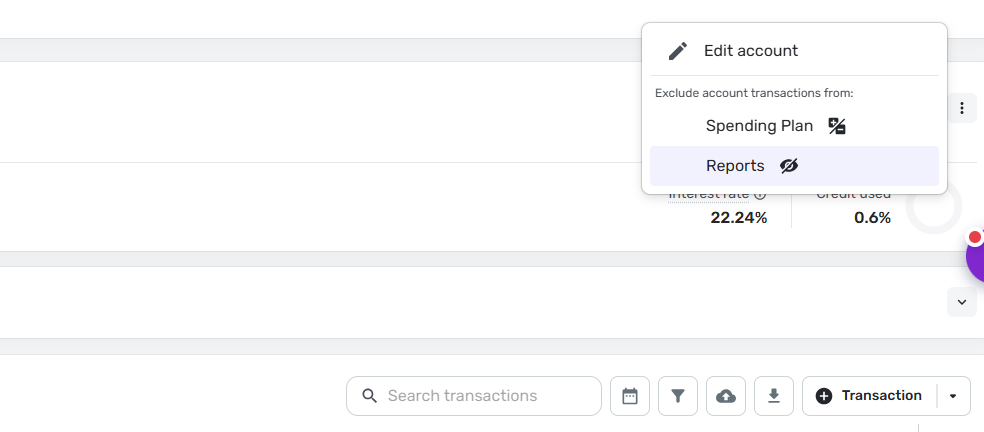
And once I made this error, I found it completely unintuitive (ironic, given this used to be an Intuit product) to reverse it. Every menu check, every filter run showed no "exclusion" boxes checked, yet I saw them all over my account. It took a few rounds with Claude to determine that I need to check the unchecked boxes and then uncheck them and THEN apply? Come on, SEs? Are we testing out AI for coding on these types of updates? Or are we just avoiding bigger work? I'm usually a pretty patient person, but I take issue with clunky, poorly executed user interfaces.
I saw several threads about this issue over the last few years, so it seems this has been a widely shared frustration. Any plans for a more release?
0 -
@uvatech97, I believe you're posting to the wrong place. This is a request to bulk remove notes. If you want to request something different, please create a separate post.
I hope this helps get you pointed in the right direction!
-Coach Natalie
0


