Invoice payment dates are not reflecting the transaction date (edited)

I just spent a bunch of time trying to solve this with support, but I still think there is an issue.
The paid dates form some of my invoices are incorrect, and there does not appear to be a way to change them. Does anyone else have this issue?
I need for my records to acutely reflect all relevant invoices dates, included issue, due, and paid. But that does not seem to be possible.
Comments
-
@cloudquick, thanks for posting your inquiry to the Community!
It doesn't appear that transaction dates can be edited after the transaction is linked to an Invoice. The only way I found I was able to change the date was to remove the payment from the Invoice, edit the date on the transaction, and then reapply the payment to the Invoice.
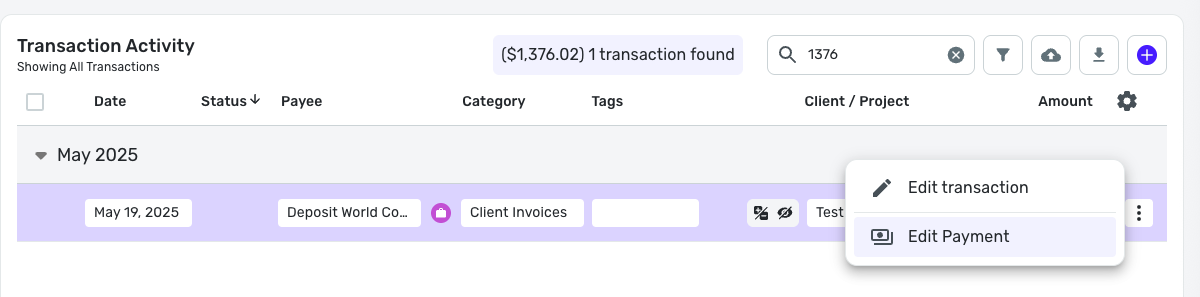
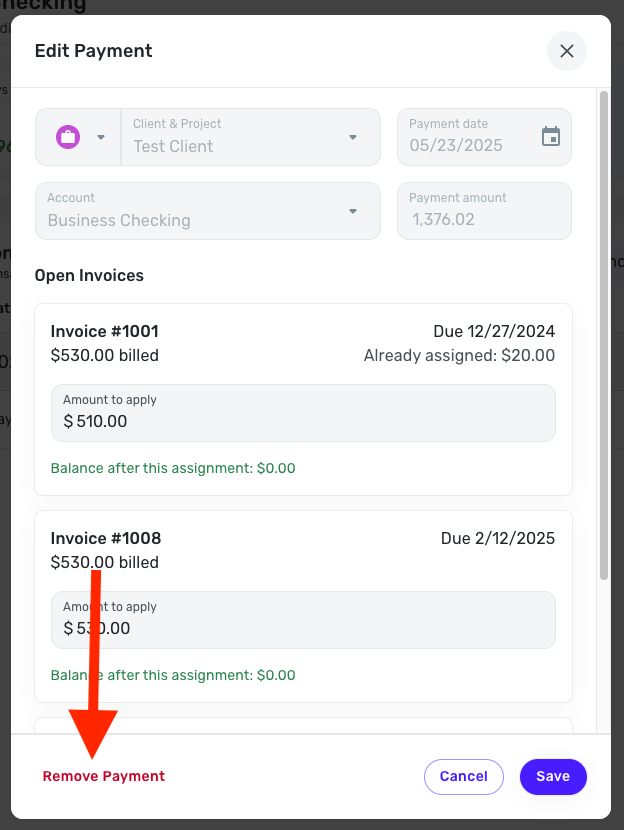
You should be able to do all of this from the transaction directly. To remove the payment, select "Edit Payment" from the three-dot menu, and then click "Remove Payment" at the bottom of the Edit Payment window:
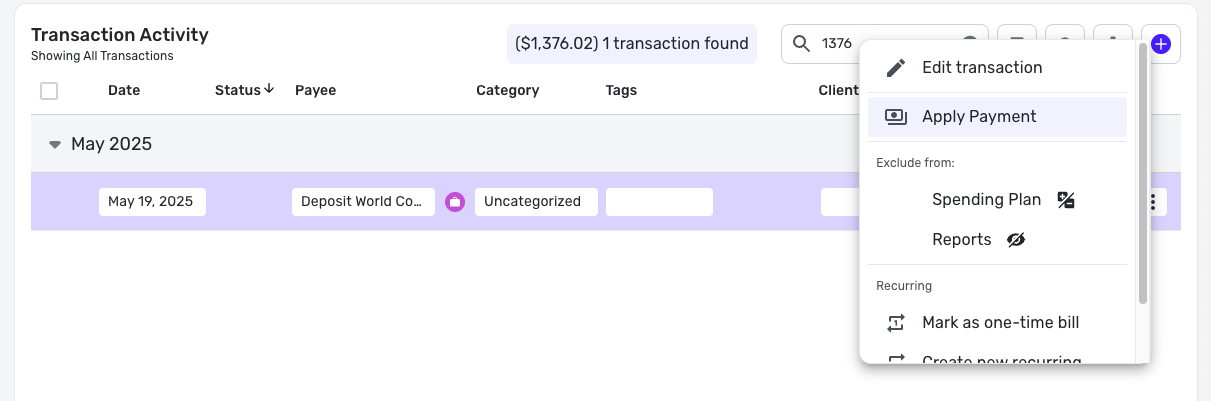
Once the payment has been removed and the date has been edited, you can reapply the payment by selecting "Apply Payment" from the three-dot menu:
Let us know how this works for you!
-Coach Natalie
0 -
Hi @Coach Natalie thanks so much for getting back to me on this. I must admit Im a little lost, and I'm wondering if we could to a session where you remote into my computer/account and walk me through it. Things are starting to get messy and I'm getting lost with all the transactions, and I think if we could arrange to do this together, step-by-step for one transaction I would be able to figure out it out for the rest.
If this is possible, please let me know how we might go about arranging for it.
Once again, thanks for your time!
0 -
@cloudquick, thanks for the reply!
It sounds like you'd benefit from a screensharing session, which is something Chat or Phone Support can do with you. I would recommend reaching back out to them and asking them to look at your screen while you go over everything that's going on. They should be able to get you situated!
-Coach Natalie
0 -
Hi @Coach Natalie thanks for getting back to me. I have actually already contacted support with this issue and had them do a screensharing session, and they were not able to solve the problem.
It looks like you may have been able to get to the bottom of it.
I will try and share what I am facing below and maybe we are able to figure it out here.
I have used one transaction as an example as that was easy to isolate. First off here are all the transactions related to this particular payment.

And this is what I am seeing for this Invoice on the invoice tab, showing a paid date of May 23, and a due date of Feb 06:

Finally, here is what I am seeing when I click on this particular invoice and view it:
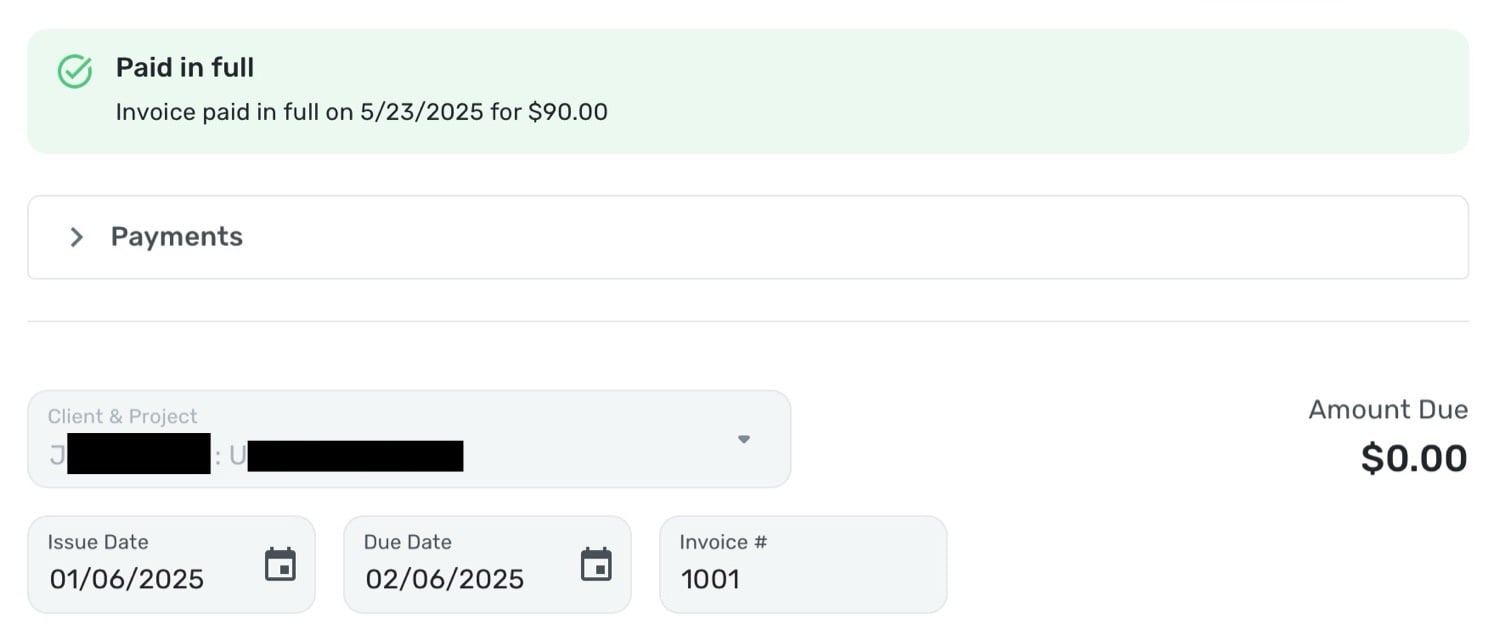
The reality is that the invoice was issued on 01/06 and was due by 02/06. The invoice was paid on Jan 6, as seen in the first screenshot - monies coming into my Navy Fed account, from Zelle. But the transaction is being recorded as being paid on May 23, which is just the date I entered the payment into Quicken.
This is also showing correctly in the reports tab, so for example this payment is showing as a profit in May in the 'Profit & Loss' report, when in fact the payment was made in January, as per the Zelle transaction.
Based on your investigation, which of the 3 transactions do you think I need to change?
Please let me know if I can provide more information?
Thanks!
0 -
@cloudquick, thanks for the reply!
If there is a transaction that is linked to an Invoice that you need to change the date on, you will have to first remove the transaction from the Invoice to do so. The steps to accomplish this are outlined in my comment above:
So, if the May 23rd transaction has an incorrect date, you will need to follow those steps to remove the payment, edit the date of the transaction so it's correct, and then re-link the transaction to the Invoice. To avoid this in the future, I would recommend changing the date to the correct date before linking the transaction to an Invoice. If you are manually entering transactions, you can select the correct date at the time of entry; if the transaction is downloaded, it can be manually edited to change the date. Let us know if you need the steps for editing the date of a transaction!
Otherwise, if you'd like to see the ability to edit transaction dates after they've been linked to an Invoice, you can request this change by submitting an Idea post. Idea posts allow other users to vote for your suggestion, as well as lets our product team gauge user interest.
I hope this helps!
-Coach Natalie
0 -
Hi @Coach Natalie thanks for the follow up.
I went ahead and removed the payment as per your original instructions and then set about re-applying the payment. Unfortunately there continues to be an issue.
You will see here that when I go to apply the payment the Payment Date of the transaction is correct and based off the date of the transaction in Quicken pulled directly from my bank account. In this example the payment date is 01/06:
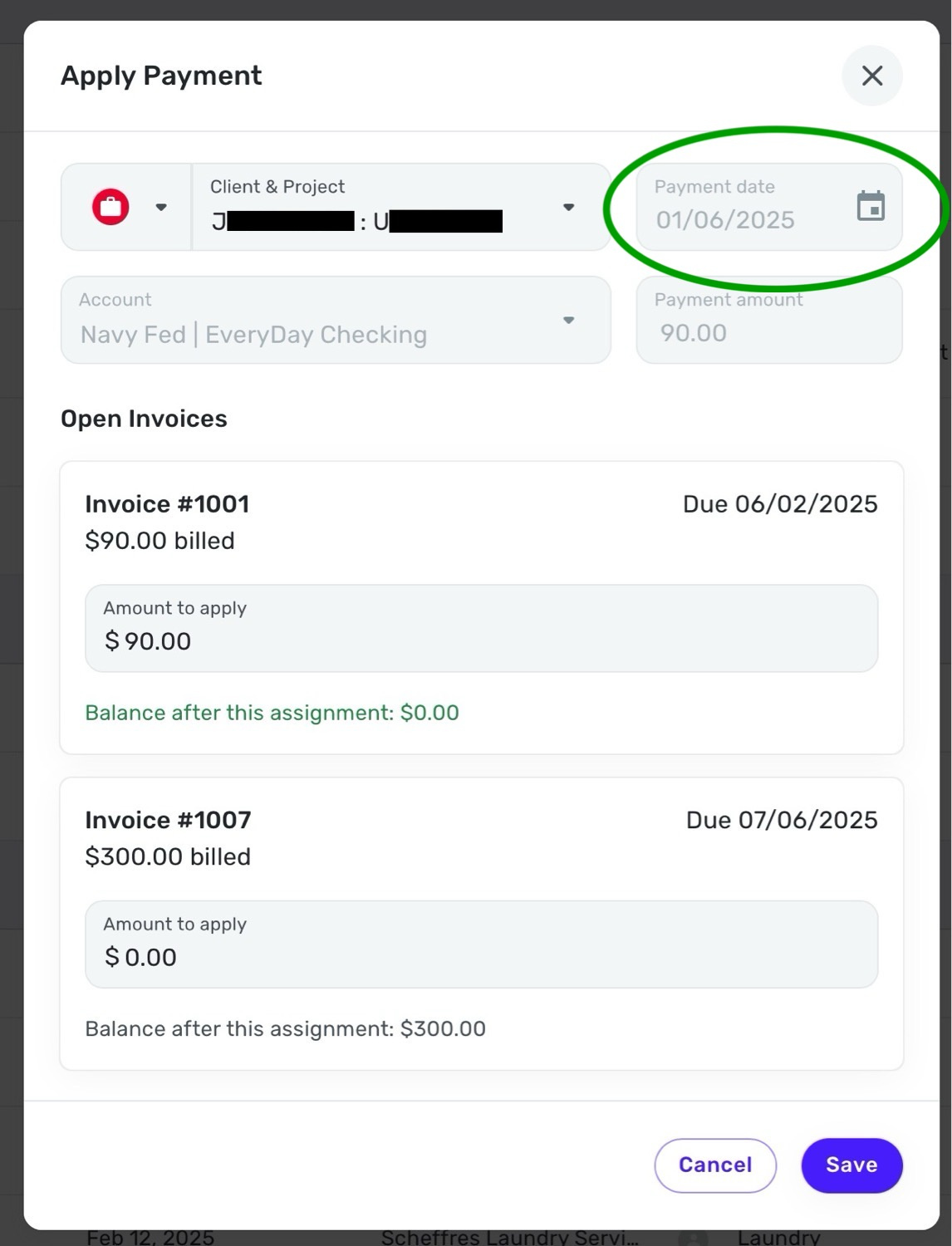
Once I save this, it creates a new transaction but with today's date:
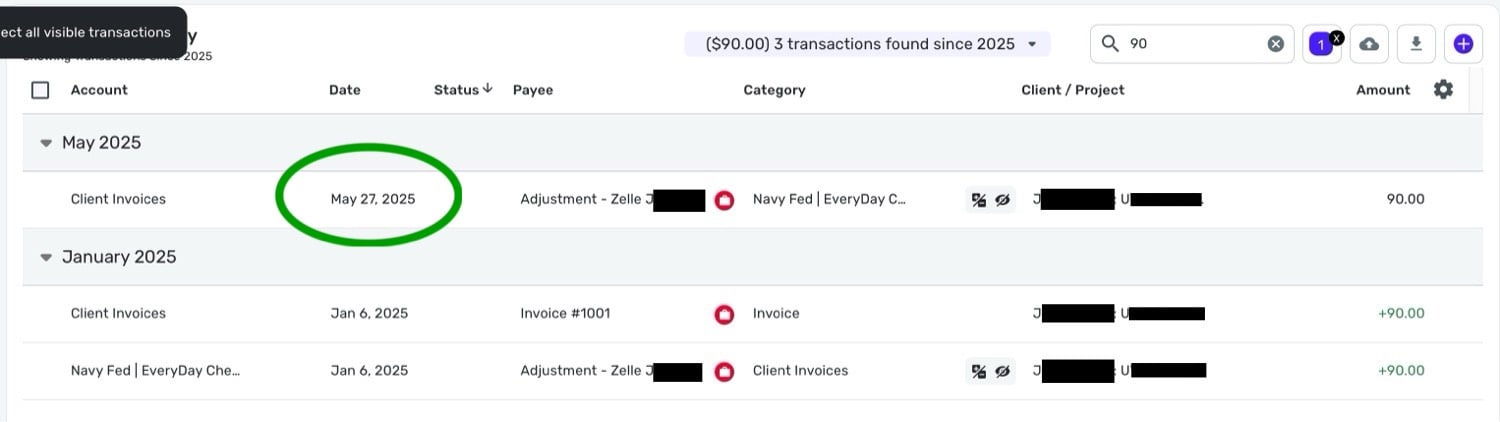
And when I go to edit the original transaction, the payment date has also been changed to today's date:
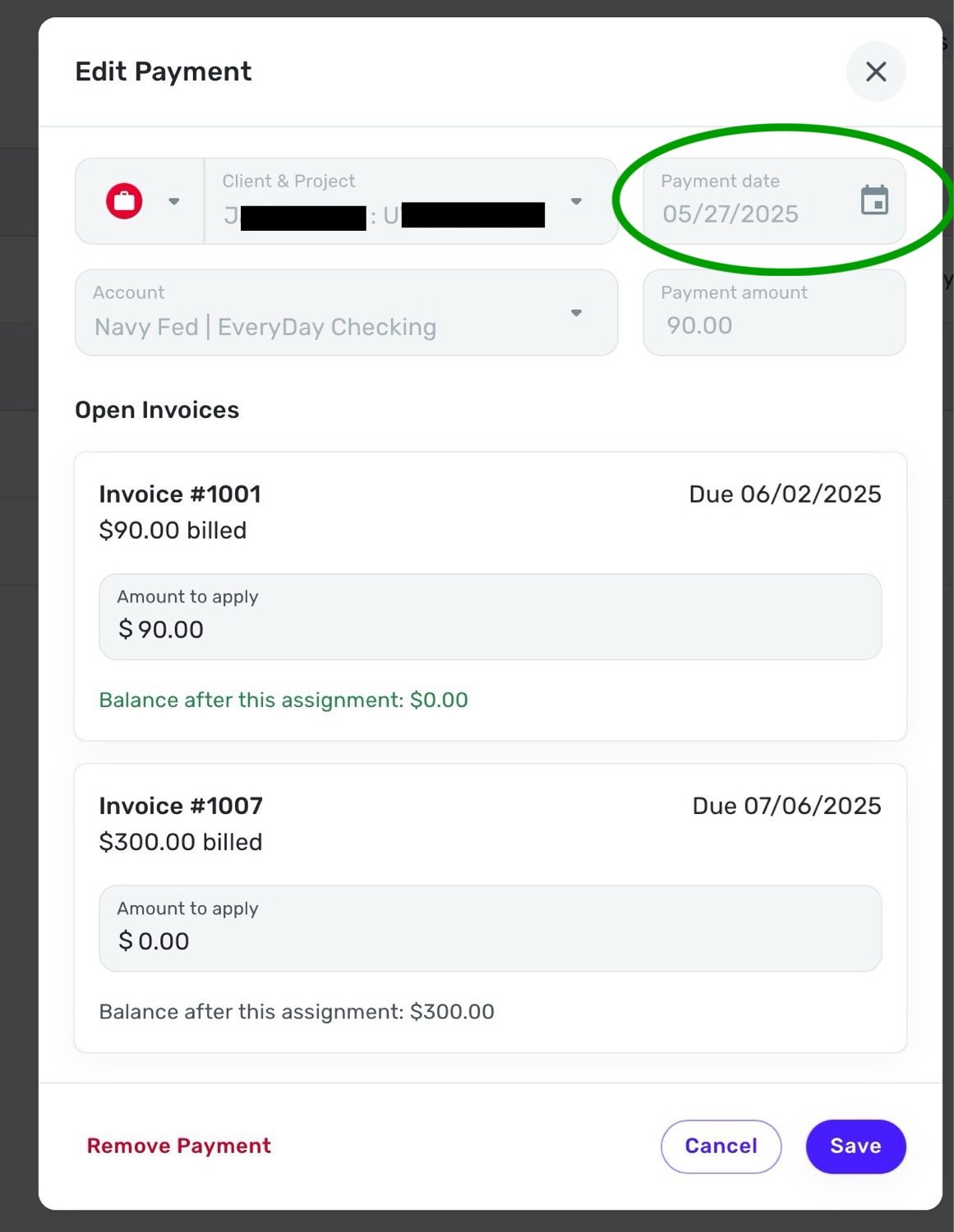
And so, the payments in reports are also still showing incorrectly. So this payment which is actually from January, is showing as part of my May income in the reports tab.
You will see here that all the income is being recorded in May, and nothing in January (when this $90 payment was actually made). The amount here of $1,890.00 is from payments made in January, February, March, April and May, not just May (when the payments were recorded):

I really need for the payment date to reflect the date that the payment was actually made, not the date the payment was recorded in Quicken. Otherwise for all my records to be accurate I would need to record the payment on the same day that it is paid, which is not realistic, or something I will be able to guarantee to do every time a payment is made.
Please let me know if you think I am doing something incorrectly, or how I might otherwise rectify this situation?Unfortunately the product is useless to me unless I can make sure it is recording accurate payment dates tied to the correct invoices.
Many thanks for your time!
0 -
@cloudquick, thanks for the reply!
I think I see what's going on here — the transaction with the 5/27 date is not the actual transaction; it is the Payment transaction that gets created in the Client Invoices account. From my testing, it seems that the Client Invoices account records the date that the payment was applied in Quicken Simplifi, not the date of the transaction. I definitely also see the payment in the P&L Report for the current month, not the month that the transaction occurred in.
I have reached out to our product team to inquire about the design here, and ask if there is a way to have business income reflect the transaction date as opposed to the date the payment was applied, and I will let you know when I hear back. The solution for now may be to more promptly apply transactions to invoices so the dates match. But hopefully I can learn about a better solution for you!
-Coach Natalie
0 -
Hello again @Coach Natalie
Thanks for this information. I think I understand what you are saying.
Obviously I can try and be prompt with marrying payment transactions to their respective invoices, but it's really not ideal that we cannot adjust the payment date on the transaction, or that it is reflecting incorrectly in the P&L section (and possibly others, I'm not entirely sure). The reason I have these historic invoices is because I was using a different system until recently and am just now starting to use QS. I wanted to get all the invoices from 2025 into the system, so that things could be clear and accurate for this year.
What worries me is that I won't have accurate records going forward, and the date the payment transaction is recorded in QS seems to take precedent over the actual date of the payment transaction. So, for another example If I go back into that invoice now, I get this explicit text saying the payment date was 27 May, and not the date that the payment transaction occurred.
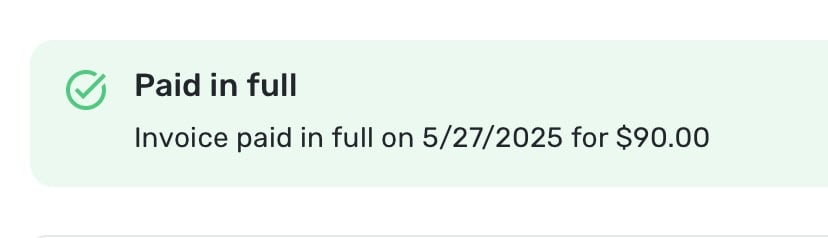
This just isn't accurate. The invoice was paid in full on the transaction date of the actual payment, long before the date it was recorded as paid in QS. So, I'm left with a situation that unless I record the payment transaction in QS on the exact day the payment transaction takes place, QS is going to be telling me an incorrect payment date for that invoice. I'm somewhat surprised that I'm the only person who is having this issue.
I appreciate your continuing to follow up on this, and any light you can shed on this from the product team would be very welcome.
At this stage I may need to abandon QS all together in favor of another product, as I am still within my 30 purchase window and could request a refund. So I would actually like to know if there is some definitive answer before committing to a product for at least a year which is not going to be accurate. I hope you can appreciate my position.
0 -
Apologies @Coach Natalie, one more example which I think is also an issue. If I go into the invoices page, and look at the paid invoices, it has the paid dates incorrect there too. I can't really understand why it would be this way. This is all completely inaccurate:
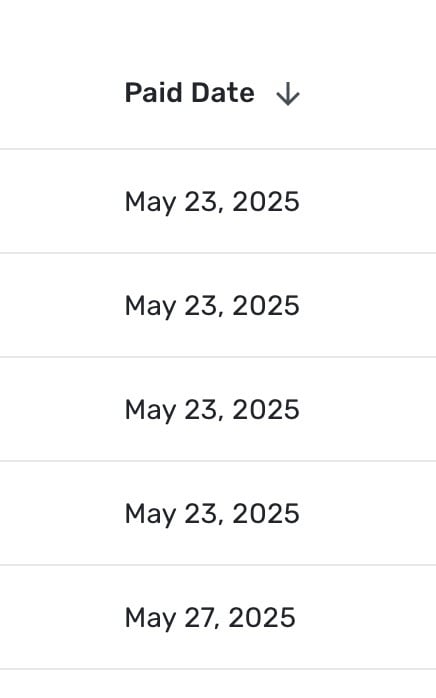
These are all dates the payment was recoded in QS, not the date the invoice was actually paid.
0 -
@cloudquick, I definitely understand the challenge here, and I agree that some flexibility should be added to payment dates for cases just like yours. I shall let you know what I find out!
-Coach Natalie
1 -
Hi @Coach Natalie sorry me for the 3rd time today… I think I'm on the verge of needing to abandon the product completely. I don't know how I am supposed to view the date when an invoice has actually been paid. Perhaps you can shed some light as an interim measure?
Here you will see the same screenshot as above, but with the "due" date also showing. It looks as if all these clients paid their invoices late, which wasn't the case.
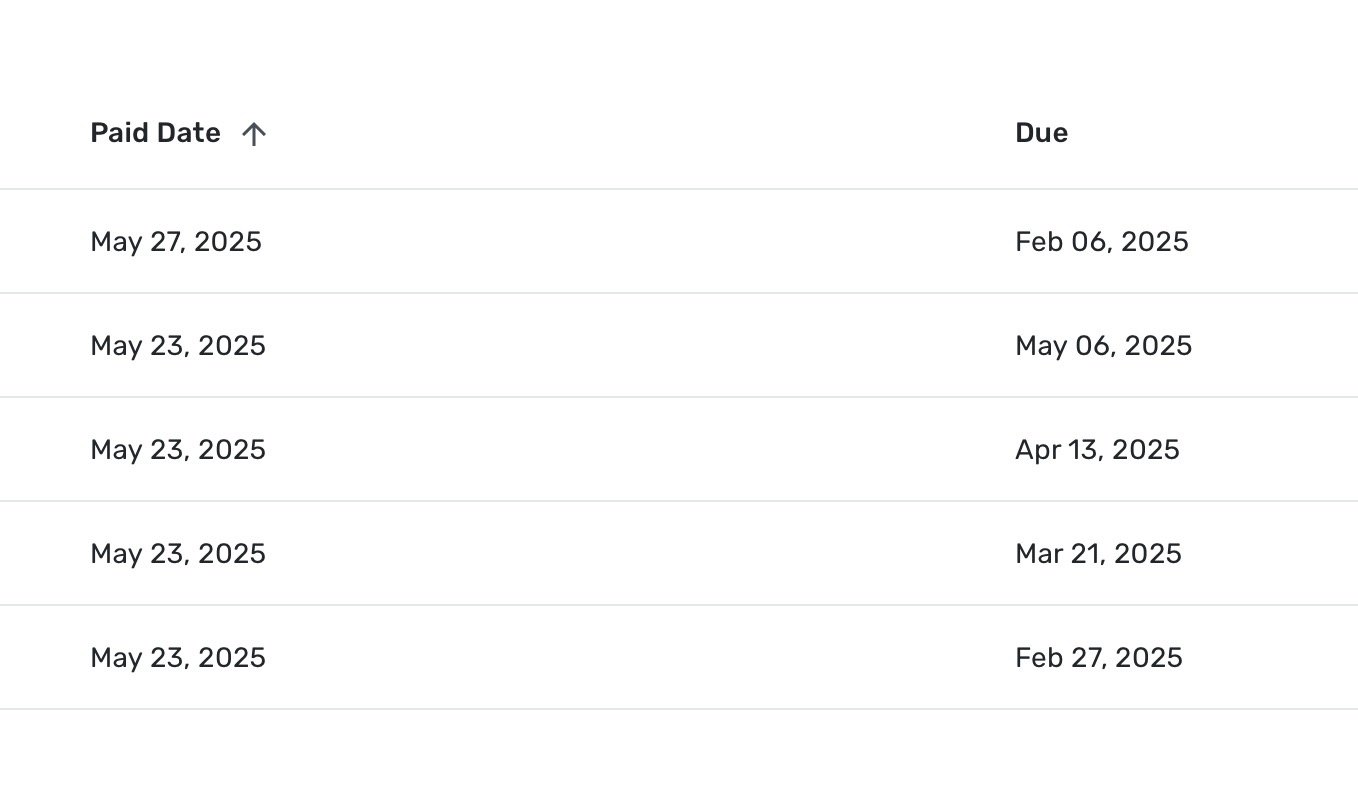
Do you know where I might go in the current system to see this information accurately ?
0 -
@cloudquick, I did confirm that payment dates are set to the date the payment is applied within the program. I shared your use case, and they will be staffing whether or not they should make a change to the current design. I should know more within the next couple of days!
-Coach Natalie
1 -
Great, good to have a timeline. Thanks again, and I look forward to hearing more!
2 -
@cloudquick, I am back with an update and some good news!
The issue presented here has been classified as a bug. I went ahead and filed a ticket, and will post back here with updates! It may take a few weeks or even longer for a fix, but hang tight, and this will all be sorted out for you very soon.
Let me know if you have any additional questions or concerns!
SIMPL-27290 // QCS-21299
-Coach Natalie
0 -
Thanks @Coach Natalie !
1 -
Just checking back in @Coach Natalie to see if there has been an update on addressing this bug? Thanks!
0 -
@cloudquick, there is no update to share as of yet. As soon as anything comes through, we will be sure to post back here and let you know.
Thank you for your continued patience!
-Coach Natalie
0 -
Thanks @Coach Natalie !
1 -
@cloudquick, I am back with an update! A fix for this issue is expected with the 4.74.0 Web Release.
-Coach Natalie
1 -
@Coach Natalie great - I look forward to the update!! Thanks for sharing this!
1 -
-
Hi @Coach Natalie just looking at this now and trying to understand what changes have been made and if the accounts are acurate. I'm going to use one Invoice as an example and perhaps we can understand this together.
To start, the reality of this Invoice is as follows:
The invoice was issued on Jan 06, 2025 with a due date of Feb 06, 2025.
Payment to my bank account (via Zelle) was also made on Jan 06, 2025Here is what I'm seeing from the Invoices page:
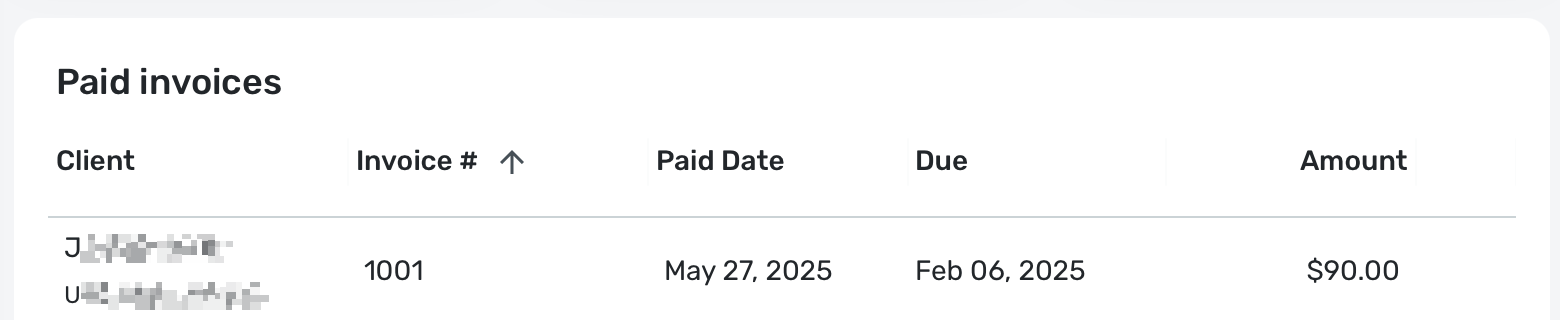
If I search for the transaction, here are the 3 specific transactions related to this:
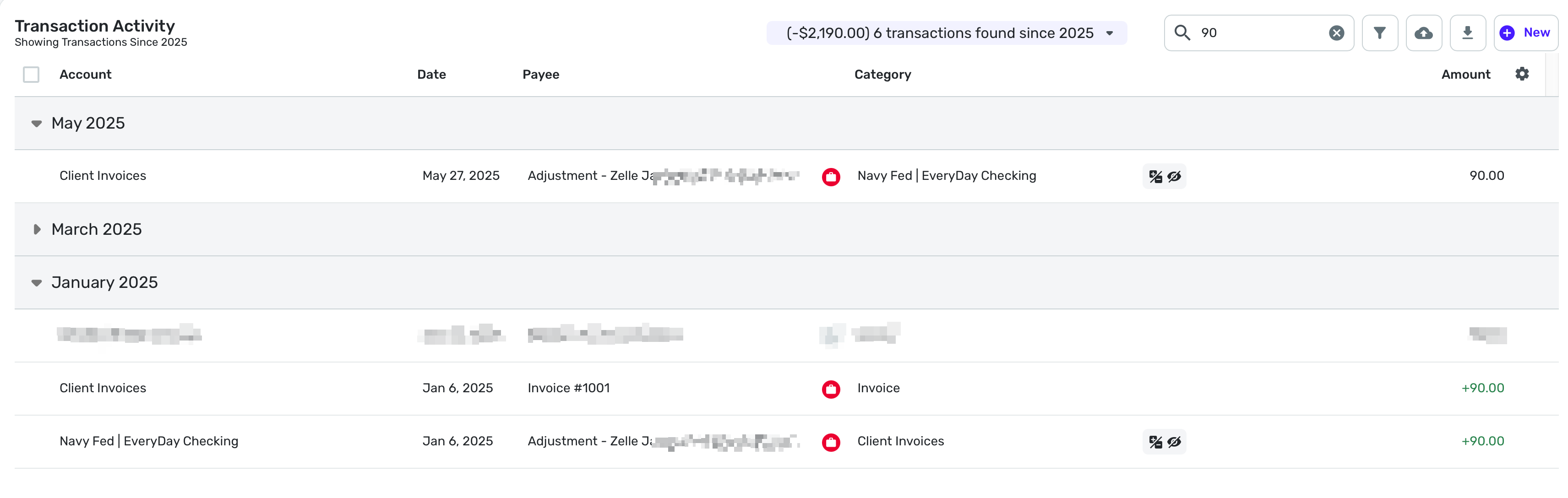
As you can see, the invoice and Zelle transaction are from Jan 06, and are correct.
The transaction from May 27 is when the payment was married to the invoice in Simplify, but it is not the pay date.
So in the Invoices page it is incorrectly saying that the invoice was paid on May 27.
I believe that the payments ARE reflecting correctly in the Reports section now, with both the 'Income' and 'Net Income' showing payments in the correct month, which if I recall correctly, was not the case previously.
So the only real issue here, is that when I go into an invoice on the invoices page, the payment date does not reflect the payment transaction date, and instead reflect the date that the payment was recorded, displayed above as 'Paid Date'.
Hopefully that makes sense?
0 -
One quick small addition to make here @Coach Natalie
When I click into the Invoice in question, I get the following information:
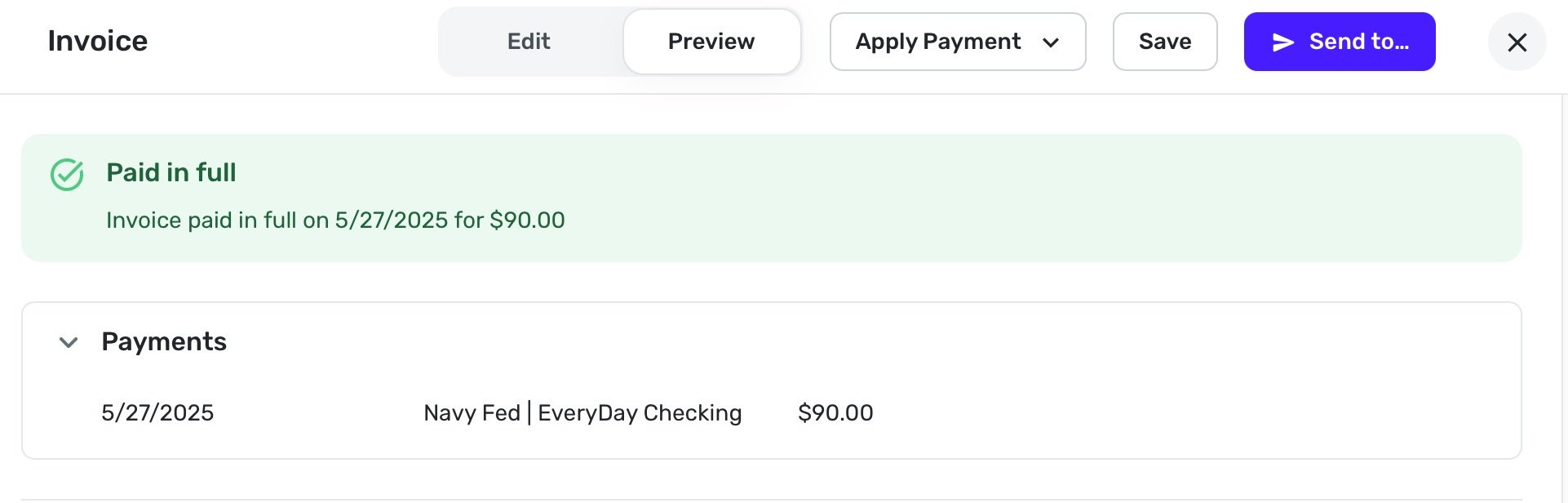
So here the 'paid in full' is not accurate, and should read Jan 06, 2025.
0 -
@cloudquick, thanks for the reply!
To clarify, the issue that was discussed and subsequently escalated via this thread was that invoice payment dates were not reflecting the transaction date, and therefore, business income was being reported for the incorrect month. It sounds like that is resolved, correct?
I would say that the issue with the Invoices page showing the date the payment was applied versus the date of the transaction would be a separate, and likely only visual, issue. To report a separate issue, please create a new post to outline the issue and share how it is impacting your usability of the program, so we can take a closer look without the issues becoming convoluted in a single thread.
Much appreciated!
-Coach Natalie
0 -
Hi @Coach Natalie I wanted to return to this topic to clarify your understanding of the issue, so that I might raise a new post to address this.
If I look at my invoices page, I get the following:
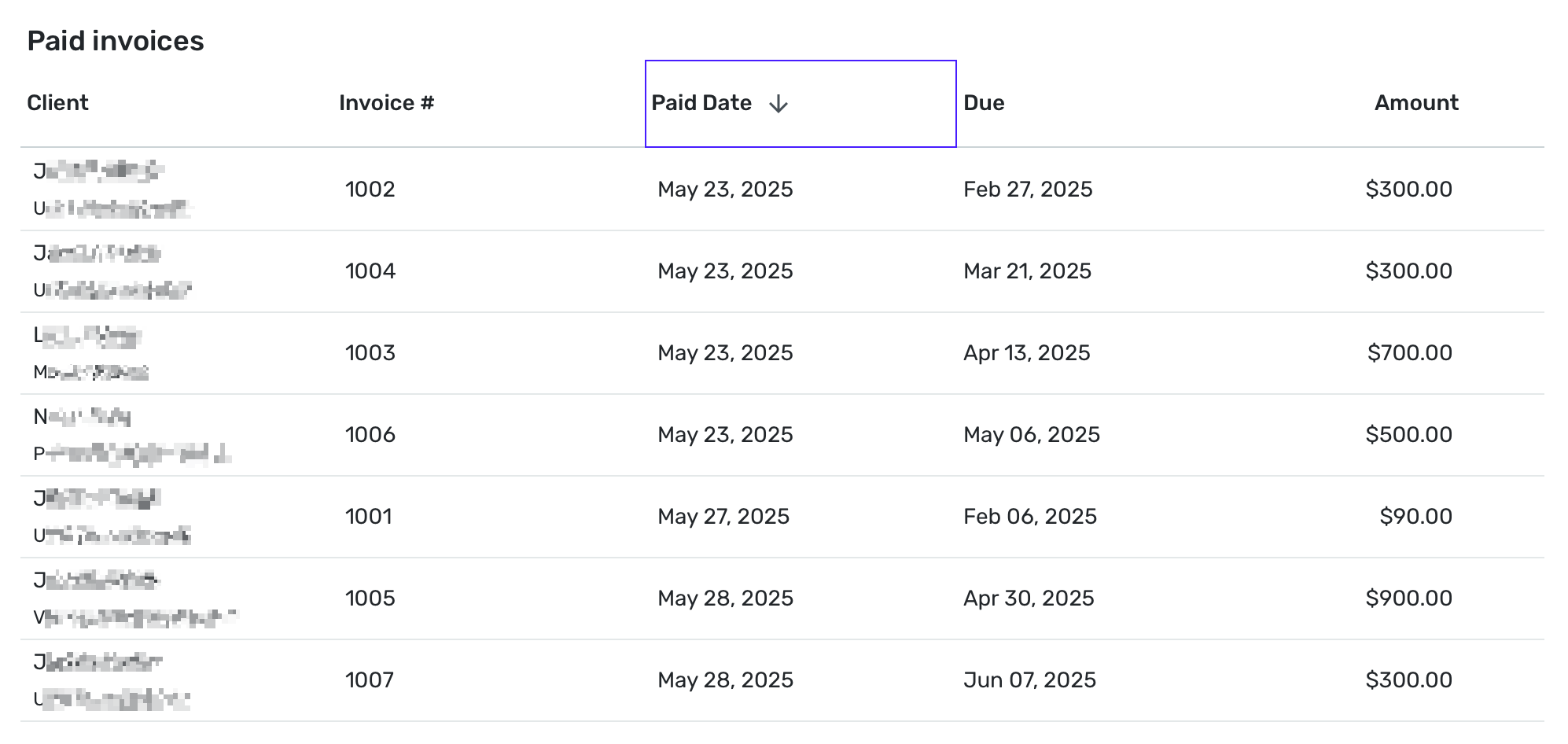
As you can see I have sorted these invoices by the column labeled "Paid Date".
However this is not correct, as these dates are NOT the paid date, they are the date the payment was entered into the software. This does not seem like a purely cosmetic issue to me, but perhaps I am miss understanding.
I'm not sure what my request should be exactly, because I want (and in truth need) to have this "Paid Date" column to function as described - that is to be able to view and order my invoices on the date they are paid. So if this is a cosmetic issue, then the solution would be to rename that column to something else, although I don't know what the elegant name would be here. Date Transaction Posted?
That would still leave me wanting a way to view/sort etc the invoices by the date they were actually paid, and not the date the transaction was entered into the software. Which would suggest a request that is more than a cosmetic change?
Please let me know if something here doesn't make sense.
Otherwise I will be very grateful if you can help assist with defining what it is I should actually be requesting.
Thanks.
EDIT: To add some more information/context
When I click into one of the invoices I see the following (this is invoice 1001):
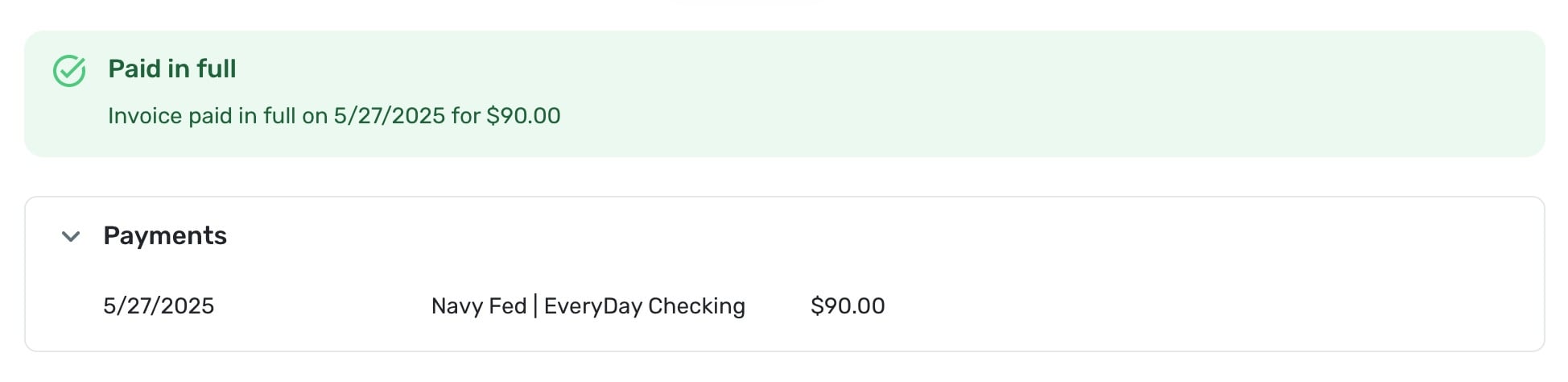
Again, we can see the payment date reflected as 5/27 which is not the date the payment was made, but the date it was entered into the software.
If I click on the section that stays "Navy Fed | EveryDay Checking" it brings up the following transaction:
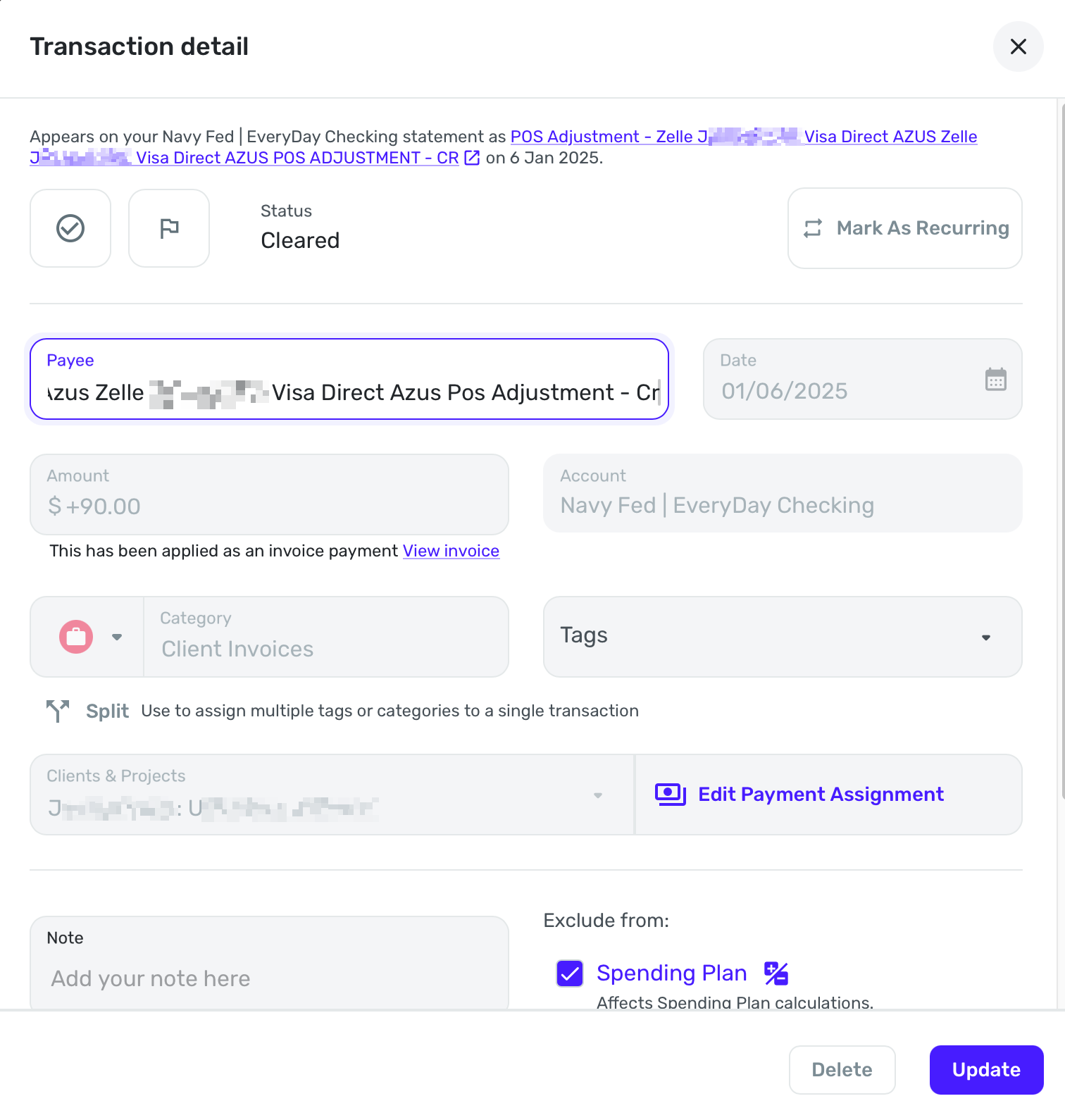
This IS the correct payment transaction, reflecting the date that the invoice was actually paid (01/06) but it is not the same as what the previous screen is showing (5/27).
I raise all of this because it's not clear to me what exactly is going on here. Why would it say the payment date was 5/27 but then link to the actual transaction date of 01/06.
Shouldn't the payment date be 01/06 (the same as the transaction it is referring to)? And in which case, isn't that more than a cosmetic change?
0 -
@cloudquick, thank you for the reply!
As previously stated, the issue that was escalated in this thread was that invoice payment dates were not reflecting the transaction date. The reason this was an issue is that if a user linked a transaction to an invoice in a different month than the transaction actually took place, it would cause business income to be reported for the wrong month.
Now that that issue has been fixed, the invoice payment date should match the date of the transaction.
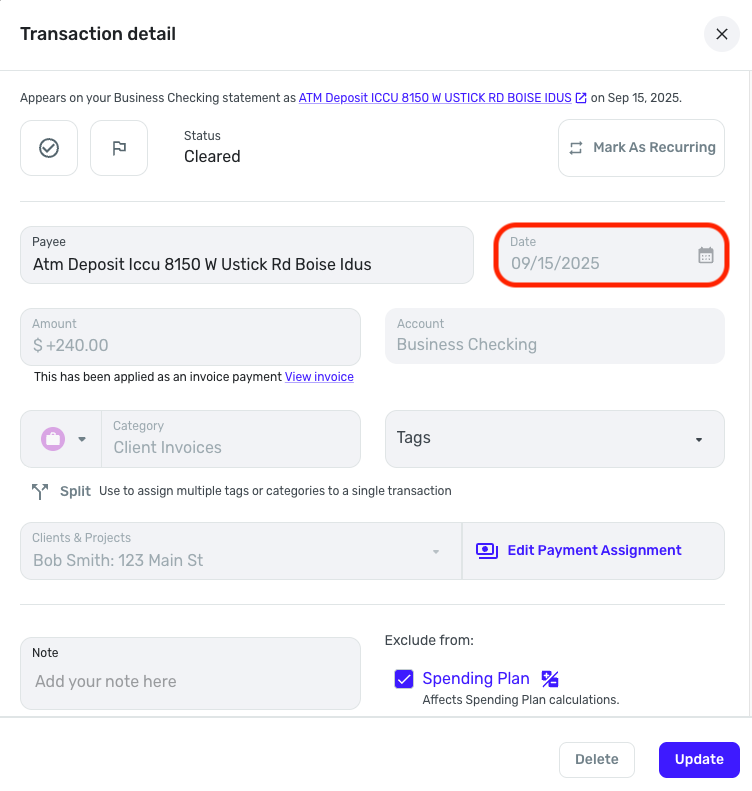
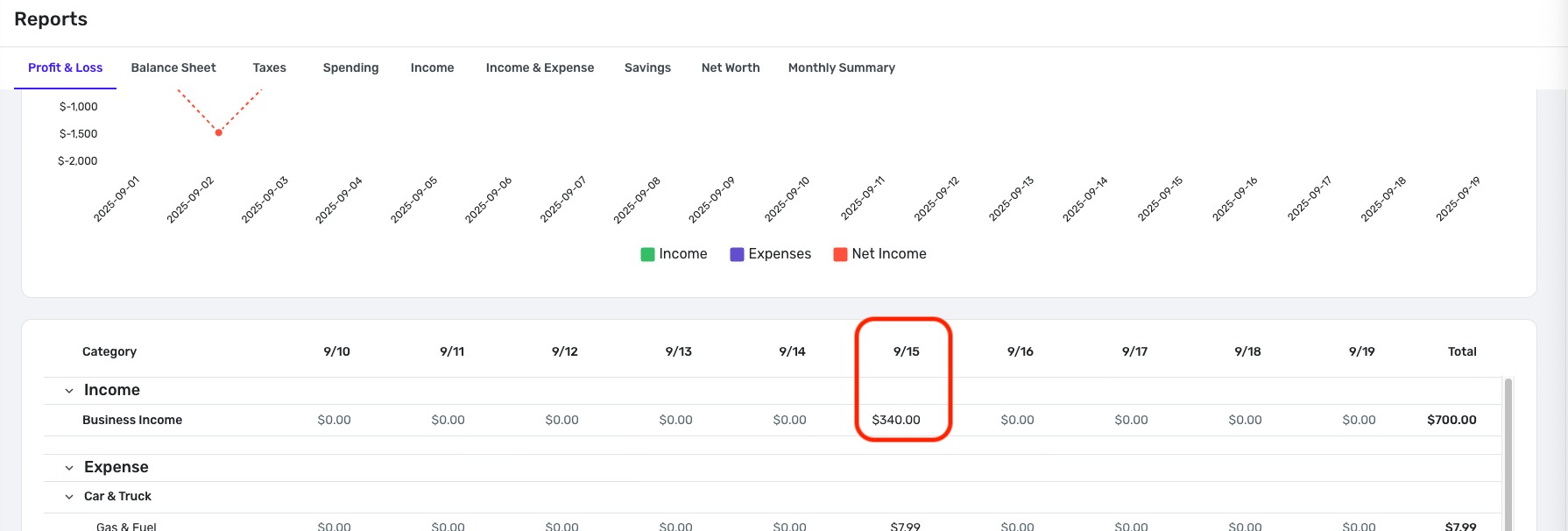
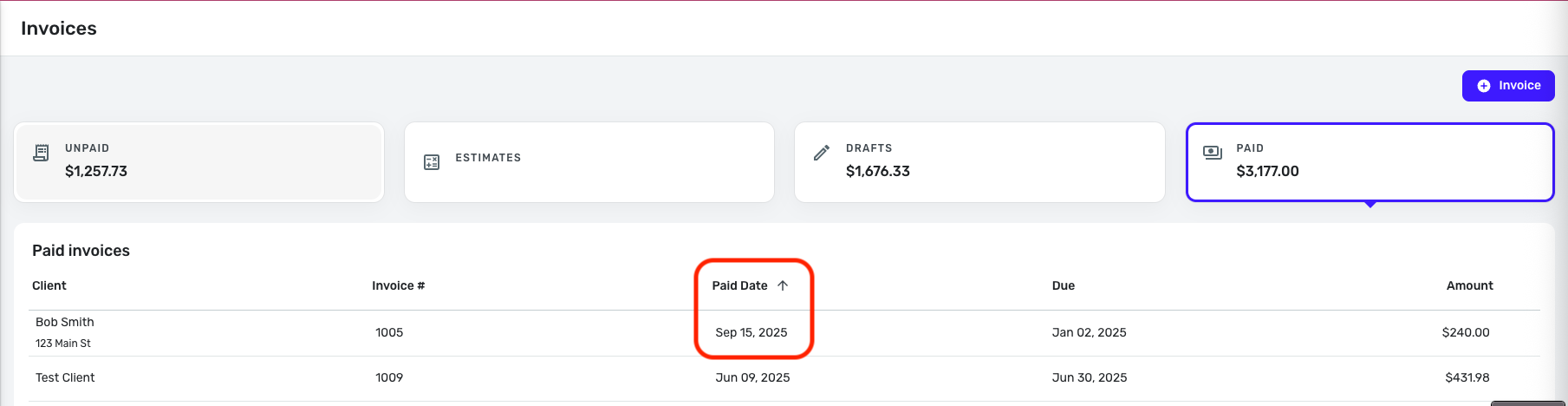
If you'd like to see the ability to customize invoice payment dates regardless of the date of the transaction, you may do so by creating an Idea post so other users can vote on it, and our product team can review it. Our FAQ here has more details:
I hope this helps!
-Coach Natalie
0 -
Hi again @Coach Natalie I edited my last post to add more information at the same time as you responded to it.
I think the additional information I added might help clarity the issue I'm having?
0 -
@cloudquick, are you saying that the invoice payment date does not match the transaction date? If so, was this payment already linked prior to the escalation coming back as resolved? If so, the fix may not have been retroactive. I would recommend deleting the transaction, re-creating it, and then re-applying it as a payment.
I see no issues currently with having my invoice payment dates match the transaction date, which is the intended design. Please see my screenshots above as proof. I linked that transaction to the invoice today, 9/19/25, but the payment date shows the 15th as expected.
Let us know how it goes!
-Coach Natalie
1 -
Thanks @Coach Natalie - when you say delete the transaction, do you mean the transaction of 5/27?
0 -
@cloudquick, yes, the invoice payments that show an incorrect date — delete and re-create the transaction, link it to the payment, and see if the payment date then matches the transaction date.
I hope this makes sense!
-Coach Natalie
1
