Can recurring reminders be automatically entered as pending transactions the day of? (edited)

Hello Quicken Support Team,
I am writing to confirm whether Simplifi supports the following workflow, and if not, whether it is planned.
What I am looking for is the ability to create recurring transactions that:
- Automatically post to the transaction register on the due date as pending transactions that can be manually cleared.
- Also flow into the Spending Plan
- Do not rely on downloaded bank transactions to trigger the entry
- Are driven by a single recurring setup, rather than reminders only
Please confirm:
- Whether this functionality exists today in Simplifi and I may be overlooking it
- If not, whether support for true recurring transactions that auto-post to the register is planned
- If it is planned, whether there is any expected timeframe or roadmap visibility
Thanks
Best Answer
-
@eeb4th Welcome to Simplifi and merry Christmas!
I urge you to vote for the feature requests that Coach Jon referenced above. As you imply, automatic entry of recurring on the due date or ability to manually turn a reminder into a transaction are needed especially for manual accounts.
For most users who pay out of a connected account, Simplifi will match the recurring with the bank's transaction when it downloads. But if you have a manual account, you have to enter the transaction yourself and then link it to a recurring.
Some users who have connected accounts would still like to be able to enter the reminder as a transaction though because there is a lag for when the transaction shows up at the bank or they would like to show that they have scheduled the payment.
When I schedule a payment from my bank's bill pay or at the biller's website, I tend to update the date and amount in the reminder myself but it would be nice simply to turn it into a transaction and edit the details in the register.
We are hopeful that one or both of these feature requests will be implemented but the more votes we get, the better!
Steve
Quicken Simplifi (Safari & iOS) Since 2021
Quicken Classic (MacOS) Since 2009
MS Money (1991-2009) and Dollars & Sense (1987-1991)0

Comments
-
Hello @eeb4th,
Thanks for reaching out! Recurring transactions are indeed a feature within Quicken Simplifi already. We have an excellent support article that explains how the feature works, as well as steps on how to utilize the feature here:
As far as the recurring transactions posting automatically to the register, as you mentioned, Quicken Simplifi takes a slightly different approach. The application automatically detects your recurring transactions and creates a series of them, as well as having the ability to create your own series. These series serve as grouped reminders, allowing you to view upcoming transactions easily.
When you download new transactions, Quicken Simplifi looks for matches to your recurring items based on specific criteria. You can find any unmatched or upcoming transactions as reminders in the Projected Cash Flow view at the top of your account registers, or within the Bills & Income section.
We also have the following features you may be interested in voting for that align with some of the points you listed:
If you are looking for something slightly different than what the feature offers, you may also feel free to create an idea post explaining what it is you are requesting in Quicken Simplifi. Just remember that each idea post is limited to one idea.
I hope this information helps!
-Coach Jon
-Coach Jon
0 -
To the extent that recurring transactions are there to remind me to pay certain bills, I oppose having them automatically entered and would prefer they stay as 'late' reminders — if i saw them in my register, I would think I already paid them when I might not have.
I support the idea, however, that you should be able to create a transaction FROM a reminder.
-Rob
—
Rob Wilkens
0 -
@RobWilk I assume that if they implement the idea to allow users to automatically enter recurring transactions, that it would be done as in Quicken Classic by user preference. I use it in Classic for those transactions that are automatically paid, e.g., most subscriptions and some of my bills I have set up on their web site to be paid on the due date.
Those bills I have to initiate, I mark them paid in Classic as soon as I've done so. That's the kind of automation I think we want.
Here's an example of one of my automatic payments from Classic:
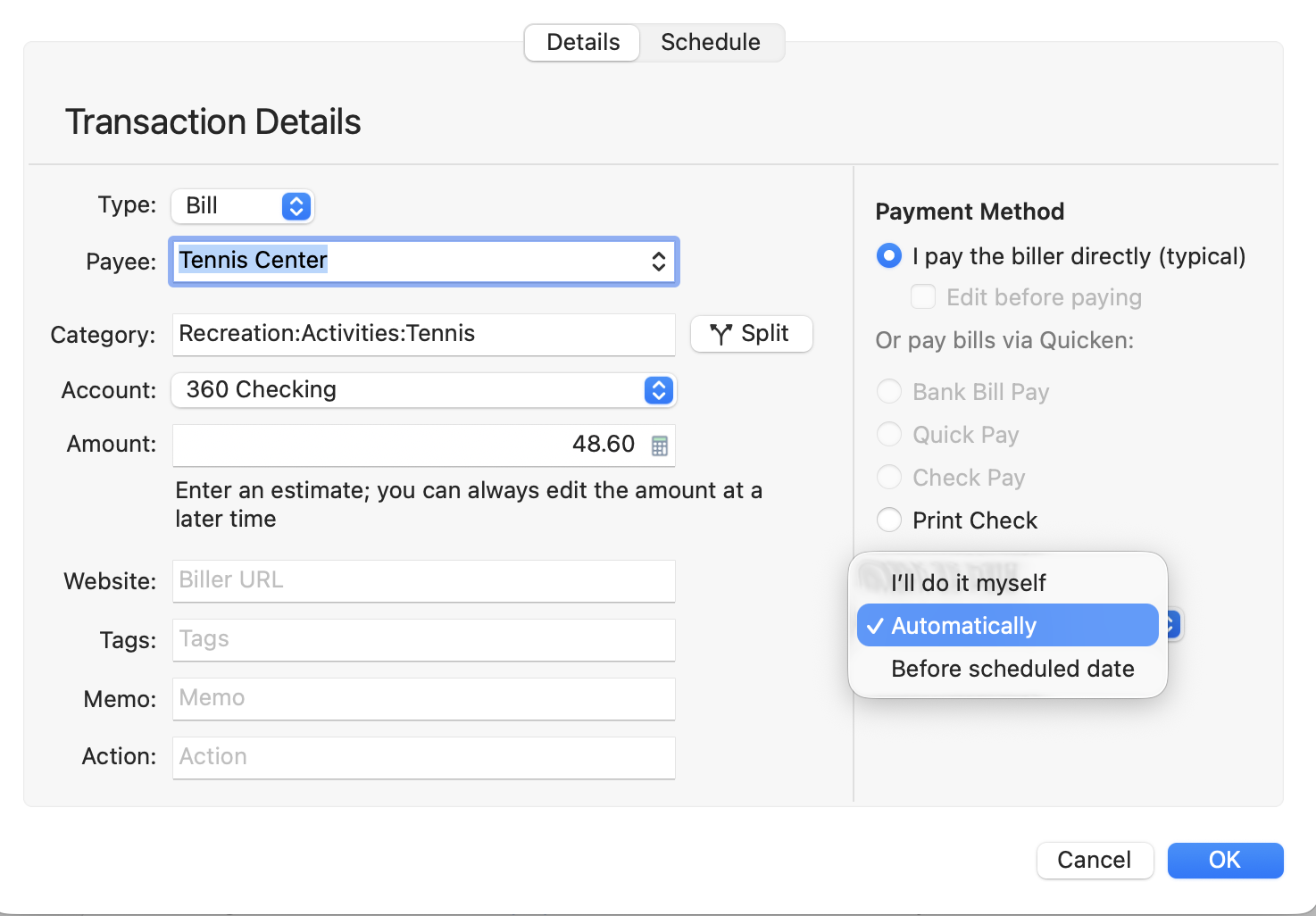
You set your preference. If you select, I'll do it myself, you will then see it in the register around the due date and you can mark it paid by right clicking. That turns it into a regular pending transaction:
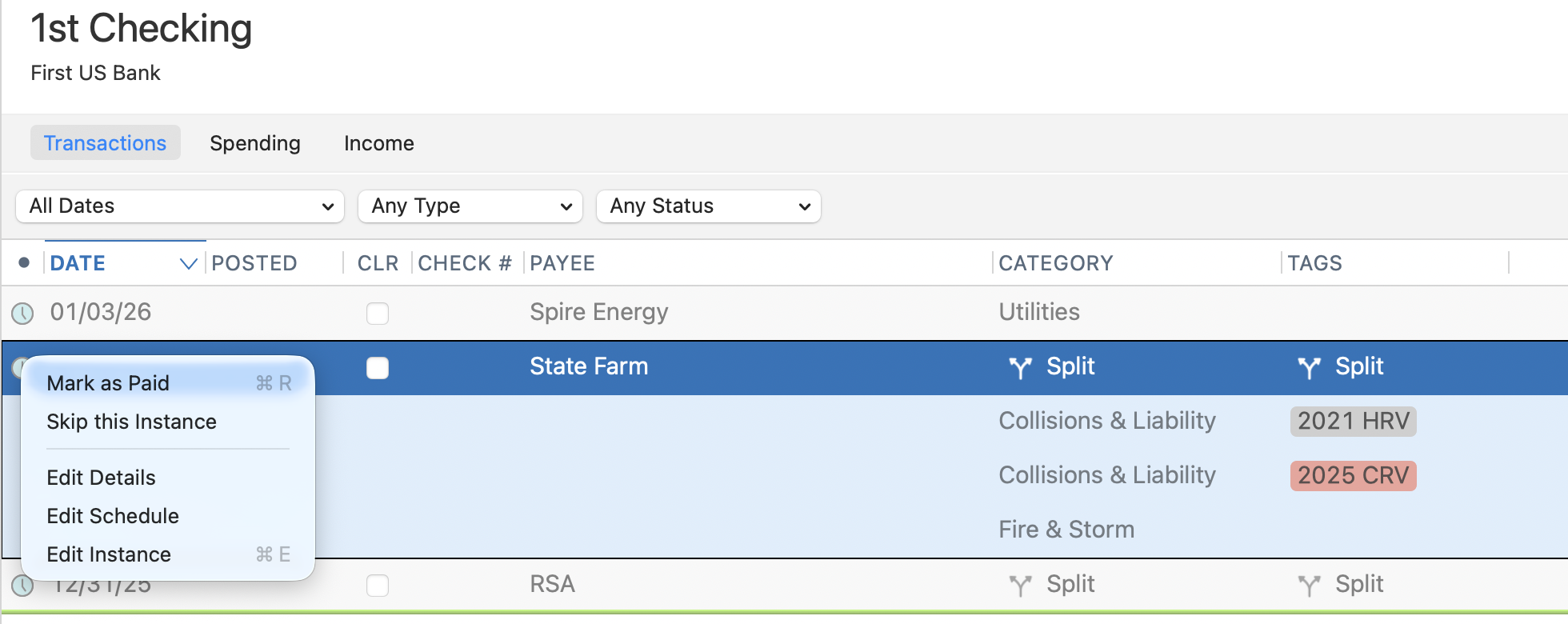
Of course, Simplifi would implement this in its beautiful Simplifi way and look way nicer than Classic. 😊
PS. Note that in Classic, you can also split the recurring reminder.
Steve
Quicken Simplifi (Safari & iOS) Since 2021
Quicken Classic (MacOS) Since 2009
MS Money (1991-2009) and Dollars & Sense (1987-1991)1 -
Same here
1 -
@EL1234 What I illustrated above, when added to Simplifi, will pretty much content me. Everything else would be gravy. You know when I started with Simplifi 4 years ago, I was pretty sure I was not going to renew my subscription and just stick with Classic. But I persevered mostly because of the Spending Plan (and I am stubborn and bookkeeping is my hobby).
The Spending Plan is so much easier to visualize and understand than the rather clunky budgeting that you had to nurse along and made you feel like a failure. Each month when I have money left over, I am a winner, and as in tennis winning 6-1,6-1 is even better. But I'll take a 7-6, 7-6 win. So whether I save $100 or $2000, I can see by how much I have left over.
Since 2023 especially, Simplifi has gotten better and better. Upgrades to the Recurring Reminders are the biggest need for me. And I am hopeful they will come in 2026.😉
Steve
Quicken Simplifi (Safari & iOS) Since 2021
Quicken Classic (MacOS) Since 2009
MS Money (1991-2009) and Dollars & Sense (1987-1991)0

