Kelley Blue Book Integration: Share your feedback here!

Please let us know what you think of linking up with Kelley Blue Book in Quicken Simplifi by commenting below!
Related announcement:
-Coach Natalie
Comments
-
Thats a great news. Do you have ETA when it will be available to all the users?
0 -
Hi @Coach Natalie , I just used the new Kelley Blue Book integration to link my existing manual vehicles to Kelley Blue Book going forward. It was easy to do, and I received confirmation that I successfully linked both vehicles.
However, the values for neither vehicle updated to the Kelly Blue Book value. When I click on each vehicle in the Accounts list, both say "Last Updated 7 minutes ago [which is when I linked the vehicles to Kelley Blue Book]," with the next available update in 29 days. Here's a screenshot:
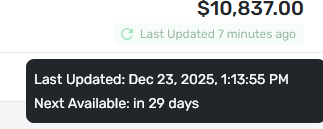
This screenshot confirms the vehicle is linked, but doesn't explain why the value wasn't updated to the Kelley Blue Book value.
Please investigate and fix.
Thanks!
0 -
Hello @Duke0486,
Thanks for letting us know! I would have you try unlinking the account from Kelley Blue Book by following the instructions here:
Then, you can try adding them as new accounts instead of linking to the existing manual accounts to see if this works.
We would be able to see if the balance not updating is due to linking them to the manual accounts, specifically in this case. Let us know how this goes!
-Coach Jon
-Coach Jon
1 -
I added my vehicles using the new KBB connection. One had an existing manual account and the other did not. The existing vehicle account adjusted successfully to the KBB valuation, and the second vehicle successfully added a new asset account to QS.
Danny
Simplifi user since 01/22
”Budget: a mathematical confirmation of your suspicions.” ~A.A. Latimer1 -
Thanks @Coach Jon !
Upon further review, one my of existing vehicles (2012 Subaru Outback) that was previously manual DID update to the KBB value when linked. The other vehicle (2014 Mazda CX-5) did NOT update to the KBB value when linked.
I unlinked the 2014 Mazda CX-5 to make it manual again, and then relinked it to KBB. Unfortunately, it still did not update to the KBB value when linked.
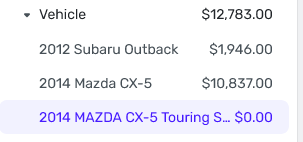
Even stranger, following your suggestion, I attempted to add the 2014 Mazda CX-5 as a new account instead of linking to the existing manual account. I received on-screen confirmation that the new account was successfully linked to KBB, but it wouldn't update to the KBB value when linked. Instead, it shows a $0 value. Here's a screenshot:
Please investigate and fix.
Thanks!
0 -
Hello @Duke0486,
Thank you for the screenshot and confirmation. I am glad that one of your accounts was successful in linking to KBB. I am wondering if this is a time-based issue. Did the first vehicle originally take some time to update to the KBB value? Are you able to verify if signing out and back in to the web application shows the updated value for the Mazda? Let us know!
-Coach Jon
-Coach Jon
0 -
Hello team.
Great news on this feature. I will add my car and see how it goes.
Simplifi User Since Nov 2023
Minter 2014-2023
Questionable Excel before 2014 to present
1 -
Glad to hear this feature is finally being rolled out! It's not yet available to me, even on early access. Any idea when it will be released to more users?
0 -
I previously had 2 manual vehicles with tracked value. When I linked both to KBB, both linked successfully. However, one vehicle showed the value in my Account list on the Dashboard and the other showed zero.
0 -
@alkaboy, thanks for posting here!
It sounds like you are experiencing the same issue outlined by Duke0486 above. This is a known issue that our product team is actively working to resolve. In the meantime, you can track the account manually instead of linking it to KBB.
We appreciate your patience as we work to resolve this matter!
-Coach Natalie
1 -
Kelley Blue Book is now live for all of Early Access!
-Coach Natalie
0 -
Thanks - Nice to see I only owe a little more than twice my car's trade-in value.
—
Rob Wilkens
1 -
Just added my car as a new account to test out the functionality before I link it to the manual one. So far, so good! But how do I update the mileage over time?
0 -
Our product team is working on adding the ability to update the zip code, condition, and miles. They are also considering estimating mileage so that aspect updates automatically. Would you all like to see something automatic like this, or would you prefer to update it manually?
-Coach Natalie
0 -
That’s great! What would be really nice would be the ability to enter an estimated mileage rate (eg miles added per month) so it can automatically update the mileage estimate in the background whenever it pulls new data from kbb.
2 -
Hi @Coach Natalie , if possible, it would be great to have both: estimating mileage so that aspect updates automatically, but with the ability to manually overwrite with actual mileage whenever desired.
The benefit of this dual approach is that the car value won’t remain stagnant and will decrease in value as estimated mileage is accrued, reducing manual work for the user. At the same time, the user can manually enter actual mileage periodically to re-anchor/recalibrate the car’s value.3 -
One of the reasons I probably won't use this. Kelly is so pessimistic. I usually do better than their number at my Honda dealer. I did connect an account to try it out, and it worked fine. I wonder if there will be an option for private sale instead of trade-in?
Steve
Quicken Simplifi (Safari & iOS) Since 2021
Quicken Classic (MacOS) Since 2009
MS Money (1991-2009) and Dollars & Sense (1987-1991)1 -
I would prefer to update the milage manually. Being able to edit the zip code, condition, and miles is needed and I am happy to hear this is being worked on.
As @SRC54 stated, it would be nice to choose trade in or private party value. Having the option would be nice to see.
TiggerTrainer
Quicken Simplifi user since January 2025
Quicken Classic (Premier) user since 2004 - 2025 (21 years)
3 -
I was able to add my vehicles and connect them to the previously added manual accounts without any issue.
TiggerTrainer
Quicken Simplifi user since January 2025
Quicken Classic (Premier) user since 2004 - 2025 (21 years)
0 -
I finally went ahead and connected my Vehicles Account. I had an asset account where I kept up with our two cars. I also have zeroed out assets for our past cars so I can easily see how much they ended up costing us.
Since my car was older and had more history, I decided to connect my old Vehicles account to it. I found I couldn't link the account until I renamed the account to a Vehicle account instead of other asset. Then I linked it and it was pretty easy. Of course, the historical value shows a big drop when I went from two cars to one, so linking probably doesn't make a big difference.
Then I created a new account for my wife's car that was bought in April. It went well and I was happy to see that Blue Book values it higher than Carfax, which I had been using. This is offset somewhat by Blue Book giving me a worst value for my car.
Next, I moved all of the $0.00 transactions that were for my wife's former cars to her account. So each account now has four cars, 3 each with no value. Just for history purposes.
Steve
Quicken Simplifi (Safari & iOS) Since 2021
Quicken Classic (MacOS) Since 2009
MS Money (1991-2009) and Dollars & Sense (1987-1991)0 -
Kelley Blue Book is now live for all users!
-Coach Natalie
0 -
@Coach Natalie, any updates?
TiggerTrainer
Quicken Simplifi user since January 2025
Quicken Classic (Premier) user since 2004 - 2025 (21 years)
0 -
It's kind of fun to watch the KBB value plotted on the chart.
I noticed between January 10th and January 17th, my car value (a 5 year old car) went up by about $300.
-Rob
—
Rob Wilkens
0 -
This morning, an update was posted for both of my vehicles, and instead adjusting the value of my vehicles, in posted a new opening balance which essentially doubled the value of each vehicle. Since I am not allowed to update again for 21 days I can refresh the values.
In a side note the same thing happened with real estate values but I was able to refresh and an adjustment was posted to fix the value.
One last bit of feedback on the Kelly Blue book feature, it would be nice to have the ability to adjust the values entered for a car. I put the wrong mileage on one of my vehicles and I do not see a way to correct it in th UI. I'm guessing the only option would be to delete the car and reenter it.
0 -
The same thing happened to me, my real estate and vehicle assets all doubled. Same thing for my savings goal balances.
TiggerTrainer
Quicken Simplifi user since January 2025
Quicken Classic (Premier) user since 2004 - 2025 (21 years)
0 -
@TiggerTrainer and @Elvin It seems like a lot of manual accounts added erroneous opening balances today too. Check to make sure that your transactions in the account add up to the right balance. If not, make adjustments. If everything is right, it should recalculate later this morning. At least, that is what they usually do.
Note: I think these Zillow/Kelly accounts are basically manual accounts that download a balance and make an adjustment. Someone can correct me if I am wrong.
Steve
Quicken Simplifi (Safari & iOS) Since 2021
Quicken Classic (MacOS) Since 2009
MS Money (1991-2009) and Dollars & Sense (1987-1991)0 -
@SRC54 Please see my post at:
TiggerTrainer
Quicken Simplifi user since January 2025
Quicken Classic (Premier) user since 2004 - 2025 (21 years)
0 -
On the topic of the KBB feature itself. It should allow for using either trade in or private party. Currently it only allows for trade-in that I can see. This number is often thousands less than the actual value of a vehicle in the market.
I will unlink and wait for this to be updated to let us track the actual market value of a car, not what a dealership will pay for it on a trade-in.
0 -
We appreciate all of the feedback left here for Kelley Blue Book! Any future suggestions can be made via an Idea post:
Anyone experiencing a balance issue with KBB can post to and/or follow the ongoing discussion, as well as the alert:
-Coach Natalie
0





