Does the account-specific Balance Type setting actually do anything?
Comments
-
This specific issue has been reported in the community previously, and our team is currently working on a resolution. I have merged your thread here so you can follow along.
It looks like they will be improving this feature eventually, and we will definitely keep everyone updated as we learn more going forward! Thank you!
-Coach Jon
1 -
It is set to Bank Balance (Default) but it displays Balance with Pending
0 -
It is set to Bank Balance (Default) but it displays Balance with Pending
I think you are responding to my post. So I interpret this as meaning that when:
- the general setting for all accounts on the Accounts list is "Balance with Pending", and
- the account-specific setting in Settings | Accounts is "Bank Balance (Default)"
then the setting displayed on the accounts Transaction List page is "Balance with Pending."
That's interesting. It makes it seem as if the general setting controls over the account-specific setting. But it may (or may not) depend on which one was set most recently.
DryHeat
-Quicken Classic (1990-2020), CountAbout (2021-2024), Simplifi (2025-…)0 -
I have three separate Bank accounts in Simplifi that I am tracking. Two of them work great with the default of "Bank Balance", but the third works best with the "Balance with Pending" option. The accounts are setup as in the following table.
Balance Settings
Institution
Balance Type
Truist
Bank Balance
Fifth Third
Balance with Pending
Wells Fargo
Bank Balance
I have noticed that this creates a balance discrepancy in Simplifi. The discrepancy also shows in the settings in the UI. Zooming in on Fifth Third, this is how the settings appear.
Fifth Third Balance Type Settings
Global Setting
Account Setting
Setting Shown in Transaction Screen
Bank Balance
Balance with Pending
Bank Balance
Below is a summary of the actual numbers I'm seeing at Fifth Third.
Fifth Third ReportedBalance
Available Balance
Pending Transactions
$1,018.31
$993.31
-$25.00
Below is what I actually see in SimplifiBalance
Pending Transactions
Difference From Actual Balance
Difference From Available Balance
$1,043.31
-$25.00
$25.00
$50.00
Based on the table above, what I believe is happening is that Simplifi is taking the actual balance of $1018.31 and adding, rather than subtracting, the pending transactions. In my experience troubleshooting, my guess from the results vs expected is that the setting is being applied to pull the actual balance, and then there is a subtraction operation being performed on numbers provided that are already negative.
Thanks for any help,
Paul0 -
Hello everyone!
I am back with an update on this issue from our product team. They have implemented a fix that should be released with Quicken Simplifi Web 6.24.0. Be sure to let us know if this issue is resolved on your end once that version is released!
Thank you!
-Coach Jon
1 -
Hello everyone!
Now that Quicken Simplifi Web 6.24.0 has been released, this issue should be resolved. Be sure to let us know if the implemented fix works for you!
Thank you!
-Coach Jon
0 -
The systems for setting/displaying this option is still confused (or confusing). Here's what I mean…
In the account info header above the Transaction Activity register, my account correctly shows "Balance w/ pending." I use this because the bank does not include pending transactions in the balance it sends to Quicken, and I want it to adjust the balance to account for those transactions. That works as expected.
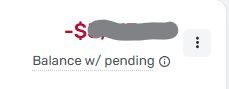
But when open the 3-dot menu to edit the setting, the choices don't use the "Balance w/ pending" or "Bank balance" setting names. Instead, they ask you to choose based on a description of what you think your bank does (include/not include pending in balance).
One option is pre-selected and should presumably the one currently in force. But I don't think it is, because its description of what Quicken is going to do is the opposite of what Quicken is actually doing in this account. It says Quicken "won't adjust" the balance, but Quicken is actually adjusting the balance the bank sends (by adding in the pending).
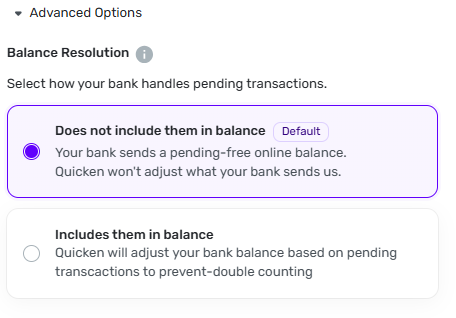
For both choices, the description of what Quicken will do for each setting seems to be the opposite of what you would want Quicken to do based on the description of what the bank does. What I mean is:
- If my bank doesn't include pending in the balance, then I do want Quicken to adjust the balance.
- If my bank does include pending in the balance, then I don't want Quicken to adjust the balance.
The descriptions say the opposite. And they contradict how the settings are recommended to be used in the help docs. See here:
DryHeat
-Quicken Classic (1990-2020), CountAbout (2021-2024), Simplifi (2025-…)1 -
OK, I think this is a bit clearer.
All of my accounts use Option 1, which means the balance from the bank does not include the pending transactions so Quicken subtracts those.
My question is for those who have banks that use option 2, I assume Quicken wouldn't double count the pending transactions downloaded from the bank BUT would subtract manually added pending transactions that haven't been downloaded from the bank. Am I right @Coach Jon?
Steve
Quicken Simplifi (Safari & iOS) Since 2021
Quicken Classic (MacOS) Since 2009
Dollars & $ense (DOS) and MS Money (Windows) 1987-20090 -
All of my accounts use Option 1, which means the balance from the bank does not include the pending transactions so Quicken subtracts those.
That's the opposite of what the description of "option 1" says:
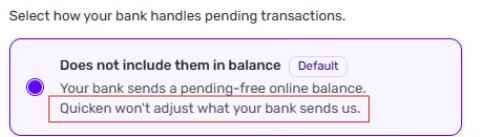
It says that when under this option — because the balance from the bank does not include pending — Quicken won't adjust what the bank sends. But I'm not sure that's true. That's the problem.
DryHeat
-Quicken Classic (1990-2020), CountAbout (2021-2024), Simplifi (2025-…)0 -
Hey @DryHeat I don't think that's what they mean though.
My interpretation:
Option 1 means that QS downloads the bank's online balance that doesn't include their known pending transactions. QS then subtracts the pending transactions in your file. That gives you the running balance.
Option 2 means that QS downloads the bank's online balance, which DOES include their pending transactions. So this tells QS not to subtract them again.
I admit it is still not as clear as it could be but it is clearer than before.
My question still for those whose bank uses Option 2 is that QS should subtract pending transactions you've added that are not yet in the bank's system, such as checks or online payments you've ordered but the bank hasn't processed them. I think this is how it works, but not sure.
For a while, my local bank was doing Option 2 (back last year) until they fixed it.
I also assume that with 6.24.0 that it will now show what it really does instead of always showing Option 1, but I don't know because I don't have any Option 2 accounts.
Steve
Quicken Simplifi (Safari & iOS) Since 2021
Quicken Classic (MacOS) Since 2009
Dollars & $ense (DOS) and MS Money (Windows) 1987-20090 -
Just to clarify, your interpretation of the options descriptions is like this, right?
What the option description says
What you think it means
Option 1: “Quicken won't adjust [the balance] your bank sends us”
Quicken will subtract pending transactions from the balance
Option 2: “Quicken will adjust your bank balance based on pending transactions”
This tells QS not to subtract [pending transactions] again
Frankly, I don't understand how you can interpret the language that way.
[EDIT] Just to make this a clear as possible… My comments are about the descriptions used in the selection options, not about how the option actually works. My point is that it doesn't work the way it says it works, which causes unnecessary confusion.
DryHeat
-Quicken Classic (1990-2020), CountAbout (2021-2024), Simplifi (2025-…)0 -
@DryHeat It is TOTALLY confusing, but I think it is the way they intend it to work.
So I look at the entire description:
If you look at all the verbiage, it starts with how your bank handles pending transactions
Your bank sends a pending-free balance
This is what my bank does! Now what does Simplifi do with that balance, it subtracts the pending transactions.
Option 2 says [Your bank] Includes them in the balance
For banks that download the balance including the pendings, QS won't subtract them again.
So this is slightly less confusing than before. Is it great? No. Could I be wrong? Yep.
But I do think this is what they mean.
I still want to know for those who have an Option 2 bank, when you click on the dots, does it have Option 2 checked, or is it the way it has always been and shows Option 1 even if it was Option 2?
Steve
Quicken Simplifi (Safari & iOS) Since 2021
Quicken Classic (MacOS) Since 2009
Dollars & $ense (DOS) and MS Money (Windows) 1987-20090 -
Thank you for working to make this more clear in the app, it's always been confusing to me.
0 -
I think by focusing on the description of what the bank does in each setting — and essentially ignoring the description of what Quicken does in that setting — you reinforce what I said in my post yesterday.
For both choices, the description of what Quicken will do for each setting seems to be the opposite of what you would want Quicken to do (based on the description of what the bank does).
As @Coach Jon said, "we can agree that the descriptions are confusing." We'll see what the product team comes up with. I think they could improve things by just swapping the descriptions, but maybe they can do better.
DryHeat
-Quicken Classic (1990-2020), CountAbout (2021-2024), Simplifi (2025-…)0 -
@RhineyII Does your Fifth Third Bank in Web Version 6.24.0 now say that it uses Option 2?
@DryHeat I agree with you that it is STILL confusing. It would be helpful to hear the programmer's view on this. You and I have struggled to make sense of this for a long time.
I wonder how Mint handled this and the other online aggregators that use the downloaded balance - pending transactions method to get the balance, e.g., B, M, etc.
I can see that the problem is that first QS has to know what kind of balance is getting downloaded. The Cleared Balance updated each morning or the Available balance (constantly updates as one uses a debit card or checks come in). I got some insight into this when my local bank switched from the former to the latter last year and then back to the former! I never knew whether it was a mistake or they changed back because I complained.
Steve
Quicken Simplifi (Safari & iOS) Since 2021
Quicken Classic (MacOS) Since 2009
Dollars & $ense (DOS) and MS Money (Windows) 1987-20090 -
the problem is that first QS has to know what kind of balance is getting downloaded.
QS doesn't seem to have a way to know this directly.
That is why it asks the user to select either "Does not include [pending transactions] in the balance" or "Does include them in the balance." I'm ok with that.
The ongoing problem is determining what QS does with pending transactions based on that user input. I think we are currently in a "QS says one thing, but does another" situation. Hopefully, that can be cleared up.
The situation will remain confused, though, because:
- some banks download pending transactions and some don't
- some banks adjust the downloaded balance based on pending transactions and some don't
- some "pending" transactions are known to the bank and some (manually entered ones) are not
This makes adjusting the bank balance based on "pending" transactions significantly more complicated than it at first appears.
Example: What should you or QS do if your bank adjusts the balance for pending transactions it knows about, but you also have manually entered pending transactions in your register? And what will be the result?
DryHeat
-Quicken Classic (1990-2020), CountAbout (2021-2024), Simplifi (2025-…)0 -
Hello everyone!
We have received clarification on this issue from our product team. They agree that the descriptions are confusing and will be working on clarifying this information. The titles for these options in bold, "Does not include them in balance" and "Includes them in balance", are correct, and the descriptions for these options will be changed to better reflect these titles. The tooltip for these options does a good job of explaining why a user would choose each option, so I would still reference it going forward when deciding.
Our team also found a few other issues with this feature that will be addressed, such as the Balance Resolution option not working correctly when changing and refreshing in Quicken Simplifi, as well as the Balance Type setting directing users to the Balance Resolution setting.
I will be sure to keep everyone updated in this thread as they work on a resolution to these issues going forward. Thank you for your patience!
SIMPL-34199
-Coach Jon
3 -
Thanks for getting the product team to look at this.
Also… Is the team also going to look at the lack of a clear relationship between the option names (like "Balance w/ pending") shown in the transaction list header and the option titles (like "Does not include them in balance") shown when selecting the option?
Someone who already knows how these things work can see the relationship between the two. Or maybe can figure it out from the description (once that is fixed). But someone who is new to the system will have trouble understanding which name goes with which title.
DryHeat
-Quicken Classic (1990-2020), CountAbout (2021-2024), Simplifi (2025-…)0 -
I also think that for banks where the setting is hardcoded (eg: Chase), the other option should not be selectable, and there should be a message explaining why. Many people have spent time fussing with it and then time searching or posting on the forums only to be told that for their bank, the setting doesn't do anything. It would be a much better customer experience if that was made obvious within the app. Thank you.
0 -
Hello everyone!
While we won't know the full details of what will be changed or fixed, any additional issues/enhancement requests can be reviewed once the work is complete!
Thank you!
-Coach Jon
0 -
I also think that for banks where the setting is hardcoded (eg: Chase), the other option should not be selectable
As I mentioned in this post above, I don't think QS has a way to know what the bank does.
Also, I'm not sure what you mean by "hardcoded." If you mean that the type of balance the bank downloads is not changeable (either by the user or by QS), I think that is the case for all banks.
As I understand it, choosing one option or the other doesn't change the type of balance that the bank provides… it just changes what QS does with it.
DryHeat
-Quicken Classic (1990-2020), CountAbout (2021-2024), Simplifi (2025-…)1 -
The problem with this is when a bank changes as mine did without meaning to do so. I had to use Option 2 (in the old setup which really was flying blind). So I don't think it is necessary to take the option away. Almost all banks use the first option and that is the default. The only time a user needs to fiddle with this is when it doesn't work.
Actually for a while, I just simply cleared the pending transactions in Simplifi and that brought the balance back correctly. When they actually cleared, they matched up just fine. 😀
As of right now, I only have banks that use the default, and I bet you do too.
Steve
Quicken Simplifi (Safari & iOS) Since 2021
Quicken Classic (MacOS) Since 2009
Dollars & $ense (DOS) and MS Money (Windows) 1987-20090 -
While we won't know the full details of what will be changed or fixed, any additional issues/enhancement requests can be reviewed once the work is complete!
Right… I was really asking if the product team had been made aware that the mismatch between the names and titles is a problem, so that they could look at it when they are revising the language.
Putting off notifying the team of that problem until after they have already reworked the option language would likely result in another revision cycle (or more likely just ignoring the problem).
DryHeat
-Quicken Classic (1990-2020), CountAbout (2021-2024), Simplifi (2025-…)0 -
It was discussed elsewhere in the community here. The setting is hardcoded for specific banks, and the fact that you didn't know is proof that it needs to be better explained to us users :)
I'll look for a link.
0 -
Please see this thread:
The original thread from the quoted post seems to have been deleted or hidden, but perhaps @Coach Natalie can confirm if anything has changed.
0 -
The setting is hardcoded for specific banks, and the fact that you didn't know…
It sounds like you mean that the QS setting cannot be changed for specific banks, including Chase Bank. Is that right? I don't think that's true, but I will check it out. I have been wrong once before. 😎
Ok… I just changed my Chase account from "Does not include them in balance" to "Includes them in balance." The change is sticking in the selection dialog when I reopen it (see below) but does not yet show up in the account header, which still says "Balance w/ pending."
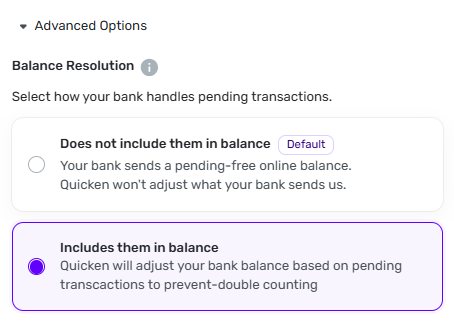
However, when I made the change I got a warning message saying it would not take effect until the next update, which is a few hours away. We'll see what happens then. Will the change stick, or will it change back?
I will let you know.
[UPDATE 4 PM]
Prior to this test:
- The heading showed "Balance w/ pending"
- The Edit Account panel showed option "Does not include them in balance" selected
- [EDIT] The balance shown was adjusted to include my pending transactions downloaded from the bank
- At the time I had no manually entered transactions
I changed the account setting to "Includes them in balance," exited the Web app, and waited for the update interval to pass. Then I reopened the web app and watched while the account updated. The results are confusingly mixed:
- The heading still says "Balance w/ pending"
- But the Edit Account panel now shows option "Includes them in balance" selected
- [EDIT] And the balance shown no longer includes my pending transactions downloaded from the bank
- The balance does include my manually entered pending transactions
[EDIT] In other words, the actual method of balance calculation changed when I changed the setting, but the balance type displayed in the account header (under the amount) remained the same — which makes no sense. And manually entered pending transactions were added to the balance even though pending transactions from the bank were not.
Now I'm going to try changing it back by selecting "Does not include them in balance" to see what that does. I'll get back in 4 hours or so.
[UPDATE 8 PM]
Prior to this test:
- The heading showed "Balance w/ pending"
- The Edit Account panel showed option "Includes them in balance" selected
- The balance shown did not adjust for my pending transactions downloaded from the bank
- The balance did include my manually entered pending transactions
This time, I changed the account setting to "Does not include them in balance," exited the Web app, and waited for the update interval to pass. Then I reopened the web app and watched while the account updated. The results are:
- The heading still says "Balance w/ pending"
- But the Edit Account panel now shows option "Does not include them in balance" selected
- The balance shown does adjust for my pending transactions downloaded from the bank
- The balance does include my manually entered pending transactions
So, once again, the actual method of balance calculation changed when I changed the setting, but the balance type displayed in the account header (under the amount) remained the same. And, as before, manually entered pending transactions were added to the balance (this seems to happen no matter what).
So here is what I take from all this:
- The setting shown in the account header never changes. It always shows "Balance w/pending" under the amount, no matter what the actual setting is. That seem wrong.
- The Edit Account panel reflects the actual setting, which matches whatever I last set it to.
- "Does not include them in balance" actually means that it will adjust your balance to take into account the the pending transactions downloaded from the bank and "Includes them in balance" means it will not. The option descriptions under those titles are backwards.
- The balance is always adjusted for manually entered pending transactions, regardless of the setting. That is a surprise to me, but then I very seldom enter manual transactions.
I would appreciate it if someone else would run these tests to see if my results are correct. The results themselves seem pretty odd, so confirmation would be nice.
It would also be nice to hear something from staff about how this is all supposed to work. I don't think the current documentation matches what is happening here, but let me know if I am wrong about that.
DryHeat
-Quicken Classic (1990-2020), CountAbout (2021-2024), Simplifi (2025-…)1 -
@DryHeat Thanks for being the guinea pig. I thought about doing this but decided to wait as I have no pending transactions at the moment. 😁
It will be a big step forward if your selection sticks. So your pending downloaded transactions should not be subtracted with the next update.
Edit: Oh, also after you do the next update with that account and it works as expected, do a manual pending transaction to see if it subtracts that one. I think it should.
Steve
Quicken Simplifi (Safari & iOS) Since 2021
Quicken Classic (MacOS) Since 2009
Dollars & $ense (DOS) and MS Money (Windows) 1987-20090 -
@DryHeat Well, it did change to not include the pending transactions; that's good.
Did you try adding a manual pending transaction to see what that would do.When you say that it still says Balance W/ Pending, did the selection stay on the 2nd option?Edit: So manual pending transactions are always subtracted, which is good, because bank knows nothing about those until they are presented.
I think the Balance with Pending is always shown in the transaction register unless one toggles to Bank Balance in the Accounts Column Settings.
I will do a test of my checking account Monday/Tuesday when I get some pending transactions.
Thanks!
Steve
Quicken Simplifi (Safari & iOS) Since 2021
Quicken Classic (MacOS) Since 2009
Dollars & $ense (DOS) and MS Money (Windows) 1987-20090



