How can I match transaction rules using partial words?

I have transactions that look like this: 0598-money.gg
If I make a rule where original statement name contains: 0598-money, it correctly identifies these transactions.
If I make it look for "0598" or "0598-" or "money" or "-money" it does not identify these transactions. How might I be able to correctly target these terms?
Comments
-
Hello @bobbiesmith,
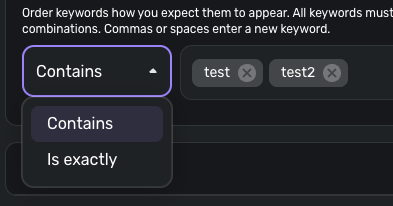
Thanks for reaching out! I am glad that you are able to match your transactions using the statement name. As for matching using the partial term, if it is not identifying, you may need to add more detail when entering the keywords, or possibly switch from "Contains" to "Is exactly" to see if either works better for you in this case.
I hope this helps!
-Coach Jon
0 -
Hi Coach Jon,
Thank you so much for responding; however, that doesn't work. The exact payee is something like "0598-money.gg". I am trying to match off of "0598", so "Is exactly" is not the right option to use.
However, "Contains" "0598" also doesn't work, neither does "0598-".
0 -
Maybe the limitation is numbers? Another example I have is something like "0598 money" without the hyphen. Still doesn't recognize.
0 -
Hello @bobbiesmith,
Thank you for clarifying. I am a little confused here, I admit. Is there something preventing you from using the original "0598-money" keyword that you used to correctly identify the transactions? Or are you just looking for other shorter ways besides that term?
Let us know!
-Coach Jon
0 -
Hi, is it possible for someone from Simplifi to clarify whether there is a limitation on matching on a number that makes up a partial string, such as the "0598" in the string "0598-money"? If there is some kind of limitation, is there a way to put in a feature request?
0 -
Hello @bobbiesmith,
Thanks for the reply. I do not believe there is any limitation on using numbers with a keyword based on the statement name. I tested this myself on my end and was able to create a rule using a keyword made up of a number from a statement name that identified existing transactions.
As for feature requests, we do have a couple of idea posts that you may be interested in voting for that are similar to this topic:
If you have another idea post that you would like to submit, that isn't covered by an existing idea post already, you may feel free to create one as well, so that other users may vote for and provide feedback going forward.
I hope this information helps!
-Coach Jon
0 -
I appreciate the response and links. As I said, when my payee had a word like ####-word in the original statement, making a rule based on #### or ####- would not work, while targeting ####-word did work. Are Simplifi devs able to test and confirm whether this should work?
1 -
Hello @bobbiesmith,
As there are no bugs present and you successfully created a working rule, there is nothing that can be escalated at this time. I encourage you to vote for one of the idea posts I shared earlier, or you can create your own idea post if they don't fully address your specific needs for rule creation in Quicken Simplifi.
Thank you!
-Coach Jon
0 -
Can you post an image of the rule setup that is not working? And the transaction text you are targeting?
I tested a rule where the text in the target was something like "abc_123_xyz" and the rule condition was "Contains" "123" and it worked. So I'm not sure why yours doesn't work.
Maybe it would be easier to figure out what is wrong with the rule, or what is wrong with the system, if we could see an image of exactly what you are targeting and what the rule is you have set up.
DryHeat
-Quicken Classic (1990-2020), CountAbout (2021-2024), Simplifi (2025-…)1 -
Sure! Good idea.

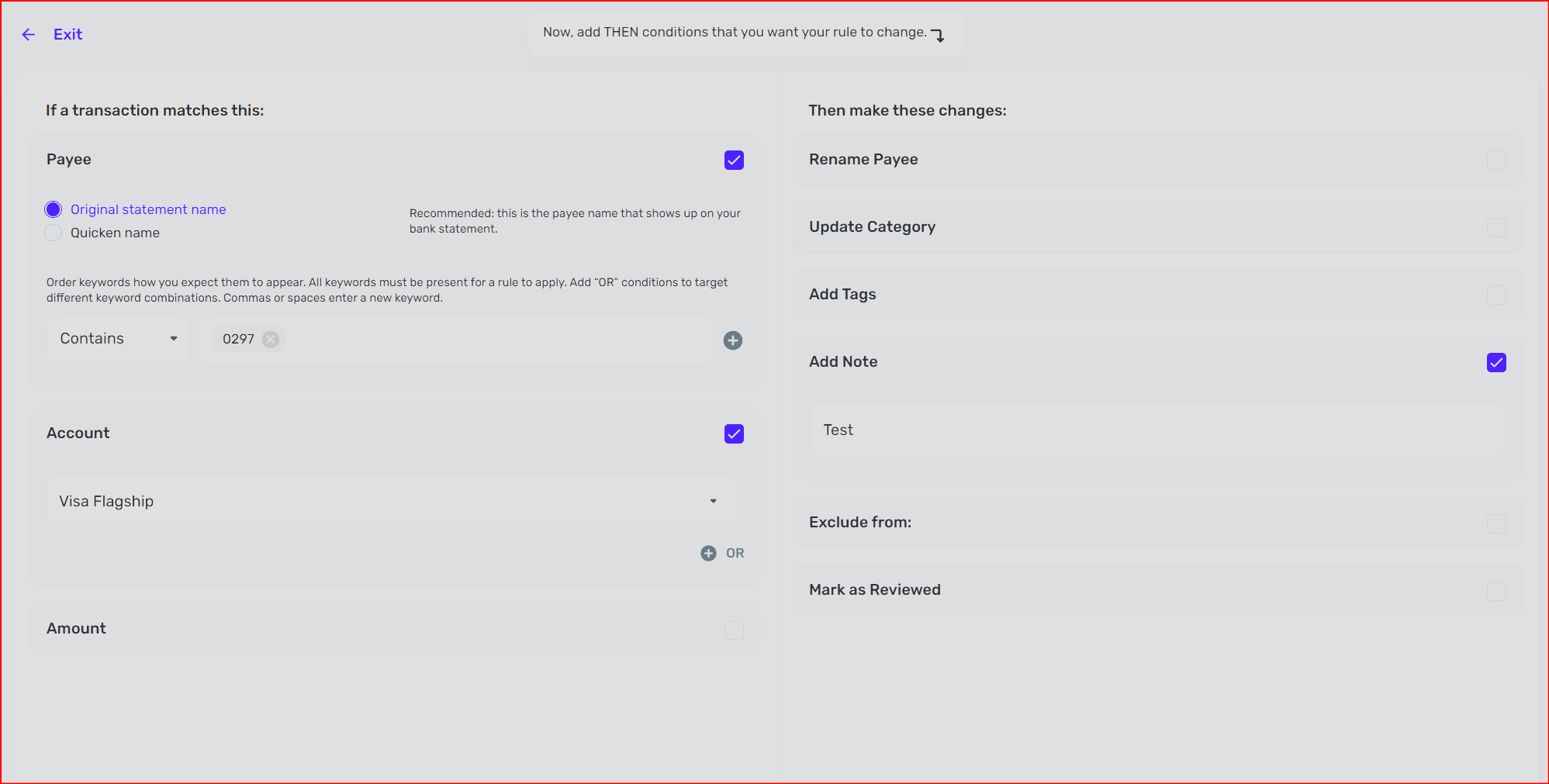
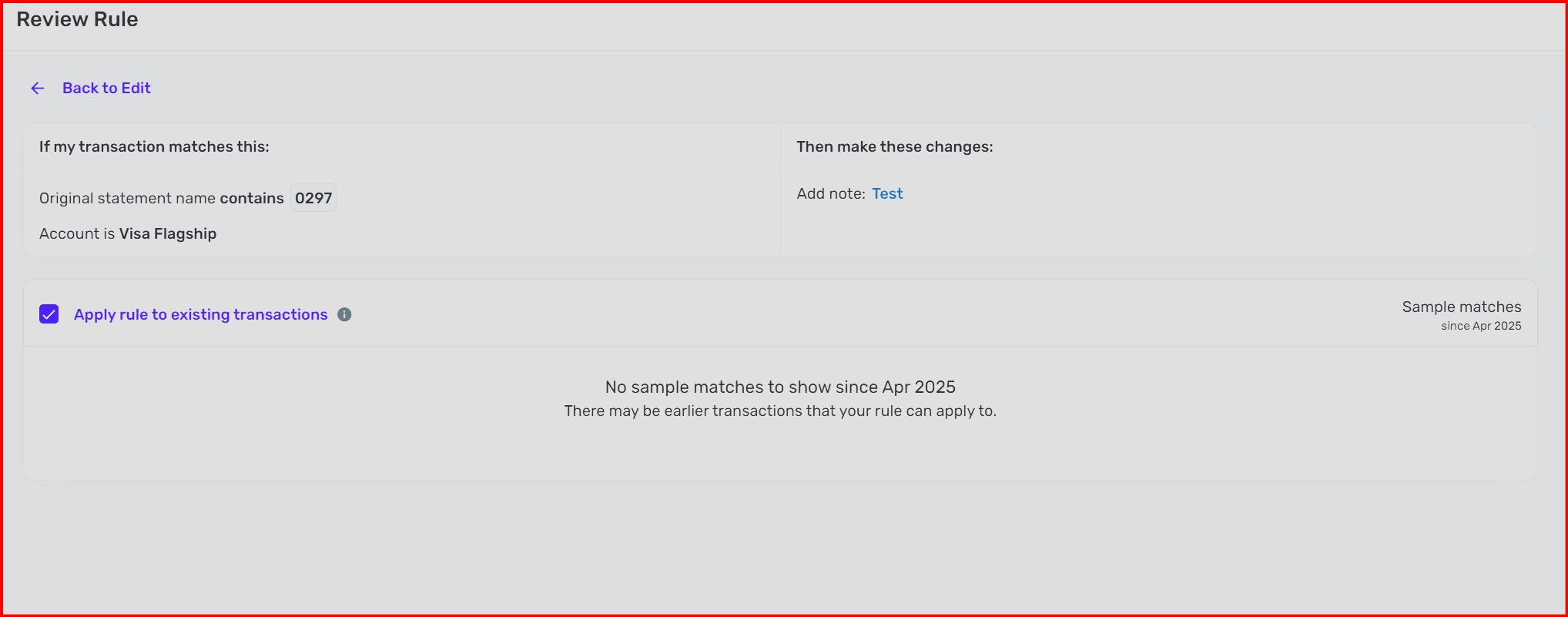 1
1 -
NOTE: I'm assuming that in the image of your transaction, the name shown is the "statement name," because the rule is trying to match on the "statement name."
I don't see anything wrong with the rule. As far as I can tell it should match the transaction. Maybe someone else will spot something I missed, but the rule looks good to me. But I can't get it to work either.
I don't have any transactions with original statement names that start with a number like yours. But I edited the Payee name on one of mine so that it looks like "0429-Amazon."
I can't get any rule containing a number to match a transaction with Payee "0429-Amazon."
I can match with a rule "Contains" — "Amazon".
But not with a rule "Contains" — "0429" or "0429-" or "429" or "9-Amazon."
I'm not sure how Simplifi's matching algorithm works. I have had some unexpected results when I have typed numbers into the "Search transactions" box at the top of Transaction Activity lists, for example.
I guess you'll have to wait for one of the coaches to weigh in on this. Fortunately this is pretty easy to test (like I just did) so they should be able to figure out if there is a problem.
DryHeat
-Quicken Classic (1990-2020), CountAbout (2021-2024), Simplifi (2025-…)0 -
Hello @bobbiesmith,
Have you tried switching to the Quicken Name instead of the Original Statement Name to see if this works better for you in what you're trying to accomplish with rule creation? If you are still unable to get the partial keywords to work, then I would just stick with setting the keyword to what you know works. Let us know!
-Coach Jon
0 -
Hi Jon, sticking with what works doesn't meet the goals I'm trying to achieve. I am trying to have rules that automatically add tags based on those numbers. Those numbers reflect the different credit card numbers for my authorized users. Conveniently, when Simpli ingests transactions from my credit card, it prepends the last 4 of the authorized users' credit card numbers to the Statement Name. The Quicken Name removes those numbers, but they exist in the original statement name.
Dryheat - I appreciate you testing and it's good (or bad?) that you confirmed the behavior.
How can we flag this for more formal Simplifi awareness and consideration for fixes?
0 -
Hello @bobbiesmith,
Let's have you try creating a rule directly from the transaction itself to see if this works better for what you are trying to accomplish. Our support article provides detailed steps to help you accomplish this task.
Please let us know if that works better for you!
-Coach Jon
0 -
Yes I have. Same results.
Hey, I keep asking this question: How can we flag this for more formal Simplifi awareness and consideration for fixes?
If we don't have a way, please let me know.
0 -
Hello @bobbiesmith,
Unfortunately, there is nothing to flag here, since you are able to create a rule that can properly identify the transactions you are trying to create a rule for. There is no bug here to escalate, to be more precise.
If you were unable to create a rule at all that could properly identify those transactions, we would be able to investigate further, but since you can, all we can really suggest is voting for the idea posts I shared, or creating your own idea post so that other users can vote for and provide feedback going forward.
-Coach Jon
0 -
Coach Jon, how do you figure that? I am unable to make a rule based on the predictable information. I have statement information that contains ####-word. The word part changes but the #### stays the same. A rule based on #### does not work.
0 -
Hello @bobbiesmith,
I reached out to my product team with this information to determine how transaction rules are specifically supposed to work when involving partial numbers within statement names as keywords. I will be sure to follow up here with my findings.
Thank you!
-Coach Jon
1 -
I think I was wrong about how the Rules' matching system works. In two different ways.
First, I don't think the system pays any attention to a Payee name that I have manually edited. It will only work based on either the Statement name or the originally assigned Quicken name.
Second, I don't think it will match when a keyword in the Rule is only part of a word in the name. For example:
— Take a transaction with Statement name = "US_233_TUCSON". Simplifi sees this as three words (ua 233 tucson) because it breaks words on an underscore. So I can match this with a keyword of "233".
— But take a transaction with Statement name = "DUTCH BROS AZ0904 TUCSON". Simplifi sees this as four words (dutch bros az0904 tucson) because it breaks words on a space. So I can match this with a keyword of "az0904" but not with a keyword of "0904".
In short, I thought the Contains operator would match a substring inside a word … but it doesn't.
Takeaway: You might be able to figure out how to handle this by experimenting with creating a rule directly from one of the transactions you want to match.
Look at the keywords that are suggested by the system for that transaction when you first open up the Create Rule page. Those may be the only keywords that will work for that kind of transaction. Using those may or may not be sufficient for your needs.
DryHeat
-Quicken Classic (1990-2020), CountAbout (2021-2024), Simplifi (2025-…)1 -
When I create a rule from a transaction such as this, it does detect the number as different from the word. For example, take this list of transactions.
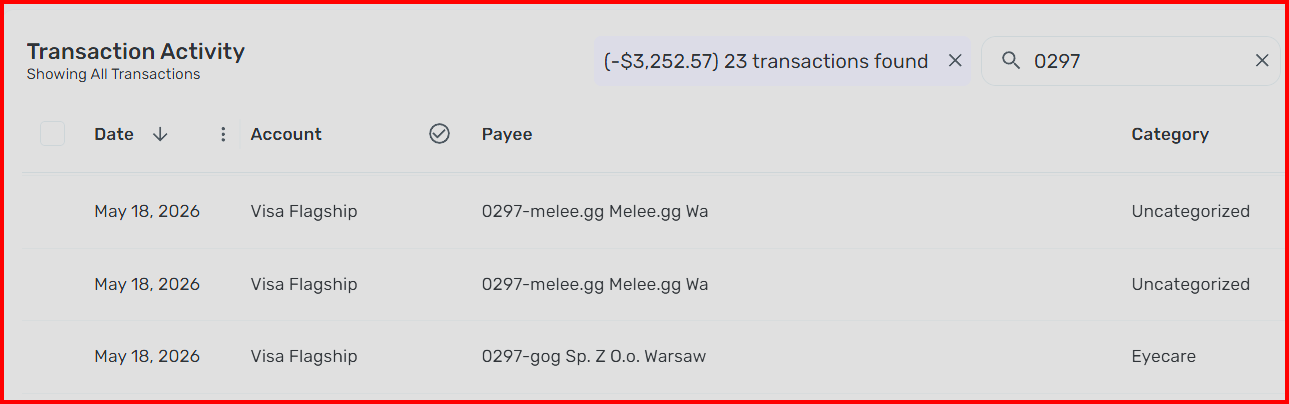
If I make a rule from one of them, it automatically breaks out the pieces like this
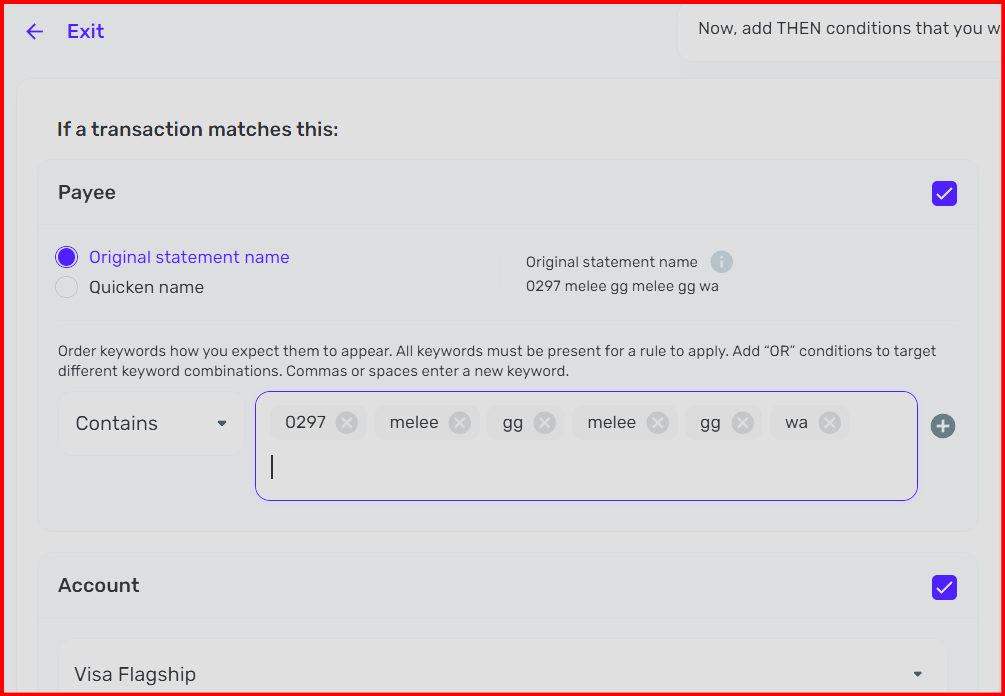
But when I trim it down to only the 0297, it doesn't actually find any of the transactions.
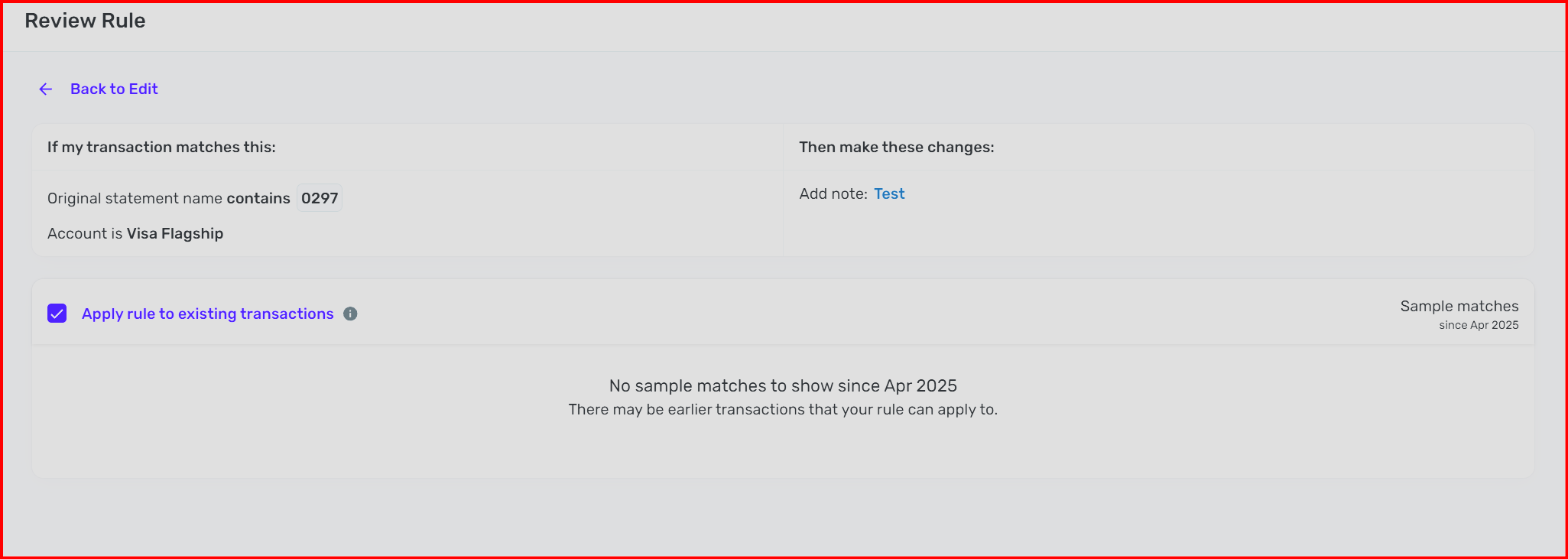
So, something is wonky in the matching algorithm.
0 -
So, something is wonky in the matching algorithm.
Your latest test demonstrates very well that a problem exists in the matching system.
- You are using one of the keywords specified by the rule creation system
- But the system won't match that keyword to the transaction it came from.
That shouldn't happen.
I know @Coach Jon said that "there is nothing to flag here," but it looks like a bug to me.
EDIT
I suppose you could run one more test by trimming the rule down to just "melee" and seeing if that matches. That would indicate that the problem is with numbers.
I believe the other keywords (gg & wa), even though they are suggested by the system, may be too short to work. If you try to enter a two letter key word when manually creating a rule you get this warning:

DryHeat
-Quicken Classic (1990-2020), CountAbout (2021-2024), Simplifi (2025-…)0 -
Melee in a rule doesn't match anything.
Melee and/or 0297 while searching transactions does work properly.
0 -
Melee and/or 0297 while searching transactions does work properly.
That's a little confusing. Rules don't have an "AND" operator, only "OR".
Are you still talking about using Rules or are you talking about searching for transactions using the "Search transactions" box in the Transaction Activity list:

The "Search transactions" system was just upgraded for those using Early Access. I don't think it uses (or ever used) the same search system that Rules does. So I'm not sure tests performed there would shed light on the problem.
DryHeat
-Quicken Classic (1990-2020), CountAbout (2021-2024), Simplifi (2025-…)0 -
Sorry, didn't mean I was using Boolean. I meant searching for melee works using the search transactions box. Searching for 0297 works using the search transactions box.
Neither successfully match transactions when used in a rule.
0 -
I see… that makes sense. The Search Transactions box has had a few problems, but it generally works the way people expect search to work.
The fact that "melee" will work in Search Transactions but won't work in Rules kind of highlights the problem.
DryHeat
-Quicken Classic (1990-2020), CountAbout (2021-2024), Simplifi (2025-…)1 -
Hi - just curious if this has been queued for development and any idea when it may come out? Thank you!
0

