Bill Connect for Credit Cards not working for some banks (edited)

First, let me say that I really like this feature.
It fits perfectly with my use case and with how I use credit cards. I currently have 10 of them.
Last year, after the feature was released, I connected all of my credit card accounts and followed the setup instructions carefully. Now, after several billing cycles, here is my feedback:
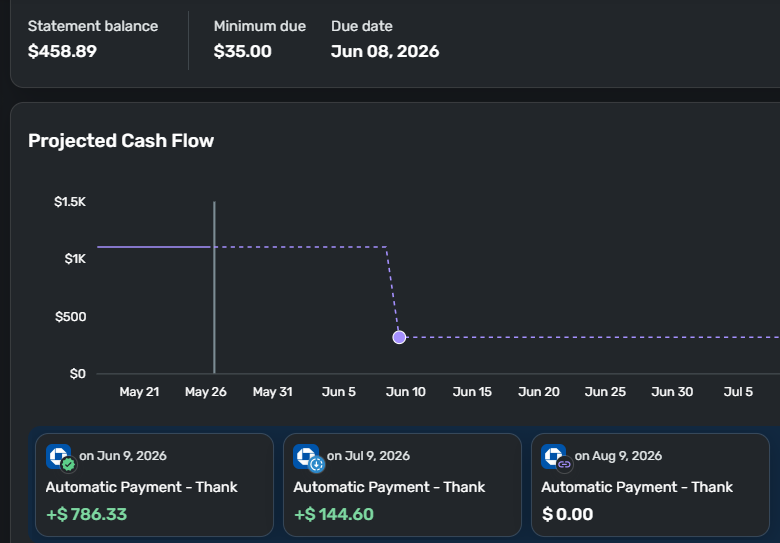
- Chase Amazon Card: Does not work correctly. Simplifi shows the correct statement balance of $458 and the correct due date. However, below the graph, it shows an automatic payment of $786.
- Amex: Works great. No issues at all. Dates and amounts have been consistently accurate.
- Citibank Custom Cash: Does not work properly. The payment transaction remains at zero and never updates, even though the system correctly displays the statement balance and due date at the top of the screen. This one is especially strange because Simplifi clearly has the correct information, but the planned transaction itself stays at zero.
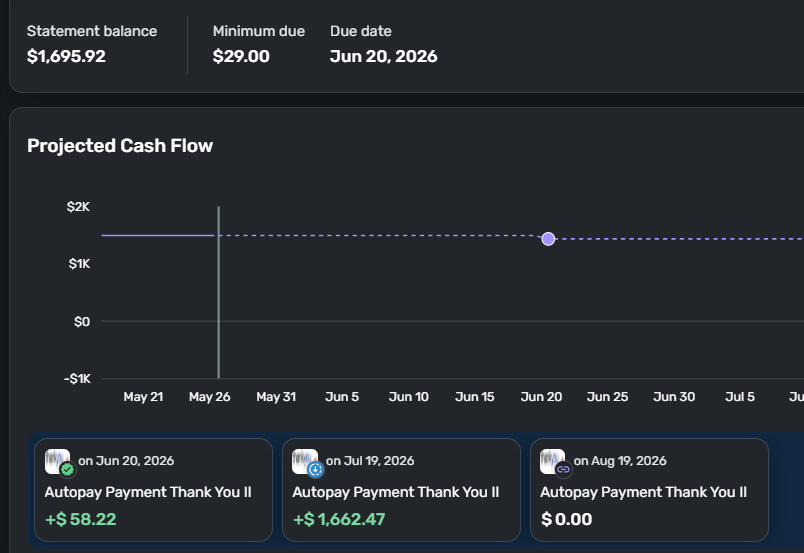
- Citi ThankYou Card: Does not work correctly. For example, the correct statement balance is $1,695, which Simplifi displays properly at the top of the screen along with the correct due date. However, the planned payment transaction below shows only $58. I verified that $58 is not even the minimum payment amount.
- Fidelity Visa: Works well. No issues.
- U.S. Bank Smartly Visa: Does not work properly. Payment balances remain at zero even though Simplifi correctly displays the statement balance and due date at the top of the screen.
I also have other credit cards showing a similar pattern where some work perfectly while others do not work at all.
It is a pity because this is an excellent feature that could genuinely save me time when planning my cash flow.
I hope these issues can be addressed in future releases.
Attached, below, examples where the statement balance and transaction amounts do not match.
This is Chase.
And this is Citi Thank You Card
Comments
-
Hi @nrp06,
Thanks for reaching out to the Simplifi Community and for providing the feedback and screenshots!
I’d like to ask a few questions to better understand the issue and determine what may be causing it:
- When was the last time this worked correctly?
- Would you be willing to share screenshots of the biller series from the financial institution’s website?
- Would you also be willing to upload screenshots of the series in Quicken Simplifi?
Please be sure to redact any personal information from the screenshots before posting.
If you have not done so already, I also suggest checking Edit Series > Bill Connect and letting me know what option you are seeing for those billers.
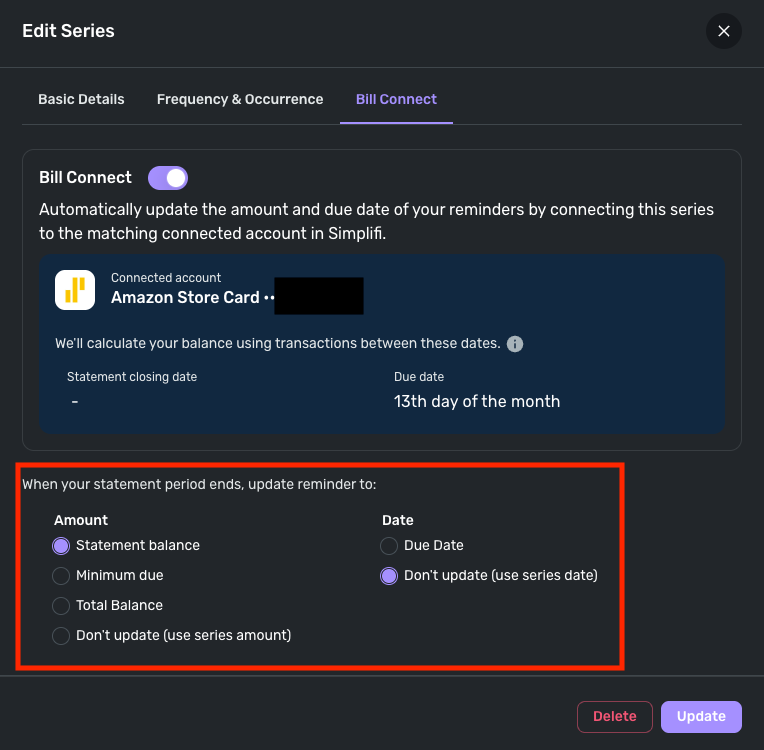
I look forward to your reply!
- -Coach Carlos
0 -
Coach Carlos
Answers below:
- When was the last time this worked correctly?
Those that are not working properly never worked properly. I saw the note here on the forum saying series needed to be updated (since you guys made changes) and I did update all of them. And they still don't work. - Would you be willing to share screenshots of the biller series from the financial institution’s website?
I'm not sure exactly what you're requesting. Would you please elaborate? - Would you also be willing to upload screenshots of the series in Quicken Simplifi?
Sure, just let me know exactly what you need, what screens, and I will send them to you.
If you have not done so already, I also suggest checking
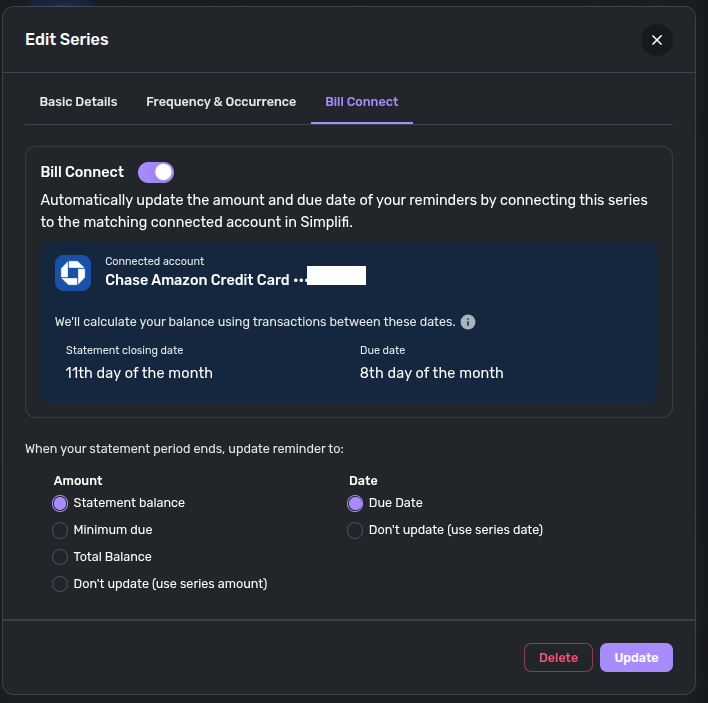
Edit Series > Bill Connectand letting me know what option you are seeing for those billers.All of them show all these options. 4 options for amount and 2 options for date, exactly like in the image you posted.
Below, the series for Chase.
And this is Citi Thank You Card
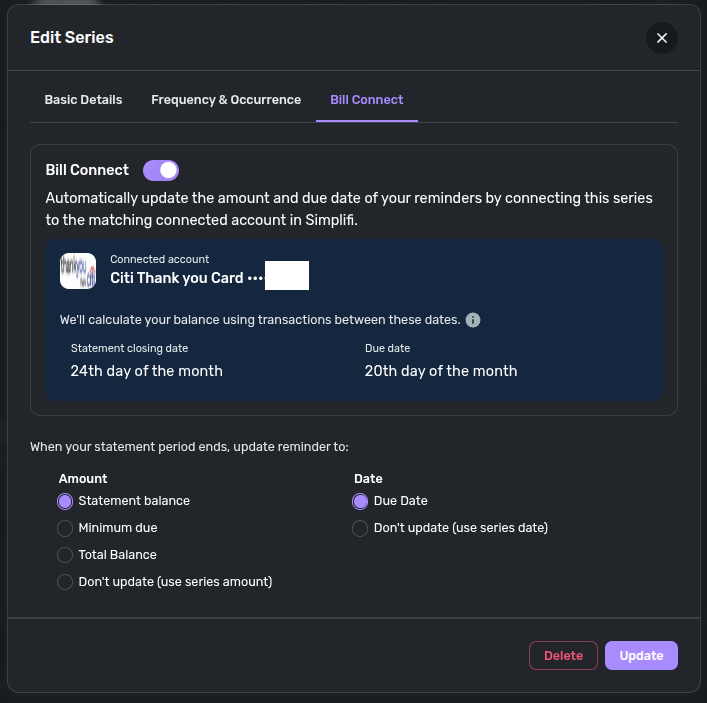
What else do you need?
0 - When was the last time this worked correctly?
-
@nrp06, thanks for the reply!
I would recommend performing the following steps for the problematic credit cards to establish a fresh Bill Connect connection:
- Disable Bill Connect in the Edit Series window and then save the changes.
- Wait 4 hours for the next successful refresh with the banks.
- Re-enable Bill Connect.
- You may need to wait a full billing cycle for the update to take effect.
Our support article here goes over connecting to Bill Connect for Credit Cards, as well as has some "things to note" that may apply or be helpful:
The other thing you may consider trying, which can be done with just one of the series at first to test whether it works, is ending the current recurring credit card series and creating a brand-new one. This should resolve any issues with the recurring series itself.
- Ending the current recurring series (versus deleting it) will retain historical links
- When you create the new recurring series, you can set it up for the next occurrence
- Once the new series is set up properly, make sure to enable Bill Connect and wait a full billing cycle
If the issue persists after following these steps, the next best option would be to create a separate post for each individual credit card/series. This feature is controlled via bank aggregation, so we'd want to look at each bank on a case-by-case basis. This will allow us to perform the proper troubleshooting and gather the best data for that particular bank.
I hope these steps get things working for you!
-Coach Natalie
0 -
I already did all these steps. Before I posted here, I researched this topic extensively here in the forum and followed all the recommended steps to fix the issues. Issues were not solved.
Repeating the same steps again does not make sense.
My post was simply to let you all know that this feature does not work. It is not reliable. Please use this feedback however you see fit.
0 -
@nrp06, I'm sorry to hear the steps did not resolve the issue for you!
If you'd like to continue troubleshooting, please create a separate post for each bank where this is occurring so we can follow our normal escalation process. In order to review a case for escalation, we do need all troubleshooting steps completed, along with logs and additional data gathered through the process.
Otherwise, we definitely appreciate you sharing your feedback and experience here, and I hope things start working better for you soon!
-Coach Natalie
0