Investments Dashboard Total Incorrect (edited)

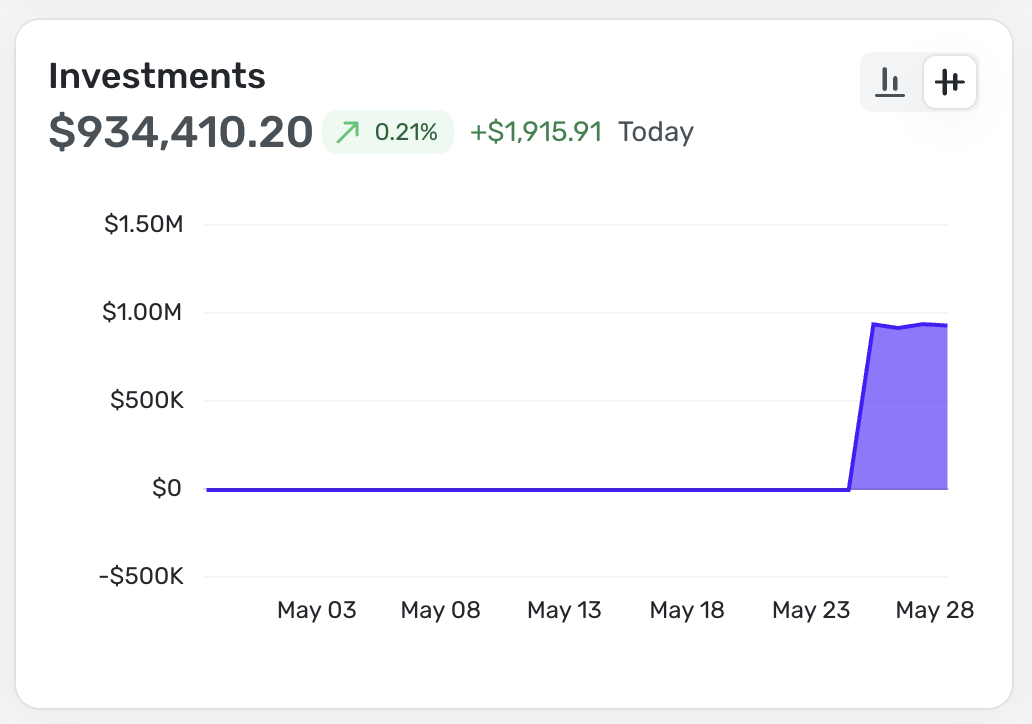
I've been noticing that on my dashboard, the Investments Total Market Value is off by ~ $10,000 from what the total is across all my investment accounts. See the attached screenshots. I believe it may have to do with an issue related to one of the securities not being recognized properly even though at the time of entry, it works fine.


Comments
-
@MoMoney99, thanks for reaching out!
It looks like the Investments dashboard card uses the Investments: Balances data rather than the Portfolio market value. I checked my Balances data and compared it to the dashboard card, and everything seems to match on my end. When you click on the card and navigate to Balances, does the data then match?
Regarding the holding you provided a screenshot of, is that in a connected investment account or a manual investment account? And what specifically is wrong with this holding?
We look forward to hearing back from you!
-Coach Natalie
0 -
Hi Natalie, thanks for the quick reply. I'm curious, why do the Investment Balances differ from the actual Market Value? Wouldn't these be the same thing? The Balances and Dashboard do match but maybe my understanding of these particular modules work is inadequate? :)
With regards to the investment holding (Mastercard: MA.TO). It seems this "Invalid Symbol. Please Try Again" error message happens with all securities I've added that trade on the Toronto Stock Exchange. These tickers all end with .TO on the end of them. Is there a way to resolve this?
0 -
@MoMoney99, thanks for the reply!
I believe the Balances section gets its data from the account balance itself, which can differ from the market value for connected accounts, as the balance is provided by the bank, whereas the market value is derived from the holdings in the Portfolio. Our support article here has more info on this:
Is it safe to say that the real issue here is that the market value is wrong since you have incorrect holdings data in the Portfolio? If so, is this occurring with a connected or a manual account? If connected, what financial institution is it?
Let us know!
-Coach Natalie
0 -
Hi @Coach Natalie thanks again for the reply. All of my investment accounts are setup manually as my institution is now available in Quicken. What I'm trying to understand is why the total on the BALANCES page is not the same as the total on the PORTFOLIO page. I'm a little confused as to why these amounts would differ.
The portfolio page/tab correctly shows all the market values and gains/losses for every holding across all my accounts.
0 -
@MoMoney99, thank you for the information!
The balances page derives its data from the account balance. I'm not sure why the account balance wouldn't match the market value if the account is manual, aside from the information being updated at separate times/in separate ways, as outlined in the article I shared above —
- Holdings Info in Manual Investment Accounts: Manual Holdings information gets updated automatically during nightly aggregation as long as a valid ticker symbol is used.
- All Other Calculations (such as Total Value, Change, etc.): This information is provided by our Investing Service Provider and updates whenever new information becomes available.
I can say that my manual investment account balance does not match the market value in the Portfolio. I suspect the Portfolio is more accurate, since the investing data was just updated about 20 minutes ago.
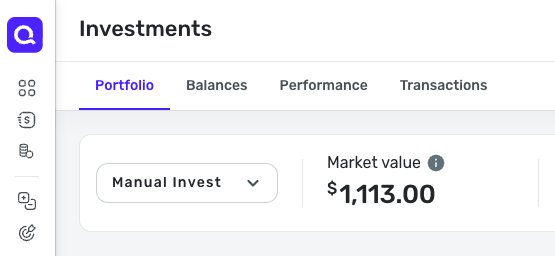

I'd recommend noting your market value and checking whether the account balance updates overnight to reflect today's market value changes, as everything should be updated during nightly aggregation.
-Coach Natalie
0 -
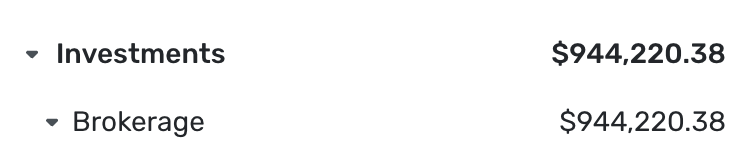
Hi again… I too am confused as to why the numbers don't match when they are all manual accounts. What's crazy is that this morning I'm seeing 3 different totals depending on where I'm looking. On the sidebar, it's showing a total of $944,220.38. On the dashboard it's showing $942,486.15 and then on the Balances tab it's showing $952,601.87. None of this makes sense as to why there would be three different totals in 3 different sections when all of these are setup as manual investment accounts. Here are the screenshots:

 0
0 -
@MoMoney99, thanks for the additional information!
Investment data in Quicken Simplifi can differ slightly depending on how and when the data is updated. To help clarify, here’s how the various investment sections work:
- Investments: Balances uses the account balance data.
- Investments: Portfolio uses holdings data.
- The Investments dashboard card uses Investments: Balances data.
- Manual Holdings information is automatically updated during nightly aggregation.
- Values such as Total Change are provided by our investing provider and are updated whenever new market data becomes available.
I'm not sure how long it would take for investment updates to be reflected in the account balance and, therefore, in the Balances section, which is why I recommended tracking the changes day to day, since Quicken Simplifi performs automatic nightly aggregation.
And since the Investments dashboard card is tied to the Balances section, it would not use the Portfolio market value, so we would not want to focus on that here. If you’d like to further investigate why your holdings data appears incorrect — which may also explain the market value discrepancy — I’d recommend creating a separate Community post focused specifically on the holdings issue.
We also have an existing discussion regarding Toronto Stock Exchange symbol issues that may relate to what you’re seeing with your .TO holdings, so you’re welcome to follow along there for updates as well.
Back to the original issue regarding the Investments dashboard card versus the Balances page: when I test this in my own Quicken Simplifi, I see the values refreshing frequently as updated investment data comes in. For example, I may see one balance on the dashboard, navigate to Balances and see it refresh, then return to the dashboard and see the updated value reflected there as well. Based on what I’m seeing, this behavior appears consistent with how investment data currently updates in Quicken Simplifi.
At this point, it may be best to contact our Chat/Phone Support team directly so they can review the behavior with you in a live screen-sharing session using your specific account data. They may be able to provide additional insight or clarification based on what you’re seeing in real time.
Feel free to post back with any findings in case it helps other users!
-Coach Natalie
0 -
@Coach Natalie Thanks for trying to assist with this but I feel like we are going around a bit in circles. There's no really good explanation as to why the "account balance" data and market value data would differ unless Quicken isn't applying the market value updates to both areas of the app which would be quite silly.
These are all manual investment accounts. Therefore, the market value shown on the "Portfolio Tab" should match the "Current Balance" shown on the "Balances" tab. The only rationale for why that's not happening is that Quicken isn't applying the updated market values to both areas of the app at the same time. This is extremely counterintuitive.
I guess I'll reach out to telephone support to see if I can wrap my head around this.
1
