New User - Here's What I See

So I've been trying Simplifi for a little over a week. I think it's really powerful and I love it so much more than Monarch. I would say I'd be glad to make a permanent switch but there are a few things that are really frustrating about the usability of Simplifi. For example, why does there need to be an assist button on the bottom right when there's an Ask Assist button right at the top? The one at the bottom right sits right above the scroll bar and nearly touches the down arrow from the scroll bar. Can't that second button be eliminated, or at least moved so it doesn't get in the way of trying to navigate your way through the program?

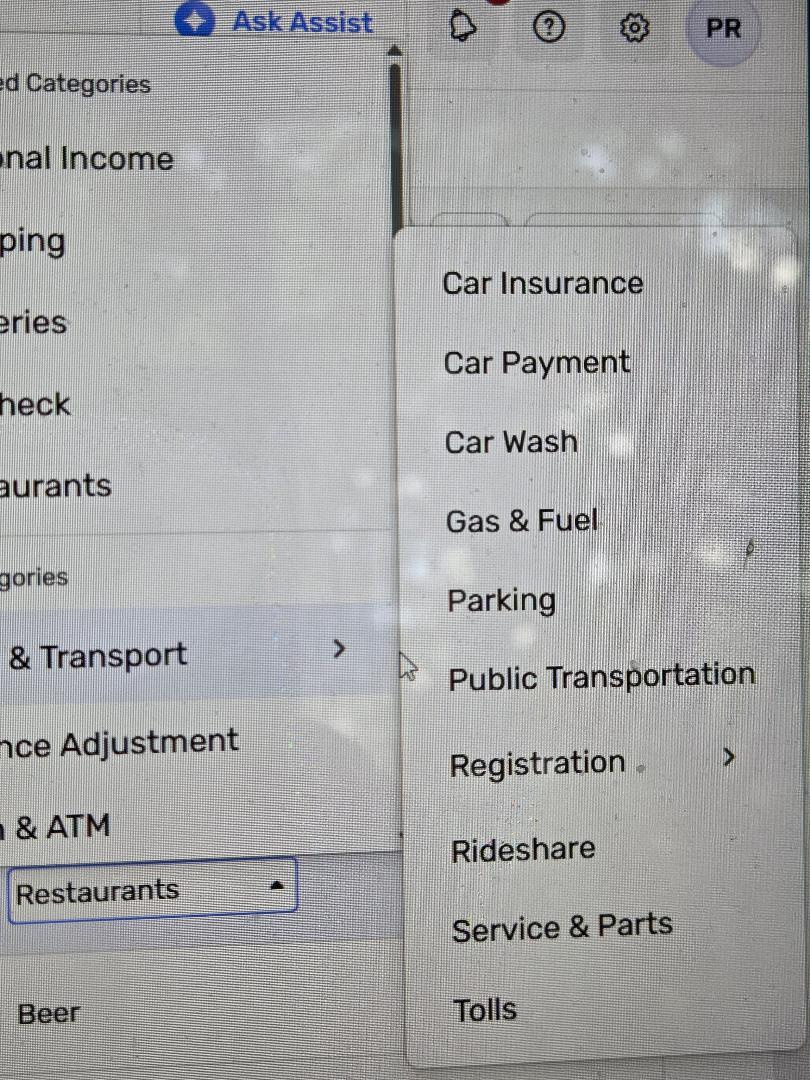
Another obstacle to ease of use is how the categories dropdowns appear. The scroll bar gets blocked there too. Let's say I want to get to the Shopping category, for which I'd have to scroll down. As soon as my cursor touches the Auto & Transport line, the subcategory popup appears and it blocks the scroll bar. So now I have to zig zag with my cursor in order to get it to disappear and get back to the scroll bar. It's a small nuisance but because it gets repeated so often, it gets in the way of really good ease of use.
But the main thing that's absolutely maddening is the lack of an Expand/Collapse All button. When reviewing transactions, if I collapse several months but then need to leave the screen to accomplish a task for a particular transaction, everything is expanded again when I return to the main transaction screen. It's so frustrating. And it requires so much extra work to use the program.
I’ve seen that people have apparently been asking for this feature for a long time. Is an Expand/Collapse All option, or a way to preserve the collapsed/expanded state when returning to the transaction screen, on the roadmap?
I really do like Simplifi and think it has the potential to be exactly what I’m looking for. But these usability issues, especially the transaction expand/collapse behavior, may be what prevents me from sticking with it.
Comments
-
Welcome to Simplifi! Glad to have you here. Lots of experienced users will be able to help you get used to the app.
I agree about the Ask Assist in two places. My guess is they really want people to try this new feature and at some point, the second location will disappear.
Enjoy!
Steve
Quicken Simplifi (Safari & iOS) Since 2021
Quicken Classic (MacOS) Since 2009
Dollars & $ense (DOS) and MS Money (Windows) 1987-20090 -
The product has everything I need in a personal finance app. I want to use it. But it's aggravating because I'm constantly encountering little things that make using it so much harder than it has to be.
0 -
Hello @CatDad,
Thank you for coming to the Community to share your feedback!
Quicken Assist is a relatively new feature, and we still have an open Feedback thread for it:
Please share your feedback there, since our Product Development teams are monitoring that discussion.
I can see how categories can be frustrating to navigate when subcategories block the scroll bar. One way to get around that problem is to start typing the category name. That will narrow the list down to the categories that share those letters, and allow you to find the category you need faster.
You can also create an Idea post to request that the current functionality be changed. Ideas that get enough votes may be implemented in the future. For information on creating an Idea post, please see the discussion linked below:
Currently, we do have a couple of Idea posts about expand/collapse functionality. It sounds like you're already aware of the one asking for expanded/collapsed state to be remembered, but it doesn't look like you've added your vote. I'd recommend adding your vote and a comment, since that helps keep the Idea active and shows how much demand there is for this to be added:
It's not yet showing as Planned, so it's probably not on the roadmap yet.
I can see there is also another Idea asking for an option to expand all/collapse all:
If that's something you'd like to see added in the future, please add your vote and a comment!
I hope this helps!
-Coach Kristina
0 -
I can see how categories can be frustrating to navigate when subcategories block the scroll bar. One way to get around that problem is to start typing the category name. That will narrow the list down to the categories that share those letters, and allow you to find the category you need faster.
This is a good point Coach Kristina makes. This is what I do and probably what most experienced users do so most of this aggravation goes away. I have found even when there is a new feature and I might not think it's so easy to use that over time I get used to it and it seems second nature.
Most of the requests we make therefore tend to be for missing features.
However, lately when Simplifi has added features, they have an ongoing feedback commentary conversation monitored by the developers like the one for Ask Assist. These have been a boon because users can immediately make suggestions for refinements and many of them get implemented somewhat quickly.
It's been impressive to see Simplifi adapt to users needs. Of course, there are some requests that have taken longer or not been implemented at all.
Steve
Quicken Simplifi (Safari & iOS) Since 2021
Quicken Classic (MacOS) Since 2009
Dollars & $ense (DOS) and MS Money (Windows) 1987-20090 -
Thank you. I'll try to follow up in these other locations.
2

