Connected account balances not updating with pending transactions (edited)
Comments
-
[rant redacted]
0 -
Hello everyone,
We understand the frustration and concern this issue causes. I can assure you our team is actively working on the issue with pending transactions being delayed in updating the balance for connected accounts. Our Alert for that issue can be followed for updates here:
If the issue is occurring on a manual account, please use the "Re-sync balance option" for an immediate fix.
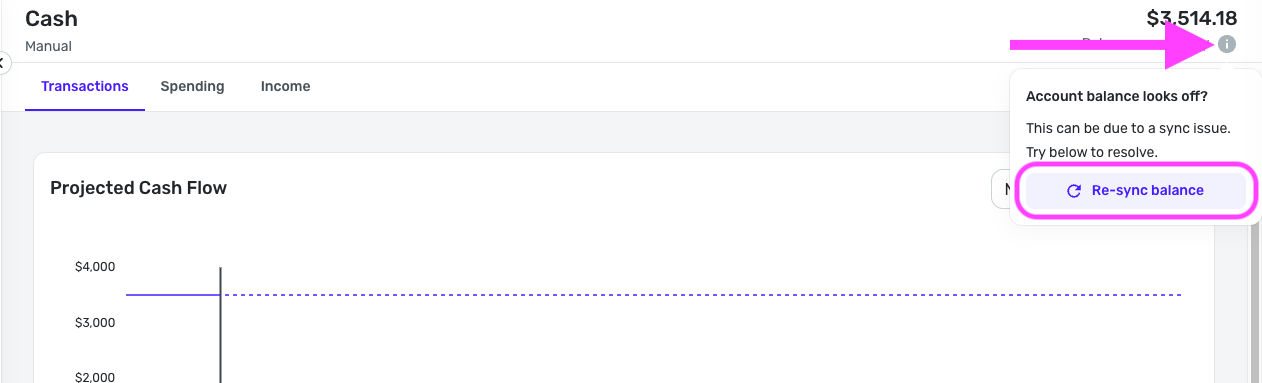
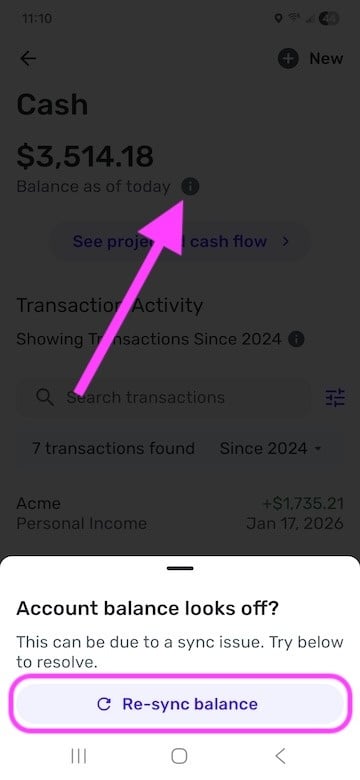
If "Re-sync balance" doesn't work, please create a separate post so your individual issue can be looked at.
We appreciate everyone's patience as we work on the balance issues with connected accounts!
-Coach Natalie
1 -
I've been following along, but this my first post. Nothing is fixed on my end. I've been a Quicken user for more years than I can even remember. This Simplifi product just STINKS! So many issues, but this one, which wasn't a problem until recently, is ABSOLUTELY RIDICULOUS! If it wasn't "broken" before, how in the world did it get "broken?" And why can't it be fixed immediately??? I'm so frustrated.
2 -
Issue is not only in the pending transactions
It's in all manually entered transactions in both linked and manual accounts.
So if you edit anything I linked bank account, it's not being changed in the balance.
Also, why my posts being redacted and deleted from this thread? I'm not using any illegal language or anything to cause that
0 -
PSA: If you click the bookmark icon at the top to subscribe to a thread, you can get an email with new posts, and see what was written before they get redacted.
0 -
[removed - repeated posting]
0 -
[removed - repeated posting]
0 -
My first ever redacted post is in this thread too…
0 -
Guys, looks like Quicken team is on the right track. 😊
App is currently working for me, completely.
Hopefully, they were able to find the culprit and make this a permanent solution. So this issue won't happen again.
0 -
Oh, I was so hopeful. Last night the issue appeared to be fully resolved. The delays are unfortunately back now, and some manual account balances were thrown off by thousands as well (although I'm used to that by now). The delays happen across manual AND connected accounts, in tandem. There's no way these aren't related.
Given the combo of this specific issue, my annual subscription renewal due at the end of this month, and the noticeable overall increase of disruptive bugs, I have trialed some other software just to see what's out there. To Quicken's credit, there is not another software I can find in the market that does nearly as well as this software does… when it works. Excel, maybe. I don't want go back there, though.
I'm not in the game of making mountains out of molehills, but I believe these things are true and need to be directly addressed soon:
Manual accounts are not fixed, and this issue has been mishandled. The re-sync button is, frankly, an obvious band-aid being framed by support as a permanent fix. It wouldn't need to exist if manual accounts were behaving normally. Sure, it's just two clicks. BUT… Support treating the manual delays as resolved and separate from connected delays in their messaging (essentially ignoring half of the issue) makes me think there is an underlying issue that is currently unfixable (too much data, not enough server?), will be long-term, and is very likely to cause more problems with quality and function of the software. I may very well be wrong, but this messaging would give any paying user reason to hesitate.
I love Simplifi. I depend a lot on this software for the financial health of my family. If it gets fixed, I'll go right back to happily obsessing over it. But this is establishing a pattern I don't feel good about.
1 -
I am going to add to this. I expect others see the same.
Connected account shows synchronized. The balance is correct in the accounts bar and at the top of the transaction registry, but recent transactions do not appear. (meaning the balance matches the bank, but a transaction at the bank is not in the list of transactions)
0 -
I don't have any recent transaction for the last few days...
So you're saying transactions aren't downloading into the app?
This started when? After this issue?
0 -
Guys, can anyone check and confirm
All seemed to be working yesterday
And now the balance is once again not updating after entering 8r charging any transaction
0 -
Correct. Balance is correct and matches the bank, but a transaction on the bank website is not downloaded into Simplifi.
This all started at the same time as the manual transaction issue - from my perspective, it appears to be tied together.
0 -
Does balance updates on your end? If you edit or add transactions? Right now
0 -
@Vlad2277 It is the same it's been for me; any changes in pending transactions will take 10-15 minutes to recalculate.
I had to change a pending transaction to cleared this morning. Simplifi continued to show the amount as pending for a few minutes, then it updated.
Steve
Quicken Simplifi (Safari & iOS) Since 2021
Quicken Classic (MacOS) Since 2009
MS Money (1991-2009) and Dollars & Sense (1987-1991)0 -
Now I haven't noticed this. I have one account, Capital One, that routinely updates its balance first and then at the next download, it clears the transaction. To fix the balance, I go ahead and clear the transaction.
Steve
Quicken Simplifi (Safari & iOS) Since 2021
Quicken Classic (MacOS) Since 2009
MS Money (1991-2009) and Dollars & Sense (1987-1991)0 -
Strange...
Seemed like it was fixed...
Started working yesterday, like before, with instant updates on the balance, right after you enter or edit any transactions
Are we back to beginning?
0 -
@Vlad2277 I think it is a work in progress. When I edit things and go on to something else, the next time I go back to the account, it tends to update. It is a pain. I am OCD so it drives me crazy but my friends and family just laugh and ask me why I bother to keep up with all my transactions.
They just check on their bank site once in a while. Oh well.
Steve
Quicken Simplifi (Safari & iOS) Since 2021
Quicken Classic (MacOS) Since 2009
MS Money (1991-2009) and Dollars & Sense (1987-1991)0 -
I understand what you saying...
But yesterday, checked in the evening, all been instant changes, no delays 😢
0 -
Yep, it seemed to be working the night before last too. Maybe server is busier in the mornings? Until one of the coaches tells us that it is fixed, it is going to be like this I think.
I would follow this thread if you haven't already done so:
Steve
Quicken Simplifi (Safari & iOS) Since 2021
Quicken Classic (MacOS) Since 2009
MS Money (1991-2009) and Dollars & Sense (1987-1991)1 -
That's pretty bad.... Wasn't aware it was going from dead to alive for days.…
1 -
So I manually added the transaction pending (I hadn't done that). The balance did not change. I added a different test manual transaction. Balance also doesn't change.
So same behavior we're all reporting.
0 -
@JCG2042 Yep, and I wouldn't add test transactions because when you add it, then delete it, they will update as you go along and your balance will be right, then wrong, then right again. Ain't it fun?
I mean we've got to laugh or we would cry. At least our data is not being lost and I am sure it will get fixed sooner and not later.
Steve
Quicken Simplifi (Safari & iOS) Since 2021
Quicken Classic (MacOS) Since 2009
MS Money (1991-2009) and Dollars & Sense (1987-1991)1 -
Agree. It's basically like the balance is locked from all changes until they get around to syncing it up.
2 -
Yes, a lot of fun.
We're crying…
Others are laughing and just having a good weekend.…
2 -
Is there any updates?
Looks like not been fixed. Any additions, edits deletions ignored by the app and no changes to the balance.…
ETA? Anything?
0 -
Seems to me that all types of accounts, manual and connected, will update quickly in the afternoon/evening and more slowly in the morning. I suspect this is a server bandwidth issue.
0 -
Hopefully, this would be resolved ASAP.
Can't keep seeing incorrect transactions, balances. I have at least 15 accounts there.
And can't remember everything. That's why such financial app must work in real time, so everything is there for you.
2 -
Nothing is fixed, its just the same mess for a couple weeks now. How long does it take to fix a software problem
1


