Apple Cash account balance incorrect on Iphone after latest update
Comments
-
I haven't used my Apple Cash for about 3 weeks, but I don't recall a problem at that time.
0 -
Thank you for the follow-up @SRC54,
I checked on the ticket. It is currently still open and ongoing. No new updates are available yet.
Thank you!
-Coach Kristina
0 -
@Coach Jon I sent you these in private but decided I might as well post them here since it isn't really that private. I thought this might provide a clue to the Apple Cash problem.
Here's a screenshot of my Apple Cash from the Web App:

The verbiage regarding Bank Balance ought to apply to Apple Card and not to Apple Cash.
Here's the Apple Card screenshot from the web app:

There is no verbiage at all. In fact, I discovered that there has been a change in the credit card accounts in the web app that it no longer says Balance with Pending or Bank Balance. This is true for all my credit cards. I don't think that used to be true. But maybe I'm wrong about that. I notice that in the Accounts Settings we can still set Bank Balance or Balance with Pending. Just wonder why it is no longer shown in the Register for Credit Card accounts.
Now in the iPhone App, it is totally different.
For Apple Cash, it says "Balance with Pending" and for Apple Card, it says "Total Balance" and gives same verbiage that the Web App erroneously applies to Apple Cash above.
As I say, the Apple Cash balance is wrong in both app and web when a new pending transaction is made though it will correct with any deposit or cleared transaction.
I have reset and re-connected various times, so I know the connection is correct and that there isn't any error, i.e., the Apple Cash account in Simplifi IS correctly connected to the Apple Cash account in Apple Wallet.
So even though this is probably not the culprit, there is a mistake in the Web App's explanation of Apple Cash balance. What it says is for Apple Card, not Apple Cash.
Thanks.
Steve
Quicken Simplifi (Safari & iOS) Since 2021
Quicken Classic (MacOS) Since 2009
Dollars & $ense (DOS) and MS Money (Windows) 1987-20090 -
Hello everyone!
I want to inform you that the escalation regarding this issue remains open and is being worked on. We will keep you updated as we receive more information!
Thank you all for your patience!
-Coach Jon
1 -
I had more problems with the Apple balances today (lately it has affected Apple Card as well), and ended up taking my Apple accounts manual, and then somehow lost my Apple Savings account and Apple Cash account completely. I told Simplifi to reset the accounts and poof, they were gone.
Since I was dealing with this on the phone screen (how anyone can do their finances on a phone is beyond me) as required, I cannot swear I didn't do something wrong, but I don't think so. I will be posting again about how Simplifi should never delete an account without explicit permission, and I mean one should have to type in DELETE or some such in order to do it!
Anyhow, I reconnected, downloaded my missing transactions, fixed the broken transfers, re-categorized and re-split as necessary. I also had to re-create some recurring and relink all of those. It took me a couple of hours before church and a couple after. Piece of cake! So, I was not irritated so much as liberated as I now have my Apple Accounts as manual accounts. I enjoyed so much saying goodbye to this horrific piece of software. I have deleted all mention of Apple in my Simplifi accounts and altered the settings in iPhone to block access from Apple Wallet. I always found the Apple Connector clunky and not worth the trouble. And now it will trouble me no longer.
I will simply do in Simplifi what I always have done in Classic. which is add my transactions manually. I am in control.
Thank Goodness I kept Quicken Classic. It has been a life saver for me 2x in 2 weeks.
Steve
Quicken Simplifi (Safari & iOS) Since 2021
Quicken Classic (MacOS) Since 2009
Dollars & $ense (DOS) and MS Money (Windows) 1987-20090 -
Hello everyone!
Our product team has implemented a fix for this issue that should be released with Quicken Simplifi Mobile 6.20.0. Be sure to let us know if everything looks alright from your end once that version is released!
Thank you!
-Coach Jon
1 -
I will wait to see how it works for the others before jumping back into that briar patch, but thanks for the update!
Steve
Quicken Simplifi (Safari & iOS) Since 2021
Quicken Classic (MacOS) Since 2009
Dollars & $ense (DOS) and MS Money (Windows) 1987-20090 -
Hello everyone!
Quicken Simplifi Mobile 6.20.0 has been released, and this issue should now be resolved. Can you please let us know whether the fix that was implemented resolved the issue you were seeing with Apple Cash?
Thank you!
-Coach Jon
2 -
I updated the app to 6.2 and reset the connection to Apple but still get this error message.
0 -
@Coach Jon With fear and trepidation, I reconnected my Apple Accounts, and
Apple Cash: No difference. It is still wrong. I have $182 balance with a $60 pending transfer so it shows my balance as $-60.00. It will stay there until it clears.
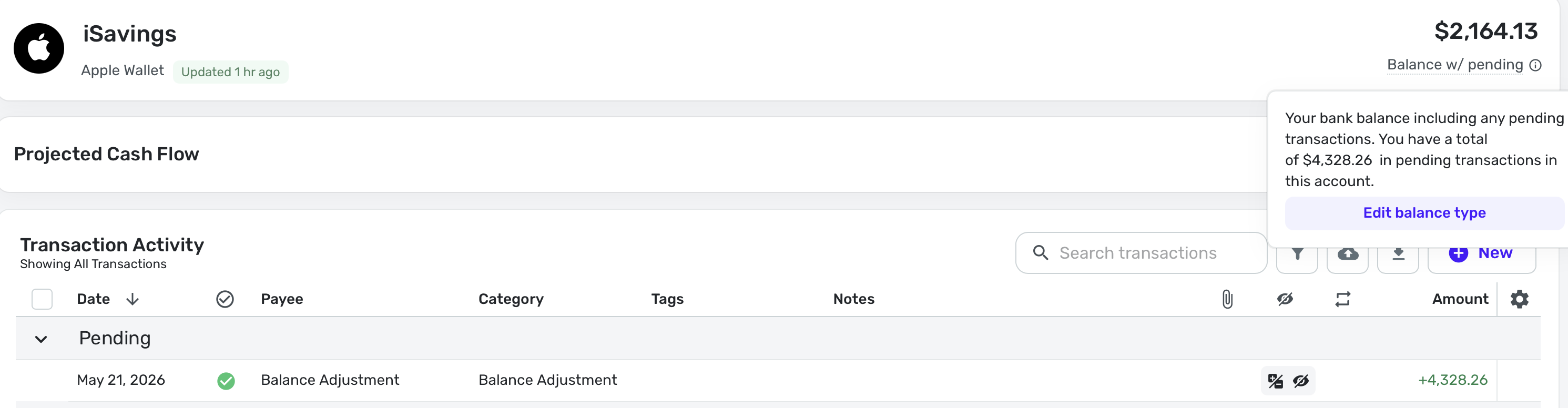
Apple Savings: It worked before but now shows me with a $-2100 balance instead of a +$2100 balance. This is new; it worked before.
Apple Card: Correctly showed a $0.00 balance.
I carefully. made my accounts manual. Very carefully. I don't care to spend another day fixing 6 years of transactions.
Also, I made the settings as recommended "All Available Activity". Would doing "Limited Availability" protect my manual account more? I think it would just download fewer transactions? At least so far, I haven't lost any transactions.
**I believe the connection thingy is still calculating the Apple Cash balance as Apple Card and vice versa. I don't know what happened to Apple Savings. Even before I linked it to my manual account, it said the balance was -2100. That problem wasn't there before.
I am sending you screenshots via DM and am sending my logs through the usual channels.
Steve
Quicken Simplifi (Safari & iOS) Since 2021
Quicken Classic (MacOS) Since 2009
Dollars & $ense (DOS) and MS Money (Windows) 1987-20090 -
Update for @Coach Jon
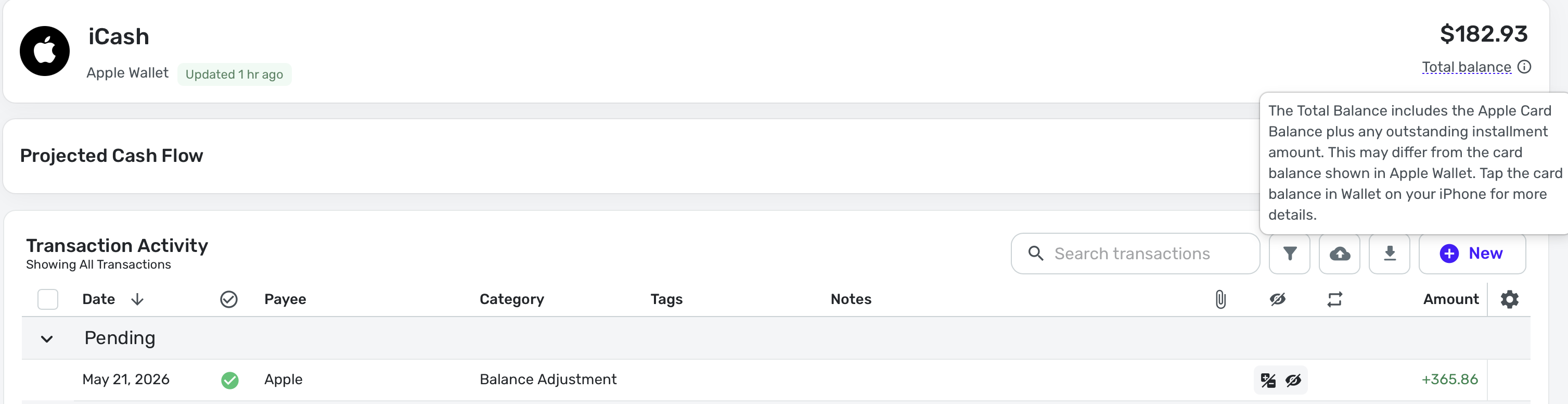
The Pending Transaction in Apple Cash cleared and now the balance is -182.93 when it should be +182.93. So now it mirrors the Savings Account in being negative rather then positive.
So not only does Apple Cash still have the bug of zeroing out the balance when there is a pending transaction, BUT now thinks that Apple Cash and Apple Savings are credit card accounts.
I fiddled with the settings, but to no avail. I have also reconnected twice.
When linking the accounts, the balance shows as negative in the Settings before linking and downloading transactions, so the connector is totally messed up.
Hope this helps. I plan to take them back to manual accounts again. They work so better that way. I am only holding off today in case you need more diagnostics.
Steve
Quicken Simplifi (Safari & iOS) Since 2021
Quicken Classic (MacOS) Since 2009
Dollars & $ense (DOS) and MS Money (Windows) 1987-20090 -
Hello @SRC54,
Thank you for the update! Could you please provide the screenshots you mentioned above when you can, along with new logs, so I can share this information with my product team?
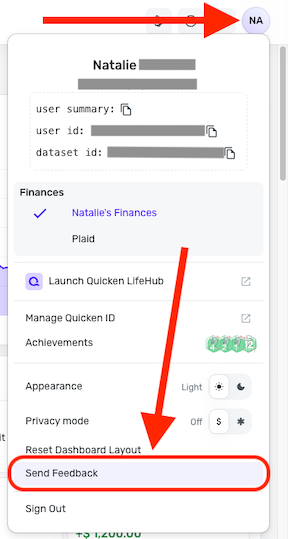
- Log in to the Quicken Simplifi Web App.
- Select the Profile icon in the upper-right corner of the screen.
- With the Profile menu open, hold down the Option key (Mac) or the Alt key (Windows), and then click Send Feedback.
- Leave all boxes checked, add a brief description of the issue, and then click Send.
-Coach Jon
0 -
I sent the logs this morning but will send them again as I reconnected again and made a few changes.
Here are the sreenshots for Apple Cash and Apple Savings. I am not quite sure that Apple Card is working right either; I just happen to have no recent transactions. You will notice my Balance Adjustment to reverse the negative balances.
Steve
Quicken Simplifi (Safari & iOS) Since 2021
Quicken Classic (MacOS) Since 2009
Dollars & $ense (DOS) and MS Money (Windows) 1987-20090 -
@Coach Jon Nope, I added a balance adjustment to fix it. Otherwise it impacts my net worth.
I just wish Apple would go back to the original connector they used until late last summer, when it worked.
New screenshots without the adjustment:
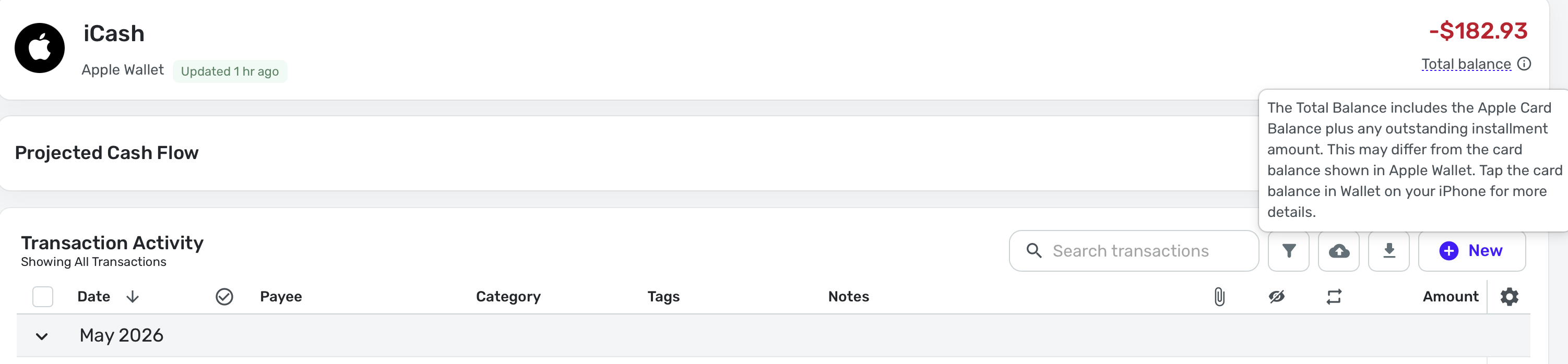
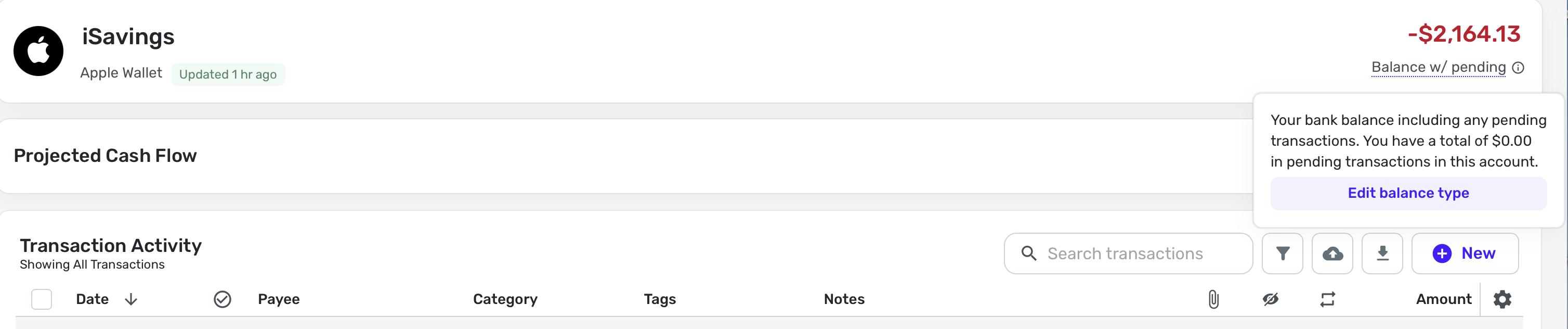
And since the pending transaction cleared this morning, you cannot tell that the original bug is still there. It's just freshened up with the confusion on what kind of account this is. And yes, it's correctly positive in the Apple Wallet on the iPhone.
Steve
Quicken Simplifi (Safari & iOS) Since 2021
Quicken Classic (MacOS) Since 2009
Dollars & $ense (DOS) and MS Money (Windows) 1987-20090 -
Am I the only one on here using Apple Cash? I think @TheReal702 may have left the forum. @Pmrussell892?
Today even with the balance adjustment, my Apple accounts went back to negative. So I am pretty sure I will revert to manual accounts later today.
This is the sort of error that usually gets a lot of notice from users. So just wondering.
Is there an equivalent connection for Google Cash? Android Cash or whatever they call it in that other universe?I realized there is Google Pay but no Google Card or Google Cash.
Steve
Quicken Simplifi (Safari & iOS) Since 2021
Quicken Classic (MacOS) Since 2009
Dollars & $ense (DOS) and MS Money (Windows) 1987-20090 -
I am glad to know I am not alone with the inverse balances in my Apple accounts. So thanks for the notice!
I think the original problem with pending transactions in Apple Cash is still there too, so will be back with more of that once this "inverse problem" is fixed.
Steve
Quicken Simplifi (Safari & iOS) Since 2021
Quicken Classic (MacOS) Since 2009
Dollars & $ense (DOS) and MS Money (Windows) 1987-20090 -
I have this issue since yesterday
1 -
I’ve also had the negative balance issue since the morning of 5/22 for both Apple Cash and Apple savings
1 -
Thanks @whyme and @CF1 for confirming! As you can see, Simplifi is aware and is working on fixing the latest issue with the Apple Wallet integration.
The other problem, which has been ongoing for about a year, affected Apple Cash (and recently Apple Card) balances getting off while transactions were pending. I hope we can finally get that fixed after the Balance Inversion problem is fixed.
Steve
Quicken Simplifi (Safari & iOS) Since 2021
Quicken Classic (MacOS) Since 2009
Dollars & $ense (DOS) and MS Money (Windows) 1987-20090 -
A new fix for this issue has been set for the
6.22.06.24.0 Mobile Release.Thank you!
-Coach Natalie
1 -
@Coach Jon Now that the inverse balance problem is fixed, I can confirm again that the original bug with the Apple Wallet integration is still there.
To wit:
I had a balance in Apple Cash of $182.93. This morning I made a $60 purchase, which is pending. So my balance is now in Apple Wallet $122.93. But Simplifi reports that my balance is -$60.00. So I have had to enter a Balance Adjustment of +$182.93.
When the pending transaction clears (probably tomorrow), the balance will be $305.86 until I delete the adjustment. Then it will be right.
Steve
Quicken Simplifi (Safari & iOS) Since 2021
Quicken Classic (MacOS) Since 2009
Dollars & $ense (DOS) and MS Money (Windows) 1987-20090 -
Hello @SRC54,
Thanks for the reply. I suggest waiting for the Quicken Simplifi Mobile 6.24.0 release, as the issue you mentioned appears to be related to this and is being addressed in that release. Let us know if the issue persists after that version is released!
-Coach Jon
0 -
@Coach Jon Drat, you mean I have to use the darn card again. I really hate using it. I used it today just to test this thingy.
LOL. Will do.
Steve
Quicken Simplifi (Safari & iOS) Since 2021
Quicken Classic (MacOS) Since 2009
Dollars & $ense (DOS) and MS Money (Windows) 1987-20091 -
Hello everyone!
Now that Quicken Simplifi Mobile 6.24.0 has been released, this issue should now be resolved. Be sure to let us know if the implemented fix works for you!
Thank you!
-Coach Jon
0 -
I am downloading 6.24 mobile right now. I will do an Apple cash transfer tomorrow. But Coach Natalie's announcement about 6.24.0 didn't mention the fix for Apple integration. FYI.
Steve
Quicken Simplifi (Safari & iOS) Since 2021
Quicken Classic (MacOS) Since 2009
Dollars & $ense (DOS) and MS Money (Windows) 1987-20090 -
I downloaded the new version and have tried to quote. Fix the connection but is unsuccessful.
0




